Claude Code + AssemblyAI in Practice: A Complete Tutorial for Building a Voice Agent in One Afternoon
Build a fully functional voice agent with Claude Code and AssemblyAI's unified API in one afternoon.
This tutorial walks through building a complete Voice Agent using Claude Code and AssemblyAI's Voice Agent API. The agent handles speech recognition, conversation understanding, qualification screening, and automatic calendar booking via Cal.com — all through a single API connection. Includes full development workflow, cost comparison with competitors, and a live demo of the finished product.
The Pain Points of Voice Agent Development
Building a Voice Agent used to require an entire team spending a month, because you needed to piece together three things: a Speech-to-Text (STT) tool, a Large Language Model (LLM) to understand and reason about conversations, and Text-to-Speech (TTS) to convert responses back into audio. Three services, three sets of documentation, three bills — and if any single component breaks, the entire system can collapse.
Now, with AssemblyAI's Voice Agent API and Claude Code's AI programming capabilities, one person can get it done in a single afternoon — with just a few lines of code and one API, you can build a Voice Agent that listens, speaks, and automatically books meetings on a calendar.
How AssemblyAI Simplifies Voice Agent Development
Single Connection, Full Pipeline Coverage
AssemblyAI packages speech recognition, LLM inference, speech synthesis, and turn detection into a single API connection. Audio in, audio out — all the complex logic in between is managed by the platform. Developers don't need to stitch together multiple services, dramatically reducing the chances of errors and failures.
Unique Feature Advantages
Compared to competitors, AssemblyAI also supports several differentiating features:
- Mid-call reconnection: Whether due to network interruptions or needing to change prompts, there's no need to rebuild the session
- Turn detection technology: Accurately determines whether the user has finished speaking, avoiding interruptions
- Fixed-rate billing: $4.5 per hour, billed by the second, with completely predictable costs
Claude Code in Practice: Complete Workflow for Building a Voice Agent from Scratch
Step 1: Configure the System Prompt
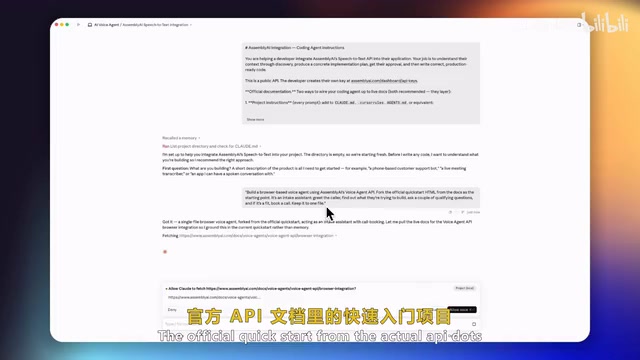
The starting point of the entire development workflow is obtaining the system prompt from AssemblyAI's API documentation, then pasting it directly into Claude Code. The system prompt tells Claude Code its role — to assist developers in integrating the Voice Agent API.
Specific steps:
- Copy the system prompt from the API documentation
- Paste it into Claude Code and press Enter
- Claude Code will automatically understand that the current directory is empty and needs to start from scratch
Step 2: Describe Your Business Requirements
Tell Claude Code what you want to build:
"I'm going to build a web-based voice agent using the AssemblyAI Voice Agent API. It will act as a client intake assistant specifically for a consulting business — greeting incoming callers, understanding what they want to build, and asking a few qualifying questions to determine if they're a good fit."
Once Claude Code understands the requirements, it will automatically reference the official API documentation's quickstart project and generate a plan based on your description.
Step 3: Answer Configuration Questions
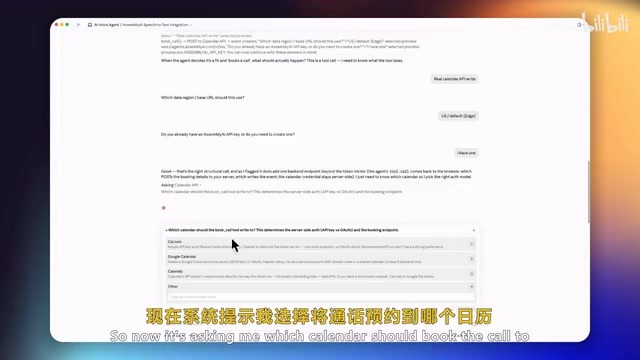
Claude Code will ask several key configuration questions in sequence:
- Token handling approach: Choose a single HTML file + lightweight token server
- Tool call setup: Configure calendar booking functionality (integrate Cal.com API)
- Data region selection: US node or EU node
- Voice selection: Choose from different voice options like IVE, GEMS, Winter, etc.
Step 4: Provide API Keys
You'll need two keys:
- AssemblyAI API Key: Obtained from the AssemblyAI dashboard
- Cal.com API Key: Obtained from Cal.com's developer settings
The Cal.com integration allows the voice agent to read calendar availability, write bookings based on client needs, and sync to Google Calendar.
Voice Agent Demo Results
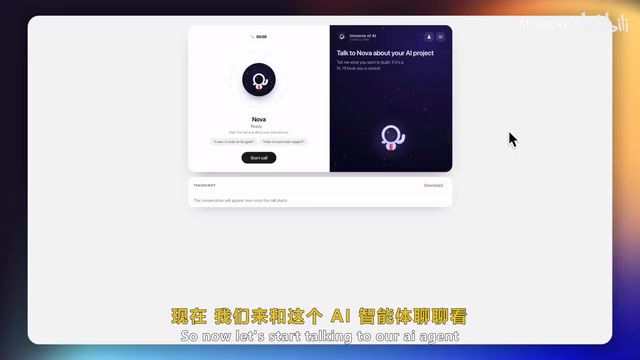
Once built, this voice agent named "Nova" demonstrated a complete business workflow:
- Proactive greeting: "Hi, I'm Nova from Universal AI. What are you looking to build with AI?"
- Needs discovery: Asking the client what specific automation they want
- Qualification screening: Confirming timeline, budget, and technical point of contact
- Booking arrangement: Collecting name, email, preferred time, and automatically creating a calendar event
- Confirmation notification: Sending confirmation information to the client's email
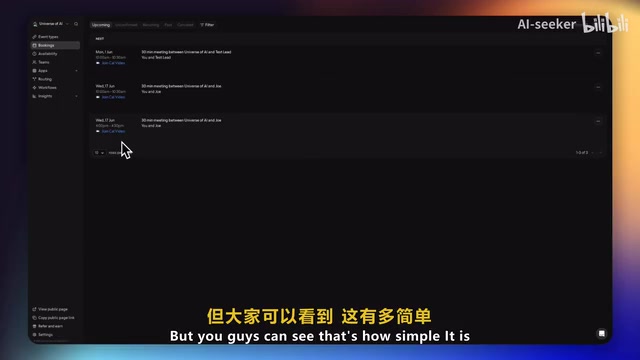
The entire call took about two minutes, with the booking successfully synced to Google Calendar, allowing the client to join the video call directly through the calendar invite.
Voice Agent Provider Cost Comparison
| Provider | Hourly Cost | Billing Method | Notes |
|---|---|---|---|
| AssemblyAI | $4.5 | Per-second billing, fixed rate | Single connection includes all services |
| OpenAI Realtime API | $18 | Per audio token | Costs fluctuate, unpredictable before billing |
| Deepgram | $4.5 | Billed per component | Need to calculate total cost yourself |
AssemblyAI's pricing advantage lies in predictability — a thousand calls will cost exactly what you expect, and you can calculate the bill before making a single phone call.
Use Case Recommendations
- Well-suited for: Scenarios where agents run on-demand and only activate on incoming calls, as well as development and testing phases
- Use with caution: Large-scale projects requiring continuous uptime — do a cost analysis first
Conclusion: The Barrier to Voice Agent Development Has Dropped Significantly
This case study demonstrates the power of combining AI programming tools with specialized APIs: write a system prompt, connect one API, answer a few configuration questions, and in minutes you have a working, practical voice agent. For independent developers and small teams, this means work that used to require a month and an entire team can now be accomplished by one person in a single afternoon.
Related articles

iOS 27 New Details Leaked: Major Notification Center Gesture Changes, Find My Interface Redesign
iOS 27 leaks reveal major changes: Notification Center gesture moves to upper left with new animations, Find My visual redesign, Photos Clean Up improvements, and under-the-hood security upgrades.
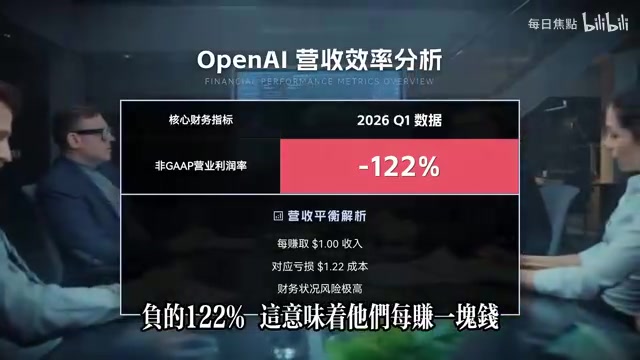
Deep Dive into the AI Bubble: The Death Spiral of Losing $1.22 for Every $1 Earned
Deep analysis of the AI industry bubble: OpenAI's -122% profit margin, enterprise token budgets burned in months, NVIDIA's shell game, and collapsing software quality.

WWDC 2026 Preview: Major Siri Overhaul and Comprehensive Apple Intelligence Upgrade
Deep analysis of WWDC 2026 Apple AI strategy: standalone Siri app, iOS 27 as an AI-native OS, and Apple Intelligence 2.0 rebuilt from the ground up.