Getting Started with Codex from Scratch: Complete Guide from Registration to Setup
Step-by-step guide to set up Codex from GPT registration to subscription.
This guide walks beginners through the entire Codex setup process, including GPT account registration with SMS verification platforms, creating a US Apple ID, downloading the ChatGPT app, and choosing the right subscription plan. It also compares Codex with Claude Code and shares money-saving tips like using Turkey region accounts.
Why You Need to Master AI Agent Tools
In the AI programming space, the two hottest tools right now are OpenAI's Codex and Anthropic's Claude Code. Unlike traditional LLM chat tools, these are called AI agent tools — think of them as giving an LLM hands and feet. They don't just think; they can actually execute tasks for you.
Whether or not you have a programming background, these tools have become essential skills in the industry. This article will walk you through the entire process from scratch — GPT registration, environment setup, and everything in between — so even complete beginners can get started smoothly.
Codex vs. Claude Code: Which One Is Right for You?
Core Differences
The two most popular AI agent tools among developers right now are Codex and Claude Code, both sitting in the top tier. Based on hands-on experience, Codex performs better in several areas:
- Stronger Chinese language comprehension: Powered by the GPT 5.5 model under the hood, it understands Chinese requirements more accurately
- Superior requirements analysis: Better at breaking down complex requirements
- Strong full-stack capabilities: Handles both frontend UI and backend logic well
- Rapidly growing MCP ecosystem: Plugins and extensions are expanding quickly
- Largest official investment: As OpenAI's flagship product, it iterates fast
Real-World Experience Comparison
Codex has a standalone app client, making daily use more convenient. Claude Code is also powerful, but if you configure domestic models (like DeepThink 4) to reduce costs, the experience drops noticeably. From a user experience perspective, Codex wins in overall smoothness and interaction design.
That said, Claude Code paired with the native Claude model also performs well — it's just relatively more expensive. If you're on a budget, consider trying both before committing to one.
Complete GPT Account Registration Walkthrough
Using Codex requires a GPT account. This is the first hurdle that stops many people. Here's the full registration process:
Step 1: Preparation
- VPN/proxy tool: This is the most basic prerequisite — you'll need to handle the network environment on your own
- Prepare an email: Gmail, NetEase, or any other email works fine — no special requirements
- Visit the registration page: Open the official GPT registration page in your browser
Step 2: Account Registration Process
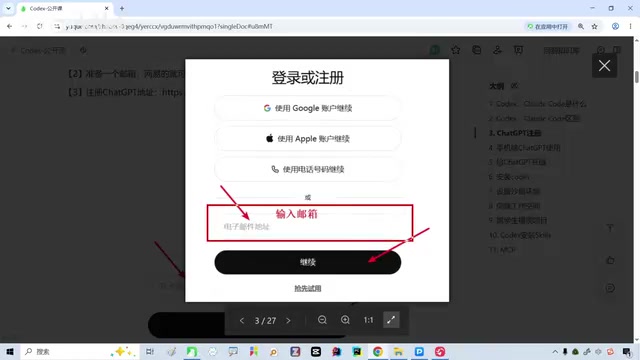
- Enter your prepared email on the registration page and click "Continue"
- Set a password and follow the normal flow
- The system will redirect to your email for verification — grab the verification code and enter it
- Click Continue to proceed to the next step
Step 3: Phone Number Verification (The Key Challenge)
This is where most people get stuck — the system requires a foreign phone number; Chinese phone numbers are not accepted.
The solution is to use an SMS verification platform:
- Go to an SMS verification platform website
- Select "OpenAI" from the service list on the left
- Choose an available country (the platform will indicate which ones work)
- Add a small amount of credit; the platform will assign you a virtual number
- Enter the virtual number on the GPT registration page and click send verification code
- Go back to the verification platform to retrieve the code, then enter it on the GPT page to complete verification
iPhone Setup Tutorial
Why You Need the Mobile App
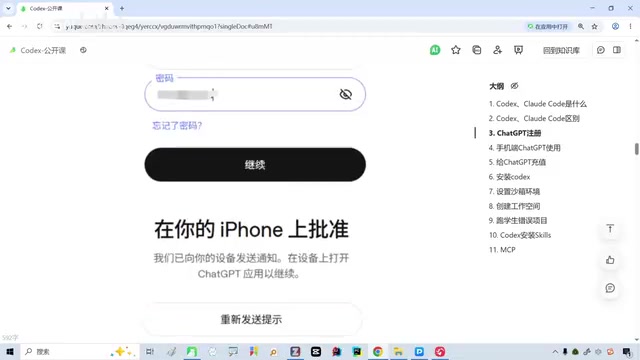
The final step of GPT registration requires authorization through the mobile app. However, the ChatGPT app cannot be found in the App Store under a Chinese Apple ID, so you'll need to switch to a US Apple ID.
Steps to Register a US Apple ID
- Visit the Apple ID registration page and create a new account
- Age must be set to 18 or older
- You can use your Chinese phone number for this step (no restrictions here)
- After registration, go to your Apple ID personal information settings
- Switch "Country/Region" from China to the United States (or Turkey)
- Select "None" for payment method
- For the address field, you'll need a US address — use an online US address generator to create one
Download and Install the ChatGPT App
- After switching your Apple ID, search for ChatGPT in the App Store
- Requires iOS 16.1 or above
- Your phone also needs a VPN/proxy connection
- Download, install, and log in with your registered GPT account
Subscription Plans and Money-Saving Tips
Payment Method
GPT payments must be completed on the mobile app (direct web payment is not supported). The process is: first add funds to your US Apple ID balance, then subscribe to ChatGPT through the App Store.
Plan Recommendations
| Plan | Price | Best For |
|---|---|---|
| Basic | $8/month | Learning phase, limited budget |
| Plus | $20/month | Personal daily use, best value |
| Team | Higher | Company teams |
Money-saving tip: Register with a Turkey region account — costs are roughly half of the US region. The US region costs about ¥180/month, while the Turkey region is only ¥80-90/month, thanks to exchange rate differences.
Summary and Next Steps
After completing all the steps above, you'll have:
- A fully functional GPT web interface
- The ChatGPT mobile app
- Access to the latest GPT 5.5 model
From here, you can configure the GPT model in Codex and start your AI programming journey. While the process involves quite a few steps, each one has clear instructions — just follow along patiently and you'll get there.
For those who can afford it, I strongly recommend using the native GPT model with Codex — it's currently the best AI programming combination available. If you're on a budget, the $8 Basic plan is perfectly sufficient for the learning phase.
Related articles

iOS 27 New Details Leaked: Major Notification Center Gesture Changes, Find My Interface Redesign
iOS 27 leaks reveal major changes: Notification Center gesture moves to upper left with new animations, Find My visual redesign, Photos Clean Up improvements, and under-the-hood security upgrades.

Deep Dive into the AI Bubble: The Death Spiral of Losing $1.22 for Every $1 Earned
Deep analysis of the AI industry bubble: OpenAI's -122% profit margin, enterprise token budgets burned in months, NVIDIA's shell game, and collapsing software quality.

WWDC 2026 Preview: Major Siri Overhaul and Comprehensive Apple Intelligence Upgrade
Deep analysis of WWDC 2026 Apple AI strategy: standalone Siri app, iOS 27 as an AI-native OS, and Apple Intelligence 2.0 rebuilt from the ground up.