Conductor CEO Demo: Multi-AI Agent Programming Workflow Explained

Conductor's CEO demos orchestrating multiple AI coding agents like a company CEO managing employees.
Conductor co-founder Charlie Holtz demonstrates how he uses multiple AI agents in parallel for software development, treating code as "sawdust" — a byproduct rather than the goal. He shares his model selection strategy (Opus for creativity, Codex for execution), his layered approach to human-AI collaboration where humans own architecture while AI handles implementation, and his vision for malleable software inspired by game modding.
Introduction: Directing AI Programming Like a CEO
Charlie Holtz is the co-founder of Conductor, a YC-backed application that lets developers orchestrate multiple AI coding agents simultaneously on their Mac. In this in-depth showcase, Charlie not only demonstrates his daily AI programming workflow but also shares profound insights on human-AI collaboration, code management, and product design philosophy.
He uses an elegant metaphor to describe this new way of programming: You're like an orchestra conductor, watching various instruments play in sync, occasionally walking over to the trumpet player to say "your pitch is off," then stepping back to adjust the overall rhythm.
Hardware & Basic Setup: A Voice-Driven AI Programming Environment
The first "can't-live-without" item Charlie showcased was surprisingly simple — a gooseneck microphone that costs just $20 on Amazon. In an open office environment, this microphone lets him lean close to his computer and quietly say "please merge PR 3475," without disturbing colleagues while efficiently communicating with AI.
His primary machine is equipped with 128GB RAM, partly to run local voice models like Parakit. Interestingly, he recently bought a MacBook with the lowest possible specs specifically to "force himself to use the minimum configuration" for testing the product experience. This extreme self-constraint reflects a founder's dedication to product universality.
The speech-to-text tool Spokenly, paired with the locally-running Parakit model, lets him press Control+Space to activate voice input, further lowering the barrier to AI communication.
Conductor Core Workflow: Multi-AI Agent Parallel Development
Charlie admits he's "always starting new tasks," and Conductor is designed precisely for this. His typical workflow looks like:
- Press Command+N to create a new workspace, speak to the computer: "Can you look at the latest Linear issue and roughly explain how you'd solve it," then hit enter
- While the AI runs in the sidebar, he switches to another chat conversation to handle other matters
- When the AI finishes, he comments on code changes just like on GitHub, such as "this looks a bit weird, why do we need this?"
- Once confirmed, he clicks the archive button, the file disappears from the sidebar and merges into the codebase
Conductor's newly added "Status" feature on the left divides tasks into three stages: In Progress, In Review, and Completed. The new dashboard page lets users see what all agents are doing in one place. Charlie describes the ideal experience as: "You can feel like you're the CEO of a small company, seeing all your employees working for you, submitting easy-to-understand reports, and you make decisions based on those reports."
Product Design Philosophy: Humans Own Architecture, AI Handles Execution
Charlie repeatedly emphasizes one core principle throughout the interview: Don't let AI make plans or design decisions for you.

Conductor's interface layout — chat history on the left, conversation in the middle, code changes and app preview on the right — is the result of careful team deliberation. Charlie believes that if you let AI make UI design decisions, "the end result will likely feel completely devoid of craftsmanship."
He proposes a layered strategy:
- Core architecture and APIs are designed by humans, with AI's role minimized in these areas
- Most areas of the codebase are open to AI, allowing free experimentation
- Explicitly marked "no auto-generation zones", with code comments that literally say "if you're an AI, please don't modify this code, this content is specifically designed for humans"
The reasoning is practical: if you're not careful, AI can easily fall into a vicious cycle — seeing bad code, then writing more bad code.
"Caveman Mode" & the Boundaries of Manual Coding
When asked "do you still write code?" Charlie's answer is interesting: "Sort of, sort of not."
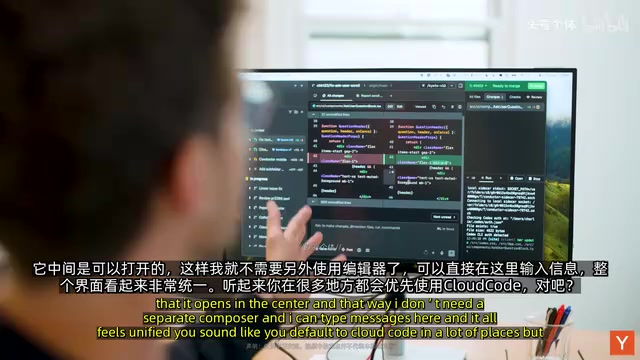
Conductor has a built-in feature called "Caveman Mode" that allows users to directly edit files with their keyboard. The name itself hints at the team's attitude toward manual coding — it's occasionally necessary but no longer the mainstream way of working. Most of the time, Charlie highlights the parts that need modification, then tells the AI what he wants, or simply says "that button looks too wide, can you make it narrower."
Model Selection Strategy: Opus Creates, Codex Executes
Charlie has a clear division of labor for different AI models:
- Claude Opus: More creative, like a true collaborator. Whenever he's preparing to develop a new feature, he instinctively reaches for Opus
- Codex: Like a diligent workhorse, fearlessly tackling complex problems without shying away from extensive debugging. Used when the goal is to "get things done"
Regarding token consumption, Charlie makes no attempt to hide his "extreme" tendencies. He reveals that when first starting the Conductor project, he spent $22,000 on tokens in a single month, producing tens of thousands of lines of code. He always uses "fast mode" (not the default setting) to get maximum token counts and has fully accepted all permission settings.
Code as Sawdust: A Fundamental Shift in Software Development
Charlie presents a strikingly provocative viewpoint: "Code is now almost like sawdust."
In the past, code was the tool we used to build things, and developers spent time carefully writing code. Now, developers spend time describing what they want and how they want it built, and the generated code is like sawdust produced during the manufacturing process — a byproduct, not the purpose.
This leads to an interesting corollary: What matters most is your prompt. When the next generation of models arrives, you just need to re-run those prompt instructions to get new code, and the old code is essentially useless.
Malleable Software: Game Modding Mentality in Product Design
Charlie uses video games as an analogy for his vision of "malleable software." Just like in Call of Duty, where the game's overall structure is the same for everyone, but each player can use custom skins or adjust parameters. He wants Conductor to also let users "build a few things that fit their own workflow."
The structure of software should remain consistent — people need thoughtfully designed software — but just like game mods, personalized customization can make tools feel more like your own. This is why Conductor maintains its own design philosophy while still providing rich skill documentation and configuration options.
Conclusion: Core Competencies of an AI Programming Commander
Charlie's presentation reveals the deep transformation AI programming tools are undergoing: from "helping you write code" to "helping you manage an AI development team." Conductor's design philosophy — humans control architectural decisions, AI handles execution, multiple agents work in parallel — represents the direction of next-generation development tools. When code truly becomes "sawdust," developers' core competitive advantages will shift toward system design, taste and judgment, and orchestration capabilities.
Related articles

iOS 27 New Details Leaked: Major Notification Center Gesture Changes, Find My Interface Redesign
iOS 27 leaks reveal major changes: Notification Center gesture moves to upper left with new animations, Find My visual redesign, Photos Clean Up improvements, and under-the-hood security upgrades.

Deep Dive into the AI Bubble: The Death Spiral of Losing $1.22 for Every $1 Earned
Deep analysis of the AI industry bubble: OpenAI's -122% profit margin, enterprise token budgets burned in months, NVIDIA's shell game, and collapsing software quality.

WWDC 2026 Preview: Major Siri Overhaul and Comprehensive Apple Intelligence Upgrade
Deep analysis of WWDC 2026 Apple AI strategy: standalone Siri app, iOS 27 as an AI-native OS, and Apple Intelligence 2.0 rebuilt from the ground up.