AI Programming in Practice: Building a Local Errand-Running Mini Program in 37 Minutes — Full Workflow
Build a complete errand-running mini program in 37 minutes using AI tools from design to deployment.
This tutorial walks through building a local errand-running platform — including user app, rider app, and admin panel — in just 37 minutes using an AI-powered tool chain: Stitch for UI design, Trae/Cursor for code generation, UniCloud for serverless backend, and UniApp for cross-platform publishing. It covers the full workflow from prompt-driven design to six-stage order status management, while honestly addressing the gap between demo and production-ready systems.
AI Programming Makes Complex Projects Accessible
A local errand-running platform with a user-facing app, a rider app, and a back-office management system would traditionally require a team working for weeks or even months. Now, with AI programming tools, a single person can complete the entire process — from UI design to full-stack development — in just 37 minutes.
Bilibili creator "芝麻侃侃" (Zhima Kankan) published an incredibly detailed hands-on tutorial using a local errand-running system as an example, demonstrating how to build a complete cross-platform application from scratch using an AI tool chain (Stitch + Trae/Cursor + UniApp + UniCloud). This article distills the core development workflow and key technical takeaways.
Development Workflow Overview: Five Steps to a Complete System
The entire project follows five clearly defined stages:
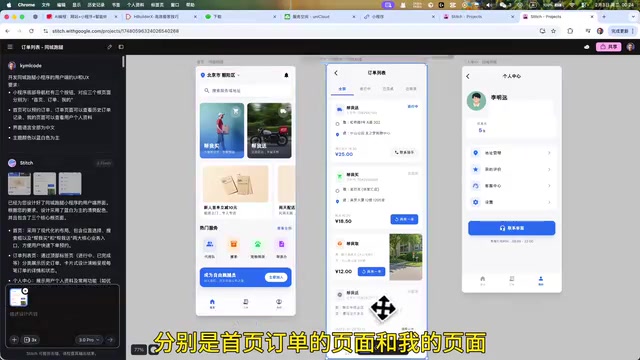
- UI Design: Use Google's AI design tool Stitch to generate UI drafts and interactive prototypes in one click
- Project Initialization: Install HBuilder X, Trae, and WeChat Mini Program Developer Tools; configure the cloud environment
- Frontend Development: Use AI programming tools to convert prototypes into interactive frontend pages with pixel-perfect accuracy
- Backend Development: Use AI to develop the database and cloud functions, enabling data synchronization between the user and rider apps
- Build & Publish: Leverage UniApp's cross-platform framework to publish a single codebase to WeChat, Douyin mini programs, and iOS/Android apps
The core philosophy behind this workflow: Let AI handle the bulk of the coding while the developer focuses on defining requirements and managing the process.
Key Players in the Tech Stack: UniApp and UniCloud
UniApp is a cross-platform development framework built on Vue.js by DCloud. Its core concept is "develop once, publish everywhere." Through conditional compilation and a runtime adaptation layer, it compiles a single Vue codebase into mini programs for WeChat, Alipay, Douyin, and other platforms, as well as H5 web pages and native iOS/Android apps. UniApp achieves this by abstracting away the rendering engine and API differences across platforms — using each platform's native renderer for mini programs and its proprietary nvue engine or WebView for native apps. Compared to cross-platform alternatives like React Native and Flutter, UniApp's unique advantage lies in its deep support for China's mini program ecosystem, making it one of the go-to frameworks for domestic developers building multi-platform applications.
UniCloud is DCloud's Serverless cloud development platform. Developers can use cloud databases, cloud functions, cloud storage, and other backend capabilities without setting up or maintaining their own servers. Serverless doesn't mean there are no servers — it means server operations, scaling, and maintenance are entirely handled by the cloud provider, so developers only need to write business logic. UniCloud currently supports Alibaba Cloud and Tencent Cloud as underlying providers, offers JQL (a JSON query language similar to SQL) to simplify database operations, and supports DB Schema (database table structure definitions) for data validation and access control. For solo developers and small teams, UniCloud's free tier is typically sufficient to support the early product validation phase.
AI-Driven UI Design with Stitch
Why Stitch?
Compared to traditional tools like Figma, Google's Stitch offers several notable advantages for AI-assisted design:
- Unlimited calls to the Gemini model for generating UI drafts
- Prompt-driven design generation with modular editing support
- One-click conversion of UI drafts into interactive prototypes
- Direct export of HTML/CSS code for easy migration to the development environment
Stitch is an AI-driven design tool launched by Google in 2025, with Gemini's multimodal capabilities integrated at its core. Unlike traditional design tools like Figma, where designers manually drag and drop components, Stitch adopts a "prompt-driven design" paradigm — users describe interface requirements in natural language, and the AI automatically generates UI layouts that conform to design systems like Material Design. Stitch's technical core lies in combining the text comprehension capabilities of large language models with the structured knowledge of UI component libraries, enabling it to not only generate static visual mockups but also understand inter-page navigation logic and produce interactive prototypes. Its ability to export HTML/CSS code essentially transforms the visual information in design drafts into structured descriptions parseable by frontend tools, providing high-quality input for subsequent AI code generation.
Key Tips for Prompt Design
In Stitch, prompt quality directly determines the quality of the generated UI. The tutorial provides a reference template structure:
- Task Definition: Clearly state the development goal (e.g., "Design the UI and UX for the user-facing side of a local errand-running mini program")
- Structural Constraints: Define the number of bottom navigation bar buttons and their corresponding root pages (Booking, Orders, Profile)
- Secondary Pages: List all required sub-pages (order placement page, order details page, not-logged-in page, etc.)
- Language and Style: Specify Chinese as the interface language with a blue-and-white color theme
For model selection, Gemini 3 Flash is recommended for its balance of generation speed and design quality. After generating the root pages, additional prompts are needed to develop secondary pages. Finally, select all draft screens and generate an interactive prototype in one click.
Project Initialization and Environment Setup
Three Essential Development Tools
- HBuilder X: UniApp's official IDE, responsible for project creation, cloud service management, and build/publish
- Trae (or Cursor/CodeBuddy): AI programming tool for code generation and debugging
- WeChat Mini Program Developer Tools: For mini program preview and on-device debugging
Trae is an AI programming IDE developed by ByteDance, while Cursor is an AI code editor developed by Anysphere. Both belong to the new generation of "AI-native" development tools. Unlike traditional IDEs where AI serves merely as a code completion plugin, these tools deeply integrate large language models into the development workflow — supporting natural language conversations to generate complete code files, understanding the entire project context for cross-file modifications, and automatically fixing bugs based on error logs. They are typically built on VS Code's open-source core, preserving the familiar editor experience while embedding AI chat windows in the sidebar or inline. Cursor primarily relies on Claude and GPT-series models, while Trae integrates ByteDance's Doubao model — each has its own strengths and weaknesses for Chinese-language development scenarios and domestic network conditions.
Key Configuration Steps
Create two separate projects in HBuilder X — one for the user app and one for the rider app — both using the UniApp blank template with UniCloud (Alibaba Cloud) enabled. Key points include:
- Both apps share the same cloud service space (e.g., "Uber-Demo"), which is the foundation for cross-app data synchronization
- Register two separate mini programs on the WeChat Official Accounts Platform, obtain their respective AppIDs, and configure them in the projects
- Quick registration via a service account allows credential reuse, eliminating redundant verification
AI Frontend Development — Pixel-Perfect Conversion from Prototype to Code
This step best demonstrates the power of AI programming. By dragging Stitch's exported prototype code into the AI programming tool and pairing it with carefully crafted prompts, frontend pages are generated automatically.
Prompt Writing Tips
Replicate this prototype 1:1 to develop the mini program's frontend pages
Requirements:
1. The bottom navigation bar has three buttons corresponding to three root pages
2. Secondary pages include: order placement page, order details page, not-logged-in page, etc.
3. The page UI design must exactly match the prototype
You also need to drag the project folder into the prompt context so the AI fully understands the project structure.
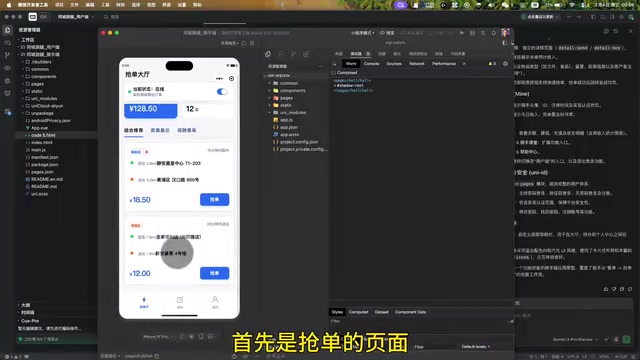
An important practical lesson: Frontend pages are rarely perfect after a single prompt. Multiple rounds of conversation are typically needed to fine-tune details. The tutorial author openly admits that the development was "completed after multiple rounds of dialogue and adjustments." It's recommended to use separate AI chat windows for the user app and rider app to avoid context confusion that could lead to code errors.
Backend Development — Database and Cloud Function Integration
Database Design
Create an order.schema.json data table in HBuilder X to store all order data. The user app and rider app share the same data table — this is the key architectural decision that enables multi-app data synchronization.
Cloud Object Development
Cloud Objects are the bridge connecting the frontend to the database. Separate cloud objects need to be created for the user app and rider app:
- User App Cloud Object: Writes order information to the database (supporting both "buy for me" and "deliver for me" order types)
- Rider App Cloud Object: Queries orders from the database and displays them on the order-grabbing page
Cloud Objects are an object-oriented cloud development pattern provided by UniCloud, an evolution of traditional cloud functions. In the traditional cloud function model, each API endpoint corresponds to a separate cloud function file, and management costs skyrocket as the number of endpoints grows. Cloud Objects encapsulate multiple related methods within a single object — for example, an "Order" cloud object can contain methods for creating orders, querying orders, and updating status, and frontend calls feel as intuitive as calling methods on a local object. At runtime, cloud objects still execute as cloud functions, but their object-oriented encapsulation significantly reduces code organization complexity. Combined with DB Schema's access control, cloud objects can also perform automatic data validation and security interception, reducing the manual validation logic developers need to write.
Prompts should include a detailed list of order fields (pickup address, delivery address, item category, weight, price, user UID, etc.), and both the cloud object code files and database schema files should be attached to the prompt to ensure the AI-generated code perfectly matches the data structure.
Order Status Synchronization — The Core Integration Logic
The most valuable part of the tutorial is the six-stage order status flow design:
- Order Paid → 2. Rider Accepted → 3. Rider Picking Up → 4. In Delivery → 5. Delivered → 6. Order Cancelled
This six-stage status flow is essentially an implementation of a Finite State Machine (FSM). State machines are a classic software engineering pattern for managing complex business processes, explicitly defining all possible system states, the events that trigger state transitions, and the valid transition paths. For example, only an order in the "Rider Accepted" state can transition to "Rider Picking Up" — it cannot jump directly to "Delivered." This strict state constraint effectively prevents data inconsistency issues caused by concurrent operations. In a real-world errand-running platform, the state machine would need to handle many more edge cases, such as automatic rollback when a rider times out on pickup, cancellation and refund logic at specific states, and concurrency locking mechanisms when multiple riders attempt to grab the same order simultaneously.
Each time a rider performs an action in the rider app (grab order, arrive at store, pick up, deliver), the order status is synchronously updated to the database via cloud objects, and the user app reflects the latest status upon refresh. Multiple data synchronization issues were encountered during this process, all resolved by describing the specific bugs to the AI for diagnosis and fixes.
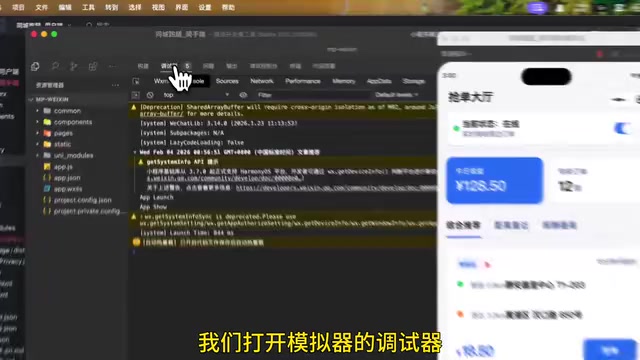
Debugging Tip: When data isn't being written or synced correctly, open the UniCloud Web Console to directly inspect the actual data in the database. Comparing it against expected results helps pinpoint the exact issue.
Back-Office Management System and Cross-Platform Publishing
Building the Back-Office Management System
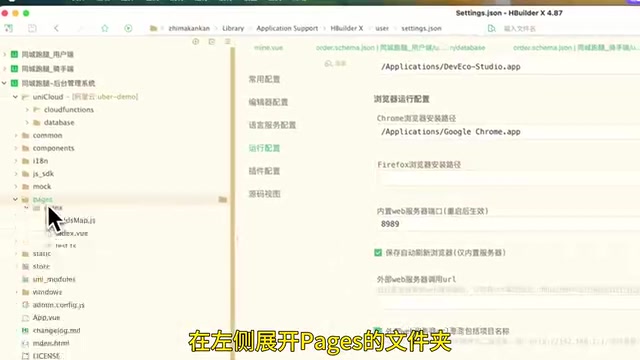
Use HBuilder X's built-in uni-admin template to quickly scaffold a back-office management system. After binding it to the same cloud service space, use the schema to code feature to auto-generate order management pages. Administrators can view detailed information for all orders in the back office, including user-uploaded product images, address information, and order status.
One-Click Cross-Platform Publishing
Thanks to UniApp's cross-platform capabilities, the same codebase can be directly packaged as:
- WeChat Mini Program
- Douyin Mini Program
- iOS APP
- Android APP
This effectively quadruples development efficiency — one development effort covers all major platforms.
Summary and Reflections
This tutorial demonstrates a complete AI-assisted development workflow: Stitch for design → Trae/Cursor for coding → UniCloud for backend → UniApp for cross-platform publishing. Not a single line of code was written manually throughout the entire process — everything was generated by AI.
However, it's important to note that the tutorial author explicitly states the demo version is still far from being production-ready, and still requires payment modules, user registration/login, payment callbacks, data security isolation, and other features.
The Reality Gap Between Demo and Production
This assessment is very pragmatic. A truly production-ready errand-running platform would need at least the following critical modules: a payment system (integrating WeChat/Alipay payment SDKs, handling payment callbacks and refund logic), real-time communication (WebSocket-based real-time rider location updates and instant messaging), a security framework (virtual phone numbers for user privacy, encrypted data transmission, API rate limiting and anti-abuse), and operational support systems (pricing algorithms, rider dispatching, commission settlement, customer complaint handling). Additionally, database performance optimization under high concurrency and distributed transaction consistency guarantees are technical challenges far beyond what current AI programming tools can automatically solve. This precisely illustrates that AI programming excels at rapidly building product prototypes and validating business logic, but polishing a prototype into a production-grade system still requires deep engineering expertise.
AI programming lowers the barrier to writing code, but product design skills, requirements decomposition ability, and debugging expertise remain irreplaceable core competencies.
For developers with zero prior experience, the greatest value of this workflow is: You don't need to learn programming before building a product — you can learn programming through the process of building one. This may be the most significant paradigm shift of the AI programming era.
Key Takeaways
Related articles

Full Walkthrough: Recreating Apple's AI Photo Reconstruction Feature with TRAE Work
A Bilibili creator uses TRAE Work AI Agent to recreate Apple's photo spatial reconstruction feature, covering research, cloud development, and multi-device collaboration.
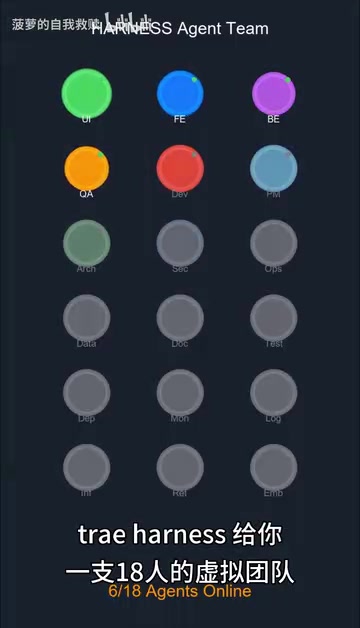
TraeHarness Open-Sourced: 18 AI Agents Form a Virtual Development Team
TraeHarness is an open-source multi-agent framework with 18 specialized AI Agents simulating a real software team, covering requirements, architecture, development, testing, and deployment.
GPT-5.5 Instant's Medical Q&A Capabili…
GPT-5.5 Instant's Medical Q&A Capabilities Now Match Frontier Reasoning Models
OpenAI announces GPT-5.5 Instant matches frontier Thinking models in health Q&A, with major improvements in emergency recognition, follow-up questioning, uncertainty expression, and plain-language explanations — free for all users.