Android Studio Agent Mode Explained: A Guide to Zero-Configuration Firebase Integration
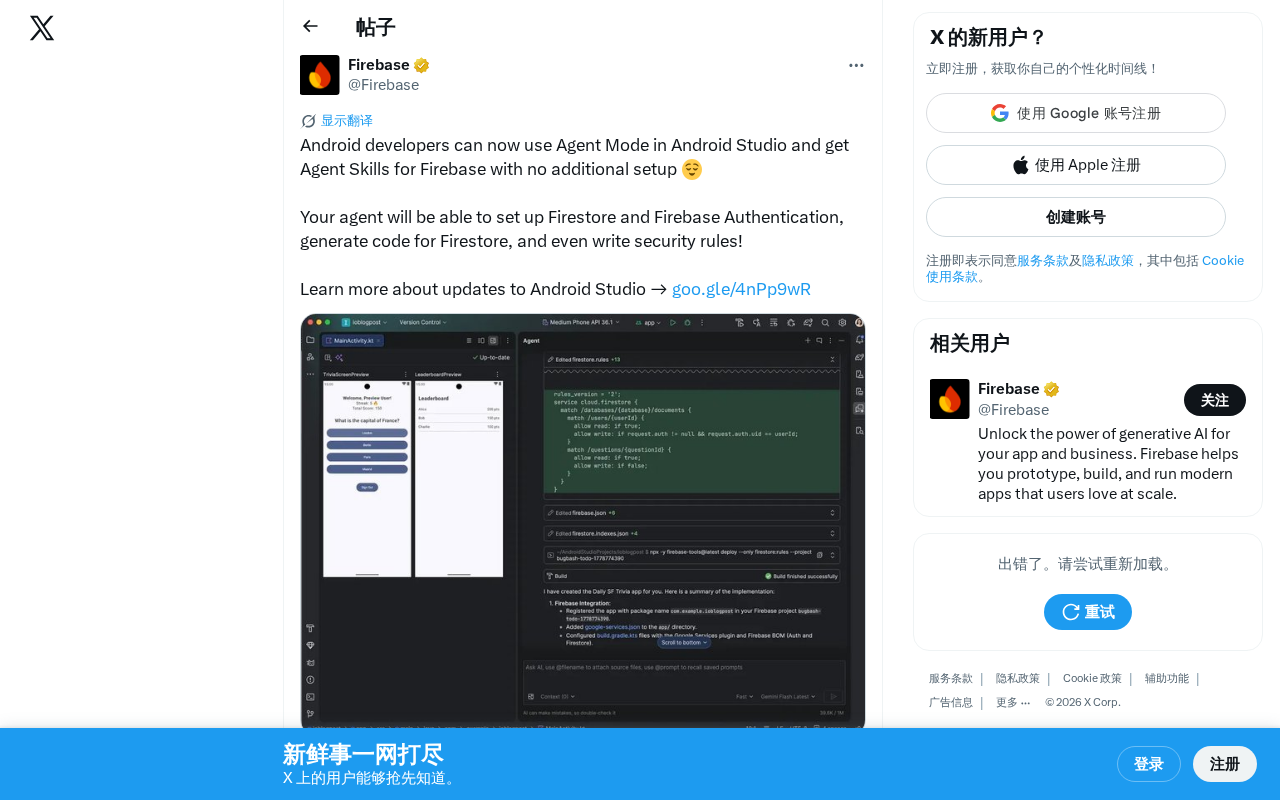
Android Studio's new Agent Mode enables zero-config Firebase integration with AI-driven automation.
Google has launched Agent Mode in Android Studio with built-in Firebase Agent Skills, enabling developers to automatically configure Firestore databases, set up Firebase Authentication, generate data operation code, and write security rules — all without leaving the IDE. This zero-configuration AI agent marks a shift from code completion to end-to-end autonomous development workflows.
Android Studio Receives a Major Agent Mode Update
Google recently announced that Android developers can now use Agent Mode directly within Android Studio, with out-of-the-box support for Firebase Agent Skills — no additional setup required. This update marks a significant step forward for AI-assisted development in the Android ecosystem.
What Is Android Studio Agent Mode?
Agent Mode is a built-in AI agent feature in Android Studio that goes far beyond traditional code completion or simple chat-based AI assistants. Agent Mode operates with greater autonomy — it can understand developer intent, automatically plan task steps, and coordinate across multiple stages to complete complex development work.
The core advantage of this mode lies in its end-to-end task execution capability. Developers no longer need to guide the AI through each individual operation step by step. Instead, they can describe a high-level goal and let the Agent decompose and execute it independently.
The concept of Agent Mode originates from the "Autonomous Agent" paradigm in AI. Unlike traditional conversational interactions with large language models, an Agent possesses three core capabilities: Tool Use, Planning, and Memory. In a development tool context, the Agent can invoke file system operations, terminal commands, API requests, and other tools, completing complex tasks step by step through a ReAct (Reasoning + Acting) loop. This means the Agent can do more than just generate code text — it can actually execute operations such as creating files, modifying configurations, and running build commands, forming a complete action loop. This is precisely what distinguishes Android Studio's Agent Mode from the earlier Gemini chat functionality.
Firebase Agent Skills: Zero-Configuration Backend Integration
The most notable highlight of this update is the integration of Firebase Agent Skills. According to the official announcement, the Agent can handle the following key tasks:
Automated Firestore Database Configuration
The Agent can help developers automatically set up a Firestore database, eliminating the tedious manual steps of creating a project in the Firebase console, configuring database rules, and more. For rapid prototyping and project initialization, this dramatically shortens the time from zero to a running application.
Firestore is a NoSQL cloud database service provided by Google's Firebase platform, using a Document-Collection data model. Unlike traditional relational databases, Firestore stores data in a JSON-like document format and supports real-time synchronization, offline caching, and automatic horizontal scaling. The manual configuration process typically involves multiple steps: creating a project in the Firebase console, selecting a database region, setting initial security rule modes, integrating the SDK into the client project, configuring the google-services.json file, adding Gradle dependencies, and more. While none of these steps are particularly complex, the cumulative time cost is significant for new developers or teams that frequently spin up new projects. The Agent's automation capability directly addresses this pain point.
One-Stop Firebase Authentication Integration
Authentication is an essential requirement for nearly every mobile app, but the configuration process often involves multiple steps — from enabling authentication methods in the Firebase console (such as Email/Password, Google Sign-In, Phone Auth, etc.), to client-side SDK integration, to implementing the login flow UI. Google Sign-In additionally requires configuring an OAuth client ID and SHA-1 certificate fingerprint, while Phone Auth requires enabling reCAPTCHA verification. Now, the Agent can complete Firebase Authentication setup in one go, allowing developers to focus on business logic itself.
Code Generation and Automatic Security Rule Writing
The Agent doesn't just configure infrastructure — it can also generate data operation code for Firestore, including read/write operations, query logic, and more. Even more noteworthy is its ability to automatically write Security Rules.
Firebase Security Rules are a declarative access control language used to define who can read and write data in Firestore or Realtime Database. The rules use a JavaScript-like syntax and support conditional checks based on user identity (request.auth), data content (resource.data), and request parameters. For example, a typical rule might be allow read: if request.auth != null && resource.data.userId == request.auth.uid, meaning only authenticated users who own the data can read it. In practice, many developers use fully open rules (allow read, write: if true) during the prototyping phase and then forget to tighten permissions before going to production, leading to serious data breach vulnerabilities. Google has issued multiple security advisories urging developers to review their rule configurations, and security researchers have repeatedly discovered large numbers of production Firebase databases left completely exposed.
The AI Agent's ability to automatically generate sensible security rules based on data models and business requirements is significant for improving application security. It can analyze field relationships and user ownership within data structures, automatically generating rule sets that follow the principle of least privilege, fundamentally reducing security risks caused by human oversight.
How Agent Mode Impacts the Android Development Workflow
Lowering the Barrier to Backend Integration
For independent developers and small teams, Firebase Agent Skills mean they can build apps with full backend capabilities much more quickly. Work that previously required consulting extensive documentation and constantly switching between the console and the IDE can now be completed seamlessly within Android Studio. This experience represents a further evolution of the Backend-as-a-Service (BaaS) concept — not only is backend infrastructure abstracted into a service, but the integration and configuration process itself is automated by an AI agent.
The Beginnings of an AI-Native Development Experience
This update reflects Google's strategic direction of deeply embedding AI capabilities into the development toolchain. Agent Mode is not a standalone plugin or external tool — it's a native feature of Android Studio. This zero-configuration (no additional setup) design philosophy lowers the adoption barrier and helps drive the widespread adoption of AI-assisted development.
It's worth noting that Android Studio is built on JetBrains' IntelliJ IDEA platform. Google's decision to deeply integrate an AI Agent within it rather than relying on third-party plugins signals that platform-level AI capabilities are becoming a core competitive advantage for IDEs rather than an add-on feature. This aligns with the "AI-first" developer tools strategy that Google has repeatedly emphasized at I/O 2024 and 2025.
Alignment with Industry Trends
From GitHub Copilot's Agent Mode to Cursor's multi-step task execution, and now Android Studio's Agent Mode, the entire development tools industry is evolving from "AI code completion" toward "AI agent-driven development." Google's move demonstrates that this trend has extended from general-purpose programming into platform-specific development ecosystems.
GitHub Copilot's Agent Mode launched in early 2025, capable of autonomously performing multi-file edits, running terminal commands, and iteratively fixing errors within VS Code. The Cursor editor implemented multi-step task execution even earlier, with its Composer feature allowing AI to coordinate modifications across files and understand the entire project context. JetBrains has also introduced Junie AI Agent across its IDE lineup, focusing on code review and refactoring tasks. The common thread among these tools is a shift from "passive response" to "proactive execution," and from single-shot code generation to end-to-end workflow automation. Android Studio's Agent Mode goes a step further by deeply binding Agent capabilities with a specific cloud service (Firebase), delivering a specialized Agent experience for a vertical domain. This could become an important direction for differentiated competition among platform-level IDEs in the future.
Summary and Outlook
Android Studio's Agent Mode and Firebase Agent Skills represent an important milestone in the evolution of intelligent mobile development tools. While the currently available capabilities focus on two Firebase services — Firestore and Authentication — it's foreseeable that Agent Skills for additional Firebase services such as Cloud Messaging (push notifications), Cloud Functions (serverless backend logic), Remote Config (remote configuration management), and Crashlytics (crash monitoring) will follow.
From a broader perspective, this update also reflects a shift in competitive strategy among cloud service providers — using AI Agents to lower the integration difficulty of their own services is essentially a battle for developer attention and technology stack choices. When Firebase integration can be completed with a single natural language command, developers' motivation to choose competitors (such as AWS Amplify or Supabase) diminishes.
For Android developers, now is the time to start exploring Agent Mode and incorporating it into your daily development workflow.
Related articles

Claude Code for Test Development in Practice: An AI Programming Workflow That Doubles Your Efficiency
A practical guide to Claude Code for test development: auto-generating test scripts, Plan Mode workflows, MCP + Playwright integration, and Subagent parallel tasks to build systematic AI-assisted workflows.

Hermes Agent Hands-On Review: An AI Efficiency Revolution for Indie Game Developers
Indie game developer reviews Hermes Agent vs OpenClaude: intelligent context compression, real-time Memory, remote control via Telegram, and practical use cases in game dev, social media, and email.

Vibe Coding Beginner's Guide: Tool Selection Across Three Categories with Practical Examples
A comprehensive guide to Vibe Coding's three tool categories: Agent frameworks, CLI Coding, and IDE tools, with practical examples including Snake game and data analysis workbench.