Antigravity 2.0 In-Depth Review: A Multi-Agent Collaboration Platform Powered by Gemini 3.5 Flash
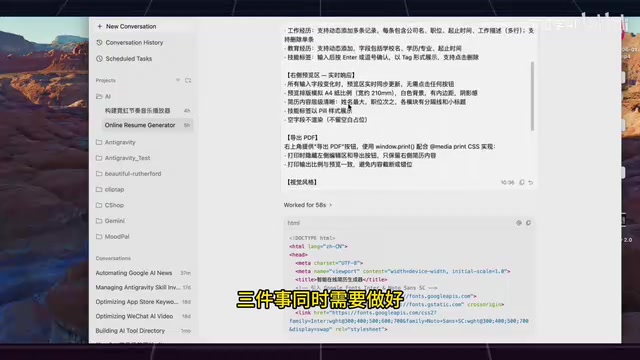
Antigravity 2.0 combines Gemini 3.5 Flash, scheduled tasks, and multi-Agent collaboration into a powerful desktop Agent platform.
Google's Antigravity 2.0 marks a shift from IDE to autonomous Agent platform. This in-depth review tests Gemini 3.5 Flash's code generation on complex frontend tasks, explores the cron-like scheduled task system that keeps Agents working 24/7, and examines the standout dynamic Sub-agent feature that enables parallel multi-Agent collaboration for comprehensive code audits — positioning it as a strong Codex desktop competitor.
From IDE to Desktop Agent: Antigravity 2.0's Repositioning
At Google I/O, Antigravity received a major upgrade. The old version of Antigravity was officially renamed Antigravity IDE, while the newly launched Antigravity 2.0 is a standalone desktop application centered around Agents.
The core change in this upgrade can be summed up in one sentence: from an "IDE that assists with coding" to an "Agent platform that autonomously executes tasks." This shift reflects the broader industry trend of moving from the Copilot model (co-pilot) to the Autopilot model (self-driving). The traditional IDE paradigm is "human-driven, tool-assisted" — developers write code while the IDE provides passive assistance like syntax highlighting, auto-completion, and debuggers. The Agent platform paradigm, on the other hand, is "humans define goals, Agents execute autonomously" — users simply describe their intent, and the Agent handles planning steps, invoking tools, generating code, and verifying results. Antigravity 2.0 is a product of this paradigm shift.
In terms of interface design, Antigravity 2.0 closely resembles OpenAI's Codex desktop client — a project list on the left, with an Agent real-time status panel and code review area on the right. But what truly sets it apart are three core capabilities: the built-in Gemini 3.5 Flash model, dynamic Sub-agent parallel collaboration, and scheduled task automation.
On the model front, it's worth noting that Antigravity 2.0 not only includes Gemini 3.5 Flash (supporting high/medium/low thinking intensities) but also integrates Gemini 3.1, Claude Sonnet, and Claude Opus 4, giving users plenty of options. Among these, Gemini 3.5 Flash's three thinking intensities are a noteworthy design choice — this mechanism allows users to dynamically adjust the model's reasoning depth based on task complexity. Low intensity is suited for simple code completion and formatting tasks with the fastest response times; medium intensity works for routine feature development; and high intensity triggers deeper logical reasoning, ideal for complex scenarios like algorithm design and architectural decisions. The underlying logic turns Chain-of-Thought reasoning into a user-adjustable parameter, providing a flexible balance between response speed, computational cost, and output quality.
Gemini 3.5 Flash Code Generation: Hands-On Testing
Test One: Online Resume Builder
The first test task was building an online resume generator with the following requirements: a left-side editor supporting input for name, work experience, skill tags, and contact information; a right-side live preview that updates in sync with input; a clean and visually appealing overall style; and one-click PDF export.
The challenge here lies in getting real-time two-way binding, PDF export, and attractive page layout all working simultaneously. Real-time two-way binding means any input change in the left editor must be instantly reflected in the right preview area, which typically requires carefully designed state management and DOM update mechanisms. PDF export involves accurately converting HTML/CSS rendered output into PDF format, dealing with pagination, font embedding, style fidelity, and a host of other issues. Gemini 3.5 Flash generated the complete HTML, CSS, and JS files in just 58 seconds.
The results were impressive: content entered on the left updated in real time on the right, with fonts, spacing, and styles all handled properly. The exported PDF maintained correct formatting as well. As the original reviewer put it, "When it comes to UI aesthetics, Gemini really delivers." The entire task passed on the first attempt, exceeding expectations.
Test Two: Rhythm-Visualized Music Player
The second test was significantly more challenging — building a music player with rhythm visualization. Requirements included local audio file import, real-time spectrum analysis using the WebAudio API, dynamic light bars that pulse with the beat and change color with frequency, a progress bar with time display and pause/resume controls, and an overall dark background for a sleek, understated vibe.
The WebAudio API is a W3C browser-native audio processing standard that provides a programming model based on an Audio Node Graph — developers can chain together audio sources, filters, analyzers, and output devices to build complex audio processing pipelines. The core of spectrum visualization relies on the AnalyserNode, which uses Fast Fourier Transform (FFT) to convert time-domain audio signals into frequency-domain data, outputting amplitude values for each frequency band. This data is then rendered frame-by-frame into dynamic bar charts via the Canvas API. The technical challenge is that audio analysis runs on a separate audio thread while Canvas rendering runs in the main thread's requestAnimationFrame callback — precise time alignment between the two is critical, or you'll get visual-audio desynchronization.
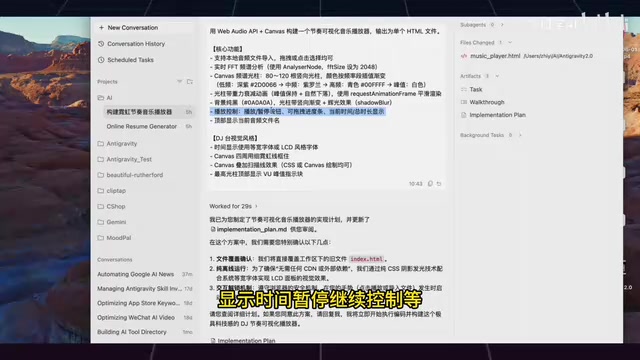
The core difficulty of this task was exactly the audio thread and rendering thread synchronization problem described above — spectrum analysis and Canvas animation need to work in precise coordination, and even slight misalignment causes stuttering or visual chaos. Yet Gemini 3.5 Flash completed the task in just 45 seconds, with progress bar scrubbing, pause/resume, and all other functions working correctly.
It's worth mentioning that tasks involving low-level browser APIs like this would have almost certainly failed at the API call stage with Gemini just a few months ago. The fact that it runs flawlessly on the first try shows that Gemini 3.5 Flash's mastery of low-level browser APIs has genuinely leveled up.
Scheduled Task Automation: Keeping Agents Working Around the Clock
Antigravity 2.0 includes a built-in scheduled task feature with a streamlined workflow: type a slash command in the input box, select Schedule, set the trigger conditions and task content, and you're done.
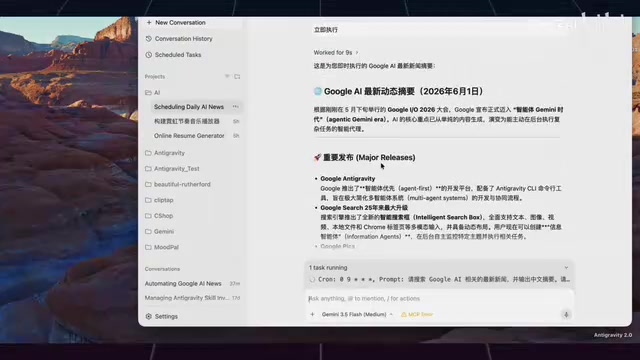
In testing, a task was set to "search for the latest Google AI news every morning at 9 AM." It was created within seconds, with the system clearly displaying the trigger time, task content, and task ID. After running it immediately, the Agent produced a well-formatted Chinese summary of the latest AI news as requested.
Cron-like scheduling is nothing new in traditional DevOps — Linux's cron and cloud platform scheduled triggers have been widely used for years. But combining scheduled execution with AI Agents creates a qualitative difference: traditional scheduled tasks run pre-written, fixed scripts, while Agent scheduled tasks execute open-ended instructions described in natural language. This means the Agent can make different judgments and produce different outputs based on the latest context each time it runs. For example, with the "search for the latest AI news every morning" task, the Agent retrieves different information each day and generates different summaries — it has the ability to understand, filter, and summarize, rather than simply scraping data. This "intelligent scheduling" essentially upgrades the Agent from "on-demand summoning" to "always online," transforming it from a temporary assistant into a long-running digital worker.
The use cases for this feature are extensive: competitive intelligence monitoring, PR summaries, automated weekly report generation, and other repetitive tasks can all be delegated to it. Scheduled tasks solve the "I forgot to do it" problem — set up periodic tasks once, and the Agent executes them on time automatically, eliminating the need for manual reminders. Tasks can also be stopped at any time via Stop Task.
Dynamic Sub-Agent Parallel Collaboration: The Real Power of Multiple Agents Working Simultaneously
This is Antigravity 2.0's most differentiated feature. The test instruction was: perform a comprehensive technical audit of the current project, dispatching 5 Sub-agents simultaneously, each responsible for architecture analysis, bug detection, performance bottleneck identification, security auditing, and code review. The constraints were that the first pass should be read-only (no code modifications), each Agent should output a maximum of 10 recommendations, and the main Agent should merge, deduplicate, and prioritize the results at the end.
Behind this feature is a classic Multi-Agent System (MAS) architecture, typically employing an Orchestrator-Worker pattern. The main Agent (orchestrator) is responsible for understanding user intent, decomposing tasks, assigning subtasks, and ultimately consolidating results; Sub-agents (workers) run independently, each with their own context window and tool-calling permissions. The advantage of this architecture isn't just parallel speedup — more importantly, it achieves "separation of concerns." Each Sub-agent only needs to focus on its assigned dimension, enabling deeper analysis within a limited context window and avoiding the attention dilution problem that occurs when a single Agent processes too much information. This mirrors the design philosophy of microservices architecture: breaking down one complex large task into multiple focused small tasks that collaborate to achieve the overall goal.
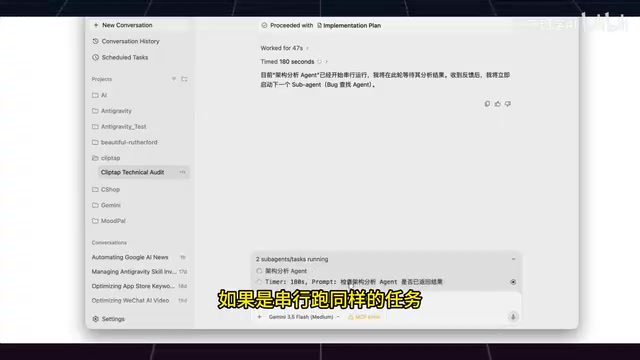
After sending the instruction, the system first displayed an execution plan (which users can modify). Upon confirmation, 5 Agent cards appeared above the input box. Clicking each card reveals real-time details of which file that Agent is reading, which function it's analyzing, and which tasks are already completed.
Parallel execution is the key advantage. Running the same tasks sequentially could take 5 times as long. After a few minutes, all 5 Agents finished, producing a comprehensive report covering security auditing, bug detection, performance bottlenecks, architecture analysis, and more. The report quality rivaled professional tools, with zero manual intervention required throughout.
The value of this multi-Agent collaboration model lies not just in speed, but in broader coverage and fewer blind spots. A single person doing a code audit can easily overlook certain dimensions, but 5 Agents analyzing simultaneously from different angles naturally produce more complete results. Google's implementation of this feature also reflects its decades of engineering expertise in distributed systems — how to efficiently allocate tasks, manage concurrency, and merge results are all core competencies of Google's infrastructure teams.
Conclusion: Is Antigravity 2.0 Worth Using?
Antigravity 2.0's three core features each address different levels of development pain points:
- Gemini 3.5 Flash: Significantly improved code generation capabilities, more mature handling of low-level browser APIs, solid UI aesthetics, and complex frontend tasks that generally pass on the first attempt
- Scheduled Task Automation: Solves the automation problem for repetitive work, turning the Agent into a 24/7 assistant
- Dynamic Sub-agents: Dramatically improves execution efficiency and coverage for complex tasks through multi-Agent parallel collaboration
From a product positioning perspective, Antigravity 2.0 is clearly targeting the Codex desktop client, but it has carved out its own path through differentiated features like scheduled tasks and Sub-agents. For developers, this is no longer just a code completion tool — it's an Agent platform capable of handling delegated complex tasks and autonomously planning their execution. Google's strategy in the Agent space is moving from concept to practical reality.
Related articles

Cloning Successful Apps to $35K/Month: An Indie Developer's Validation-First Methodology
A former optometrist self-taught coding and earns $35K/month by cloning validated apps. Learn his 4-step screening, data-driven validation, and growth strategy.
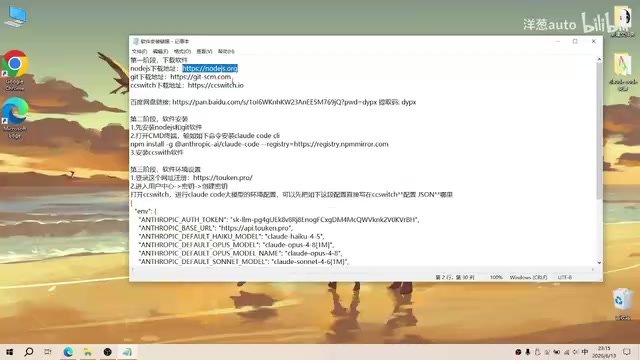
Complete Guide to Installing Claude Code CLI in China: Four Simple Steps
Step-by-step guide to installing Claude Code CLI in China using Node.js, Git, CC Switch, and an API relay service to bypass Anthropic's access restrictions.

The Compute Crisis: Why Google and Anthropic Are Paying SpaceX a Premium to Rent GPUs
Microsoft, Google, and Anthropic face severe compute shortages. Anthropic pays SpaceX $1B/month for GPUs. From TSMC capacity to HBM, storage, and power, the AI supply chain is in full crisis.