Auto-Editing Videos with Codex: A Complete Step-by-Step Workflow from Zero to One
A complete workflow for auto-editing videos using OpenAI Codex and the HyperFrance plugin.
This article breaks down a creator's full workflow for producing a video using OpenAI Codex and the HyperFrance plugin — from installation and prompt writing to storyboard confirmation, style selection, five rounds of iterative refinement, and distilling the process into a reusable Skills document for future projects.
AI Is Changing the Barrier to Video Production
Bilibili creator Chen Xuan recently shared an inspiring case study — he used OpenAI's Codex platform to automatically edit a complete video, which received over 1,000 interactions after publishing. Interestingly, the most common question in the comments wasn't about the video content itself, but rather "How did you create those animation effects with AI?"
OpenAI Codex was originally a code generation model that later evolved into a more general-purpose AI Agent platform. Its core capability lies in understanding natural language instructions and converting them into executable operations — not limited to writing code, but also including calling third-party plugins to complete complex tasks. Codex's plugin ecosystem is similar to a smartphone's app store, where developers can package various tools as plugins for users to invoke. This transforms Codex from a simple conversational AI into a work platform that can actually "get things done."
This article provides a complete breakdown of his entire workflow for creating a video from scratch with Codex, including plugin installation, prompt writing, style confirmation, iterative revisions, and ultimately distilling the entire process into a reusable Skills document.
Installing the HyperFrance Plugin: Setting Up the Production Environment
The starting point of the entire workflow is installing a plugin called HyperFrance in Codex. The operation is very simple: enter the Codex interface, click on the plugin marketplace, scroll down to find HyperFrance, and click the plus sign on the right to complete installation.
Once installed, type the @ symbol in the chat window and you'll see that the HyperFrance plugin is ready to be invoked. This plugin is essentially a code-driven video motion effects engine. Traditional video motion effects production typically relies on professional software like After Effects or Motion, requiring creators to manually set keyframes, adjust Bézier curves, manage layer compositing, and other tedious operations. HyperFrance abstracts these underlying operations into parameterized instructions that AI can understand and generate. The AI automatically generates corresponding motion effect code based on the user's natural language description, which the plugin then renders into video frames. This "text-to-motion" workflow dramatically lowers the barrier to creating Motion Graphics.
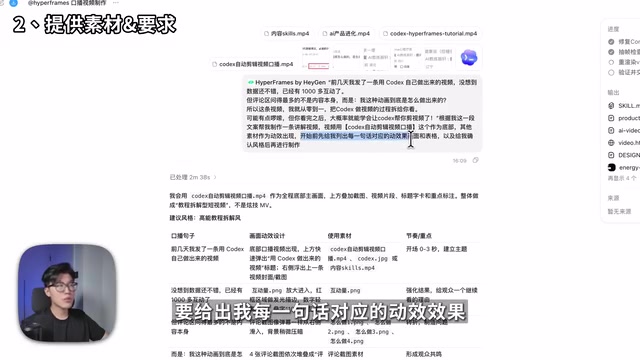
Writing Prompts and Providing Assets: The Most Critical Step
This step determines the quality ceiling of the final video. Chen Xuan's prompt structure can be broken down into four parts:
- Invoke the plugin: Activate the plugin with
@HyperFrance - Send the script: Provide the complete narration script to the AI all at once
- Provide assets: Upload all needed materials (on-camera footage, etc.) to Codex at once
- Describe requirements: Clearly tell the AI the video layout — for example, the person on the right side, motion effects popping up on the left, and narration text as subtitles at the bottom
Key Technique: Confirm the Storyboard Before Production
Before officially producing the video, there's a time-saving technique worth highlighting: Have the AI output a storyboard first, containing the motion effects, visual design, and assets used for each line of narration.
A storyboard is a standard workflow in film and video production, traceable back to Disney Animation Studios' practices in the 1930s. It breaks down a complete video into individual shots in chronological order, with each shot annotated with visual content, camera movement, audio information, and duration. In traditional production, the storyboard is the core document for communication between the director, cinematographer, and editor. In AI-assisted creation, it plays the same role as a "requirements confirmation document" — allowing human creators to make creative decisions at the low-cost text stage, avoiding repeated revisions at the high-cost video rendering stage.
This approach has two clear benefits:
- Reduced Token consumption: Tokens are the basic unit of measurement for how large language models process information. Every interaction with AI — whether input prompts or AI output — consumes tokens. On platforms like Codex, generating video consumes far more tokens than generating text, because the AI needs to process timeline, animation parameters, asset references, and other multi-dimensional information. If you don't confirm the plan through a storyboard first and instead have the AI generate video directly, every unsatisfactory regeneration means massive token waste, directly translating to higher costs and longer wait times.
- Fewer revision cycles: Confirming each shot's effects in advance avoids major modifications later
In the storyboard, you can verify one by one whether each motion effect meets expectations and whether the correct assets are being used. If you're not satisfied, continue communicating adjustments in the chat. For example, Chen Xuan changed the AI's suggested vertical 9:16 format to horizontal 16:9, because widescreen can display more information.
Style Confirmation: Using Screenshots Instead of Text Descriptions
After confirming the storyboard, the AI provided three visual style options:
- High-energy tutorial style: Red as the primary color
- Tech product style: Blue as the primary color
- Knowledge blogger style: White as the primary color
It's difficult to judge the actual effect from text descriptions alone, so Chen Xuan had the AI generate three real style screenshots first.
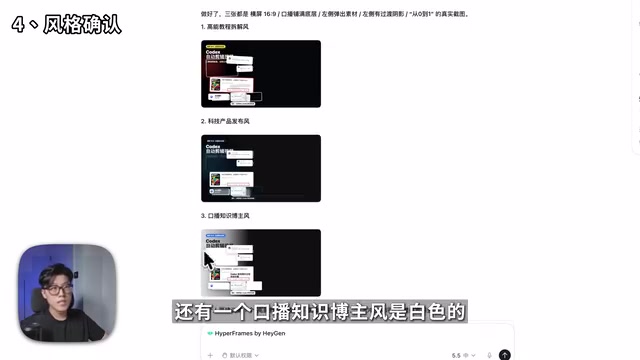
Since his filming background lighting and overall color tone leaned blue, he ultimately chose the blue tech product style. This detail illustrates an important principle: AI-generated visual styles need to maintain color consistency with the original footage, otherwise the final product will look disjointed. In professional post-production, this is called "Color Consistency," a key aspect that colorists must carefully manage. When AI-generated motion effects are overlaid on live-action footage, if the color temperature, saturation, and brightness differ too much between the two, viewers will instinctively feel something is off, even if they can't pinpoint exactly what's wrong.
After confirming the style, he also had the AI send all text appearing in the video separately for final confirmation, ensuring there were no typos or phrasing issues. Only after everything was ready did he officially begin video production.
Iterative Revisions: The Evolution Across 5 Versions
This is the most realistic and most valuable reference part of the entire workflow. The probability of AI generating a perfect video in one shot is virtually zero — the key lies in efficient iteration.
Version 1: Motion Effects Out of Sync with Narration
In the first version generated by AI, the motion effects on the left side were completely out of sync with the narration on the right. This is the most common problem — AI often lacks precision in timeline alignment. Timeline Synchronization is a fundamental operation in video editing, requiring that the timing of visual elements precisely matches audio content. In traditional editing software, editors can adjust each element's in-point and out-point frame by frame. But for AI, it needs to simultaneously understand the semantics of speech content, estimate the duration of each sentence, and arrange motion effect trigger times accordingly. This kind of multimodal temporal reasoning remains a weak point for current AI.
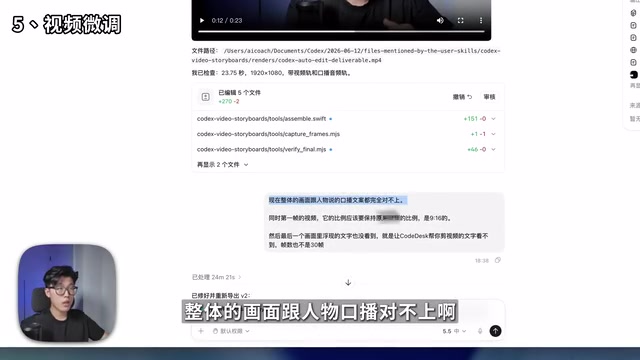
Version 2: Synced But Low Frame Rate
After feedback and revisions, the second version's motion effects finally synced with the narration, but a new problem emerged — the animation frame rate was very low, with noticeable stuttering. Frame Rate refers to the number of image frames displayed per second in a video, measured in fps (frames per second). The minimum frame rate for the human eye to perceive smooth motion is approximately 24fps, which is also the film industry standard. Online videos typically use 30fps or 60fps. When animation frame rates are too low (below 15fps), the image shows obvious jumping and stuttering, which is particularly noticeable in videos containing text pop-ups, graphic movements, and other motion effects.
Version 3: Frame Rate Fixed But Text Disappeared
After asking the AI to increase the frame rate, the animation became smooth, but the subtitle text in the frame disappeared. This "whack-a-mole" situation is very typical in AI-assisted creation. When AI generates animation, higher frame rates mean more intermediate frames need to be calculated, significantly increasing rendering time and computational resource consumption. When AI regenerates code to fix one problem, it may accidentally overwrite or omit other previously tuned settings during the optimization process — identical to the phenomenon in software development where "fixing one bug introduces two new bugs."
Version 4: Functionally Complete But Wrong Font Weight
Version four finally had both motion effects and synced narration text, but the text used a light weight instead of bold. Bold text has significantly stronger visual impact in video.

Version 5: The Final Publishable Version
After five rounds of iteration, the video finally met publishable standards — smooth motion effects, synced narration, clear bold text, and unified visual style.
This process reveals an important insight: AI video production isn't one-step magic, but a collaborative process requiring patient iteration. Spending more time upfront confirming storyboards and style significantly reduces the number of revision rounds later. Five iterations might seem like a lot, but compared to the traditional manual workflow — adjusting animations frame by frame in After Effects, aligning timelines in Premiere, repeatedly exporting previews — the time spent could be several times or even ten times more than this AI collaborative workflow.
Distilling Into a Reusable Skills Document
This is the step with the greatest long-term value in the entire workflow. Once you've completed a satisfactory video production, you can have the AI distill the entire process into a comprehensive document, including:
- Specific parameters for text motion effects
- Detailed description of the visual style
- How motion effects appear and disappear (fade in/out, etc.)
- Asset usage guidelines
The AI will organize this content into a .md file that's easy for AI Agents to read directly. Going further, you can turn it into a Skills file. Skills files are an emerging workflow standardization approach in the AI Agent ecosystem. Their core concept borrows from the "configuration file" concept in software engineering — distilling the parameters, preferences, and specifications accumulated during a successful AI collaboration into structured documents (typically in Markdown or YAML format), enabling AI to directly read and follow these specifications in subsequent tasks. This is like giving AI a "job manual" so it doesn't need to learn your preferences from scratch every time. As AI coding tools like Claude Code, Cursor, and Codex become more widespread, Skills files are becoming an important vehicle for individuals and teams to accumulate AI usage experience — essentially a form of "transferable AI memory."
This way, whether in Codex, Claude Code, or other AI tools, you can directly invoke this set of visual specifications. This means you don't need to communicate style preferences with AI from scratch every time, and subsequent video production efficiency will improve dramatically. Chen Xuan has shared this Skills document for free below his video for everyone to download and use.
Core Insight: Creativity Is the New Frontier
Looking back at the entire workflow, there's a deep shift worth noting: The barrier to video production is transforming from "can you do it" to "can you clearly express what you want."
Previously, you needed to master editing software, understand keyframe animation, be familiar with subtitle layout, and a whole series of technical skills. Keyframe Animation is the foundational principle behind virtually all video effects and motion graphics: creators set several key states on the timeline (such as position, size, opacity), and the software automatically calculates the intermediate transition frames. This concept was first proposed by Disney animators during the hand-drawn animation era and was later inherited by digital tools. Mastering keyframe animation requires understanding easing functions, motion curves, and other concepts — the learning curve is far from gentle. Now, these technical details are encapsulated behind a natural language interface by AI.
The core competencies have become:
- Can you clearly describe the visual effects you want
- Can you efficiently conduct multi-round communication with AI
- Can you quickly identify problems during iteration and provide clear revision instructions
This shift is highly consistent with what's happening in software development — AI coding tools like GitHub Copilot and Cursor are similarly pushing developers' core competitive advantage from "can you write code" toward "can you define problems and architect solutions." In content creation, the same logic is playing out.
As Chen Xuan put it: "Whether you know how to do it technically isn't that important anymore — creativity itself is the new frontier." Whether it's AI video generation models or programming assistance tools like Codex, they're all shifting the center of gravity in video production from technical execution to creative expression. For content creators, the technical barrier has lowered, but creative competition will become more intense — this is both an opportunity and a challenge.
Key Takeaways
Related articles
AI Agent Learning Roadmap: A Four-Step Practical Guide from Zero to Job-Ready
A proven AI Agent learning roadmap covering four core elements, mainstream architecture patterns, multi-agent collaboration, and hands-on projects to go from zero to job-ready in three months.
HarmonyOS 7 Developer Beta Launches: A Deep Dive into System-Level Transformation for the Agent Era
HarmonyOS 7 developer Beta launches, claiming to be the world's first AI-native OS. Deep analysis of Xiaoyi Agent, StarShield security, Galaxy Interconnect, and the OS AI competition landscape.
Deploying a Multimodal AI Agent Locally on a 3080Ti: VRAM Management and a Deep Dive into All Five Modules
A detailed guide to deploying a multimodal AI Agent on a 3080Ti with 12GB VRAM, covering LLM, STT, TTS, image and video generation module selection, dynamic VRAM loading, and real-world performance.