Deploying a Multimodal AI Agent Locally on a 3080Ti: VRAM Management and a Deep Dive into All Five Modules
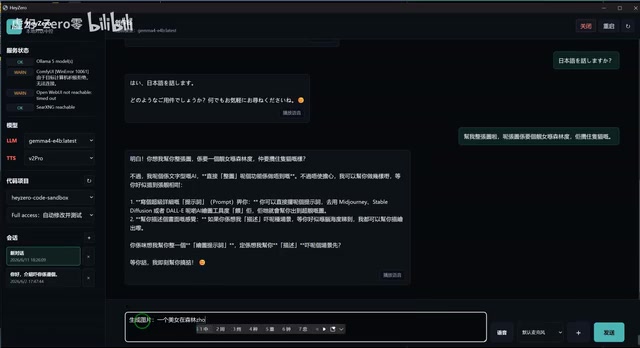
Deploying a full multimodal AI Agent locally on a 3080Ti 12GB GPU with dynamic VRAM management.
This article details a hands-on project deploying a complete multimodal AI Agent on a 3080Ti GPU with just 12GB VRAM. It covers the selection of five core modules — LLM, STT, TTS, image generation, and video generation — along with the dynamic VRAM loading strategy needed to work within hardware constraints, multilingual voice interaction results, and an honest assessment of where local deployment excels and where it still falls short compared to cloud solutions.
Project Overview: How Many AI Modules Can a Single 3080Ti Handle?
Bilibili creator Zero recently shared an ambitious project — deploying a complete multimodal AI Agent system locally on a 3080Ti GPU (12GB VRAM). The system integrates speech-to-text (STT), a large language model (LLM), text-to-speech (TTS), image generation, and video generation modules, with the goal of building an all-in-one local AI assistant that can listen, speak, draw, and search.
The project's approach is straightforward: replace cloud services with open-source models and deliver a multimodal interactive experience locally — similar to what you'd get from Doubao or ChatGPT. Over the past two years, the open-source LLM ecosystem has experienced explosive growth — from Meta's LLaMA series to Google's Gemma and Alibaba's Qwen. The open-source community now has a complete spectrum of models ranging from 1B to hundreds of billions of parameters. Through quantization techniques (such as 4-bit/8-bit quantization in GGUF format), these models can dramatically reduce VRAM usage, making it possible to run them on consumer-grade GPUs. Meanwhile, the maturation of inference frameworks like Ollama, vLLM, and llama.cpp has significantly lowered the engineering barrier for local deployment. The core drivers behind this trend are users' growing concern for data privacy, the demand for customization, and the cumulative cost of cloud API calls.
However, the challenges posed by hardware bottlenecks, model capability limitations, and engineering details during actual deployment are exactly the real-world problems that many developers looking to deploy AI locally will encounter.
Technical Architecture: Local Solutions for Five Core Modules
Core Model Selection
As shown in the demo, the system's tech stack is quite comprehensive:
- LLM (Large Language Model): Primarily Gemma 4, with Qwen 3.6 as a backup — both uncensored versions
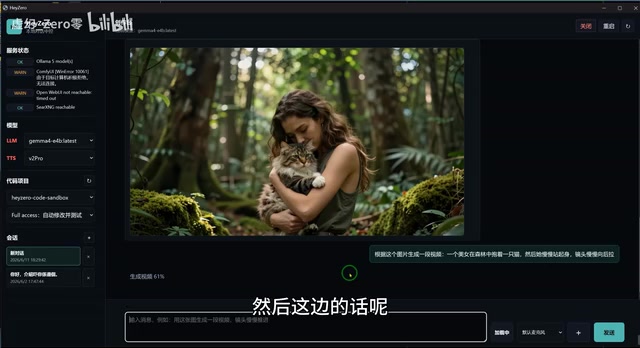
- Image Generation: Based on the ZenImage model, running through ComfyUI
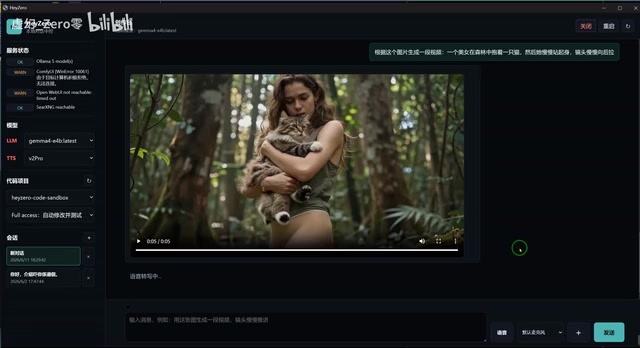
- Video Generation: Using the WAN 2.3 model, also running on ComfyUI
- Speech-to-Text (STT): A locally deployed speech recognition module
- Text-to-Speech (TTS): Supports multilingual output including Cantonese, English, and Japanese
Gemma 4 is an open-source large language model released by Google DeepMind in 2025. It uses a Mixture of Experts (MoE) architecture, achieving reasoning capabilities close to commercial models while maintaining a relatively small number of active parameters. Qwen 3.6 is an iteration of Alibaba's Qwen series, known for its strong Chinese language comprehension and robust multilingual support. The so-called "uncensored versions" typically refer to community fine-tunes based on the original model weights, with the manufacturer's preset Safety Alignment restrictions removed so the model can respond to a broader range of instructions. These models circulate on platforms like Hugging Face under tags like "uncensored" or "abliterated" and are a popular choice in the local deployment community.
You might have missed it, but the creator specifically mentioned that the models used are "basically all uncensored models" — this is one of the major advantages of local deployment over cloud services. Users have full control over the model's behavioral boundaries, free from platform content moderation policies.
Both the image and video generation modules run through ComfyUI. ComfyUI is an open-source node-based workflow interface for image/video generation. Unlike the more mainstream Stable Diffusion WebUI (A1111), ComfyUI breaks down the entire generation pipeline into a visual node graph, giving users precise control over every step — from text encoding and sampler selection to VAE decoding. The advantage of this architecture lies in its extreme flexibility and extensibility — users can easily integrate plugins like ControlNet, LoRA, and IP-Adapter, and it's well-suited for building complex automation pipelines. Models like ZenImage and WAN 2.3 are connected to the system through ComfyUI's custom nodes, enabling coordinated calls from the LLM Agent.
Multilingual Voice Interaction Testing
During the demo, the Agent showcased voice interaction capabilities in Cantonese, Mandarin, English, and Japanese. Cantonese performed the most naturally, which is related to the creator's specific tuning of system prompts for Cantonese tone and style. English and Japanese pronunciation were generally accurate, but the Mandarin voice model performed poorly since no targeted voice training had been done for it.
The comparison test with Doubao was also noteworthy — Doubao doesn't support voice read-aloud output on PC and can't switch to Cantonese conversation, whereas the local Agent was actually more flexible in these areas. This demonstrates that local deployment truly has customization advantages that cloud products struggle to match.
Surviving on 12GB VRAM: Dynamic Loading Strategy
The Necessary Compromises of VRAM Management
The 3080Ti's 12GB VRAM is the biggest hardware bottleneck for the entire project. When all modules are loaded simultaneously, VRAM falls far short. The creator adopted a pragmatic but somewhat brute-force solution: dynamic unloading and loading.
Specifically, when image or video generation is needed, the system first unloads the STT and TTS modules from VRAM. Once image/video generation is complete, the voice modules are reloaded. This leads to an obvious UX issue — after generating images or videos, voice functionality briefly shows a "loading" state.
From a technical perspective, GPU VRAM is the core bottleneck resource for deep learning inference. A 7B-parameter language model at 4-bit quantization occupies roughly 4-5GB of VRAM, while image generation models (such as those based on Diffusion architectures) typically require 6-10GB, and video generation models demand even more. When total demand exceeds physical VRAM capacity, developers generally have several strategies: first, model offloading — transferring temporarily unused model weights from GPU VRAM to system RAM or even disk, then loading them back when needed; second, model quantization — trading precision for space; third, using unified memory architectures (like Apple Silicon's UMA) that let CPU and GPU share a memory pool. The creator's dynamic offloading approach falls into the first category, with the trade-off being several seconds to tens of seconds of loading time per switch — causing a noticeable experience disruption in real-time interaction scenarios.
While this approach isn't elegant, it's a reasonable trade-off given the hardware constraints. For developers looking to replicate this project, a 4090 with 24GB VRAM or higher would be a much more comfortable choice. It's worth noting that NVIDIA's consumer GPU AI inference capabilities are evolving rapidly: the 3080Ti (12GB GDDR6X) has a memory bandwidth of approximately 912GB/s, the 4090 (24GB GDDR6X) doubles the VRAM with bandwidth exceeding 1TB/s, and the 5090 released in 2025 pushes VRAM to 32GB with FP4 inference support. VRAM capacity directly determines the upper limit of model sizes that can be loaded, while memory bandwidth determines token generation speed (since LLM inference is a memory bandwidth-bound task). For multimodal Agent scenarios that require multiple models to reside in memory simultaneously, 24GB is practically the current minimum threshold, and 32GB or more is needed for reasonably smooth multi-module parallelism.
Limitations of Video Generation
The WAN 2.3 model used for video generation performed poorly in prompt comprehension. The creator bluntly stated that the model is "incredibly, incredibly dumb at understanding prompts" — unable to recognize camera movement instructions or understand action descriptions. Improving this would likely require training a dedicated camera movement LoRA model.
LoRA (Low-Rank Adaptation) is a parameter-efficient fine-tuning technique. Its core idea is to freeze the pre-trained model's main weights and only train inserted low-rank decomposition matrices. This dramatically reduces the computational resources and storage needed for fine-tuning — a LoRA adapter is typically only tens to hundreds of MB, yet can significantly alter the model's performance on specific tasks. In the video generation domain, camera movement LoRAs specifically train models to understand camera motion instructions (such as push, pull, pan, tilt, orbit, tracking, etc.), compensating for the base model's deficiencies in understanding cinematic language. The community already has camera movement LoRAs for some video models, but WAN 2.3's ecosystem is relatively new, and related resources are still being developed.
The generated video quality could only be described as barely passable, with a noticeable gap compared to the video generation capabilities of cloud services like Doubao. This also reflects the significant capability gap that still exists between current open-source video generation models and commercial ones.
Search and Code Features: The Unfinished Puzzle
Web Search Module
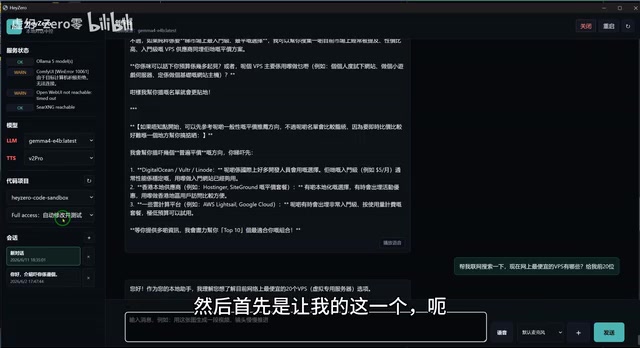
The system also integrates a web search function, allowing the Agent to retrieve information online. In the demo, the creator asked the Agent to search for "the top 10 cheapest VPS providers." The Agent did return results, but the search speed was slow, and the accuracy and organization of results still need optimization.
The creator mentioned that the search function worked when testing with Codex, but occasionally failed during manual testing, indicating that this module's stability still needs further debugging.
Local Code Assistant: The Biggest Pain Point
The most frustrating part of the entire project was the local code development functionality. The creator tried multiple approaches:
- Running a code model directly on the local Agent — basically didn't work
- Connecting a VS Code plugin to the local LLM — Qwen 3.6's Code model took 32 minutes to read a single MD document
- Using dedicated code models — tried several, none were satisfactory
This led the creator to an important conclusion: LLM Code models think in a fundamentally different way than conversational LLMs. Code generation tasks place demands on large language models that are vastly different from natural language conversation. First, there's the context window: a medium-sized code repository might contain tens of thousands to hundreds of thousands of tokens of context, and the model needs to make local modifications while understanding the overall architecture — this places extremely high demands on long-context processing capabilities. Second, there's reasoning depth: code generation is essentially a structured reasoning task where the model must maintain variable states, understand control flow, and ensure syntactic correctness, requiring far more "thinking steps" than open-ended conversation. This is why commercial solutions like OpenAI's Codex and Claude's coding capabilities typically use larger parameter models, combined with specialized code pre-training data and reinforcement learning optimization. Under the constraint of 12GB local VRAM, the parameter scale of quantized code models that can run is limited, and inference speed is also constrained by memory bandwidth, resulting in poor performance on complex coding tasks.
Ultimately, the creator had to resort to using OpenAI's Codex desktop version for code tasks, with individual tasks taking about 21 minutes to process. This also indirectly shows that in the code generation domain, local deployment currently struggles to compete with cloud-based solutions.
Conclusion and Reflections: Where Are the Boundaries of Local Deployment?
This project is an extremely valuable exercise in local AI deployment, clearly demonstrating several key facts:
The advantages of local deployment lie in high customizability (language, tone, uncensored models), data privacy protection, and core functionality that doesn't depend on network connectivity.
The bottlenecks of local deployment are concentrated in module-switching delays caused by VRAM limitations, the capability gap between open-source models (especially video and code models) and commercial models, and the complexity of engineering integration.
For developers looking to attempt similar projects, I'd recommend preparing a GPU with at least 24GB of VRAM, prioritizing the deployment of conversation + voice modules, and treating image and video generation as optional extensions. As for a local code assistant, at this stage it's still advisable to use cloud-based solutions as a stopgap.
The direction of local multimodal AI Agents is undoubtedly correct, but to reach a truly practical level, we may still need to wait for more efficient model architectures and more powerful consumer-grade hardware.
Related articles

AI Agent Learning Roadmap: A Four-Step Practical Guide from Zero to Job-Ready
A proven AI Agent learning roadmap covering four core elements, mainstream architecture patterns, multi-agent collaboration, and hands-on projects to go from zero to job-ready in three months.
HarmonyOS 7 Developer Beta Launches: A Deep Dive into System-Level Transformation for the Agent Era
HarmonyOS 7 developer Beta launches, claiming to be the world's first AI-native OS. Deep analysis of Xiaoyi Agent, StarShield security, Galaxy Interconnect, and the OS AI competition landscape.
DeepSWE Benchmark Reveals the Truth: GPT 5.5 Leads Opus 4.7 by a Wide Margin
DeepSWE long-horizon benchmark shows GPT 5.5 leads Opus 4.7 by 15+ points with 70% pass rate at one-third the cost. Deep dive into contamination-free testing and AI coding implications.