Beginner's Guide to Vibe Coding: Let AI Write Code for You — No Experience Required

A beginner's guide to Vibe Coding: let AI write code while you describe what you want.
Vibe Coding is a new development paradigm where you describe what you want in natural language and let AI generate the code. This guide explains the core philosophy behind Vibe Coding, how it differs from traditional programming, and walks you through setting up a Python virtual environment with Miniconda — everything you need to take your first step into AI-assisted programming.
What Is Vibe Coding? A Fundamental Shift in the Programming Paradigm
Have you ever had this experience: a brilliant idea for an app or website suddenly pops into your head, you get incredibly excited, but then reality hits — "I don't know how to code" — and the idea dies right there? If you've ever felt that frustration, Vibe Coding was made for you.
Vibe Coding is an entirely new approach to software development. Its core philosophy is simple: You don't need to know how to write code. You just need to clearly and accurately describe the effect and feel you want to the AI, turning it into your 24/7 personal programmer.
This concept was first introduced by OpenAI co-founder Andrej Karpathy in February 2025. He described his experience using AI for programming on social media: "Fully immersed in the vibes, embracing exponential growth, forgetting that code even exists." Karpathy is a top expert in deep learning and former AI Director at Tesla. His endorsement quickly sparked widespread discussion in the tech community, because it precisely captured a paradigm shift already underway — from humans writing code by hand to humans guiding AI to generate code.
The word "Vibe" — atmosphere, feeling — might sound abstract, but if you've ever worked as a product manager, it's anything but unfamiliar. When a boss describes requirements, they often say things like "I want that kind of feel" — which is essentially a natural Vibe mode. And now, AI has become powerful enough to understand and execute these fuzzy descriptions. This relies on the semantic understanding capabilities of Large Language Models (LLMs). Models like GPT-4 and Claude, trained on massive codebases and natural language text, have established mappings between "natural language descriptions" and "code implementations." When you say "I want a minimalist login page," the model can decompose the abstract concept of "minimalist" into specific CSS properties — generous whitespace, low-saturation color palettes, sans-serif fonts, and so on. This ability to transform vagueness into precision is the technical foundation that makes Vibe Coding possible.
From "Construction Worker" to "The Client": The Core Difference Between Traditional Programming and Vibe Coding
Traditional Programming vs. Vibe Coding
To understand how revolutionary Vibe Coding is, let's use a building construction analogy:
- Traditional Programming: You are the construction worker, laying every brick yourself to build the entire structure. The learning curve is extremely steep and the process is grueling. Just mastering a single programming language can take months or even years. Take web development as an example: you need to learn at least HTML (page structure), CSS (styling), and JavaScript (interactive logic), plus frameworks (like React or Vue), databases (like MySQL or MongoDB), server deployment, and a whole stack of other technologies. Going from beginner to independently completing a full project typically takes one to two years of systematic study.
- Vibe Coding: AI takes on the worker's role. You play the part of the blueprint designer — and even the blueprint itself can be delegated to AI. Your real role is "the person who initiates the whole thing" — in other words, the client, the boss.

Your Ability to Describe Is Your Productivity
All you need to do is tell the AI: What style of house do I want? Gothic, minimalist, or Baroque? How should the rooms be lit? How should the layout be arranged? The clearer your description, the closer the AI's "construction result" will match your expectations.
And if your description isn't clear enough? No big deal — it just means having the AI "redo a few rounds." This is the fault tolerance of Vibe Coding: the cost of trial and error is extremely low, and iteration speed is extremely fast. In traditional development, modifying a feature might involve code changes across multiple files, testing, and debugging, taking hours or even days. In Vibe Coding mode, you simply tell the AI in natural language, "Change the button color to blue and add a loading animation," and you can see the result within seconds.
So the core of the work has shifted from "How to Code" to "How to Describe." This shift is the essence of Vibe Coding. For non-technical professionals like product managers and designers, this means your natural communication skills and ability to break down requirements can finally be directly converted into "programming ability." In a sense, the ability to write a good PRD (Product Requirements Document) and the ability to write a good AI Prompt are essentially different manifestations of the same skill.
Practical Preparation: Python Virtual Environment Configuration Guide
Before you actually start using Vibe Coding tools, there's a critically important foundational concept to understand — virtual environments. This is the key to ensuring your code runs reliably on any computer.
Why Do You Need a Virtual Environment?
Here's an analogy: your computer is your home, and every project needs certain tools (compilers, third-party libraries, etc.). If you pile all the tools from every project into the living room, it'll quickly become a mess — Project A needs Python 2.0, Project B needs Python 3.0, Project C needs Python 3.1, and when their dependencies get mixed together, they'll "fight" each other.
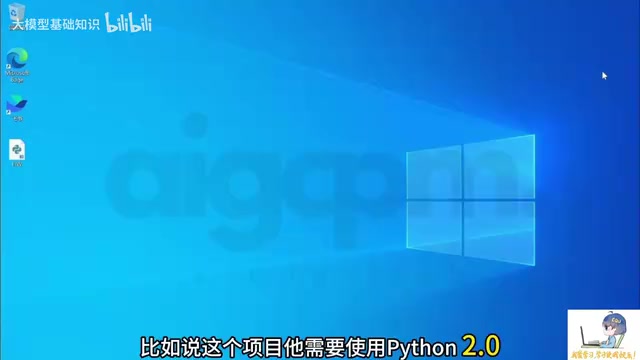
The purpose of a virtual environment is: to create an independent "room" for each project, where each room has its own dedicated compiler and third-party libraries, completely isolated from one another. This makes project management cleaner and keeps your system files tidy.
From a technical standpoint, the core mechanism of Python virtual environments is dependency isolation achieved by modifying the PATH environment variable. When you activate a virtual environment, the system prioritizes looking for the Python interpreter and third-party libraries in that environment's directory rather than the global installation path. This solves Python's notorious "Dependency Hell" problem — different projects may depend on different versions of the same library, but Python by default only allows one version to be installed globally. Besides Miniconda, other common virtual environment management tools include Python's built-in venv module, virtualenv, and the increasingly popular uv.
Step-by-Step Miniconda Installation Guide
We recommend using Miniconda to manage Python virtual environments. The reason for choosing Miniconda over the full Anaconda distribution is that Anaconda comes with hundreds of pre-installed scientific computing packages, with an installer exceeding 3GB. Miniconda is its lightweight version, containing only the conda package manager, the Python interpreter, and a few basic dependencies, with an installer of only about 80MB. For Vibe Coding purposes, Miniconda is more than sufficient — you can install packages as needed, avoiding unnecessary disk space usage. Both use identical conda commands, so there's no difference in subsequent operations.
Here's the detailed installation process:
Step 1: Download the Installer
- Search for "Miniconda" in your browser and find the official Anaconda website (green circle icon)
- Click through and find the "Download" page
- Scroll down further to find the "Miniconda Installer" entry
- Note the distinction: the left side is the Anaconda installer, the right side is the Miniconda installer
- Click Download based on your operating system (Windows/Mac/Linux)
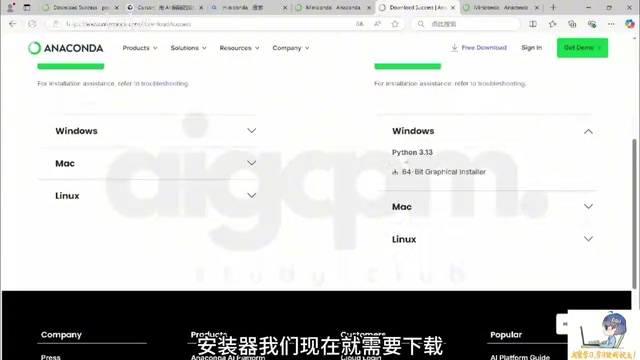
Step 2: Installation Configuration
Windows users will get a graphical installation interface (Mac and Linux also have command-line installation options). During installation, there's one critical setting:
⚠️ Make sure to check the option "Register Miniconda as the system's Python interpreter"! Otherwise, various IDEs (Integrated Development Environments, such as code editors like VS Code, Cursor, etc.) may not be able to find Python later. This option essentially writes Miniconda's Python path into the system's environment variables, allowing any program to find the Python interpreter through the standard path.
Keep all other options at their defaults. You can adjust the installation path according to your personal preference.
Step 3: Verify the Installation
After installation is complete, open the Start menu and you'll find two new terminal entries:
- Anaconda terminal in CMD mode
- Conda terminal in PowerShell mode
Open either one (e.g., PowerShell) and enter the following command:
python --version
If a Python version number is displayed (e.g., 3.13.5) and it matches the Conda version you downloaded, the installation was successful. You can also enter conda --version to confirm that the conda package manager is properly installed — you'll rely on this tool for creating and managing virtual environments going forward.
The Essence of Vibe Coding: From Writing Code to Describing Requirements
Vibe Coding is not a specific tool or framework — it's a shift in mindset. Its underlying logic is this: as the capabilities of Large Language Models advance at breakneck speed, the bottleneck of "programming" has shifted from "the ability to write code" to "the ability to describe requirements."
The tool ecosystem supporting Vibe Coding is already quite rich. At the IDE level, there's Cursor (deeply customized from VS Code with built-in AI chat and code generation) and Windsurf (built by the former Codeium team, emphasizing multi-file collaborative editing). At the plugin level, there's GitHub Copilot (integrated into mainstream IDEs like VS Code). For pure conversational approaches, there's Claude Artifacts, ChatGPT Canvas, and more. Additionally, there are frontend-focused zero-code AI tools like Bolt.new, Lovable, and v0, where users don't even need to install any local environment — they can generate complete web applications directly in the browser through conversation. For beginners, Cursor is widely recommended as the go-to starting point due to its low learning curve and powerful contextual understanding.
For users with zero coding background, this carries several important implications:
- Don't be intimidated by the word "programming" — what you need to learn isn't syntax, but how to express requirements in a structured way. A good Prompt should include a clear objective, specific constraints, and the expected output format — which is fundamentally no different from writing an excellent project brief.
- Product thinking matters more than technical thinking — people who can clearly break down requirements actually have an advantage in the Vibe Coding era. Decomposing a large requirement into smaller steps, defining the input and output of each step, anticipating edge cases — these everyday product manager skills are precisely the core competencies for effective collaboration with AI.
- Environment setup is a fundamental skill — infrastructure like virtual environments may be tedious, but sharpening your axe won't delay the woodcutting. A well-configured development environment will save you from countless mysterious errors during your Vibe Coding journey, letting you focus your energy on what truly matters — describing what you want.
Once you've mastered these foundational concepts and environment configurations, you've already taken the first step in Vibe Coding. The next move is to choose the right AI programming tool (such as Cursor, Windsurf, etc.) and start your first hands-on project. The barrier to programming has never been lower than it is today.
Key Takeaways
Related articles

ChatGPT Schedule Planning Feature Explained: How AI Helps Teams Organize Work Efficiently
A deep dive into ChatGPT's schedule planning feature: coordinate team schedules and assign tasks through natural language. Learn AI planning strategies and practical tips to boost collaboration.
Vibe Coding in Practice: Three Strategies for Building an English Learning Game with Dramatically Different Results
Three controlled experiments compare pure Prompt, pre-prepared assets, and Godot engine strategies for Vibe Coding an English learning game — revealing dramatic differences in quality and Token cost.
Build an App in 30 Minutes with Zero Code: A Complete Hands-On Walkthrough Using the AI Tool Tusi
Build a fully installable mobile app in 30 minutes with zero code using AI tool Tusi. A complete walkthrough from requirements to finished product, showing how AI shifts app development from coding skills to clear communication.