Building a Local Knowledge Graph RAG System with Dify + Neo4j: A Hands-On Guide

Build a local GraphRAG system with Dify, Neo4j, and Docker for multi-hop knowledge reasoning.
This hands-on guide walks through building a local knowledge graph RAG system using Dify, Neo4j, and Docker. It covers data preparation, Neo4j graph construction with APOC plugin, and Dify Chatflow integration via HTTP requests. The GraphRAG approach enables multi-hop relational reasoning that traditional RAG cannot achieve, while keeping all data secure in local containers.
Why Traditional RAG Falls Short
Traditional RAG (Retrieval-Augmented Generation) systems perform reasonably well for simple factual Q&A, but they often struggle with complex relational reasoning. For example, if you ask "What is the relationship between Xiao Ming and Zhang Hong?" and the knowledge base only contains "Xiao Ming's mother is Li Hua" and "Li Hua's mother is Zhang Hong," traditional RAG has a hard time performing the two-hop reasoning needed to conclude that "Zhang Hong is Xiao Ming's grandmother."
This is precisely where GraphRAG (Knowledge Graph-enhanced RAG) shines. By structuring entities and relationships into a graph, AI can not only find answers but also understand deep connections between entities, enabling multi-hop reasoning and truly unlocking the deeper value of knowledge.
This article is based on a comprehensive tutorial by Bilibili creator "A Shui," walking through the complete process of building a local knowledge graph RAG system from scratch. It covers three core stages: data preparation, Neo4j graph construction, and Dify workflow integration.
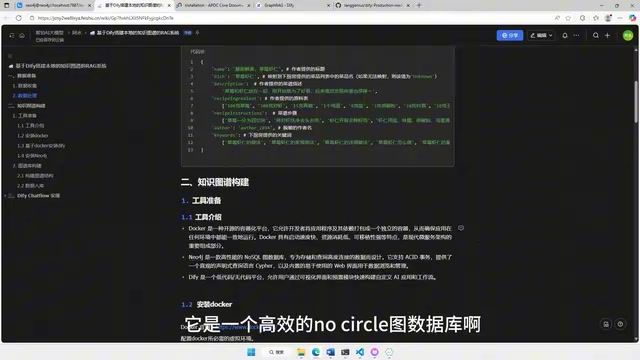
Overall Architecture and Tool Selection
The entire system's tech stack consists of three layers:
- Docker: A containerization platform that manages the runtime environments for both Neo4j and Dify, eliminating tedious dependency installations
- Neo4j: A high-performance graph database for storing and querying relationships between entities
- Dify: A low-code/no-code AI application platform that builds RAG workflows through visual Chatflow design
The advantage of this architecture is that all components run in local Docker containers, keeping data fully under your control without relying on cloud servers — making it especially suitable for scenarios with strict data security requirements.
Step 1: Data Preparation and Processing
Data Acquisition
The quality of a knowledge graph depends on the quality of the underlying data. The tutorial uses a recipe-related dataset (containing 6 streamlined records). The original dataset was much larger and ran slowly on average computers, so it was trimmed down. In real-world applications, you'll need to prepare relevant internal data based on your specific business scenario.
Data Formatting
Neo4j recommends JSON format for data imports. If your raw data is unstructured text (such as PDFs or Word documents), you'll need to perform structured processing first to extract entities and relationship information. Large language models can assist with this step, but manual review is still necessary to ensure accuracy.
Practical Tip: In real-world project deployments, entity recognition and relationship extraction are the biggest pain points. Large datasets require professional involvement — LLMs can assist but cannot fully replace manual review.
Step 2: Building the Knowledge Graph in Neo4j
Environment Setup
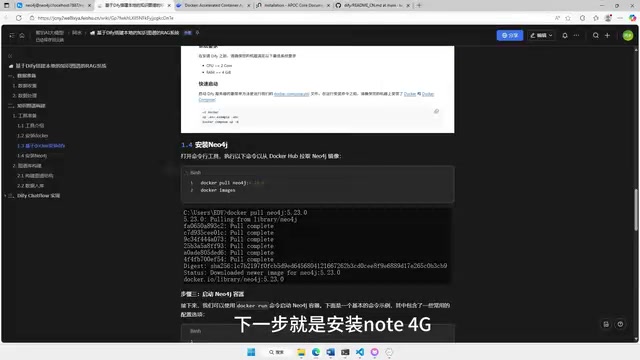
First, you need to pull the Neo4j image in Docker. There are several key configurations to note when starting it up:
- Enable the APOC Plugin: This is a Neo4j extension plugin that supports importing local JSON files. Without it, you won't be able to import your prepared data into the graph database
- Memory Settings: It's recommended to set the maximum memory to 4GB (adjust based on your machine's performance)
- User Authentication: The default username is
neo4j, and the password is set topassword
After installing the APOC plugin, you can verify the installation with a query statement. If it returns a large list of tools, the plugin has been loaded correctly.
Constructing the Graph
A knowledge graph consists of two parts: entities and relationships. Using the recipe scenario as an example:
- Entities: Rice, eggs, vegetables, cooking oil, egg fried rice, main dishes, etc.
- Relationships: Ingredient → can make → Dish, Dish → belongs to → Category
After placing the JSON data file into Neo4j's import directory, you execute the import command using Neo4j's Cypher query language. Once the import is complete, you can see the relationship network between entities in Neo4j's visualization interface, with drag-and-drop interaction support.
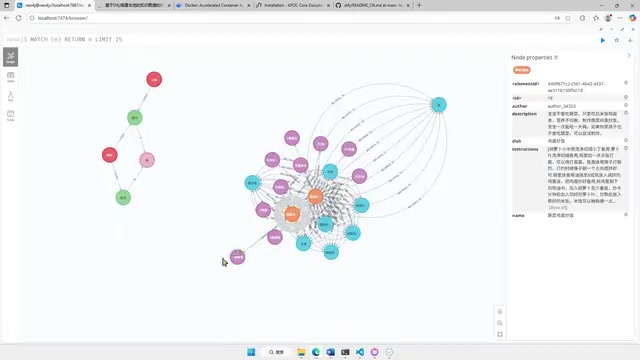
You can also use query statements to check the number of nodes for each label, ensuring the data import is complete and accurate.
Step 3: Dify Integration and RAG Workflow Setup
Dify Installation and Model Configuration
Dify is also deployed via Docker. After downloading the source code from GitHub, simply run the startup command in the Docker directory. The initial image pull takes approximately 15–20 minutes.
Once started, visit 127.0.0.1 to access the Dify interface and configure the model provider in settings. The tutorial recommends SiliconFlow because of its generous free tier — new users receive 14 RMB in credits upon registration, and inviting new users earns an additional 14 RMB, which is more than enough for learning and testing. Configuration only requires entering an API Key.
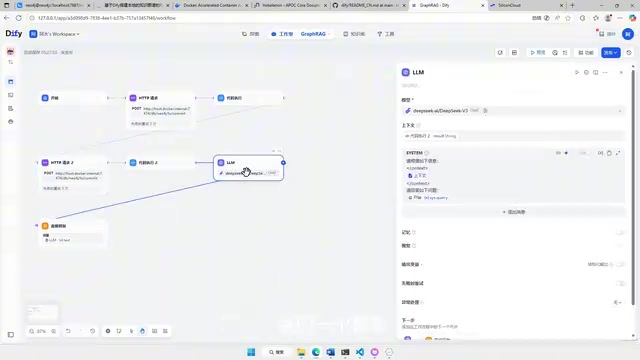
Building the Workflow
Dify accesses the Neo4j database through HTTP requests. Since Neo4j requires user authentication, you need to convert the username and password into Base64-encoded format for use in Dify's HTTP request nodes.
Here are the specific steps:
- Convert
neo4j:passwordto Base64 encoding in PowerShell - Save the encoded result for later use in Dify to replace the plaintext password
- Verify that the HTTP request can correctly access Neo4j using a curl command
- Import the pre-built Chatflow workflow file into Dify
- Critical modification: Replace the Base64 authentication information in the workflow with your own encoded value
- Select an appropriate LLM (the tutorial uses DeepSeek V3)
The entire Chatflow logic is very straightforward: User asks a question → HTTP request queries Neo4j → Retrieves related entities and relationships from the graph → LLM generates an answer based on the graph information.
Testing the Results
Once the setup is complete, you can test it in Dify's preview interface. For example, asking "I have a bowl of rice, what can I make?" will prompt the system to return multiple recipe recommendations like vegetable egg fried rice based on the ingredient relationships in the knowledge graph, with well-reasoned answers.
Advanced: Embedding in a Web Page
Dify supports embedding your built AI application into your own web pages. The process is very simple:
- Click "Embed in Website" in Dify
- Select the second embedding option (floating button style in the bottom-right corner)
- Copy the generated embed code
- Paste it into the
<body>tag of your HTML file
After saving and opening the web page, a chat button will appear in the bottom-right corner. Clicking it allows you to interact with the knowledge graph RAG system. Note that each conversation consumes model tokens, so if you make the application publicly available, be mindful of quota management.
Summary and Reflections
The GraphRAG approach described in this article offers three significant advantages over traditional RAG:
- Relational Reasoning: Multi-hop reasoning through graph structures enables understanding of deep connections between entities
- Local Deployment: All components run in Docker containers, keeping data secure and under your control
- Low Barrier to Integration: Dify's visual workflow builder eliminates the need to write extensive code
Of course, this approach has its limitations. Entity recognition and relationship extraction remain the biggest engineering challenges. Larger data scales place higher demands on machine performance, and maintaining and updating the knowledge graph requires ongoing effort. However, as an introductory GraphRAG practice, this solution effectively demonstrates the value of knowledge graphs in RAG systems.
Related articles
 Tutorials
Cursor + Codex Dual-IDE Collaboration: A Practical Methodology for Open-Source Project Customization
A complete methodology for open-source project customization based on real-world experience, detailing the Cursor+Codex dual-IDE workflow, seven-stage process, MVP validation, and AI source code reading techniques.
 Tutorials
Cursor Multi-Agent in Practice: Building a Full-Stack Next.js Blog in 50 Minutes
Build a full-stack blog in 50 minutes using Cursor IDE's multi-Agent mode with Next.js, Clerk auth, and Supabase. Learn the 4-phase AI Agent workflow and key integration pitfalls.
 Tutorials
Building an AI Software Factory from Scratch: A Cursor Engineer's Hands-On Experience with Multi-Agent Collaboration
Cursor engineer Eric shares practical insights on building an AI software factory: automation levels, guardrail design, parallel Agent management, and scaling to 1000+ Agents for 24/7 development.