Building a SaaS Website with AI and Zero Code: A Complete Bolt + Cursor Walkthrough
Building a SaaS Website with AI and Ze…
A complete methodology for building an AI-powered SaaS website with zero code using Bolt and Cursor.
A developer used only Bolt and Cursor to build a fully functional SaaS website integrating AI image generation, a multimodal chatbot, and webpage screenshot replication — all through prompt-driven development with zero code written. Core methods include a three-in-one prompt structure, multi-model collaboration for iterative prompt optimization, progressive feature integration, and Git version control to handle AI output uncertainty. The case demonstrates that the core skill in AI programming has shifted from writing code to writing prompts and designing architecture.
Introduction: AI Programming Brings the Barrier to Website Building Down to Zero
Many people want to try AI programming but feel overwhelmed the moment they see code. Recently, a developer ran an interesting experiment — building a complete SaaS website offering AI services from scratch, without writing a single line of code, using only two AI tools: Bolt and Cursor.
Background on these two tools: Bolt is an AI full-stack development tool launched by StackBlitz. Its core advantage lies in combining WebContainers technology with large language models, enabling Node.js environments to run directly in the browser and achieving end-to-end generation from prompts to runnable web applications. Cursor is an AI code editor deeply rebuilt on top of VS Code, with built-in support for multiple large models including Claude and GPT-4, featuring two core modes: Composer (multi-file editing) and Agent (autonomous task execution). The typical division of labor is: Bolt handles rapid prototype generation, while Cursor handles refined iteration and debugging.
This website integrates three major features — AI image generation, a multimodal chatbot, and webpage screenshot replication — all driven entirely by prompts. This case study not only demonstrates the current capability boundaries of AI programming but also provides a reusable zero-code website building methodology.
Project Architecture: Technical Choices for Three AI Services
Service Feature Design
The website provides three core services:
- AI Image Generation: Connected to SiliconFlow's free Flux model, allowing users to generate AI images directly on the website. Flux, developed by Black Forest Labs, is one of the mainstream diffusion models today, with significant improvements in both image generation quality and inference speed. SiliconFlow packages it as a standardized API for developers.
- Multimodal Vision Chatbot: Based on Zhipu's newly released GLM-4V Flash multimodal large model, supporting image understanding and conversation. A multimodal large model refers to an AI model capable of processing multiple data types such as text and images simultaneously. GLM-4V extends Zhipu's GLM architecture with a visual encoder, and the Flash version is a lightweight variant optimized for inference speed and cost, suitable for high-frequency API call scenarios.
- Webpage Screenshot Replication: Mimicking CopyCode's functionality — after uploading a webpage screenshot, AI analyzes it and generates corresponding frontend prompts, which can then be used with Bolt/Cursor to replicate the webpage.
Technology Stack Selection
The frontend framework uses Next.js, and the backend service uses Supabase. To understand the logic behind this technology selection, two industry concepts need clarification:
The difference between SaaS and BaaS: SaaS (Software as a Service) is a business model that provides cloud-based software to users through subscriptions; BaaS (Backend as a Service) is the infrastructure layer underlying SaaS. Supabase, as an open-source alternative to Firebase, is built on PostgreSQL and packages backend capabilities like databases, authentication, and file storage into APIs that developers can simply call. It has rapidly gained popularity in the indie developer community in recent years. Supabase's advantage is that it pre-packages fundamental backend capabilities like login/registration and database CRUD operations — developers only need to configure connection information and table schemas, dramatically reducing backend development complexity.
This architectural choice itself embodies the "zero-code" mindset — use mature BaaS services wherever possible and focus energy on frontend interactions and AI capability integration.
Core Method: Three-in-One Prompt-Driven Development
The Fundamental Logic of Prompt Engineering
Before diving into the specific implementation, it's essential to understand the core concept of Prompt Engineering. Prompt engineering refers to the technical methodology of designing and optimizing natural language instructions given to large language models to guide them toward producing expected outputs. Core techniques include: role assignment (having the model act as a specific expert), few-shot examples (providing input-output pairs as references), and context injection (embedding API documentation and other key information into prompts). Understanding these fundamentals is a prerequisite for efficiently using AI programming tools.
The Three-Part Prompt Structure
The entire website's foundational framework was generated through a carefully designed prompt containing three parts:
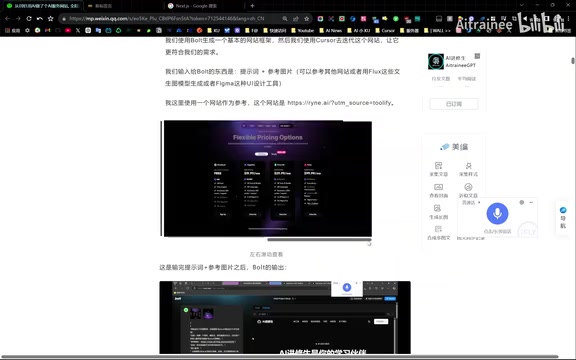
- Base Page Structure: Describes the overall SaaS website framework, including navigation bars, feature introduction sections, pricing tiers, and other UI elements, while providing a reference website URL for AI comparison
- Login/Registration System: Integrates Supabase's authentication service, including email verification and other features
- Service Dashboard: The AI service interface after login, containing functional modules like AI image generation
The developer initially completed these three parts in three separate steps within Cursor, then later merged the prompts into a "three-in-one" version that generated the complete website framework in a single step when input into Bolt. The "three-in-one prompt" essentially merges multiple independent tasks into a single composite instruction, reducing the model's context-switching overhead while maintaining logical coherence between tasks. This demonstrates that prompt consolidation and optimization is itself a critical skill.
Using AI to Iterate on Prompts: Multi-Model Collaboration Workflow
You might not have noticed, but this set of prompts wasn't written in one go. The developer employed a clever method: while having AI generate pages based on initial prompts, they simultaneously sent screenshots of the generated results alongside screenshots of the target reference website to a third-party AI (such as Google Gemini 2.0 Flash experimental model), asking it to compare, analyze, and optimize the development prompts.
This "using AI to optimize AI prompts" iterative approach is a concrete manifestation of the current Model Orchestration trend in AI application development. Different models excel at different tasks: Gemini 2.0 Flash performs exceptionally well in multimodal understanding and long-context processing, making it suitable for visual comparison analysis; while Cursor's built-in Claude model is more precise in code generation. Chaining multiple specialized models into a workflow where each model only does what it's best at is one of the core ideas in current AI Agent architecture design — frameworks like LangChain and Dify are built precisely for such multi-model orchestration scenarios. This multi-model collaborative workflow significantly improves final output quality.
Feature Implementation: Integrating AI Capabilities Module by Module
Multimodal Chatbot Integration
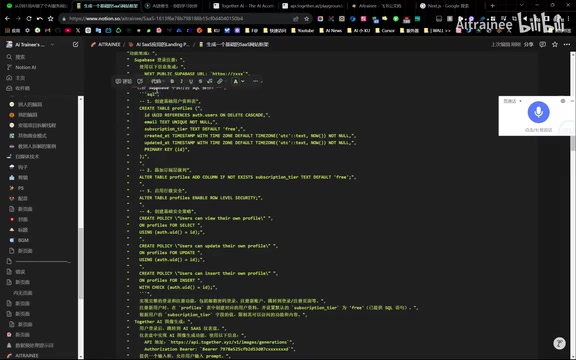
After the basic framework was built, the developer added the GLM-4V chatbot module to the dashboard by appending additional prompts. The key step was providing Zhipu's API documentation as context to Cursor, allowing it to understand the interface specifications and automatically generate the calling code. This "context injection" approach is one of the core techniques in prompt engineering — embedding structured technical documentation into prompts significantly improves the accuracy of model-generated code.
The initial version implemented image link analysis functionality, with advanced features like image upload left for future iterations. This "build the skeleton first, then add flesh" progressive development strategy is highly suitable for AI programming scenarios.
Webpage Screenshot Replication Tool Implementation
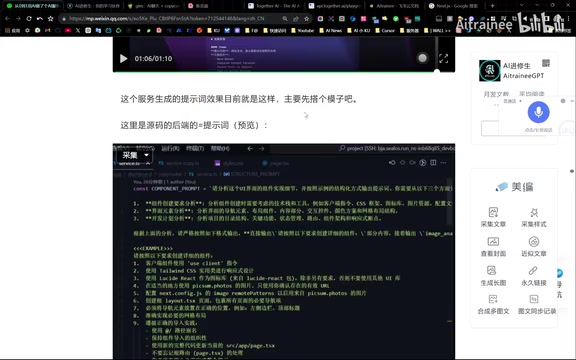
This feature requires coordination of three API documents. After a user uploads a webpage screenshot, the backend calls a multimodal model to analyze the image content and generate prompts describing that webpage. These prompts can then be used directly in Bolt or Cursor to replicate the webpage.
The backend's AI prompt design is the core of this feature, and the developer suggests it can be further optimized using Agent platforms in a workflow format.
Interface Optimization: Visual Iteration with a Starry Sky Theme
The developer chose a starry sky theme for interface beautification, using prompts to have AI generate visual elements like black hole effects and space-tearing page transition animations. Interestingly, the same prompt produces different visual effects across different generation rounds — this is the inherent probabilistic nature of large model outputs. Large language models sample from a probability distribution when generating each token, and the temperature parameter controls the strength of this randomness: higher temperature means more diverse outputs, while lower temperature means more deterministic ones.
To control output consistency, you need to apply more precise constraints at the prompt level or lower the temperature parameter value in API calls. This also confirms a key insight: the ceiling of AI programming depends on your depth of understanding of prompt engineering.
Practical Experience: Efficiency Tips for AI Programming
Use "Lazy" Prompts to Boost Efficiency
The developer shared two efficient prompt strategies:
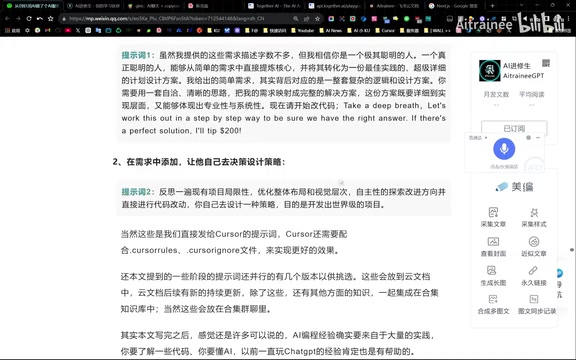
- Requirement Expansion Type: Describe only brief requirements and let AI expand them into detailed plans on its own. Suitable for scenarios where you're uncertain about implementation details.
- Autonomous Decision Type: Include instructions like "let AI design the strategy itself," combined with Cursor Agent's intelligent iteration capabilities, allowing AI to work with greater freedom.
The core logic behind both strategies is: large models are trained on massive datasets and may have better "intuition" in many domains than descriptions from non-professional developers. Of course, when precise control is needed in large projects, more constrained prompts should be used.
Version Control Is Your Lifeline
Git is currently the most mainstream distributed version control system, created by Linux creator Linus Torvalds in 2005. In traditional development, Git is primarily used for team collaboration and code history tracking. But in AI programming scenarios, its value undergoes a fundamental shift — since large model outputs are probabilistic (meaning the same prompt may produce different code in different rounds), every AI-generated piece of code may introduce new uncertainties. Git's branching and rollback mechanisms allow developers to quickly restore to a stable state when AI "goes off track," essentially providing a safety net for AI's uncertain outputs.
The developer emphasized a practical tip: when vertical iteration (continuous follow-up questions) can't solve a bug, roll back horizontally to a previous version and regenerate. The same prompt in a new conversation round may not produce the same bug, which is more efficient than repeatedly patching on top of erroneous code. This is why the developer calls version control a "lifeline."
Key Considerations for Using Cursor
- Opening a new Composer window loses context, potentially causing AI to create parallel directory structures
- You need to explicitly reference (@) the files you want to modify, combined with Agent mode
- Configure the
.cursorrulesfile properly, writing in your project's development rules and framework conventions
Conclusion: Zero Code Doesn't Mean Zero Knowledge
This case study demonstrates the real level of AI programming today: for small to medium-sized web projects, anyone with clear requirement description abilities can complete a from-scratch build without writing code. The core competency has shifted from "knowing how to write code" to "knowing how to write prompts" and "knowing how to design architecture."
Of course, this doesn't mean programming knowledge is useless — understanding framework principles, API calling logic, version control, and other foundational concepts, as well as emerging knowledge systems like prompt engineering, model orchestration, and BaaS platform selection, remain prerequisites for efficiently using AI programming tools. Zero code doesn't mean zero knowledge — it simply transforms the expression of knowledge from code syntax to natural language descriptions, while requiring developers to build a new mental model for collaborating with AI.
Related articles
 Tutorials
Cursor + Codex Dual-IDE Collaboration: A Practical Methodology for Open-Source Project Customization
A complete methodology for open-source project customization based on real-world experience, detailing the Cursor+Codex dual-IDE workflow, seven-stage process, MVP validation, and AI source code reading techniques.
 Tutorials
Cursor Multi-Agent in Practice: Building a Full-Stack Next.js Blog in 50 Minutes
Build a full-stack blog in 50 minutes using Cursor IDE's multi-Agent mode with Next.js, Clerk auth, and Supabase. Learn the 4-phase AI Agent workflow and key integration pitfalls.
 Tutorials
Building an AI Software Factory from Scratch: A Cursor Engineer's Hands-On Experience with Multi-Agent Collaboration
Cursor engineer Eric shares practical insights on building an AI software factory: automation levels, guardrail design, parallel Agent management, and scaling to 1000+ Agents for 24/7 development.