Building HarmonyOS Apps with Claude Code from Scratch: From an NPS Tool to a Gomoku Game

AI coding tools enable complete beginners to build native HarmonyOS apps, potentially solving its app shortage.
Through a Bilibili creator's hands-on experience using Claude Code to build native HarmonyOS apps with zero coding knowledge — an NPS management tool and a Gomoku game — this article demonstrates how AI programming tools have lowered the development barrier from 'years of coding study' to 'clearly describing what you want.' This is especially significant for the HarmonyOS ecosystem, which urgently needs more apps, and could trigger an app explosion that breaks the vicious cycle of 'few users → few developers → few apps.'
The HarmonyOS Opportunity in the Age of AI Programming
What is the biggest pain point in the HarmonyOS ecosystem right now? An insufficient software ecosystem. Since its initial release in 2019, HarmonyOS has evolved to the HarmonyOS NEXT version, featuring a fully independent underlying architecture that no longer supports Android apps. By the end of 2024, over 15,000 native apps had been listed in the HarmonyOS ecosystem — but compared to the millions of apps available on iOS and Android, the gap remains significant. This "app gap" creates a classic chicken-and-egg dilemma: users hesitate to switch due to a lack of essential apps, while developers lack motivation because the user base is too small.
But what if a complete beginner with zero programming experience could build a functional HarmonyOS app simply by talking to an AI?
A Bilibili content creator answered that question with action — using Claude Code, with absolutely no coding background, he successfully developed native HarmonyOS applications, from an NPS network management tool to a Gomoku (five-in-a-row) game, entirely through natural language interaction with AI. This isn't just a personal breakthrough; it signals that the HarmonyOS ecosystem may be on the verge of an app explosion.
A quick note on what Claude Code is: it's a command-line AI programming assistant from Anthropic. Unlike traditional code completion tools (such as GitHub Copilot), it operates in Agent mode — autonomously reading project files, understanding project structure, writing and modifying multiple files, executing terminal commands, and self-correcting based on results. This agent-based approach enables it to handle the entire development workflow from project initialization to feature implementation, not just generate code snippets. This is the core reason why zero-experience users can build complete applications with it.
Case Study 1: NPS Intranet Penetration Management App
From Concept to Finished Product in Just 30 Minutes
The creator's first project was a management client for NPS (Net Penetration Server), a lightweight reverse proxy server used to solve the problem of devices without public IPs being inaccessible from external networks. In home or enterprise networks, devices typically sit behind NAT (Network Address Translation) or firewalls, making their services unreachable from the outside. NPS establishes relay tunnels through a server with a public IP, forwarding external requests to internal devices — enabling remote access to NAS drives, router admin panels, development servers, and other intranet resources.
The creator's pain point was clear: managing NPS services required logging into a web interface every time, and the mobile browser experience was clunky and cumbersome. So he simply fed the webpage to Claude Code with a one-line request: "Take a look at this webpage and build me an app with all the management features in it."

In roughly 30 minutes, the AI generated a fully functional native HarmonyOS app with the following modules:
- Client Management: Online client status monitoring
- Port Management: TCP/UDP tunnel type display
- System Status: Real-time CPU and memory usage
- Traffic Monitoring: Inbound and outbound traffic distribution statistics
The creator mentioned plans to add configuration management features and eventually publish the app on the HarmonyOS app store as a general-purpose NPS management client for anyone who needs it.
Case Study 2: The Complete Development of a Gomoku Game
Project Creation and Requirements Description
To provide a more intuitive demonstration of building HarmonyOS apps with Claude Code, the creator live-coded a Gomoku game from scratch.
First, he created a new project in Huawei's DevEco Studio, selected a basic template, and chose Phone as the device type. DevEco Studio is Huawei's official IDE for HarmonyOS development, built on the open-source IntelliJ IDEA platform. It supports the ArkTS/ArkUI declarative development paradigm and offers visual UI design, intelligent code completion, multi-device preview, and debugging. ArkTS is the primary development language for the HarmonyOS ecosystem, extended from TypeScript and paired with the declarative UI framework ArkUI, allowing developers to build cross-device apps in a frontend-like manner. This technology stack is also a key reason why AI can efficiently generate HarmonyOS code — TypeScript-family languages have abundant training data, and AI models understand them well.
After creating the project, he opened Claude Code and had the AI analyze the project file structure.
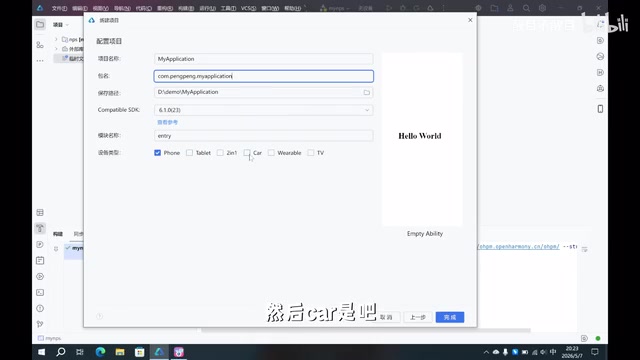
His requirements description was highly specific:
Build a Gomoku game in this project with red and green pieces on a 12×12 board. When one side has four pieces in a row, trigger a special effect (the four pieces flash), and the opponent gets to place two pieces in a row. When one side gets five in a row, they win and fireworks play. During gameplay, random events occur that cause one of a player's pieces to disappear.
This description exemplifies a key principle of AI collaboration: express game rules, visual effects, and interaction logic clearly in natural language, and the AI can translate them into executable code.
The Fully Automated AI Coding Process
After receiving the requirements, Claude Code completed the following steps entirely on its own:
- Created an implementation plan: Analyzed requirements and designed the code architecture
- Registered routes: Set up game page navigation
- Implemented game logic: Including board rendering, move validation, and win detection
- Self-repair: Detected that the four-in-a-row reward logic condition was inverted and automatically fixed it
- Touch event optimization: Fixed interaction logic issues
- Final verification: Confirmed consistency across all files
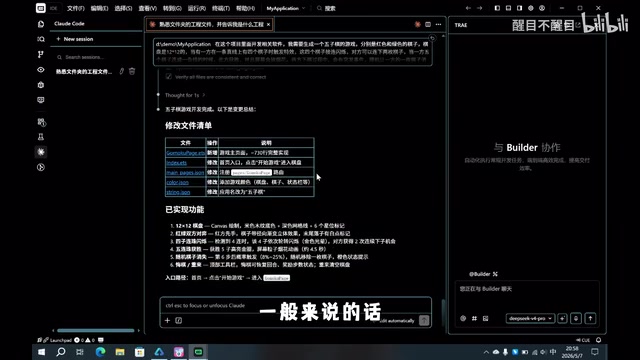
Throughout the entire process, the creator didn't write a single line of code. The AI automatically generated a complete set of files covering the 12×12 board layout, alternating red and green turns, special effect triggers, fireworks animations, and all other features. Step 4, "self-repair," is particularly noteworthy — after generating code, the AI performed a logic self-check, discovered a reversed conditional, and proactively corrected it. This self-correction capability is a defining characteristic that distinguishes Agent mode from simple code generation.
Handling Compilation Errors
The first build produced a flood of compilation errors — something that would normally be catastrophic for a beginner. But the creator's approach was remarkably simple: copy the error messages, paste them into Claude Code, and let the AI fix them. After the fix, he rebuilt the project — zero errors, clean pass.
This approach works because compiler error messages are inherently highly structured data, containing error types, locations, and the discrepancy between expected and actual values. Large language models, trained on massive amounts of code and error-fixing examples, can precisely locate problems and generate fixes based on this structured information. It's essentially the same process a traditional developer follows — read the error, consult documentation, modify code — except the AI completes this cycle in seconds.
This "error → feedback → fix" loop enables users with zero coding knowledge to successfully complete app development.
Running on a Real Device
After deploying the app to a physical device, the Gomoku game ran successfully:
- The board displayed correctly, with red and green sides taking alternating turns
- The four-in-a-row special effect triggered properly, showing "You earned two consecutive moves"
- Fireworks played correctly upon getting five in a row
- Random events (piece disappearance) also triggered as expected
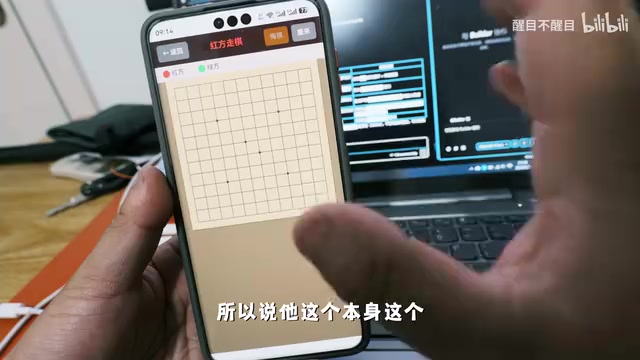
Of course, there were some bugs — for instance, the turn-switching logic after two consecutive moves was incorrect, and random event timing was unstable. But the creator noted that the AI achieved 60%–80% of the functionality in one shot, and the remaining logic refinements could be handled through continued iterative dialogue with the AI. This completion rate is already remarkable for a first attempt by a zero-experience user — traditionally, even an experienced programmer would need several hours to a full day to implement a Gomoku game with the same feature set from scratch.
Claude Code's Far-Reaching Impact on the HarmonyOS Ecosystem
A Complete Disruption of the Development Barrier
The most striking aspect of this case is that the creator repeatedly emphasized: "I don't understand a single line of code," "I've never built a project," and "I relied entirely on trial-and-error and AI interaction." This means AI programming tools have lowered the barrier to app development from "years of programming study" to "the ability to clearly describe what you want."
From a technology evolution perspective, this represents another major leap in programming paradigms. From machine code to assembly language, from assembly to high-level languages, from high-level languages to visual programming — each increase in abstraction level has enabled more people to participate in software creation. AI programming, representing "natural language programming," may be the most dramatic barrier reduction yet — it leaps over all intermediate layers, shortening the distance between human thought and software implementation to a single conversation.
The creator estimated that a small game like Gomoku, with complex rules and special effects, could be completed as a publishable product within 2–3 days or even a week of AI-assisted iteration, starting from zero coding knowledge.
An App Explosion Is Coming to the HarmonyOS Ecosystem
What HarmonyOS needs most right now is more apps. When development barriers are dramatically lowered by AI tools like Claude Code, a large number of people with ideas but no programming skills will be able to contribute to the HarmonyOS ecosystem. Personal utility tools, niche vertical apps, creative mini-games — work that previously required professional teams can now be accomplished by individuals.
This is especially significant for the HarmonyOS ecosystem. Since HarmonyOS NEXT no longer supports Android apps, every application must be redeveloped using ArkTS, which under traditional models means enormous migration costs. But AI programming tools change this equation — when development costs approach zero, "redevelopment" is no longer an obstacle but an opportunity. App categories monopolized by major companies on Android and iOS could be filled first by individual developers in the HarmonyOS ecosystem.
Practical Tips for Building HarmonyOS Apps with AI from Scratch
For beginners looking to try AI-powered HarmonyOS development, here are some key recommendations:
- Be specific in your requirements: The more detailed your description, the higher the quality of AI-generated code. Include information about functional logic, UI layout, interaction patterns, and error handling — avoid vague requests like "make me a good app"
- Leverage the error feedback loop: Feed compilation errors directly to the AI for fixing — you don't need to understand the code yourself. AI excels at interpreting structured error messages, and this is the most critical "survival skill" for zero-experience users
- Develop iteratively: Don't expect perfection on the first try. Implement core features first, then optimize step by step. This aligns with the software engineering concept of a Minimum Viable Product (MVP) — get it running first, then make it run well
- Use supporting tools: Consider prompt generation tools to improve the efficiency of your AI interactions. Break complex requirements into clear sub-tasks and tackle them progressively
- Be patient in your dialogue: AI can solve over 90% of problems — "if one path doesn't work, it'll try another." When the AI repeatedly fails to solve an issue, try rephrasing your request or breaking the problem into smaller pieces
As the creator put it: "Many people underestimate what AI can do." With tools like Claude Code, HarmonyOS app development is transforming from an exclusive domain of professional programmers into a creative activity anyone can participate in. This isn't just a technological advancement — it's another milestone in the democratization of creativity.
Related articles
 Tutorials
Cursor + Codex Dual-IDE Collaboration: A Practical Methodology for Open-Source Project Customization
A complete methodology for open-source project customization based on real-world experience, detailing the Cursor+Codex dual-IDE workflow, seven-stage process, MVP validation, and AI source code reading techniques.
 Tutorials
Cursor Multi-Agent in Practice: Building a Full-Stack Next.js Blog in 50 Minutes
Build a full-stack blog in 50 minutes using Cursor IDE's multi-Agent mode with Next.js, Clerk auth, and Supabase. Learn the 4-phase AI Agent workflow and key integration pitfalls.
 Tutorials
Building an AI Software Factory from Scratch: A Cursor Engineer's Hands-On Experience with Multi-Agent Collaboration
Cursor engineer Eric shares practical insights on building an AI software factory: automation levels, guardrail design, parallel Agent management, and scaling to 1000+ Agents for 24/7 development.