Claude Code Beginner's Guide: From Installation to Real-World Development
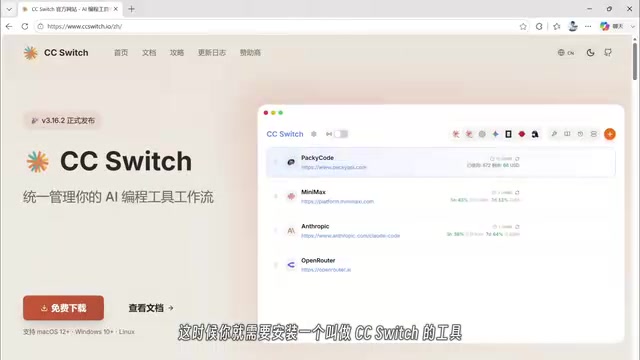
A complete beginner's guide to installing Claude Code and building projects with domestic Chinese LLMs.
This guide walks beginners through installing Claude Code, connecting affordable domestic LLMs (Qwen, DeepSeek, Xiaomi MiMo) via CC Switch proxy tool, and completing real projects including batch file processing and e-commerce website development. It covers permission modes, model selection strategies, and token-saving tips.
Claude Code (referred to as CC below) is a command-line AI programming tool developed by Anthropic. Unlike ordinary AI chat tools, CC can not only converse with you but also directly read files on your computer, batch-process tasks, and build complete websites or software projects. This article takes you from zero to completing CC installation, connecting domestic Chinese LLMs, and real-world project development.
As a command-line interface (CLI) tool, CC is fundamentally different from VS Code plugins like Copilot or web-based tools like ChatGPT. CLI tools run directly in the operating system's Shell environment, with full access to the file system. They can execute system commands, invoke compilers, and run scripts—giving CC the characteristics of an "Agent." It doesn't just generate code text; it can autonomously complete entire workflows including creating files, installing dependencies, and running tests. This design philosophy represents the evolution of AI programming tools from "copilot" to "autonomous executor."
Two Ways to Install Claude Code
Method 1: Official Native Installation
Open CC's official download page and copy the installation command. On Windows, right-click the Windows logo, select "Terminal (Administrator)," paste the command, and press Enter to execute. Wait for the automatic installation to complete.
Method 2: Install via Node.js (Recommended for Users in China)
If your network environment cannot directly access Anthropic's official website, you can install via Node.js:
- Install Node.js: Go to the Node.js official website, download the installer, and follow the default options through the installation. After completion, press
Win+R, typecmdto open a terminal, and enternode -vto verify the installation. - Switch NPM Mirror: To avoid network issues, change NPM's server address to a domestic mirror.
- Install CC: Copy the official NPM installation command and paste it into the terminal. After installation, enter
claude --version—if it returns a version number, the installation was successful.
Node.js is a JavaScript runtime environment built on Chrome's V8 engine, enabling JavaScript to run on the server side outside of browsers. NPM (Node Package Manager) is Node.js's package management tool and the world's largest open-source software registry, hosting over 2 million packages. Claude Code chose NPM for distribution because it provides a unified cross-platform installation experience. Users in China switch mirror sources (such as Taobao mirror cnpm or npmmirror) because NPM's default registry server is located overseas, resulting in slow and unstable direct connections.
Connecting Domestic LLMs via CC Switch
CC uses Anthropic's official AI model by default, but this presents network restrictions and higher costs for users in China. The solution is to use CC Switch to connect domestic LLMs—essentially giving CC a "domestic brain."
Installing the CC Switch Model Management Tool
CC Switch is a visual model management tool that lets you conveniently switch between different AI models for CC. Go to its GitHub page, download the Windows .msi installer, and double-click to install.
After launching, you'll see that CC is currently using the official model API. Click the "+" button in the upper right corner to add other models.
CC Switch is essentially a local API proxy server. It starts an HTTP service on your machine, intercepts requests that Claude Code would normally send to Anthropic's official API, and forwards them to domestic LLM API endpoints (like Alibaba Cloud Bailian or DeepSeek) based on user-configured model mapping rules. The advantage of this architecture is that it requires no modification to Claude Code's own code—you only need to change its API base URL to point to the local proxy. The model mapping feature solves API format differences between providers, enabling flexible "one tool, multiple brains" switching.
Connecting Alibaba Cloud Bailian (Qwen Models)
- Open the Alibaba Cloud Bailian platform website, log in, and click "Create API Key." Add a description, confirm, and copy the generated API Key.
- In CC Switch, add a new provider, select "Bailian," and enter the API Key.
- Expand the "Model Mapping" in advanced settings and visit Bailian's "Model Square" to choose a model. Many models offer 1 million free tokens—it's recommended to enable the "stop when free quota is exhausted" toggle to avoid unexpected charges.
- Enter the model name as the "Default Fallback Model," click "One-Click Setup," then add.
An API Key is a secret string used by LLM service providers for identity verification and billing. When Claude Code sends a request, it includes the API Key in the HTTP request header, allowing the provider to identify the caller and deduct corresponding token fees from their account. A Token is the basic unit of text processing for LLMs—in Chinese, one character typically equals about 1.5-2 tokens. Different models have different pricing strategies, usually divided into input tokens and output tokens, with output token prices typically 3-5x higher than input. Understanding this mechanism helps you manage costs effectively.
Connecting DeepSeek
DeepSeek is currently one of the most cost-effective LLMs in China:
- Create an API Key on DeepSeek's API platform and save it.
- In CC Switch, add DeepSeek as a provider and enter the API Key.
- The recommended model is DeepSeek V3/V4 Flash—faster with lower token consumption, and the difference from the standard version is minimal for non-intensive tasks.
- You need to top up your balance on DeepSeek's platform before use.
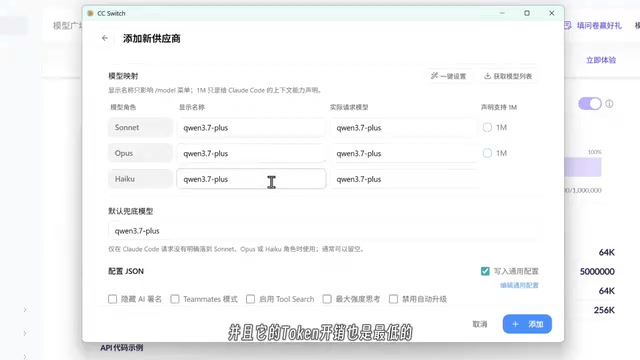
CC Switch has three model roles you can configure: the top slot is suitable for deep research and hardcore programming (slower speed), the middle is a general-purpose balance, and the bottom provides the fastest response with the lowest token overhead. You can assign different models to different roles or use the same one across all.
Connecting Xiaomi MiMo
Xiaomi MiMo recently announced a price reduction, making it nearly identical to DeepSeek's pricing, with some free quota included:
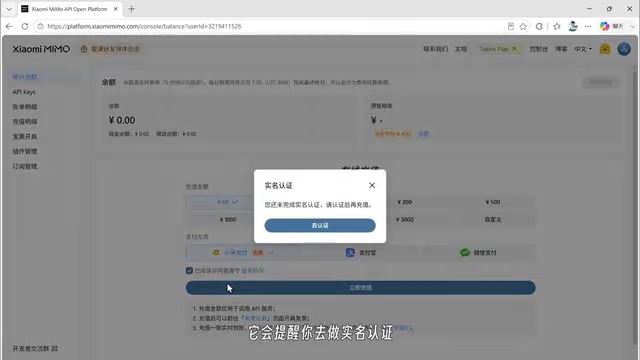
- Open the Xiaomi MiMo official website, enter the console, and log in.
- After completing identity verification, you'll receive 5 yuan in bonus credit, with an additional 10 yuan available through referral activities.
- Create an API Key and add it in CC Switch. Recommended models are V2.5 or V2.5 Pro.
Launching Claude Code and Completing Your First Task
Basic Startup Process
- Find a working folder (or create a new one), right-click in the folder, and select "Open in Terminal."
- Type
claudeand press Enter to launch CC. - On first launch, you'll need to select an appearance theme (dark/light), confirm security prompts, and trust the folder.
- When you see the input interface, startup is successful. The top shows the version number, and below it displays the current AI model in use.
Batch File Processing in Practice
The simplest beginner task—batch renaming files. For example, if you have many images in a folder that need Chinese filenames, simply describe your requirements in CC's input box. During execution, CC will ask for confirmation. Selecting the second option (agree and auto-execute similar operations in the future) reduces the number of confirmations needed.
Building an E-commerce Website with Claude Code
Requirements Communication and Project Planning
In CC's conversation, you can reference files or folders using the @ symbol. For example, type a space followed by @ to select a file for the AI to read. If you have multiple product images, place them in a subfolder and @ the entire folder.
Important Note: Qwen and Xiaomi MiMo support multimodal capabilities (image recognition), while DeepSeek does not currently support image recognition. Switch to a multimodal model when working with image-related tasks.
Multimodal models can simultaneously process multiple data types including text, images, and audio, while text-only models can only understand and generate text. Technically, multimodal models typically include a vision encoder (such as ViT architecture) that converts images into vector representations the model can understand. Qwen (Qwen-VL series) and Xiaomi MiMo's multimodal support means you can let the AI "see" product images and generate corresponding web layouts and descriptions. DeepSeek's current flagship models focus on text and code capabilities without an open image understanding API, so image analysis tasks require switching models.
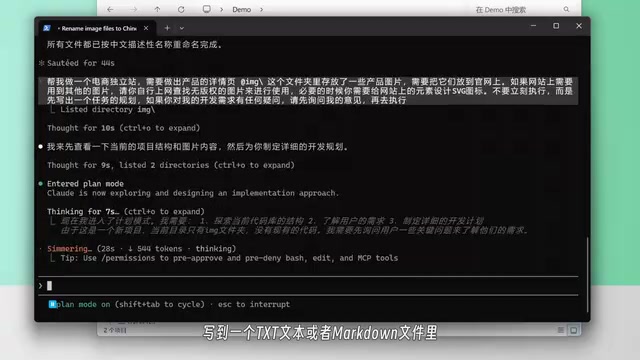
Recommended Approach: Write detailed requirements in a txt or markdown file and have CC read the requirements document before executing. The more detailed the requirements, the closer the output matches expectations. Also add a line like: "Don't execute immediately—first write out a task plan and ask me if you have any questions." This prevents wasting tokens due to vague requirements.
Technology Stack and Page Configuration
CC will guide you through several key decisions:
- Technology stack: If you don't know code, choose HTML directly—the generated files can be opened directly in a browser.
- Page scope: Check the pages you need (homepage, product page, about page, etc.) and add any extra requirements.
- Website style: Select an overall visual style and submit.
Four Permission Modes Explained
Press Shift+Tab to switch between CC's four permission modes:
| Mode | Description | Use Case |
|---|---|---|
| Default | All operations require confirmation | First-time use, sensitive projects |
| Plan | Read-only mode, plans only without execution | Requirements planning phase |
| AcceptEdit | Auto read/write files, only confirms high-risk operations | Daily development |
| Auto | Fully automatic execution, only intercepts high-risk operations | Recommended after gaining experience |
These four permission modes embody the "human-AI collaboration gradient" concept in AI Agent security design. Default mode follows the "principle of least privilege," requiring manual confirmation for every step. Plan mode implements a "read-only sandbox" where AI can only observe and plan without modifying system state. AcceptEdit and Auto modes progressively relax restrictions to improve efficiency. This design draws from operating system permission management—similar to the difference between regular users and root users in Linux. High-risk operations (such as deleting files, executing unknown scripts, or accessing the network) always require confirmation, serving as the last line of defense against AI mistakes or malicious prompt injection attacks.
After switching to Auto mode, CC can essentially complete the entire development task autonomously, only pausing to ask when encountering high-risk operations.
Development Results
After a period of automatic execution, CC generates complete website files in the folder. Double-click index.html to preview in a browser—including a homepage, product listing page, product detail page, about page, and contact page. The overall design looks good, with product images read from the folder and displayed as required.
Note that shopping cart and purchase functionality requires backend server support and cannot be implemented with pure frontend pages. Pure HTML/CSS/JavaScript frontend pages run in the user's browser and can only achieve static display and local interactions (like carousels and form validation). Shopping cart persistence, online payments, and order management require backend server support—the backend handles database operations, business logic, and third-party service integration. For complete e-commerce functionality, you typically need backend frameworks like Node.js/Python and databases like MySQL/MongoDB. Claude Code can also generate backend code, but deployment and operations require additional server resources and technical knowledge.
Additionally, the final result is closely related to the chosen model—different models vary in design aesthetics and code quality.
Practical Tips and Pitfall Avoidance Guide
- Model Selection Strategy: Use DeepSeek Flash or Qwen's free quota for lightweight daily tasks, switch to Qwen or MiMo for image recognition, and consider paid stronger models for complex projects.
- Token-Saving Tips: Use Plan mode first to plan, confirm the approach, then switch to Auto mode for execution. The clearer your requirements document, the less rework needed, and the lower the token consumption.
- API Key Security: Keep your API Key safe and never expose it—otherwise it could be stolen and incur charges. Regularly rotate keys and set usage alerts and spending limits in the provider's dashboard.
Claude Code's core value lies in upgrading AI from "can only chat" to "can actually do the work." Even if you have zero coding knowledge, with clear requirement descriptions and proper model configuration, you can use CC to complete website development, file processing, browser extensions, and many other real-world projects.
Key Takeaways
Related articles
Claude Code's Hidden Advantages Explained: Design Choices Every AI Coding Tool Should Copy
Deep dive into Claude Code's leading design in agentic coding: skill script execution, CLAUDE.md imports, remote control, dynamic workflow orchestration, and why Cursor, Codex and others should adopt these features.

Agent Harness: The Paradigm Leap from Prompt Engineering to Harness Engineering
Deep dive into Agent Harness: tracing the paradigm evolution from Prompt Engineering to Context Engineering to Harness Engineering, and how loop-based architectures solve context loss in AI coding agents.
OpenAI Codex CLI Practical Guide: From Installation and Configuration to Enterprise-Level Development
A deep dive into OpenAI Codex CLI's core capabilities and practical usage, covering setup, agents.md configuration, slash commands, MCP protocol, multi-agent collaboration, and RAG system development.