Claude Code + Firecrawl MCP Tutorial: One-Click Install with No Registration or API Key
Give Claude Code web search power via Firecrawl MCP — no registration or API Key needed.
Firecrawl MCP now offers a zero-friction setup for Claude Code: one command, no registration, no API Key. With 1,000 free monthly searches, developers can give Claude Code real-time web search capabilities to look up docs, troubleshoot errors, and stay current — all without leaving the editor or breaking their flow state.
The Pain Point: Claude Code's Search Weakness
If you've used Claude Code, you've probably run into this problem — when you want to look up documentation or find the latest information while coding, the built-in search often fails to return results due to network issues. You're forced to switch to a browser and search manually, instantly breaking the flow state you worked so hard to get into.
The "flow" mentioned here isn't just a casual metaphor. Flow State is a classic concept proposed by psychologist Mihaly Csikszentmihalyi, describing the highly focused, highly productive mental state a person enters when fully absorbed in an activity. For programmers, entering flow typically requires a 15–20 minute warm-up period, and once interrupted — say, by switching to a browser to search documentation — it can take just as long to get back in the zone. Research shows that frequent context switching is one of the top productivity killers in software development. This is precisely why integrating search capabilities directly into the coding environment has such significant practical value.
There's actually been a solution to this problem for a while: install Firecrawl MCP for Claude Code. But the previous installation process had friction — register an account, log into the dashboard, find the API Key, paste it back into the terminal configuration... That alone was enough to turn many people away.
The good news is that Firecrawl has now completely eliminated that barrier.
What Is Firecrawl MCP?
Firecrawl is a professional web search and scraping tool. Its core capability is simple: give it a URL or keyword, and it fetches the target webpage's content, automatically strips out ads, navigation bars, and other irrelevant elements, and delivers clean Markdown-formatted text.
From a technical standpoint, Firecrawl's work is far more complex than simple HTTP requests. It uses a Headless Browser to fully render target pages, meaning it can handle modern websites that rely heavily on JavaScript for dynamic content loading. After rendering, Firecrawl employs content extraction algorithms based on DOM structure analysis and machine learning to automatically identify the main content area of a page, filtering out noise elements like ads, sidebars, and footer navigation. The final Markdown output is extremely LLM-friendly, since large language models encountered vast amounts of Markdown-formatted documents during pre-training and can more accurately understand and utilize this structured text.
Once connected to Claude Code via the MCP (Model Context Protocol), Claude automatically determines when it needs to call Firecrawl to search the web. The entire process is seamless for the user — you just ask your question, and Claude decides on its own whether it needs to go online for information.
Background on the MCP Protocol: MCP is an open protocol launched by Anthropic in late 2024, designed to provide large language models with a standardized interface for calling external tools. Before MCP, different AI applications that wanted to integrate external tools (such as search engines, databases, file systems, etc.) each had to implement their own proprietary plugin mechanisms, resulting in high development costs and incompatibility. MCP's design philosophy is similar to what the USB protocol did for hardware devices — it defines a unified communication standard that allows any compliant tool server to be called plug-and-play by AI clients. MCP is currently supported by Claude Code, Cursor, Windsurf, and several other AI coding tools, with the ecosystem expanding rapidly.

Zero-Barrier Installation: No Registration, No API Key
The biggest highlight of this update is the radically simplified installation process. The old workflow for connecting Firecrawl MCP looked like this:
- Register an account on the Firecrawl website
- Log into the dashboard to find your API Key
- Copy the Key into the terminal for configuration
- Restart Claude Code
Now the process is reduced to a single step:
- Open your terminal, type one command, hit Enter, wait for installation to finish, and restart Claude Code
No account registration required. No API Key needed. Firecrawl has completely removed the authentication step, delivering a truly out-of-the-box experience.

Firecrawl currently offers 1,000 free searches per month, which is more than enough for everyday documentation lookups and research during development. This means you can give Claude Code web search capabilities at zero cost.
This free tier strategy is a classic application of the Freemium business model in the developer tools space. For individual developers and small teams, 1,000 searches per month can basically cover daily development documentation needs — at roughly 20 searches per workday, it can sustain about two months of use. For enterprise users or heavy users who exceed the free quota, a paid subscription plan is required. This model has been repeatedly validated in the developer tools market — platforms like GitHub, Vercel, and Supabase all employ similar strategies, attracting users with generous free tiers and monetizing through premium features and higher quotas.
Real-World Demo
After installation, the actual user experience is remarkably smooth. When you ask Claude Code a question involving the latest information, it won't get stuck, nor will it "hallucinate" an answer from memory. Instead, it automatically calls Firecrawl to fetch the latest content from the web, organizes it, and presents it directly to you.
It's worth elaborating on the "Hallucination" problem in large language models. Hallucination refers to when a model, lacking real information, generates content that sounds plausible and is delivered with high confidence but is actually incorrect. This problem is especially pronounced when dealing with the latest technical information, because the model's training data has a Knowledge Cutoff — any framework versions, API changes, or new tools released after that cutoff date cannot be accurately answered by the model. Web search capability is essentially a real-time application of Retrieval-Augmented Generation (RAG) — by retrieving the latest real information before generating an answer, it significantly reduces the probability of hallucination and ensures the model's responses are grounded in evidence.
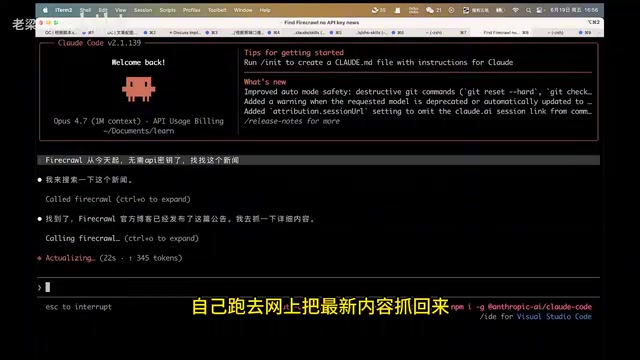
Throughout the entire process, you never need to leave your editor to open a browser, so your coding rhythm stays uninterrupted. For developers who frequently need to consult API documentation, framework changelogs, or technical blogs, the productivity boost is very real.
Use Cases and Recommendations
Best Use Cases
- Looking up the latest technical documentation: API changes after framework version updates that Claude's training data may not yet cover
- Searching for error information: When you hit an error, let Claude search online for solutions directly
- Staying up to date: Querying recently released tools, libraries, or tech news
- Scraping specific web content: Give a URL and let Claude extract and summarize the page information for you
Usage Tips
While 1,000 free searches per month is a decent amount, if you're a heavy user, it's still wise to be mindful of your call frequency. For questions that Claude's own knowledge base can answer well, there's no need to trigger a web search every time. Fortunately, Claude makes this judgment on its own and won't blindly call the tool — a well-thought-out design choice.
This intelligent "on-demand invocation" mechanism actually reflects a core principle in current AI Agent design: tool calls should be autonomously decided by the model based on task requirements, rather than manually triggered by the user. After receiving a user's question, Claude Code first evaluates whether its own knowledge base is sufficient to answer. Only when it determines that the latest information is needed or its own knowledge is uncertain will it proactively call Firecrawl for a web search. This design both conserves API call quotas and avoids unnecessary network latency.
Summary
Firecrawl MCP's registration-free integration solves a long-standing search pain point for Claude Code users. With zero-barrier installation and 1,000 free searches per month, adding web search capability to your AI coding assistant has never been easier. If you're using Claude Code, this MCP is worth spending one minute to install and try out.
Related articles
Claude Code Installation & Setup Guide: Low-Cost Vibe Coding with Chinese AI Models
Step-by-step guide to installing Claude Code and configuring it with Chinese models like DeepSeek for low-cost vibe coding, including Node.js setup and CCSwitcher usage.
Keyroll: An In-Depth Look at a Stability-Focused Claude Refill Tool
In-depth review of Keyroll, a stability-focused Claude refill tool. Analyzing its core strengths, security implications, and compliance considerations for developers facing usage limits.

OpenLLMVTuber: A Deep Dive into the Open-Source AI Virtual Character Framework
Deep dive into OpenLLMVTuber, a 10K-star open-source AI virtual character framework integrating ASR, LLM, TTS, and Live2D with voice interruption, visual perception, and modular architecture.