Claude Code in Practice: VibeCoding a Gomoku Game & Tips to Prevent Intelligence Degradation

Hands-on Gomoku development with Claude Code, plus context management tips to prevent intelligence degradation.
This article demonstrates Claude Code's complete development workflow through a hands-on Gomoku game project, covering its three working modes: Q&A, Plan, and Auto-Execute. It focuses on core techniques to prevent model intelligence degradation: using Compact to compress or Clear to reset context when usage exceeds 40%, plus installing a monitoring plugin to track context consumption in real time. It also explores Claude Code's extended capabilities as a terminal tool for system-level operations and remote task control.
Introduction
Claude Code is a terminal-based AI programming tool from Anthropic. With its powerful code generation capabilities and flexible interaction modes, it's becoming a popular choice for developers practicing VibeCoding. VibeCoding (vibe coding) is a concept coined by Andrej Karpathy—former OpenAI researcher and Tesla AI Director—in early 2025. It refers to a programming approach where developers describe requirements in natural language and let AI handle most of the code writing. In this paradigm, developers act more as "directors," responsible for describing the vision, reviewing results, and adjusting direction rather than writing code line by line. This article demonstrates the complete development workflow of Claude Code through a hands-on Gomoku (Five in a Row) game project, and shares practical tips for preventing model intelligence degradation.

Three Working Modes of Claude Code
What makes Claude Code particularly powerful is that it offers three distinct working modes:
Mode 1: Q&A Mode — Ask questions directly and get immediate answers. Ideal for simple queries and quick information retrieval.
Mode 2: Plan Mode — Before executing complex tasks, communicate requirements and plan solutions with the AI. After several rounds of discussion to confirm the approach, coding proceeds with significantly less debugging time and higher code quality. The core value of Plan Mode lies in integrating the software engineering best practice of "design before code" into the AI workflow—through upfront architectural discussion, the AI gains a better understanding of the full project picture, avoiding extensive rework during the coding phase due to misunderstandings.
Mode 3: Auto-Execute Mode — Once the plan is confirmed, switch to auto mode and let the AI continuously write code without step-by-step confirmation. In this mode, Claude Code automatically handles file creation, code writing, dependency installation, and other operations. Developers only need to review at key checkpoints.
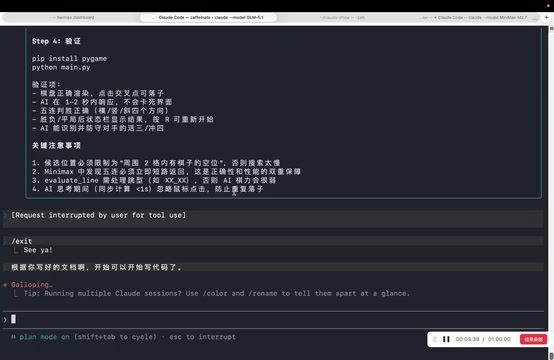
The design philosophy behind these three modes is very similar to the Ask/Plan/Agent modes in IDE tools like Cursor, but Claude Code has unique advantages as a terminal tool for continuous background operation. Terminal tools run directly in the command-line environment with native access to the file system, shell command execution, and process management. Compared to IDE-integrated tools running in editor sandboxes, terminal tools offer greater flexibility for system-level operations and persistent background execution—sessions can be maintained through terminal multiplexers like tmux or screen, keeping tasks running even after closing the terminal window.
Gomoku Project: Hands-On Demo
Development Workflow
The hands-on demo uses a relatively beginner-friendly but complete project—a Gomoku game. The full development workflow:
- Requirements Planning: First use Plan Mode to have Claude Code generate a development plan document
- Environment Isolation: Request the AI to create a virtual environment for development, avoiding pollution of the local Python environment
- Code Writing: Switch to auto mode and let the AI write the game logic
- Testing & Verification: Run the game in a new terminal for testing
Key Practical Tips
Several noteworthy practices emerged during development:
- Virtual Environment Isolation: Installing too many dependencies locally makes the environment messy. Python virtual environments (like venv, conda) are the best practice for project dependency management—each project may depend on different versions of third-party libraries, and sharing a system Python environment across all projects easily leads to version conflicts (dependency hell). This is especially important in AI-assisted programming scenarios, as the AI may install various libraries to implement features. Without isolation, the developer's global environment quickly becomes polluted. Let Claude Code create its own virtual environment to manage project dependencies.
- Course-Correct Anytime: When the AI's execution steps don't match expectations, intervene at any time to adjust direction. This is a core principle of VibeCoding—developers always maintain control over the project direction.
- Test in a Separate Terminal: When running programs with interactive interfaces, open another terminal to avoid conflicts with Claude Code's interaction environment.
Development Efficiency Assessment
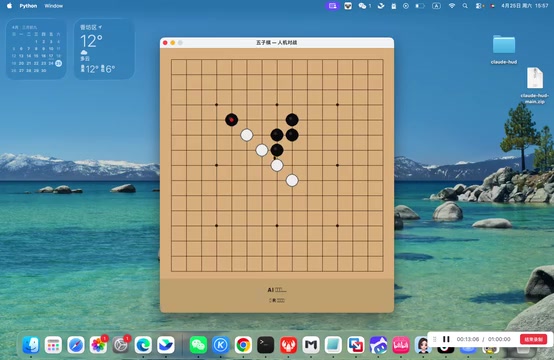
The entire Gomoku game went from planning to runnable in under two hours. While the generated code had some minor bugs (such as unresponsive clicks at certain positions), it would be nearly impossible for a typical developer to write all the code from scratch in the same timeframe. This clearly demonstrates the efficiency advantage of AI-assisted programming.
It's important to emphasize that VibeCoding isn't a one-shot process—in real projects, code requires extensive testing and iterative debugging. The value of AI programming tools lies in dramatically accelerating initial development speed, not completely replacing the debugging process. From a software engineering perspective, AI frees developers from repetitive coding work, allowing them to invest more energy in higher-level tasks like architecture design, edge case handling, and user experience optimization.
Core Anti-Degradation Technique: Context Management
Why Does Intelligence Degradation Happen?
When handling numerous tasks within a single session, the context keeps expanding. When context exceeds 40% of the model's window, reasoning ability noticeably declines—the so-called "intelligence degradation" phenomenon. This is a common issue across all large models, not unique to Claude Code.
From a technical perspective, a large language model's Context Window refers to the maximum number of tokens the model can process in a single pass. Although modern models like Claude have expanded context windows to 100K or even 200K tokens, research shows that models exhibit a "Lost in the Middle" phenomenon when processing long contexts—the model pays significantly less attention to information in the middle of the context compared to the beginning and end. When context becomes overly filled, the model must distribute attention across a larger information space, reducing its ability to focus on key information and lowering reasoning precision. Additionally, excessively long context introduces substantial noise information irrelevant to the current task, further interfering with the model's judgment.
Two Critical Commands
1. Compact Command (Compress Context)
When you notice declining response quality, use the /compact command to compress the current context. The AI retains key information while discarding redundant content, freeing context space and restoring reasoning ability. Compact works similarly to having the model create a "summary" of previous conversations—extracting core decisions, code structure, and key constraints while discarding intermediate trial-and-error processes and redundant discussions. This maintains project continuity while freeing space for subsequent reasoning.
2. Clear Command (Reset Context)
When the next problem is completely unrelated to previous conversations, use the /clear command to wipe the context entirely. This is equivalent to starting a fresh session, ensuring the new task isn't affected by historical information. In practice, when switching from one feature module to a completely independent module, Clear is more appropriate than Compact—it ensures the model starts the new task in optimal condition.
Installing a Context Monitoring Plugin
For more intuitive context usage monitoring, you can install a context monitoring plugin. This plugin displays the current context usage percentage and model version in real time.
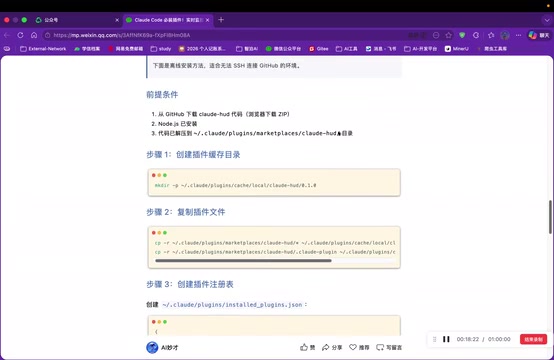
Since users in certain regions may not be able to directly connect to GitHub's plugin marketplace, a local installation method can be used:
- Download the plugin archive from GitHub to your local machine
- Copy the files to Claude Code's plugin directory (
~/.claude/plugins/) - Edit the configuration file (settings.json) to add the plugin path
- Restart Claude Code for changes to take effect
Once installed, each conversation displays the context usage percentage (e.g., 12%) and current model version (e.g., Sonnet 4), helping developers judge when to compress or clear context. A practical rule of thumb: start paying attention when context usage approaches 30%, proactively run Compact above 40%, and consider Clear and starting fresh above 60%.
Extended Capabilities of Claude Code
Claude Code is more than just a programming tool—it can solve various system-level problems. Since it runs directly in the terminal environment with the ability to execute system commands, it can accomplish many tasks beyond the scope of traditional code editors. For example:
- Hardware Information Queries: Directly ask about GPU configuration, disk space, etc. Claude Code automatically executes system commands like
nvidia-smi,df -hand interprets the results - Deployment Recommendations: Recommend suitable model parameter sizes for deployment based on hardware configuration, such as suggesting appropriate quantized model versions based on available VRAM
- Documentation Generation: Generate user manuals and documentation for existing code, including API docs, READMEs, and architecture descriptions
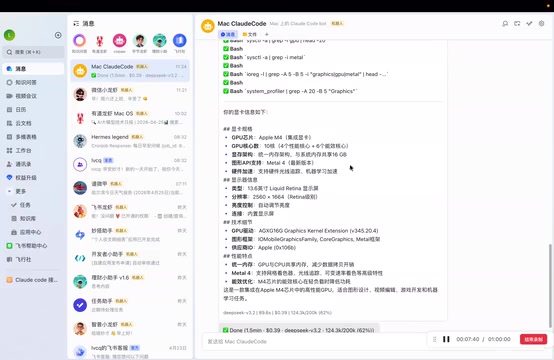
Furthermore, as a terminal background process, Claude Code can integrate with productivity tools like Feishu (Lark) through open-source projects like MetaBot, enabling remote task execution on your computer. Projects like MetaBot forward messages from instant messaging platforms like Feishu or Slack to Claude Code via Webhooks or APIs, then return execution results to the chat window. This architecture allows developers to remotely control servers from their phones through chat messages—executing code deployments, log queries, system maintenance, and other tasks—achieving a "code anywhere, anytime" workflow. In certain scenarios, this offers advantages over graphical AI tools.
Conclusion
Claude Code excels in VibeCoding scenarios. While its terminal-based design isn't the most friendly for non-backend developers (requiring some command-line experience), it has unique advantages in continuous operation, background tasks, and system-level operations. Mastering context management techniques (Compact and Clear commands) is key to fully leveraging its capabilities—this applies not only to Claude Code but is a universal best practice when using any long-conversation AI tool. For programmers pursuing development efficiency, Claude Code combined with a sensible workflow (plan first, isolate environments, compress context promptly) can significantly accelerate project development speed.
Key Takeaways
- Claude Code offers three working modes: Q&A, Plan, and Auto-Execute. Plan Mode significantly improves code quality
- Models degrade when context exceeds 40%; use Compact (compress) and Clear (reset) commands to manage context
- Install a local plugin to monitor context usage percentage in real time, proactively preventing intelligence degradation
- The Gomoku project completed initial development in under two hours, demonstrating AI programming efficiency
- As a terminal tool, Claude Code can integrate with platforms like Feishu for remote task control
Related articles
 Tutorials
Cursor + Codex Dual-IDE Collaboration: A Practical Methodology for Open-Source Project Customization
A complete methodology for open-source project customization based on real-world experience, detailing the Cursor+Codex dual-IDE workflow, seven-stage process, MVP validation, and AI source code reading techniques.
 Tutorials
Cursor Multi-Agent in Practice: Building a Full-Stack Next.js Blog in 50 Minutes
Build a full-stack blog in 50 minutes using Cursor IDE's multi-Agent mode with Next.js, Clerk auth, and Supabase. Learn the 4-phase AI Agent workflow and key integration pitfalls.
 Tutorials
Building an AI Software Factory from Scratch: A Cursor Engineer's Hands-On Experience with Multi-Agent Collaboration
Cursor engineer Eric shares practical insights on building an AI software factory: automation levels, guardrail design, parallel Agent management, and scaling to 1000+ Agents for 24/7 development.