Claude Code Practical Guide: From Installation & Configuration to Production-Ready Business Projects
A practical guide to building production-grade projects with Claude Code + Opus in hours, not days.
This guide covers the full workflow of using Claude Code + Opus for AI-powered development, from environment setup with CCSwitch for unified model management to a real-world case study where a complex payment system was built in 4 hours with zero hand-written code at just $60 cost. It includes installation steps, Prompt engineering best practices, model selection advice, and practical tips for developers entering the AI Coding era.
Introduction: AI Coding Has Entered the Production Era
AI-assisted programming tools are emerging left and right, but only a handful of solutions can truly deliver stable results in production-grade business projects. Based on a seasoned developer's real-world project experience, this article walks through how to use the Claude Code + Opus combination to complete a complex payment system's secondary development in just 4 hours — with zero hand-written code and only $60 in costs.
This article covers the entire workflow from environment setup and model configuration to production-grade implementation, helping developers avoid common pitfalls.
Three Mainstream AI Coding Approaches & How to Choose
There are currently three main approaches to AI Coding:
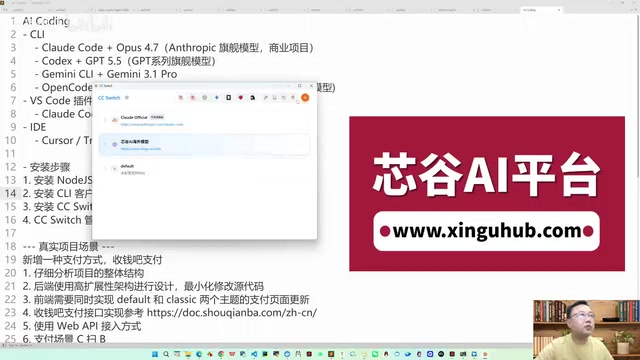
- CLI (Command Line) Mode: Pure terminal interaction, ideal for lightweight tasks and scripting
- VS Code + Plugin Mode: Integrates AI capabilities within the editor, balancing code browsing and AI conversation
- Dedicated IDE Mode: All-in-one tools like Cursor, ByteDance's Trae, Windsurf, etc.
CLI (Command Line Interface) mode means developers interact with AI directly in the terminal via text, where the AI reads, modifies files, and executes commands based on instructions. The advantage of this mode is fast startup, low resource usage, and natural compatibility with DevOps toolchains like Git and Docker. Dedicated IDE mode, on the other hand, deeply embeds AI capabilities into the editor's code completion, refactoring, debugging, and other workflows, providing richer visual feedback. VS Code + Plugin mode sits between the two — it retains the IDE's code browsing and project management capabilities while flexibly connecting to different AI backends through the plugin mechanism, avoiding the risk of vendor lock-in with any single tool ecosystem.
After hands-on comparison, VS Code + Claude Code plugin is currently the most recommended approach. Here's why: Cursor's Pro plan ($20/month) has low quotas and subpar latency; domestic tools like Trae underperform in complex project scenarios; and the VS Code + plugin approach offers the highest flexibility — paired with the right model configuration, it far outperforms other options.
CCSwitch: The Core Tool for Unified Model Management
The key to the entire configuration process is a tool called CCSwitch (also known as SysSwitch). Its core value is: unified management of model configurations across all CLI tools, while bypassing account login verification.
Installation Steps (Four Steps)
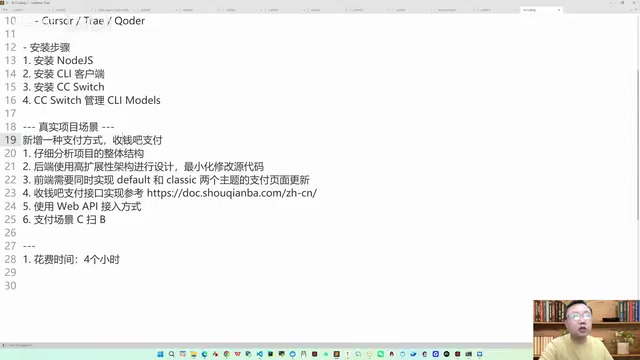
Step 1: Install Node.js
Node.js is the foundational dependency for all CLI tools. As a JavaScript runtime built on Chrome's V8 engine, Node.js provides the underlying support for the npm (Node Package Manager) ecosystem, and tools like Claude Code and Codex CLI are all distributed as npm packages. After installation, verify with:
node --version
npm --version
Step 2: Install CLI Clients
Install the corresponding CLI tools as needed:
# Claude Code
npm install -g @anthropic-ai/claude-code

# OpenAI Codex CLI
npm install -g @openai/codex-cli

# Google Gemini CLI
npm install -g @google/gemini-cli

# Open Code
npm install -g opencode-ai
Mac users can also install Open Code using brew install.
Step 3: Install CCSwitch
Go to CCSwitch's GitHub Release page, download the latest version (e.g., v301.5.0), and select the appropriate installer for your operating system. Windows users should use the MSI installer.
Step 4: Configure Models in CCSwitch
CCSwitch supports managing the following tools: Claude Code CLI, Claude Code Desktop, Codex, Gemini CLI, Open Code, as well as agent tools like Cline and Agentic.
Model Configuration Details
In CCSwitch, click "Add Unified Provider" and configure the API gateway information:
- Name: Any custom name
- API Address: The API address of your aggregation platform
- API Key: The key obtained from the aggregation platform
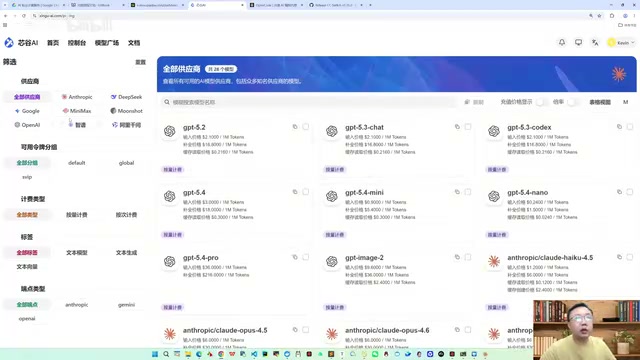
An API Gateway is a middleware layer between the client and backend services, responsible for request routing, protocol translation, rate limiting, and authentication. In the context of AI model invocation, aggregation platforms serve as API gateways — they provide a unified wrapper around the API interfaces of multiple model providers such as Anthropic, OpenAI, and Google. Developers only need to configure a single API address and key to switch between different providers' models on demand. This architecture not only simplifies multi-model management but also leverages the aggregation platform's caching and load balancing mechanisms to reduce latency and cost, while circumventing network restrictions that may exist when directly accessing overseas APIs from certain regions.
A single provider can serve multiple clients simultaneously, including Claude Code, Codex, Gemini CLI, and more.
For Claude Code, the recommended configuration includes four models:
- Opus 4.7 (primary model)
- Sonnet 4.6
- Haiku 4.5
- Opus 4.7 (fallback model)
Critical Setting: Bypassing Login Verification
This is the most easily overlooked yet most important step. In CCSwitch's settings, you must enable the "Skip Claude Code initial installation region" option and apply it to the Claude Code plugin. This allows you to use the service directly through the API gateway without registering an Anthropic account.
Real-World Case Study: Payment System Secondary Development in 4 Hours
Project Background
The task was to perform secondary development on an existing aggregated API platform (based on 6API), adding Shouqianba payment functionality. The project's backend uses Go, and the frontend includes two UI themes — Default and Classic — with a massive codebase and complex architecture.
Go (Golang) is a compiled language developed by Google, known for its high concurrency, low latency, and clean syntax. In payment system scenarios, Go's goroutine concurrency model efficiently handles large volumes of concurrent payment requests, and its built-in net/http standard library and strong type system reduce the risk of type errors in API development. Additionally, Go compiles to a single binary, making deployment extremely simple — ideal for financial-grade applications requiring high availability and rapid iteration. The platform chose Go as its backend language precisely for these performance advantages in high-frequency trading and multi-channel payment routing scenarios.
Shouqianba is a leading aggregated payment service provider in China. Its core capability is unifying access to multiple payment channels — WeChat Pay, Alipay, UnionPay QuickPass, etc. — so merchants only need to integrate with a single API to support multiple payment methods. The "C-scan (aggregated QR code)" mentioned in this article refers to the scenario where consumers actively scan a QR code displayed by the merchant to complete payment, as opposed to "B-scan" where the merchant scans the consumer's payment code. The Web API integration approach means communicating with Shouqianba's servers via HTTP RESTful interfaces, which is lighter and language-agnostic compared to SDK integration, making it suitable for non-Java tech stacks like Go.
Prompt Engineering: The Make-or-Break Factor
In AI Coding, you can't simply write "add a new payment method" and call it done. A high-quality Prompt should include clear engineering guidance:
- Step 1: Have the AI carefully read the project's overall structure
- Step 2: Design the backend using a highly extensible architecture, minimizing modifications to original code
- Step 3: Implement payment pages for both Default and Classic frontend themes
- Step 4: Integrate Shouqianba's payment API, referencing the official integration documentation
- Specific parameters: Specify Web API integration, with the payment scenario being C-scan (aggregated QR code)
Writing Prompts like this requires developers to have architectural design thinking and engineering capabilities — this is the core requirement for developers in the AI Coding era. It's worth noting that Prompt Engineering has evolved from simple "questioning techniques" into a systematic engineering discipline. It requires developers not only to understand business requirements but also to decompose them into AI-executable subtasks with clear acceptance criteria. In complex projects, a good Prompt often needs to include contextual constraints (e.g., tech stack, coding standards), task decomposition (e.g., read-first-then-write execution order), and quality requirements (e.g., minimal modifications, multi-UI compatibility) — which shares striking similarities with traditional requirements documentation.
Execution Process and Final Results
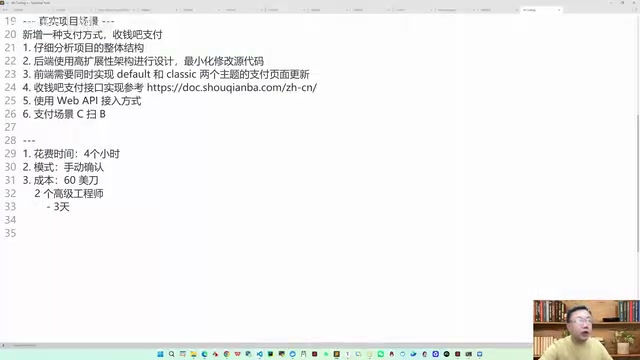
- Time: 4 hours
- Cost: ~$60 (~430 RMB)
- Mode: Manual confirmation mode (not fully automated)
- Hand-written code: 0 lines
"Manual confirmation mode" means the developer needs to click confirm when the AI executes critical modifications. Although manual confirmation was selected, in practice it was just clicking "Yes" throughout — without reviewing code line by line — because the AI's output quality was already reliable enough. This human-AI collaboration pattern is known in the industry as "Human-in-the-Loop," which maximizes automation efficiency while maintaining safety. For high-risk operations involving database migrations, payment API integration, and similar tasks, manual confirmation mode provides a necessary safety barrier, preventing irreversible damage when the AI misunderstands something.
Final deliverables:
- Flexible payment gateway configuration supporting merchant SN, keys, activation codes, and other parameters
- Automatic generation of terminal SA and terminal keys
- Both Default and Classic frontend UIs perfectly adapted
- Order history and order reconciliation features fully implemented
- Ran successfully on the first try, no iterative debugging needed
Model Selection: Why Opus Is the Best Partner
After multiple rounds of real-world testing, Claude Code paired with the Opus model delivers the best results. The reason is that Anthropic specifically applied reinforcement learning to optimize the Claude Code + Opus combination. Switching to DeepSeek, GLM, or other models with Claude Code significantly degrades performance.
Reinforcement Learning (RL) is a machine learning method that guides model behavior optimization through reward signals. The reinforcement learning Anthropic applied to the Claude Code + Opus combination essentially uses code correctness, architectural soundness, and modification minimization as reward functions across a large volume of real programming tasks, teaching the Opus model to better understand project context, generate code that meets engineering standards, and plan multi-step code modification strategies. This specialized training for a specific toolchain (an extension of RLHF — Reinforcement Learning from Human Feedback) makes the model's performance in that tool far superior to general-purpose scenarios, which also explains why the same model can perform vastly differently across different tools.
Recommended Combinations for Different Scenarios
| Scenario | Recommended Combination | Notes |
|---|---|---|
| Complex commercial projects | Claude Code + Opus | Top choice, specifically optimized via reinforcement learning |
| Commercial projects (alternative) | Codex + GPT advanced models | Also capable of handling complex scenarios |
| General/small projects | Open Code + GLM | Best value with domestic models |
| Lightweight testing | Open Code + Kimi | Ideal for quick idea validation |
Cost Comparison: AI Coding vs. Traditional Development
Using this payment system secondary development project as an example, let's do a straightforward cost comparison:
- Traditional approach: Requires 1 senior Go engineer + 1 senior frontend engineer, minimum 3-day timeline. At ~$70/person/day (actual costs including benefits are much higher), two people for three days comes to ~$420
- AI Coding approach: 4 hours, $60, completed by one person
Efficiency improvement of over 10x, cost reduction of approximately 85%. And this is using the most premium model available.
It should be noted that this cost calculation primarily covers the development execution phase. In real projects, requirements analysis, architecture design, testing & validation, and operations & deployment still require human effort. However, AI Coding dramatically compresses the most time-consuming phase — "from design to working code" — allowing developers to invest more energy in high-value work like business understanding and system design. As model capabilities continue to improve and API prices gradually decrease, this cost advantage will only grow further.
Six Practical Tips for Developers
-
Don't be stingy with Token consumption: Just as coding volume used to be a measure of programmer capability, many companies now ask AI Coding candidates "how many Tokens have you consumed in AI Coding?" Without actual consumption, just watching tutorials is useless. Tokens are the basic units that large language models use to process text — one English word typically corresponds to 1-2 Tokens, and one Chinese character typically corresponds to 1-3 Tokens. In AI Coding scenarios, Token consumption directly reflects the depth and breadth of a developer's interaction with AI — including input Prompts, code context the AI reads, and generated code output, all of which count toward Token usage.
-
Practice with top-tier models: The lower the model quality, the more likely you are to develop bad interaction habits. Start with the best models to cultivate proper engineering thinking.
-
Level up your Prompt Engineering skills: The core competitive advantage in AI Coding isn't whether you can write code, but whether you can craft high-quality requirement descriptions with engineering thinking.
-
Leverage Claude Code's generated project files: Claude Code automatically generates files like
AGENTS.mdandCLAUDE.mdin your project. These files record project context information and are crucial for subsequent development. The design philosophy behind AGENTS.md and CLAUDE.md stems from "Context Engineering" — providing project background to AI in a structured way so it doesn't need to re-understand the full project picture in subsequent conversations. This is similar to README.md and CONTRIBUTING.md in traditional software engineering, but specifically optimized for AI Agents. In multi-person collaboration or long-term projects, these files can significantly reduce Token consumption and improve the consistency of AI output — an indispensable engineering practice in AI-native development workflows. -
Don't hesitate to expense it to your company: The ROI of AI Coding is extremely high, making it absolutely worth requesting company reimbursement.
-
Start with real projects: Don't just practice with demos. Find a project with actual business value to truly understand how AI Coding performs in production environments.
Conclusion
AI Coding has moved beyond the "toy" stage into genuine production-ready deployment. With the CCSwitch + Claude Code + Opus combination, developers can achieve highly efficient secondary development in complex commercial projects, dramatically reducing labor costs and development timelines. The key isn't the tools themselves, but whether developers possess the engineering mindset to translate business requirements into high-quality AI instructions.
From a broader perspective, AI Coding is redefining the role of software engineers — transforming them from "code writers" into "AI programming commanders." Future developers will need three core competencies: business understanding, architecture design ability, and AI collaboration skills. And right now is the best window to build these capabilities.
Related articles
Vibe Coding in Practice: The Right Way to Communicate with AI — Just Ask When You Don't Understand
Learn effective AI communication techniques for Vibe Coding: how to ask when you don't understand, discover plan gaps through follow-ups, and align on terminology with AI.
AI Engineering in Practice: The Right Way to Build Enterprise Projects with Claude Code
Learn how to use Claude Code with Specification-Driven Development (SDD) to build enterprise projects, solving common AI coding pitfalls like infinite bug loops, code quality issues, and hallucination risks.
Andrew Ng and Anthropic's Definitive Claude Code Tutorial: A Deep Dive
Andrew Ng and Anthropic launch a Claude Code course covering context management, parallel sessions, MCP server integration, and hands-on projects in RAG, data analysis, and Figma-to-code conversion.