Claude Code Skills and MCP Resources: A Complete Guide from Beginner to Expert
Complete guide to Claude Code Skill instructions and MCP tool resources for maximum AI coding productivity.
This article systematically covers the best Skill and MCP resources for Claude Code, including international platforms (Skills.mp, Skills.sh, Smithery, Glama Registry) and Chinese alternatives (SkillHub, PromptPort, ModelScope). It explains how Skills serve as the AI's logical brain while MCP tools connect it to external services, and provides a quick selection guide for different developer needs.
Claude Code is evolving from a simple AI programming assistant into a truly versatile technical partner. The two core engines driving this evolution are Skills (structured instruction files) and MCP (Model Context Protocol). The former gives it a logical brain, while the latter equips it with hands to interact with the external world.
This article systematically covers high-quality Skill and MCP resources from around the world, helping you quickly find the configuration that best suits your needs.
Skills: Giving Claude Code a Logical Brain
Skills are essentially structured prompt instruction files that have been deeply optimized for specific development scenarios. With the right Skills installed, Claude Code can more precisely understand your intent and output code that better conforms to project standards.
From a technical implementation perspective, the underlying mechanism of Skill instructions stems from the System Prompt and Few-shot Learning paradigms of large language models. When we place a set of structured Markdown instruction files in a project's .claude/ directory or global configuration, Claude Code injects these instructions as system-level context at the start of each conversation. This is conceptually similar to traditional .editorconfig or .eslintrc configuration files—except the former constrains editor behavior, while Skills constrain the AI's reasoning and output behavior. A well-crafted Skill file typically includes modules for role definition, output format constraints, code style specifications, and error handling strategies, essentially making senior engineers' tacit knowledge explicit and structured.
The Four Major International Skill Resource Libraries
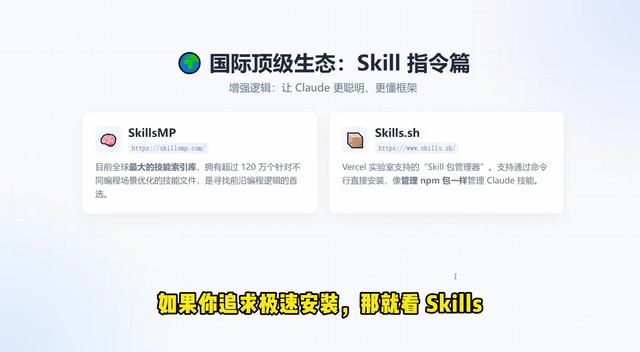
1. Skills.mp — The World's Largest Skill Repository
This platform is the encyclopedia of the Skill domain, hosting over 1.2 million skill files optimized for different scenarios. Whether you're using React, Vue, Python, or Rust, you can find corresponding framework logic templates. The sheer volume of resources covers virtually all mainstream development scenarios.
The scale of 1.2 million Skill files reflects the "configuration as capability" paradigm shift happening in AI-assisted programming. In traditional software development, a developer's capability boundary is determined by personal experience and knowledge reserves; in the AI programming era, it's largely determined by the quality of AI tool configuration. Skills.mp's massive resources cover everything from frontend frameworks (React, Vue, Svelte, Angular) to backend languages (Python, Go, Rust, Java), from infrastructure (Docker, Kubernetes, Terraform) to specialized domains (machine learning, blockchain, embedded development).
2. Skills.sh — One-Command Skill Installation
This tool from Versil Labs focuses on maximum efficiency. It makes the Skill installation experience as smooth as managing NPM packages—just run an install command in your terminal. For developers who value efficiency and don't want to browse through web pages, this is the go-to solution.
3. AgentSkills.io — Cross-Tool Universal Skill Format
If you simultaneously use multiple AI programming tools like Claude Code and Cursor, AgentSkills.io deserves your attention. It uses a lightweight open-source format that makes Skills universal across different tools, eliminating the hassle of redundant configuration.
The cross-tool universal format addresses the core pain point of ecosystem fragmentation in current AI programming tools. Major AI programming tools on the market include Claude Code, Cursor, GitHub Copilot, Windsurf, Aider, and others, each with different format requirements and file paths for instruction files. For example, Claude Code uses the .claude/ directory and CLAUDE.md files, while Cursor uses the .cursor/rules/ directory. AgentSkills.io defines a lightweight intermediate format with conversion tools, enabling seamless migration of the same Skill configuration across different tools—particularly valuable for teams whose members use different AI tools.
4. Awesome Claude Skills — Productivity Automation Collection
A curated list maintained by Composio, focused on productivity and automation scenarios. If you want Claude Code to do more than just write code—helping with workflow automation—this collection is an excellent starting point.
MCP Tools: Connecting Claude Code to the External World
A smart brain alone isn't enough—Claude Code also needs the ability to interact with the external world: searching the web, reading and writing databases, calling third-party APIs. This is exactly what MCP (Model Context Protocol) tools solve.
MCP is an open standard protocol officially launched by Anthropic in late 2024, inspired by LSP (Language Server Protocol). LSP uses a standardized protocol to let any editor connect to any language server, while MCP uses a standardized protocol to let any AI model connect to any external tool or data source. MCP uses a client-server architecture: Claude Code acts as the MCP client making requests, while various MCP Servers serve as middleware responsible for interacting with specific external services (databases, APIs, file systems, etc.). Communication is based on the JSON-RPC 2.0 protocol, supporting both stdio and HTTP+SSE transport methods. This decoupled design means developers only need to write an MCP Server once for it to be callable by all AI tools that support the MCP protocol.
Three Major MCP Resource Platforms
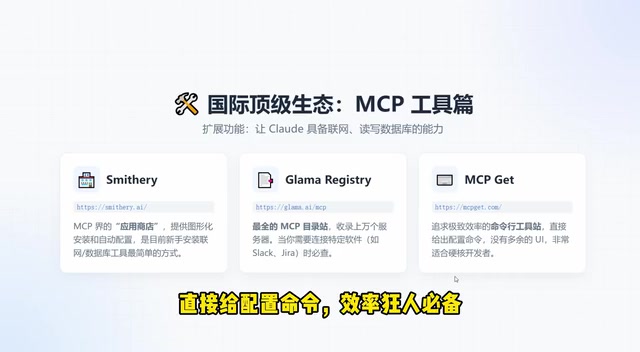
1. Smithery — The App Store for MCP
If you're new to MCP, Smithery is the most beginner-friendly platform. It provides a graphical installation interface where you can complete configuration with just a few clicks—truly the Apple App Store of the MCP world. It lowers the technical barrier, making it easy for non-geek users to get started.
Smithy earns such high praise because it wraps the MCP Server installation process—which originally required manually editing JSON configuration files—into a visual one-click installation experience. Before Smithery, configuring an MCP Server typically required: manually cloning repositories, installing dependencies, editing claude_desktop_config.json or the project's .mcp.json file, and configuring environment variables and API keys. Smithery automates these steps and provides ratings, reviews, and category browsing features, helping users quickly find the highest-quality tools that best suit their needs among thousands of available MCP Servers.
2. Glama Registry — Massive API Integration Hub
Need to connect Claude Code to specific services like Slack, Jira, or Notion? Glama Registry is your lookup center. The platform aggregates tens of thousands of server nodes, covering API integration solutions for virtually all mainstream SaaS products.
3. MCPGet — The Power User's Choice
No unnecessary UI—just configuration commands. For developers comfortable with the command line, MCPGet is the most efficient choice: copy, paste, run—done in three steps.
Chinese Resources: Solving Network Access and Localization Pain Points
For developers in China, the two biggest headaches when using international resources are: slow network access and poor Chinese language adaptation. The following domestic resources specifically address these pain points.
The network issues Chinese developers face when using international AI programming resources go beyond just slow access speeds. MCP Servers often need to communicate with overseas API endpoints in real-time, such as calling Google Search API, GitHub API, or webhooks for various SaaS services. Network latency and instability directly affect MCP tool response speed and reliability, potentially causing timeout errors in production environments. Additionally, some npm or Python packages that international MCP Servers depend on download extremely slowly in China, requiring mirror source configuration. Domestic platforms systematically solve these problems through CDN acceleration, mirror hosting, and localized API proxies.
Network Acceleration and Chinese Adaptation Solutions
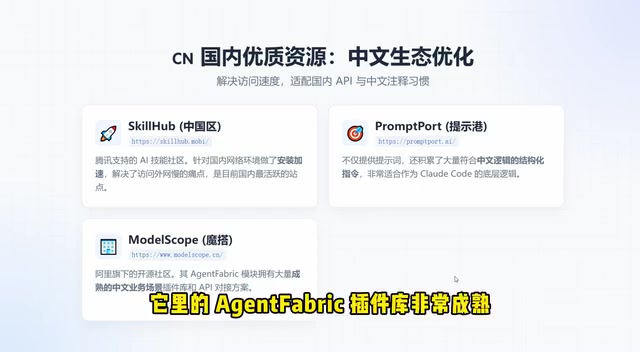
1. SkillHub (Tencent-backed) — Top Choice for Domestic Network Acceleration
Backed by Tencent, SkillHub is specifically optimized for the Chinese network environment, offering far better stability than directly accessing international resources. If you find GitHub access too slow in China, this is the most straightforward alternative.
2. PromptPort — Chinese Structured Instruction Templates
For scenarios requiring authentic Chinese logic, PromptPort provides high-quality structured instruction templates. Whether for Chinese documentation generation or Chinese code comments, its instruction design is exemplary.
3. Alibaba ModelScope — Enterprise-Grade Agent Plugin Library
Alibaba's ModelScope community features a mature Agent Fabric plugin library with enterprise-verified Agent solutions. For enterprise-level application scenarios, this is a trustworthy choice.
4. Claude Code Skills ZH — A Resource Library for Chinese Developers
This GitHub repository is a highly recommended treasure trove. It specifically provides Skill configurations for Chinese comment standards and Chinese Code Review, truly understanding the pain points Chinese programmers face in daily development—such as standards for mixed Chinese-English comments and code review processes that align with domestic team practices.
Quick Selection Guide: Match the Best Solution to Your Needs
With so many resources available, how do you make a quick choice? Here are recommended solutions for three typical scenarios:
| Scenario | Recommended Solution | Reason |
|---|---|---|
| Want more efficient code writing | Skills.sh | One-command installation, ready to use immediately |
| Want AI to search the web and read docs | Smithery | Graphical interface, rich selection of search plugins |
| Domestic network priority | SkillHub | Tencent-accelerated, stable and reliable |
Conclusion: From Bare to Fully Loaded, the Productivity Gap Is Orders of Magnitude
Claude Code's capability boundary is largely determined by what Skills and MCP tools you configure for it. The productivity gap between an unconfigured Claude Code and a carefully tuned one can be orders of magnitude.
Skills and MCP don't exist in isolation—their true power lies in synergistic collaboration. A typical efficient workflow works like this: Skill instructions define Claude Code's behavioral guidelines and output standards (e.g., "all database operations must use parameterized queries, string-concatenated SQL is prohibited"), while MCP tools provide the actual capability to execute these operations (e.g., directly reading and writing databases through a PostgreSQL MCP Server). Skills are "knowing what to do," and MCP is "having the ability to do it." When the two work together properly, Claude Code evolves from a chatbot that can only output text in a dialog box into an autonomous coding agent that understands project specifications, follows team conventions, and directly operates real systems.
The recommended onboarding path is: start by installing a few Skills from Skills.sh or SkillHub that match your daily development framework, then configure one or two commonly used MCP tools through Smithery (such as web search or document reading). Take it step by step, gradually transforming Claude Code into a truly capable technical partner.
Related articles

AI Code Output Up 10x — How Do You Keep Code Review from Collapsing?
When AI code generation outpaces human review, Code Review becomes the biggest bottleneck. Learn guardrail systems, architecture constraint tests, and TDD-driven Agent development strategies.
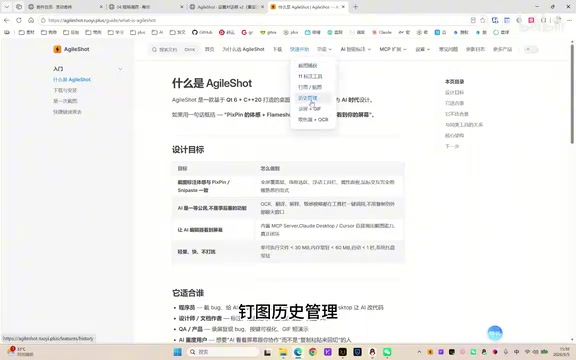
A Giant Shot: An AI Screenshot Tool with Built-in MCP That Lets AI Directly Control Your Computer
A Giant Shot is a desktop screenshot tool with a built-in MCP Server, offering 11 annotation tools, smart OCR, AI chat, and desktop automation for Cursor and Claude Desktop.
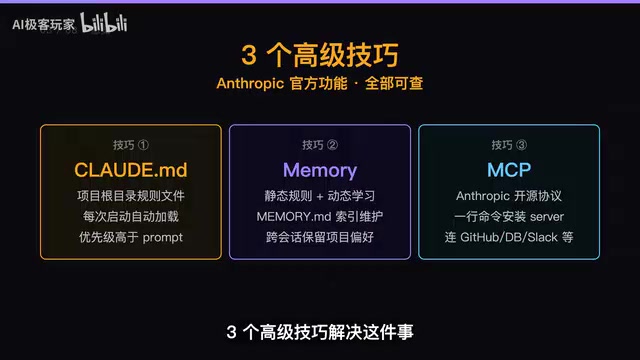
Three Essential Claude Code Configuration Techniques: A Practical Guide to CLAUDE.md, Memory & MCP
Master three Claude Code configuration techniques: use CLAUDE.md for project rules, Memory for auto-learning preferences, and MCP for connecting GitHub and external tools.