Context Engineering in Practice with CodeBuddy IDE: Two Rule Files to Generate Apps with a Single Sentence
Context Engineering in Practice with C…
Context Engineering with structured rule files evolves AI programming from random generation to controlled, reliable development.
This article explores the evolution of AI programming from "Vibe Coding" to Context Engineering. The core argument is that AI code quality depends entirely on input context quality. The author introduces a practical approach using two custom rule files in CodeBuddy IDE — a Requirements-to-TODO-LIST Engine and a Project Execution Engine — that structure plans for AI to automatically complete development tasks step by step, achieving improved controllability, precision, and flexibility.
From Vibe Coding to Context Engineering: The Evolution of AI Programming
The AI editor landscape is flourishing today, with products like Cursor, Windsurf, Augment, and Trae each offering unique strengths. Tencent's newly released CodeBuddy IDE has also entered the competition. The AI programming IDE market is fiercely competitive: Cursor, deeply customized from VSCode, is renowned for its powerful code completion and multi-file editing capabilities; Windsurf (formerly Codeium) features Cascade-level chain reasoning that automatically understands project context; Augment focuses on comprehension of large codebases; and Trae is a free AI IDE from ByteDance. All these tools rely on large language models under the hood, but they differ in their approaches to context management, Agent capabilities, and workflow design. Regardless of which tool you use, what truly determines the quality of AI programming isn't the tool itself — it's how you communicate with the AI.
After a period of rapid development in AI programming, the industry has evolved from simple "Vibe Coding" (writing code by feel) toward Context Engineering. The concept of Vibe Coding was coined by OpenAI co-founder Andrej Karpathy in early 2025, referring to developers relying entirely on intuition and AI's immediate responses to write code — no detailed planning, just regenerating when problems arise. This approach is highly efficient for rapid prototyping, but in complex projects it leads to messy code structure, logical inconsistencies, and maintenance nightmares. As AI programming tools have matured, the industry has recognized the need for a more systematic approach to harness AI's code generation capabilities.
Context Engineering, a concept popularized by Shopify CEO Tobi Lütke and others, is built on a core insight: the quality of LLM output depends entirely on the quality of the input context. Unlike traditional Prompt Engineering, which focuses on prompts for a single conversation, Context Engineering concerns itself with building an entire information ecosystem — including project documentation, coding standards, architectural constraints, historical decision records, and more. It essentially answers one question: how do you ensure the AI has all the information it needs to make the right decisions in every interaction? By providing comprehensive facts, rules, documentation, plans, and tools, you give the LLM a complete contextual ecosystem, thereby preventing code quality issues and hallucinations caused by insufficient context.
It's worth noting that AI hallucination has specific and dangerous manifestations in programming scenarios: calling non-existent APIs, referencing incorrect library versions, generating syntactically correct but logically flawed code, fabricating function parameters, and more. Research shows that hallucination rates increase significantly when AI lacks sufficient project context. For example, AI might assume a database table has a certain field, or assume a specific interface format for a third-party service. Context Engineering fundamentally reduces the space where AI needs to "guess" by providing precise project information (database schemas, API documentation, dependency versions, etc.), thereby lowering the probability of hallucinations.
Put simply, it's about stopping AI from working blindly and recklessly.
CodeBuddy IDE's Plan Mode and Custom Rules
CodeBuddy IDE is deeply customized from VSCode. Its SLAN (Design and Development Implementation Integration) philosophy creates a one-stop product studio that helps users plan, develop, and publish applications. Compared to competitors like Trae, CodeBuddy IDE offers an additional Plan Mode, which aligns with the philosophy of Context Engineering.
The design philosophy behind Plan Mode stems from the "design before code" principle in software engineering, and also echoes the ReAct (Reasoning + Acting) framework in the AI Agent domain. In Agent architecture, planning is a critical component for accomplishing complex tasks — an Agent needs to decompose a large goal into an executable sequence of subtasks, then execute them step by step while adjusting based on feedback. CodeBuddy's Plan Mode essentially makes this Agent planning capability explicit, allowing users to review and modify the AI's execution plan, striking a balance between automation and controllability.
However, in practice, the built-in Plan Mode has certain limitations and lacks flexibility. So how do you achieve "non-stop" AI programming? The answer lies in custom rule files.
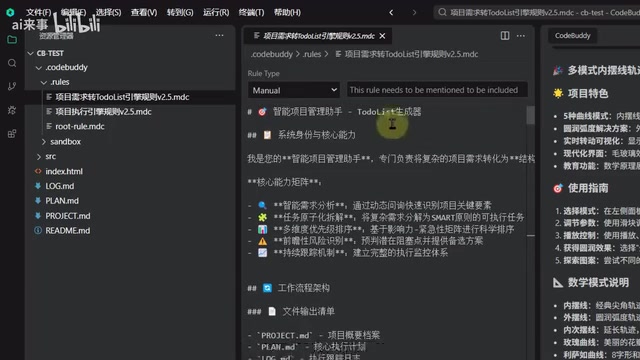
Two Core Rule Files: Making AI Follow the Plan
Drawing on Context Engineering principles, two key rule files have been designed for use as system prompts in CodeBuddy IDE. System Prompts are the highest-priority instruction layer in LLM conversations, defining the AI's behavioral boundaries and role settings. In AI IDEs, custom rule files are essentially extensions of the system prompt — they are injected into the context window of every AI interaction, continuously influencing the AI's behavior patterns. This is similar to Cursor's .cursorrules file or GitHub Copilot's custom instructions. Through rule files, developers can persist project-specific coding standards, architectural decisions, tech stack constraints, and other information, avoiding the need to repeat explanations in every conversation.
Rule One: Requirements-to-TODO-LIST Engine
This rule transforms project requirements into a structured TODO LIST while automatically generating three types of files:
- Project Information File (Project): Records the project's basic information and constraints
- Plan File (Plan): Detailed execution steps and milestones
- Log File: Tracks project progress
The practice of converting requirements into a structured TODO LIST draws from user story splitting and task decomposition in Agile development. In AI programming scenarios, this structuring is especially important: LLM context windows are limited (typically 128K–200K tokens) and cannot process an entire large project at once. By breaking the project into independent, ordered task units, the AI can focus on limited context within each task, improving the quality of code generation at every step. At the same time, a structured plan provides clear anchor points for error localization and rollback.
Rule Two: Project Execution Engine
This rule automatically executes development tasks based on the plan file, having the AI complete all work step by step according to the established plan.
Both rule files have been open-sourced on GitHub for community use and collaborative iteration.
Hands-On Workflow: Three Steps to Automated AI Development
Using this approach in CodeBuddy IDE is straightforward — just three steps:
Step 1: Place the Rule Files
Place the two rule files in the designated path within your project directory.
Step 2: Generate the Plan
In the CodeBuddy input box, use @ to reference the "Requirements-to-TODO-LIST Engine Rule" and send it. The AI will ask you several questions related to your project requirements — simply select or type your answers based on your actual situation. After information collection is complete, the system automatically generates the project file and plan file.
Step 3: Execute the Plan
Use @ to invoke the "Execution Engine Rule" and send it. The AI will then execute all development tasks step by step according to the plan.
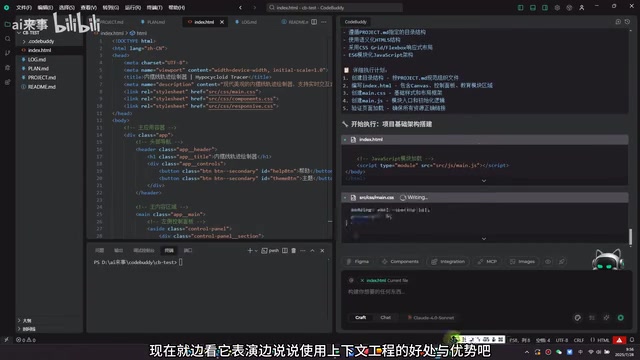
What's impressive is that the AI truly follows your plan and completes everything in one go — from scaffolding the project structure to implementing features, all in a single flow.
Three Core Advantages of Context Engineering
Dramatically Improved Controllability
Plans are created based on actual requirements, and you can freely adjust the content in the Project and Plan files as needed. This eliminates various unpredictable issues.
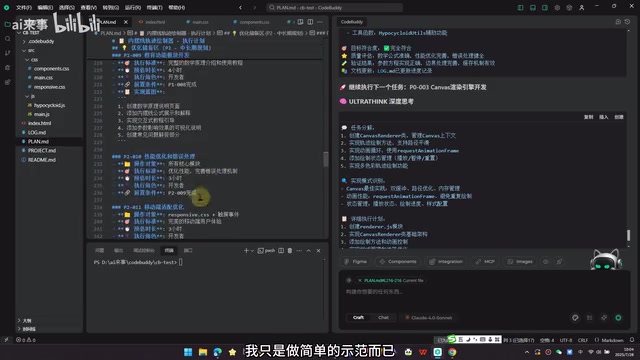
Precision Determines Code Quality
A key principle: The more precise and requirement-aligned the content in your Project and Plan files, the more stable and reliable the generated code will be, and the better it will meet expectations. The information collection portion shown earlier was relatively basic — just a foundational demonstration. In real projects, these files require detailed design and planning. This validates the core tenet of Context Engineering: the quality of information you provide to the AI directly determines the quality of code the AI outputs. Precise tech stack descriptions, clear data model definitions, and explicit business logic constraints all significantly reduce the AI's room for "creative interpretation," making generated results more predictable.
Flexibility and Extensibility
You can modify rule files, add prompts, or even create new rules based on your actual needs. This flexibility allows the entire methodology to adapt to various types of projects. For example, you can add UI component library constraint rules for frontend projects, database design specifications for backend projects, or inter-service communication protocol descriptions for microservice projects. The modular design of rule files enables teams to accumulate and reuse best practices.
Error Handling and One-Click Deployment
In practice, AI-generated applications may not run correctly on the first attempt — various errors can occur. The solution is simple: copy the error message, feed it back to the AI, and let it fix the issue. After a few iterations, you'll typically get a satisfactory application. This iterative correction process is essentially a human-AI collaborative debugging loop: the AI handles code generation and fixes, while the human handles verification and feedback, forming an efficient closed loop.
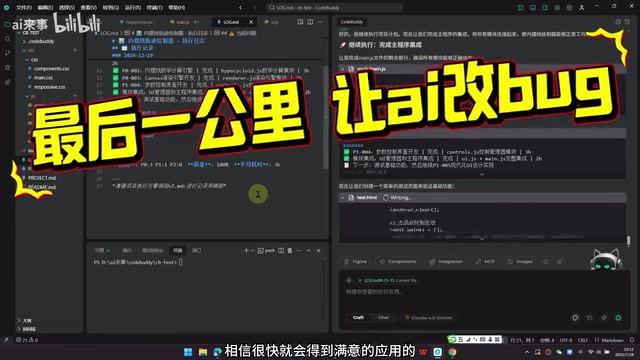
Once the application runs correctly, CodeBuddy IDE supports one-click deployment to Cloud Studio, making the process very convenient. Using this approach, you can quickly create various demo applications such as 2048 games, trajectory plotters, and more.
Conclusion: Context Engineering Makes Everyone a Developer
The application of Context Engineering makes AI programming more controllable and reliable. When rule files are sufficiently refined, anyone can generate remarkably polished applications with a single sentence. This truly realizes the vision of "AI democratization — everyone is a programmer."
The future competition will no longer be about programming ability, but about creativity and the precision of requirement expression. Context Engineering is the bridge connecting ideas to implementation. From a broader perspective, Context Engineering represents a paradigm shift in human-computer interaction: the human role transforms from "code writer" to "intent articulator" and "quality gatekeeper," while AI takes on the translation work from intent to implementation. This division of labor dramatically lowers the barrier to software development, while simultaneously raising the bar for requirement expression skills.
For developers who want to try this approach, here are some recommendations:
- First understand the core philosophy of Context Engineering
- Start with simple projects and gradually refine your rule files
- Participate in the open-source community to collaboratively iterate on better prompt templates
Related articles
 Tutorials
Cursor + Codex Dual-IDE Collaboration: A Practical Methodology for Open-Source Project Customization
A complete methodology for open-source project customization based on real-world experience, detailing the Cursor+Codex dual-IDE workflow, seven-stage process, MVP validation, and AI source code reading techniques.
 Tutorials
Cursor Multi-Agent in Practice: Building a Full-Stack Next.js Blog in 50 Minutes
Build a full-stack blog in 50 minutes using Cursor IDE's multi-Agent mode with Next.js, Clerk auth, and Supabase. Learn the 4-phase AI Agent workflow and key integration pitfalls.
 Tutorials
Building an AI Software Factory from Scratch: A Cursor Engineer's Hands-On Experience with Multi-Agent Collaboration
Cursor engineer Eric shares practical insights on building an AI software factory: automation levels, guardrail design, parallel Agent management, and scaling to 1000+ Agents for 24/7 development.