Codex APP In-Depth Review: Head-to-Head Comparison with Claude Code and Tool Selection Guide
Codex APP vs Claude Code comparison: choose Codex for frontend, Claude Code for backend, and master all three tools.
This article provides an in-depth comparison between OpenAI's Codex APP and Anthropic's Claude Code across pricing, stability, and capability dimensions. Key findings: Codex offers better value and no rate limiting, excels at frontend/UI work, while Claude Code is stronger for backend logic. The recommendation is to master all three major tools—Cursor, Claude Code, and Codex—for different scenarios.
AI Programming Tools Enter an Era of Multi-Form Competition
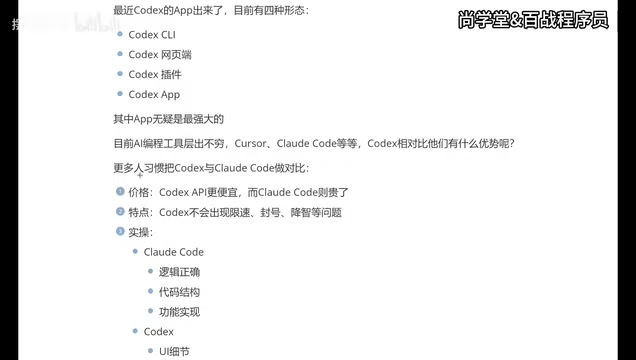
OpenAI's Codex recently launched a standalone APP version, bringing the total number of Codex usage forms to four: CLI terminal, web interface, IDE plugin, and standalone APP. In today's rapidly iterating AI programming tool landscape, a three-way competition between Cursor, Claude Code, and Codex has essentially taken shape.
The AI programming tool market experienced explosive growth from 2024 to 2025. Cursor, developed by Anysphere, is a deeply customized fork of VS Code positioned as an "AI-first IDE" that quickly won developer favor, with its valuation exceeding several billion dollars. Claude Code is Anthropic's command-line AI programming assistant that directly leverages the powerful reasoning capabilities of the Claude model. OpenAI's Codex has evolved from its original code completion API into a complete programming assistant product line covering multiple forms. The competition among these three is essentially an ecosystem battle between the two major model providers (OpenAI and Anthropic) and independent tool startups—the market is far from settled.
So what unique advantages does the Codex APP actually offer? How should you choose between it and Claude Code? Based on a Chinese tech YouTuber's in-depth hands-on experience, this article provides a comprehensive comparison across multiple dimensions including pricing, stability, and capability focus.
Codex's Four Forms: Why the APP Is the Top Choice
Codex currently offers four usage methods:
- CLI (Terminal): Ideal for heavy command-line users. CLI (Command Line Interface) is one of the most primitive yet efficient ways for developers to interact with computers. In the AI programming tool space, the CLI form means developers can invoke AI capabilities directly in the terminal using natural language commands without leaving their current development environment. This approach is particularly suited for advanced developers using Linux/macOS who are accustomed to automating workflows through Shell scripts, enabling seamless integration with command-line tools like git, npm, and docker to build complex automation pipelines.
- Web Interface: No installation required, accessible via browser
- IDE Plugin: Integrated into development tools like VS Code—previously the primary usage method for most users
- Standalone APP: The newest form, and currently the most feature-complete
Among these four forms, the reviewer explicitly recommends the APP version. The reason is that the APP form integrates the most complete feature set while being compatible with traditional development tools like VS Code, balancing both independence and collaboration. For developers who aren't comfortable with terminal operations, the APP's graphical interface is clearly more user-friendly.
Codex vs Claude Code: Head-to-Head on Core Dimensions
Many developers are accustomed to comparing Codex and Claude Code side by side, and this is indeed the most valuable comparison in the current AI programming space. Let's analyze the key dimensions one by one.
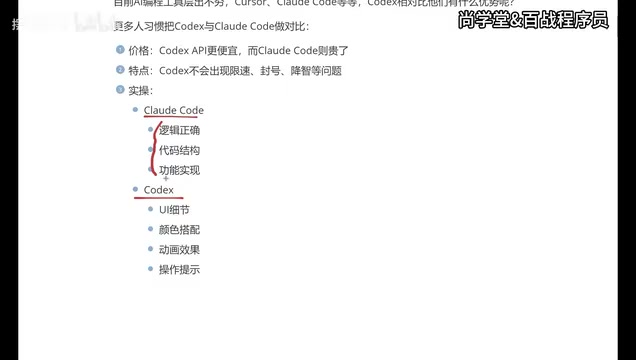
Price Comparison: Codex Offers Better Value
From a pricing strategy perspective, the cost of using Codex APP is noticeably lower than Claude Code. For individual developers or small teams, price is often the deciding factor for long-term tool adoption. By comparison, Cursor's subscription fees aren't cheap either—the reviewer mentioned that after using Cursor for over six months, "every renewal feels painful."
Stability Comparison: Codex Has No Rate Limiting or Account Bans
Claude Code has a particularly frustrating issue during use—rate limiting and account bans. For developers racing to meet project deadlines, this is undoubtedly a dealbreaker. Codex performs better in this regard, with no rate limiting or account ban issues.
Rate Limiting and account bans are common risk control measures used by LLM API providers. Since the inference computation cost of large language models is extremely high (a single complex code generation can consume several cents worth of GPU computing power), providers need rate limiting to balance server load and operational costs. Claude Code is based on Anthropic's Claude model, and its API calls have limits on requests per minute (RPM) and daily token consumption. When users send a large number of code generation requests in a short period, the system triggers rate limiting mechanisms, and in severe cases, accounts may be temporarily banned. For developers in project sprint phases who need continuous high-frequency AI assistance, this indeed poses a significant workflow interruption risk.
Regarding the "quality degradation" issue, there's some debate in the community. Some users have reported that Codex also exhibits quality degradation, but the reviewer did not noticeably experience this issue during personal use. This may be related to usage scenarios and frequency, and more data points are needed for verification.
The so-called "quality degradation" is a colloquial term used in user communities to describe the phenomenon of declining AI model output quality. This phenomenon may stem from multiple technical causes: first, providers may route requests to smaller model versions during peak periods to relieve server pressure; second, as the context window approaches its limit, the model's "memory" of earlier information decays, leading to decreased generation quality; third, some providers may allocate different computing resources based on user subscription tiers. Currently, no vendor has publicly acknowledged the existence of quality degradation behavior, which means community discussions often remain at the subjective experience level, lacking quantifiable verification standards.
Capability Focus: Codex for Frontend, Claude Code for Backend
This is an extremely valuable practical takeaway:
- Claude Code: Leans more toward logical correctness, code structure, and functional implementation—backend developers tend to prefer it
- Codex: Focuses more on UI details, color schemes, animations, and interaction prompts—frontend developers and APP developers have a better experience
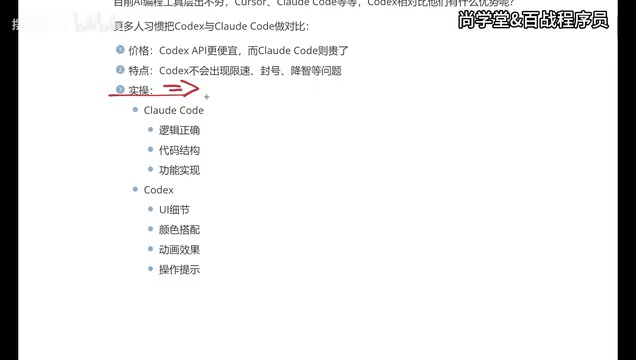
The difference in AI programming tool requirements between frontend and backend development fundamentally reflects the essential distinction between two development paradigms. Frontend development is highly dependent on visual presentation—CSS layouts, animation transitions, responsive design, color systems, etc., all require the AI to possess "aesthetic understanding" and generate UI code that conforms to modern design standards. Backend development, on the other hand, focuses more on logical concerns like data flow correctness, algorithm efficiency, concurrency handling, and database query optimization. Claude model's advantages in logical reasoning and code structure design stem from Anthropic's deep expertise in Constitutional AI training methods; meanwhile, OpenAI's models may have invested more training resources in multimodal understanding (including visual design comprehension), which explains why Codex performs better in frontend scenarios.
As a frontend developer, the reviewer concluded after long-term use of both tools that Codex delivers a superior experience in frontend development scenarios. Of course, Claude Code is indeed more powerful in logical processing capabilities, which is why a significant number of developers choose it.
The Big Three: You Should Master Cursor, Claude Code, and Codex
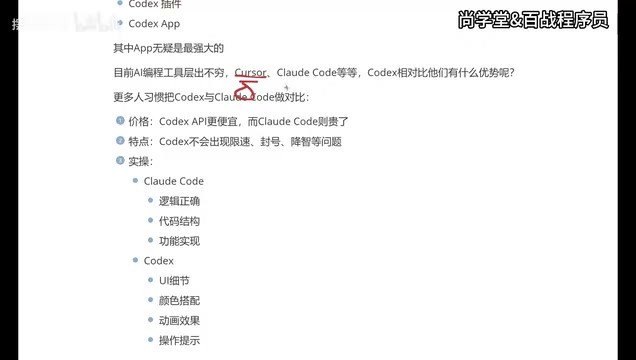
While this article primarily recommends Codex APP, a pragmatic suggestion is: you should master all three AI programming tools—Cursor, Claude Code, and Codex. Here's why:
- Team tech stack differences: Different companies may provide accounts for different tools, and you need to adapt to your team's choices
- Different scenario fit: Use Codex for frontend-intensive projects, Claude Code for logic-heavy backend projects, and Cursor for daily coding assistance
- Tools iterate extremely fast: Today's weaknesses may be addressed tomorrow—maintaining multi-tool proficiency is itself a competitive advantage
The reviewer's own usage journey is quite representative: initially using Cursor for over six months, then switching to Claude Code with domestic Chinese models integrated (cheaper but with a worse experience), and finally adopting Codex as the primary tool after its APP launch. This migration process reflects the rapid evolution of the AI programming tool market. It's worth noting that beyond these three tools, GitHub Copilot (Microsoft/OpenAI ecosystem), Google's Gemini Code Assist, and domestic Chinese products like Tongyi Lingma are also continuously iterating. Maintaining awareness of and adaptability to multiple tools will become one of the core professional competencies in the AI era.
Who Is Codex APP Best Suited For
Based on the above analysis, the following types of users are best suited to adopt Codex APP as their primary AI programming tool:
- Frontend developers: Codex has superior understanding of UI details and visual effects
- APP developers: Codex's performance better aligns with mobile development needs
- Programming beginners or creators without development backgrounds: Codex's presentation is more intuitive, and the APP form lowers the barrier to entry
- Cost-sensitive individual developers: Compared to Cursor and Claude Code, Codex offers better value for money
- Users who dislike terminal operations: The APP's graphical interface is much friendlier than the CLI approach
Conclusion: Find the AI Programming Tool Combination That Works for You
In the three-way battle among AI programming tools, Codex APP is becoming the top choice for an increasing number of developers thanks to its lower price, more stable service, and excellent support for frontend and UI scenarios. But tool selection is never an either/or proposition—understanding each tool's strengths and boundaries, and using the right tool for the right scenario, is the proper stance for developers in the AI era.
I recommend getting hands-on experience with all three tools—Cursor, Claude Code, and Codex—to find the combination that best fits your workflow. In this era of rapidly evolving AI programming tools, the only constant strategy is maintaining the ability to learn and adapt.
Related articles

AI Agent Learning Roadmap: A Four-Step Practical Guide from Zero to Job-Ready
A proven AI Agent learning roadmap covering four core elements, mainstream architecture patterns, multi-agent collaboration, and hands-on projects to go from zero to job-ready in three months.

HarmonyOS 7 Developer Beta Launches: A Deep Dive into System-Level Transformation for the Agent Era
HarmonyOS 7 developer Beta launches, claiming to be the world's first AI-native OS. Deep analysis of Xiaoyi Agent, StarShield security, Galaxy Interconnect, and the OS AI competition landscape.
Deploying a Multimodal AI Agent Locally on a 3080Ti: VRAM Management and a Deep Dive into All Five Modules
A detailed guide to deploying a multimodal AI Agent on a 3080Ti with 12GB VRAM, covering LLM, STT, TTS, image and video generation module selection, dynamic VRAM loading, and real-world performance.