Codex + Claude Code Dual-AI Collaboration: An Engineering Approach to Write-and-Review
A write-and-review methodology for pairing Codex CLI and Claude Code like an engineering team.
This article presents a battle-tested dual-AI collaboration methodology pairing OpenAI Codex CLI and Claude Code. Using a write-and-review pattern, file-driven workflows, unified verification scripts, and Git Worktree parallelism, the two tools work like an engineering team — one implements while the other reviews — avoiding mutual overwrites and code drift.
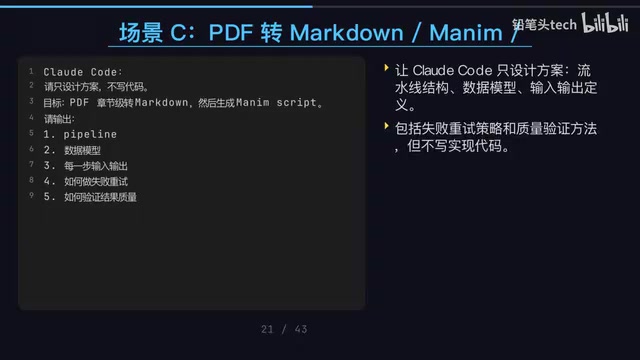
When we have both OpenAI Codex CLI and Claude Code at our disposal, the biggest temptation is to have them write code simultaneously — but that's precisely the most dangerous approach. This article systematically introduces a battle-tested dual-tool collaboration methodology: the write-and-review pattern, enabling two AIs to work together like a real engineering team.
Core Philosophy: Two AI Engineers with Different Styles
Think of Codex and Claude Code as two engineers with distinctly different strengths: Codex excels at rapid implementation and verification — it's a local terminal Coding Agent that can read, modify, and run code, with Web Search capabilities; Claude Code excels at architectural analysis and review, with powerful long-context exploration abilities ideal for understanding complex codebases.
The complementary nature of these two tools stems from fundamental differences in their underlying technology. OpenAI Codex CLI is based on the codex-1 model — an o4-mini variant specifically optimized for code tasks through reinforcement learning. It can read, modify, and execute code in a local sandbox environment with internet search support, focusing on rapid iteration and tool invocation. Claude Code is based on Anthropic's Claude Sonnet/Opus model family, renowned for its ultra-long context window (supporting up to 200K tokens), capable of understanding the full picture of large codebases in a single pass, with a focus on deep reasoning and long-text comprehension. It's precisely this significant difference in model architecture and training strategy that forms the technical foundation for dual-tool collaboration.
There's only one core principle: Never let them modify the same workspace simultaneously. The bridge for collaboration isn't conversation — it's Git Diff, task documents, and verification scripts.
The Typical Mistake
Many people let Claude Code modify files halfway through, then send Codex to modify the same batch of files. The result: the two AIs overwrite each other's work, changes drift further and further from the goal, and recovery becomes nearly impossible. This "dual-write" pattern is the cardinal sin of collaboration.
The Correct Collaborative Workflow
The correct workflow is a clear relay race:
- Claude Code performs read-only analysis, outputs a plan to a document, modifies no files
- You confirm or fine-tune the goals and plan
- Codex implements the minimum viable change, runs Build and Test
- Claude Code reviews the Git Diff, identifying edge cases and hidden bugs
- Codex fixes issues based on review feedback
- You make the final judgment and merge
It's worth noting that the choice of Git Diff as the collaboration bridge in step 4 is no accident. Git Diff precisely records every line addition, deletion, and modification in Unified Diff Format. In traditional software engineering, the core vehicle for Code Review is the Diff — reviewers don't need to read the entire codebase, only the changes and their context. Compared to having two AIs pass information through natural language conversation, Diff is structured, precise, and traceable, completely eliminating the ambiguity of natural language.
The value of this "write-and-review" approach far exceeds having both tools write code. The most common problem with AI-written code isn't that it can't produce output — it's that changes drift further off course with each iteration. Introducing a reverse review mechanism keeps the code on a controllable track.
Project Structure: File-ify All Collaboration Information
To achieve efficient collaboration, you need to establish a unified task directory structure in every project:
project/
├── AGENTS.md          # Project spec read by Codex on startup
├── CLAUDE.md          # Project spec read by Claude Code on startup
├── scripts/
│   └── check.sh       # Unified verification script (safety harness)
└── .ai/
    ├── brief.md       # Task objectives
    ├── plan.md        # Design plan
    ├── review.md      # Review feedback
    ├── backlog.md     # Accumulated pending issues
    └── decision-log.md # Decision rationale log
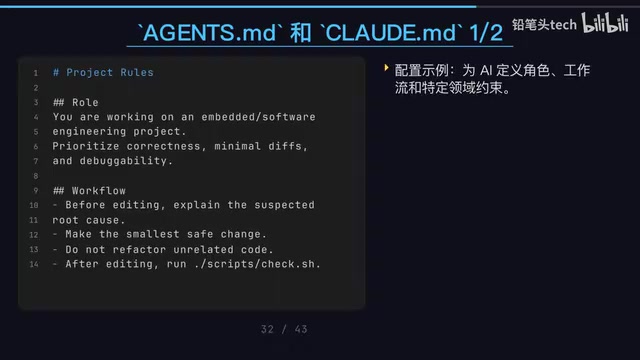
The design of AGENTS.md and CLAUDE.md deserves deeper understanding. AGENTS.md is Codex CLI's project-level instruction file — Codex automatically reads this file from the project root on startup, injecting its contents as system-level context into the conversation. CLAUDE.md is Claude Code's equivalent configuration file (also known as CLAUDE.md memory), which Claude Code similarly auto-loads on startup. The design inspiration for these two files comes from the Convention over Configuration philosophy seen in developer tools like .editorconfig and .eslintrc — by placing declarative files in the project root, tools automatically pick up project specifications without requiring manual repetition each time. In a dual-tool collaboration scenario, you can customize instructions for each tool's characteristics. For example, AGENTS.md might emphasize "you must run scripts/check.sh after every modification," while CLAUDE.md might emphasize "perform read-only analysis only, do not modify any files."
The key significance of this design: All collaboration information is file-based, eliminating dependence on conversation memory. When you switch a task from Claude Code to Codex, Codex just needs to read plan.md to know what to do — completely eliminating the unreliable dependency of "I already told the other AI about this."
check.sh: The Safety Rope That Prevents AI from Going Off Track
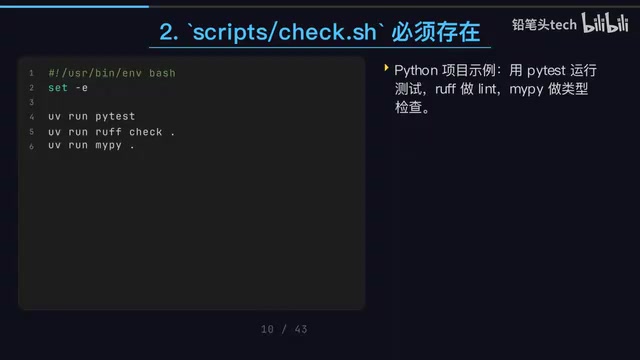
scripts/check.sh is the single most critical element in the entire collaboration workflow. Claude Code's official documentation explicitly states: if you don't give the Agent a runnable verification command, it can only stop when things "look done" — and at that point, there are likely still problems.
The design philosophy behind this embodies the core idea of Continuous Integration (CI). Traditional CI systems (like Jenkins, GitHub Actions) automatically trigger builds, run test suites, and execute static analysis after code pushes, ensuring each change doesn't break existing functionality. check.sh essentially front-loads CI's verification step into the AI coding process — instead of waiting until code is pushed to a remote to discover problems, the AI verifies locally after every modification. This "modify code → run checks → review results → fix issues → run checks again" closed loop is known as the Fast Feedback Loop in CI/CD, and it's a key mechanism for improving code quality.
Different project types have different check.sh contents, but the approach is consistent:
- Embedded C/C++ projects: CMake build + CTest testing, ensuring compilation and functionality
- Python projects: pytest unit tests + ruff code style + mypy type checking
- Frontend projects: pnpm lint + test + build
Regardless of which tool is operating, the same script runs after every change, with completely consistent verification standards. This is like attaching a safety rope to the AI — it must pass your quality checks to continue, and can't get by on "looks done."
Four Hard Rules: The Bottom Line for Dual-AI Collaboration
From various practical scenarios, four mandatory hard rules emerge:
Rule 1: Single Write Permission
At any given time, only one tool may have file modification permissions. The tool without write permission can perform read-only analysis, review Diffs, and output suggestions, but write operations are absolutely forbidden. The consequence of violating this rule is straightforward: the two AIs will fight each other, with code written by one immediately overwritten by the other.
Rule 2: File-Driven, Not Conversation-Driven
All collaboration must be transmitted through files in the .ai/ directory and Git. Don't expect Codex to know what you told Claude Code — they don't share memory. File content is the sole basis for collaboration. This is easy to understand technically: Codex CLI and Claude Code run in completely independent processes, each maintaining independent conversation contexts with no inter-process communication mechanism. The file system and Git repository are their only shared state space.
Rule 3: Single-Responsibility Prompts
Each time, let the AI focus on only one role. If you say "analyze, design, implement, test, and optimize this project for me," the AI easily loses direction. The correct approach is to give clear single-responsibility prompts, such as "only perform architectural analysis, do not modify files," or "only fix P0 and P1 issues, don't touch P2."
The theoretical foundation of this rule is one of the most important design principles in computer science — Separation of Concerns (SoC), proposed by Edsger Dijkstra in 1974. Its core idea is to decompose complex systems into multiple independent parts, each responsible for one clear concern, communicating through well-defined interfaces. In this article's collaboration model: Claude Code is only responsible for analysis and review (no code writing), Codex is only responsible for implementation and verification (no architectural decisions), and humans are only responsible for final judgment and merging. This separation not only reduces cognitive load for each role but, more importantly, establishes a system of checks and balances — the AI writing code can't review its own work, and the reviewing AI can't bypass review to modify directly. This is entirely consistent with the modern software engineering rule that "submitters cannot approve their own PRs."
Rule 4: Unified Verification Entry Point
After every code change, scripts/check.sh must be run — don't let the AI decide what commands to run on its own. This puts the AI into a closed loop: modify code → run checks → review results → fix issues → run checks again. This is the essence of continuous integration.
Real-World Scenario: The Three-Role Method for Embedded Debugging
The most common problem during AI debugging is "changes making things worse." A highly effective solution is to split the task into three roles:
- Claude Code as the diagnostician: Read-only code access, locate the root cause of the bug, write the analysis to a document, absolutely no file modifications
- Codex as the surgeon: Perform only precise fixes with minimal changes, never refactor other code while you're at it
- Claude Code returns for follow-up review: Review the Diff, identify potential risks
There's an iron rule here: Never refactor other code while fixing a bug. Once you open that door, the scope of changes exceeds review capacity, and it becomes very easy to introduce new problems. In software engineering, this is known as the "Shotgun Surgery" anti-pattern — a single change touching too many unrelated modification points, making the impact of the change difficult to assess and test. If you discover additional issues, log them in .ai/backlog.md and address them in a dedicated future session.
Advanced Technique: True Parallelism with Git Worktree
For particularly complex tasks, you can use Git Worktree to achieve true parallel work between the two tools:
git worktree add ../proj-claude  # Claude Code dedicated: analysis and design
git worktree add ../proj-codex   # Codex dedicated: implementation and testing
Git Worktree is a feature introduced in Git 2.5 that allows checking out multiple working directories from the same repository, each corresponding to a different branch while sharing the same .git object database. Unlike traditional git clone with multiple copies, Worktree doesn't duplicate the entire repository history, resulting in minimal disk usage with real-time branch state synchronization. In the dual-AI collaboration scenario, Worktree's value lies in providing physically isolated workspaces: the two AI tools operate in different directories, and even when running simultaneously, there are no file-system-level conflicts.
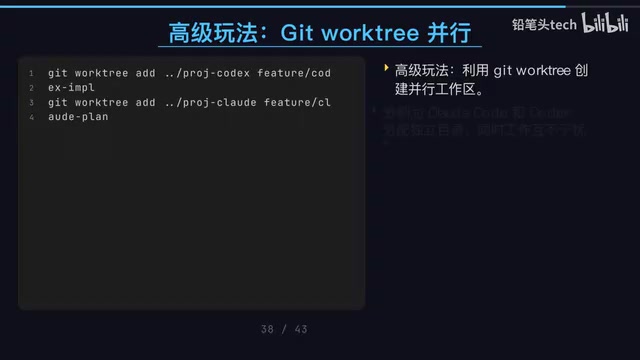
The two tools run in completely independent directories with no risk of file conflicts. After completion, use git diff to review changes, cherry-pick to select commits, or merge directly into the main branch. The entire process is fully under version control, with every step traceable.
Recommended Daily Work Rhythm
Integrating the collaboration model into your daily routine, you can establish this rhythm:
- Morning: Claude Code understands requirements, sets the plan, records it in
plan.md - Late morning/Noon: Codex strictly executes
plan.md, runscheck.shafter changes - Afternoon: Claude Code reviews the Diff, writes issues to
review.md; Codex applies targeted fixes - Wrap-up: You perform the manual merge, completing the day's closed loop
In one sentence: Claude Code is your architect and reviewer, Codex is your implementer and verifier. They collaborate seamlessly through Git, task documents, and check scripts — not through verbal communication. Never let them modify the same place at the same time.
The essence of this methodology is applying mature software engineering practices — code review, continuous integration, separation of concerns — to AI tool collaboration. Code Review ensures every change is examined by a second pair of eyes; continuous integration ensures every change passes automated verification; separation of concerns ensures each participant focuses solely on what they do best. When AI is no longer working solo but is integrated into an engineered workflow, both the quality and controllability of its output improve dramatically.
Related articles

AI API Relay Startup's First Month: Open Books Reveal Just ¥16K Profit on ¥290K Revenue
A 3-person team shares their AI API relay startup's first month: ¥290K revenue, 95% spent on API costs, only ¥16.7K book profit. A deep dive into adjusted margins, cost structure, and competition.
Trae Hands-On Tutorial: Build a Full-Stack Website with Just 3 Prompts
Learn how to use ByteDance's AI coding tool Trae to build a full-stack website with just 3 prompts—covering frontend, backend API, and admin panel.
AI Progress Demands a More Nuanced Examination: A Rational Framework Beyond Hype and Panic
Current AI discourse is trapped in polarization. This article explores how to rationally assess AI's real progress, analyzes the gap between benchmarks and actual capabilities, and offers a pragmatic evaluation framework.