Codex Infinite Canvas Workflow: A New Approach to Precise AI Image Editing
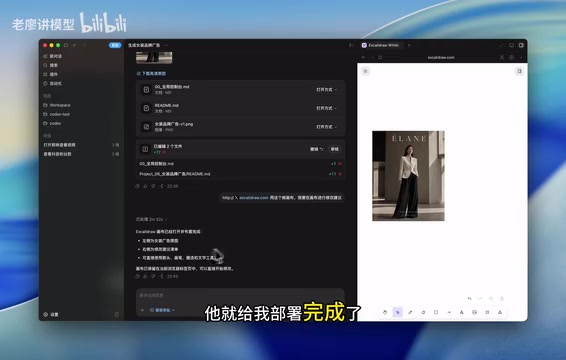
Combine Codex with online canvas tools to achieve precise, iterative AI image editing through visual annotations.
This article presents a creative workflow that combines OpenAI's Codex with free online canvas tools to achieve precise local image modifications. The approach follows a closed-loop process: generate an initial image, deploy it to a canvas, visually annotate desired changes with arrows and text, then have Codex regenerate based on those annotations. This solves the core pain point of ambiguous text-only editing instructions, offering a zero-cost alternative to professional AI design tools.
Introduction: Can Codex Really Achieve an Infinite Canvas?
OpenAI's Codex, as a powerful AI coding and generation tool, doesn't natively include an infinite canvas-style visual editing feature. Codex was originally an AI system fine-tuned specifically for code generation tasks based on the GPT series of models, later evolving into a comprehensive AI coding agent platform. The Codex product launched in 2025 not only writes code but also integrates image generation capabilities (based on DALL·E and GPT-4o's multimodal abilities), capable of autonomously executing complex task chains in a sandbox environment—including generating images, deploying web applications, reading screenshot feedback, and more. This "agentic" working mode enables Codex to accomplish multi-step workflows that traditional AI tools struggle with.
However, some creators have found a clever workaround by combining online canvas websites with Codex, successfully achieving an infinite canvas-like workflow for precise image modifications. The core idea behind this approach is simple yet ingenious—use an online canvas for annotations and let Codex handle execution. Real-world testing has yielded impressive results.
Core Approach: A Three-Step Workflow
The entire workflow can be broken down into three key steps:
Step 1: Have Codex generate the initial image. The creator first had Codex generate a women's fashion brand advertisement image. The image quality was solid, containing elements like a model, clothing, a logo, and bottom text.
Step 2: Deploy to an online canvas website. This is the most critical part of the entire approach. The creator instructed Codex to deploy the generated image to an online canvas website, serving as a workbench for subsequent modifications. Online Canvas/Whiteboard tools like Excalidraw, Miro, tldraw, etc., are built on HTML5 Canvas API or SVG technology, supporting infinite zoom and pan in a two-dimensional space. Core features of these tools include: free-form drawing and annotation, adding text notes, dragging and dropping image elements, and more. In this approach, the canvas tool serves as an intermediary layer for human-AI interaction—humans express modification intent through visual means, while AI understands these intentions by reading canvas screenshots. This provides higher information density and lower ambiguity compared to pure text prompts. Codex successfully completed the deployment, placing the image into the canvas environment.
Step 3: Annotate modifications on the canvas, and Codex executes the second-round generation. After the creator annotated the modification requirements on the canvas and told Codex "modifications complete," Codex performed a second-round generation based on the annotations.
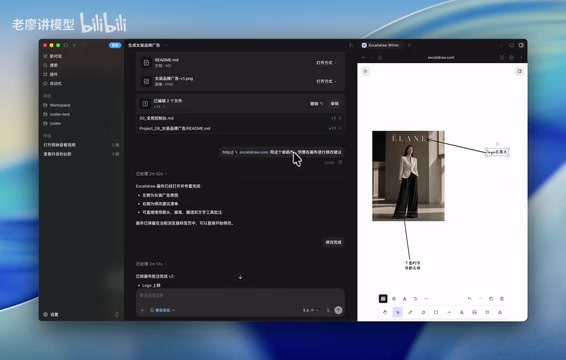
The elegance of this workflow lies in seamlessly connecting "human visual annotation ability" with "AI image generation ability," solving the ambiguity problems that arise when describing modification requirements in pure text.
Real-World Results: Precise Modifications, Perfect Preservation
In practical testing, the creator proposed two specific modification requirements:
- Delete all English text at the bottom
- Move the top logo position upward to make it higher
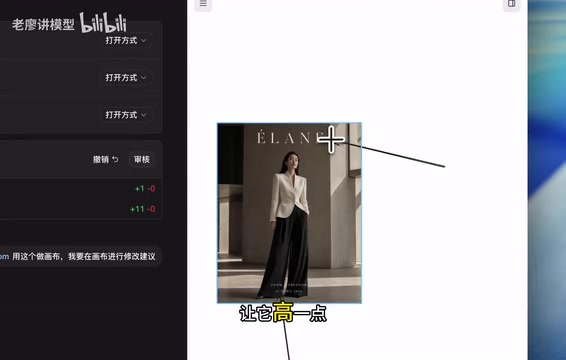
After receiving the modification instructions, Codex clearly understood the requirements: move the logo up, delete all bottom text, while preserving the model, clothing, lighting, and composition unchanged, then performed the second-round generation.
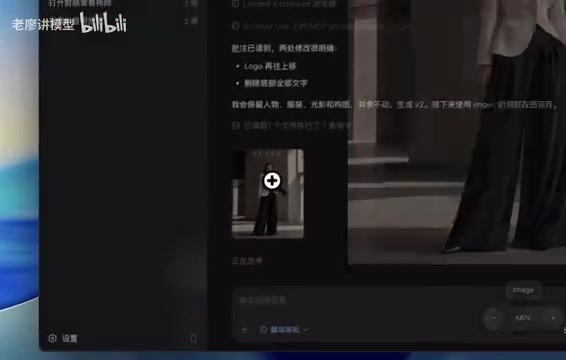
The final result was excellent:
- ✅ Logo position successfully moved up
- ✅ All bottom text removed
- ✅ Model's appearance perfectly preserved
- ✅ Clothing, lighting, composition, and other details unaffected
This demonstrates that after understanding canvas annotation information, Codex can precisely execute local modifications without making unnecessary changes to the overall image. This is extremely important for practical design workflows.
Value Analysis: Why This Approach Deserves Attention
Solves the Core Pain Point of AI Image Editing
One of the biggest pain points with current AI image generation tools is precise local modification. Precise local modification of AI images technically involves multiple subfields including Inpainting and Image Editing. Traditional methods like Stable Diffusion's Inpainting require users to manually draw masks to specify modification areas, creating a high barrier to entry. Instruction-based editing methods (like InstructPix2Pix) reduce operational difficulty, but pure text instructions have limited spatial positioning capability.
Pure text descriptions are often imprecise—"move the logo up a bit" means how much exactly? "Delete the bottom text" means which text specifically? Through visual annotations on the canvas, these vague descriptions become precise instructions, dramatically reducing communication costs. This approach cleverly solves the spatial positioning problem through canvas annotations—arrows, circles, text labels, and other visual elements provide AI with precise spatial references, essentially serving as a more intuitive "visual mask."
A Low-Barrier "Budget Infinite Canvas"
Compared to professional AI design tools (like Figma + AI plugins), this approach costs virtually nothing—you only need Codex and a free online canvas website. In professional design, iterative modification is the standard workflow. Designers typically perform multiple rounds of revisions in tools like Figma or Sketch, with each round based on client or team feedback annotations (commonly called Redlines or Markups). AI design tools like Midjourney's Vary Region and Adobe Firefly's Generative Fill are all attempting to simplify this process, but each has limitations: Midjourney's region selection isn't precise enough, and Adobe's tools require paid subscriptions. For individual creators and small teams, this approach achieves similar results using free tool combinations, offering significant cost advantages as a highly practical alternative.
Highly Extensible
This workflow isn't limited to simple text deletion and position adjustments. Theoretically, any modification requirement that can be annotated on a canvas—color adjustments, element replacements, layout rearrangements, etc.—can be achieved through this process. As Codex's image understanding capabilities continue to improve, particularly with advances in multimodal models' visual reasoning and spatial understanding, this approach's applicability will only grow broader. In the future, when AI can more precisely understand complex visual annotations (such as gradient color indicators, perspective transformation markers, etc.), this workflow has the potential to cover more professional-level design modification scenarios.
Summary and Recommendations
The core logic of this Codex infinite canvas approach can be summarized as: Generate → Deploy to canvas → Annotate modifications → Second-round generation. The entire process forms an iterable closed loop where each modification can continue optimizing based on the previous result, truly achieving "infinite canvas"-style progressive design.
If you're also using Codex for image creation, consider trying this approach. Key points to remember: choose an online canvas tool that supports free-form annotation (open-source free options like Excalidraw are recommended), clearly communicate your modification intent to Codex, and emphasize elements that need to be preserved (model, composition, lighting, etc.)—this maximizes the quality of second-round generation. It's worth noting that when annotating, use clear arrows, circles, and concise text descriptions, avoiding overly complex annotations that might cause AI misinterpretation.
Related articles
Claude Code Hands-On: A Full Workflow Demo of the Terminal AI Coding Assistant from Requirements to Deployment
In-depth hands-on review of Anthropic's Claude Code terminal coding tool, demonstrating its complete workflow of code understanding, natural language development, auto test fixing, and Git commits through a Next.js project.
AI Programming in Practice: Building a Local Errand-Running Mini Program in 37 Minutes — Full Workflow
Learn how to build a full local errand-running mini program in 37 minutes using AI tools like Stitch, Trae, UniApp, and UniCloud — covering UI design, full-stack development, and cross-platform publishing.
Four Prompts to Remove the AI Smell from Your Articles, Plus Detection Tools and a Complete Workflow
Four tested prompts to fix AI-generated articles: remove clichés, simplify structure, add conversational tone, and adjust voice. Includes detection tools and a complete workflow.