Complete Cursor Tutorial: Core Advantages and Use Cases of the AI-Native Programming Tool
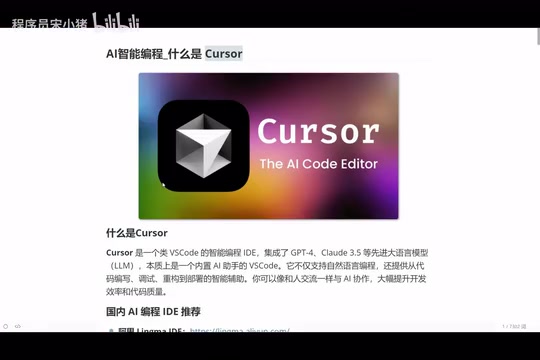
A comprehensive guide to Cursor, the AI-native programming tool that's redefining how developers write code.
This article provides a deep dive into Cursor, an AI-native programming tool built on VS Code's core. It covers five key features — AI-native design, intelligent code generation, context awareness, real-time assistance, and multi-model support — and compares Cursor with traditional IDEs across six dimensions. The guide explains who benefits most from Cursor and why mastering AI programming tools is now essential.
What is Cursor?
Cursor is an intelligent programming tool with built-in AI capabilities — think of it as an upgraded version of VS Code. Unlike traditional editors, Cursor isn't simply a code editor with an AI plugin bolted on. It's designed from the ground up for AI-powered programming, fundamentally reimagining how developers interact with their code.
In simple terms, Cursor is a VS Code that "can write code and teach you programming." It integrates the world's top large language models, including DeepThink (free), Claude 3.5/3.7/4.0, and other leading models in the programming domain, helping developers with the entire workflow — writing code, debugging, error detection, and refactoring. These models are built on the Transformer architecture and trained on massive code corpora (including public GitHub repositories, technical documentation, etc.). The Claude series, developed by Anthropic, performs exceptionally well on code generation benchmarks (such as HumanEval and SWE-bench) and excels at long-context code understanding and multi-file collaborative editing. DeepThink is a deep reasoning model suited for complex algorithm design and architectural decision-making scenarios.
Compared to similar domestic products, Alibaba's Tongyi Lingma and ByteDance's Trae have both introduced AI capabilities, but Cursor currently maintains its lead in overall feature integration and intelligence level.
Five Core Features of Cursor
AI-Native Design
Cursor isn't a plugin added after the fact — it's a programming environment built from the ground up for AI. This means AI capabilities permeate every corner of the editor rather than existing as an add-on feature. This design philosophy makes the integration of AI with the programming workflow more natural and efficient.
AI-Native design means that AI capabilities are treated as core components rather than supplementary modules from the very beginning of product design. Traditional IDEs like VS Code introduce AI features through plugin marketplaces (such as the GitHub Copilot plugin), but this approach is limited by plugin API boundaries — AI cannot deeply access the editor's internal state. Cursor is built on VS Code's open-source core (Electron + Monaco Editor) with fundamental restructuring, allowing AI models to directly access the AST (Abstract Syntax Tree), LSP (Language Server Protocol) data, and the project file system. This enables deeper code understanding and a smoother interactive experience.
Intelligent Code Generation
Users only need to describe their requirements in natural language, and Cursor generates complete code logic. For example, tell it "write a login endpoint for me," and it will understand the context, auto-complete the code, and explain the underlying principles.
Context Awareness
One of the current bottlenecks of large language models is context awareness — when conversations become too long, models tend to "forget" or hallucinate. Cursor has deeply optimized this aspect. It can understand the overall project structure and relationships between variables, providing more accurate code suggestions.
From a technical perspective, the Context Window refers to the maximum number of tokens a large language model can process in a single pass. Early GPT-3.5 only supported 4K tokens, while current mainstream models have expanded to 128K-200K tokens. However, even with larger windows, models still exhibit the "Lost in the Middle" phenomenon when processing very long contexts — meaning the model's attention to information in the middle of the input decreases. Hallucination refers to the model generating content that seems plausible but is actually incorrect, such as referencing non-existent APIs or fabricating function parameters. Cursor mitigates these issues through RAG (Retrieval-Augmented Generation) technology, code indexing, and project-level semantic search, ensuring AI suggestions are based on the project's actual code rather than fabricated content.
Real-Time Assistance
Cursor provides suggestions in real time as you write code, like having an experienced programmer sitting next to you offering guidance at any moment. Whether it's function naming, logic optimization, or potential bug alerts, you get instant feedback during the coding process.
Multi-Model Support
Cursor supports virtually all of the world's top programming models, including the Claude series, Google models, and more. Users can freely switch between models based on different task scenarios, choosing the AI model best suited for their current needs.
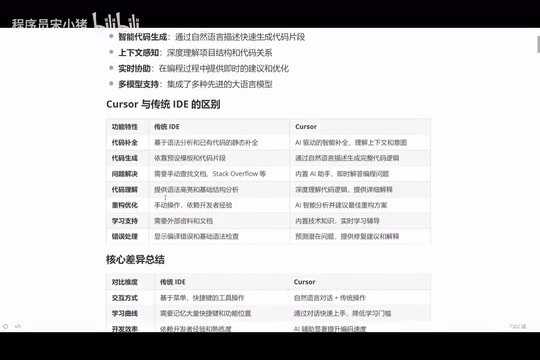
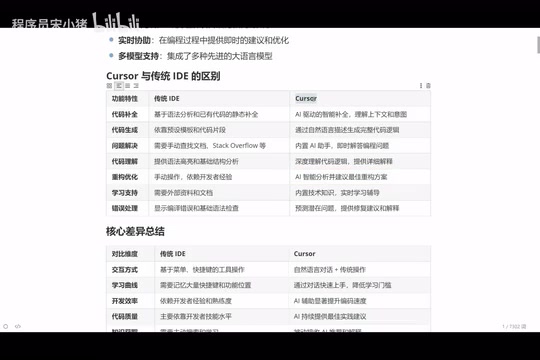
Cursor vs Traditional IDEs: Six Core Differences
Code Completion
Traditional IDE code completion is based on syntax analysis — if you've written a function before, it will auto-suggest it next time you use it. Cursor's completion is based on contextual understanding — it predicts what you're about to do and proactively offers complete code suggestions.
Behind this are two fundamentally different technical paradigms. Traditional IDE code completion relies on static analysis and symbol table matching, essentially performing exact matches based on defined variables, functions, and types. IntelliSense (Microsoft) and Language Server Protocol represent this technology. AI-driven code completion is based on probabilistic prediction, analyzing the semantic intent of current code, project context, and common programming patterns to predict what the developer is most likely to write next. This approach can not only complete existing symbols but also generate entirely new code logic, including function implementations that have never appeared in the project.
Code Generation Approach
Traditional IDEs rely on preset templates and code snippets to generate code. Cursor understands your business requirements through natural language and generates complete functional code based on logic.
Problem Solving and Error Handling
When problems arise in traditional IDEs, developers can only rely on search engines and documentation to solve them on their own. Cursor has a built-in AI assistant that can answer questions at any time — simply tell it the error message, and you'll get root cause analysis, fix suggestions, and detailed explanations.
This is especially important for beginner programmers. Experienced programmers can solve problems quickly because they've accumulated extensive experience. Cursor gives beginners "senior-level" problem-solving capabilities.
Refactoring and Optimization
Traditional IDE code refactoring relies entirely on the developer's own experience, making it difficult for junior programmers to produce high-quality refactoring plans. With Cursor, you simply say "optimize this function for me," and the AI will provide an optimal refactoring solution based on best practices.
Code Refactoring is the process of improving the internal structure of code without changing its external behavior, systematized by Martin Fowler in Refactoring: Improving the Design of Existing Code. Common refactoring techniques include Extract Method, Inline Variable, and Replace Conditional with Strategy Pattern. Traditional IDEs only support mechanical refactoring (such as renaming and extracting methods), while AI-driven refactoring can identify Code Smells, suggest design pattern applications, and even refactor procedural code into object-oriented or functional styles. This requires a deep understanding of software engineering principles (SOLID, DRY, KISS, etc.) — precisely the kind of capability that large language models learn from massive amounts of high-quality code.
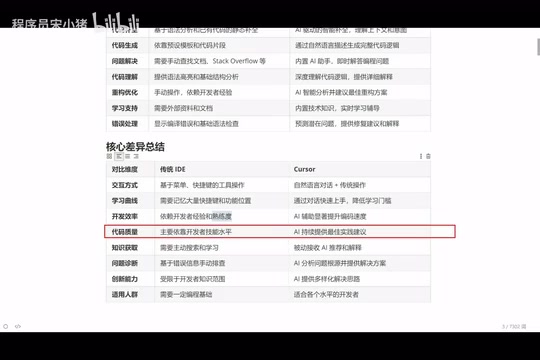
This means: a junior programmer + Cursor ≈ a programmer with five years of experience.
Learning Curve
Traditional IDEs require memorizing numerous keyboard shortcuts and feature locations, resulting in a steep learning curve. Cursor's core interaction method is natural language conversation, significantly lowering the barrier to entry — even programming beginners can get up to speed quickly.
Innovation Capability
Traditional development is limited by the developer's personal knowledge scope, while Cursor can provide diverse solution approaches. More importantly, once you master AI programming, you can develop in virtually any programming language — whether it's Java, Python, frontend technologies, or Go, AI can assist you.
Who Should Use Cursor?
Cursor is suitable for developers at all skill levels, with different groups benefiting in different ways:
- Senior programmers (10+ years of experience): Too lazy to manually type simple, repetitive code — let Cursor generate it and make minor adjustments, dramatically improving development efficiency
- Mid-level programmers: Leverage AI to get better code solutions, break through personal experience bottlenecks, and accelerate technical growth
- Beginner programmers: Compare AI-generated code with your own code with a learning mindset, understand which approaches are more rigorous, and rapidly improve programming skills
- Zero-experience users: Even without programming knowledge, you can describe requirements in natural language and have Cursor generate usable code, lowering the barrier to entry for programming
Summary
Cursor represents the future direction of programming tools — shifting from "humans adapting to tools" to "tools understanding humans." It won't replace programmers, but it will give every programmer a 24/7 online AI assistant. In an era of rapidly iterating AI programming tools, mastering tools like Cursor is no longer a bonus — it's an essential skill.
For those looking to get started, it's recommended to first have a basic understanding of programming, then practice with Cursor. Understanding business requirements, writing good prompts, and leveraging AI assistance effectively — these three factors will determine the upper limit of your efficiency with AI programming tools. Prompt Engineering refers to the technique of carefully designing input instructions to guide AI models toward more accurate outputs. In AI programming scenarios, good prompts should include: clear functional descriptions, tech stack constraints, input/output formats, boundary conditions, and performance requirements. For example, "write a login endpoint" is far less precise than "write a login endpoint using Node.js + Express that supports JWT authentication, with parameter validation, bcrypt password encryption, error handling, and rate limiting." Mastering prompt techniques is the key factor in determining AI programming efficiency.
Key Takeaways
Related articles
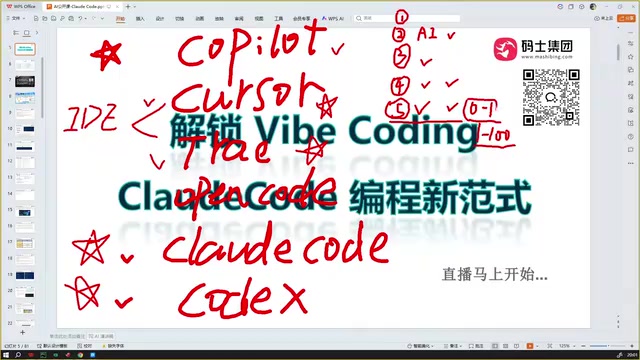
Claude Code Installation Guide & The Five Stages of AI Programming Tools Explained
Complete Claude Code installation guide with the five stages of AI programming tools, from manual coding to agents. Learn 0-to-1 project building and 1-to-100 iteration challenges.

Enterprise-Level AI Project Rules Files: 5 Hard Rules + 6 Writing Techniques
AI keeps messing up your code? Learn 5 hard rules and 6 writing techniques for enterprise-level Rules files in Claude Code, Cursor & more, with templates.

Building Cloud Computing Clusters from Old Phones: Google and UCSD Explore a New Path to Sustainable Computing
Google and UCSD explore building cloud clusters from old phones, leveraging ARM chip efficiency to cut e-waste and data center carbon footprints.