Enterprise-Level AI Project Rules Files: 5 Hard Rules + 6 Writing Techniques

5 hard rules and 6 writing techniques to make AI coding tools follow your project conventions reliably.
This article explains why AI coding tools often ignore project conventions and how to fix it with well-crafted Rules files. It covers 5 core rules (define boundaries, quantify requirements, specify versions, keep it under 500 words) and 6 writing techniques (prohibitions before permissions, always explain the why). Includes templates for frontend/backend, data processing, and Agent tool projects.
Why a Smart AI Doesn't Mean an Obedient AI
Models are getting smarter with every generation, but anyone who's used AI to write project code has had this experience: there's perfectly good existing code, yet the AI insists on creating a new version from scratch; you deliberately kept something, and it casually rewrites it. Over the past couple of years, what truly separates people in AI programming isn't who uses the more powerful model — it's who can get AI to work steadily by their rules.
These "rules" are what we call a Rules file — a project rules document you set for the AI. In Claude Code it's called CLAUDE.md, in Cursor it's called Cursor Rules. Regardless of the tool, it's fundamentally the same thing: an MD document placed in the project root directory that makes it crystal clear to the AI what it can touch and what it absolutely cannot.
The concept of Rules files originates from the classic software engineering principle of "Convention over Configuration." In the AI programming tool ecosystem, these files are essentially an engineering implementation of system-level prompts. Claude Code's CLAUDE.md, Cursor's .cursorrules, GitHub Copilot's .github/copilot-instructions.md, and OpenAI Codex's AGENTS.md — while their filenames and loading mechanisms differ, the underlying logic is the same: before each AI code generation, this document is injected as context into the large language model's reasoning process, thereby constraining its output behavior. This follows the same philosophy as traditional DevOps configuration files like .editorconfig and .eslintrc — turning team conventions from verbal agreements into explicit, machine-readable rules.
Why Most People's Rules Files Don't Work
Sounds simple, but most people's Rules files are completely ineffective. To understand why, you first need to understand why AI "disobeys."
The "disobedience" of large language models is fundamentally determined by their generation mechanism. LLMs predict the next token based on probability, tending to generate the most frequent patterns from training data. After being trained on massive amounts of open-source code, the model's "default behavior" is to generate generic code that fits the statistical distribution, rather than following your project-specific conventions. This is why AI loves to "create a new version" instead of reusing existing code — in the training data, samples of writing a function from scratch far outnumber samples of reusing existing modules within a specific project context. Context Window limitations further exacerbate this problem: as conversations grow longer, the weight of earlier instructions in the attention mechanism gets diluted, and the model's "memory" of rules gradually decays.
With this underlying mechanism in mind, let's look at the two most common failure patterns:
Too Vague for AI to Execute
"Code should be elegant" — the AI has no idea what you mean. "Performance should be good" — how good is good? The AI can only guess, and after three rounds of revisions, your timeline is basically blown.
Only Stating What to Do, Not What Not to Do
This is the real killer. Rules without red lines are as good as no Rules at all. Whether it's Claude, Cursor, or Codex, without clear red lines, code becomes increasingly bloated, and by code review day you discover a pile of changes in places that should never have been touched.
The Counterintuitive Trap: More Isn't Better
Write too much, and the AI actually misses the critical items. You think casting a wider net is safer, but the rules that matter most end up being the ones that slip through.
Five Hard Rules: The Core Skeleton of a Rules File
What should a functional Rules file look like? The core consists of five hard rules:

Rule #1: Start by Defining What the Project Is NOT
What's out of scope goes at the very top of the document. This is more effective than writing a hundred items about what to do. Defining clear boundaries is the first line of defense against AI overreach.
Rule #2: Every Rule Must Be Quantifiable, Verifiable, and Include the "Why"
When AI knows why, it actually follows the rules. This is the same principle as managing a team — orders without explanations always have a discounted compliance rate.
Rule #3: List Both the "Do's" and "Don'ts" for Core Files
Leave no gray areas. Which files can be modified and which must never be touched — spell it out in black and white.
Rule #4: Specify Exact Version Numbers for the Tech Stack
Don't just write names — write version numbers. Without version numbers, the AI will pick the latest one on its own. Anyone who's been burned knows that once dependency conflicts pop up, rollback means an all-nighter.
Rule #5: Keep the Entire Document Under 500 Words
Beyond this word count, the probability of AI missing critical items rises noticeably. Conciseness is a hard requirement for production-grade Rules files.
The 500-word limit isn't arbitrary — it's closely tied to how large language models allocate attention. Research shows that LLMs exhibit a "Lost in the Middle" phenomenon when processing long contexts — the model pays the most attention to information at the beginning and end of text, while information in the middle is most easily overlooked. When a Rules file is too long and critical rules happen to fall in the middle section, the probability of the model "missing" them rises significantly. Furthermore, Rules files consume precious context window space — the longer the document, the fewer tokens remain for actual code generation and reasoning, directly impacting AI code quality. 500 words corresponds to roughly 600-800 tokens, maintaining rule completeness while keeping context usage within a reasonable range.
Six Writing Techniques: Making Your Rules File Actually Work
Among the six writing techniques, the two most critical are:
Technique #1: Prohibitions Take Priority Over Permissions
Telling AI "what not to do" first is more effective than telling it "what to do." Human cognition works the same way — red lines are easier to remember than goals.
This technique is backed by both cognitive science and AI alignment research. In cognitive psychology, a "Negation Frame" triggers more vigilant attention than an "Affirmation Frame" — the human brain retains prohibitions better than general guidance. For LLMs, explicit negative instructions (e.g., "Never modify config.yaml") form stronger constraint vectors in semantic space, making them easier for the model to follow during decoding than vague affirmative instructions (e.g., "Be mindful of keeping configuration files stable"). This also aligns with the "Red-line Alignment" approach in AI safety: defining clear forbidden zones is more reliable and verifiable in engineering than describing a vague ideal state.
Technique #2: Provide Reasons, Don't Just Issue Commands
Don't just write "don't do this" — explain the reasoning behind it. When AI knows the "why," it's far more compliant than when it's simply being bossed around. This is a lesson validated through extensive real-world practice — rules with reasons have significantly higher AI compliance rates.
This phenomenon is directly related to the Chain-of-Thought reasoning capability of large language models. When rules come with reasons, the model incorporates those reasons as additional logical constraints during its code generation reasoning process. For example: "Do not use ORM for direct queries, because this project's database uses a sharding strategy, and ORM-generated SQL cannot route correctly" — this reasoning provides the model with a causal chain, enabling it to "reason" toward the correct behavior in similar decisions rather than mechanically matching rule text. This is essentially a form of In-context Learning: you're teaching domain knowledge to the model through natural language, not merely issuing commands. Research from both OpenAI and Anthropic shows that instructions with explanations achieve 20%-40% higher compliance rates on complex tasks compared to bare instructions.

Putting It Into Practice: Rules Templates for Three Project Types
By project type, Rules can be divided into three template categories:
- Frontend/Backend Projects: Focus on constraining routing structure, component reuse rules, and API calling conventions
- Data Processing Projects: Focus on constraining data source read/write permissions, intermediate file management, and pipeline ordering
- Agent Tool Projects: Focus on constraining tool invocation boundaries, state management, and error handling strategies
These three template categories correspond to the three most mainstream AI programming application scenarios today. The difference in Rules focus for each type stems from their different core risks. The biggest risk in frontend/backend projects is "structural drift" — AI may create duplicate components across different files, break established routing hierarchies, or bypass unified API calling layers, causing project architecture to gradually deteriorate. The core risk in data processing projects is "uncontrolled side effects" — AI may execute write operations on data sources that shouldn't be written to, or disrupt the execution order of ETL (Extract-Transform-Load) pipelines, causing data contamination. The key risk in Agent tool projects is "permission overreach" — AI Agents may invoke external tools beyond the expected scope, introduce race conditions in state management, or choose unsafe degradation strategies in error handling. Understanding each project type's core risk is essential to writing Rules with real protective power.
Whichever template most closely matches your current project, use it as your starting point. Adapt it to your own needs and save it to the project root directory.
The Long-Term Value of This Rules Methodology
Following this methodology through to completion, you'll achieve three things:
- Before any AI programming project kicks off, drop a Rules file in first. You'll never again have the problem of AI randomly modifying code you intended to keep.
- Quickly identify root causes — when someone says "AI messed up my project," you can immediately pinpoint that the Rules weren't properly established.
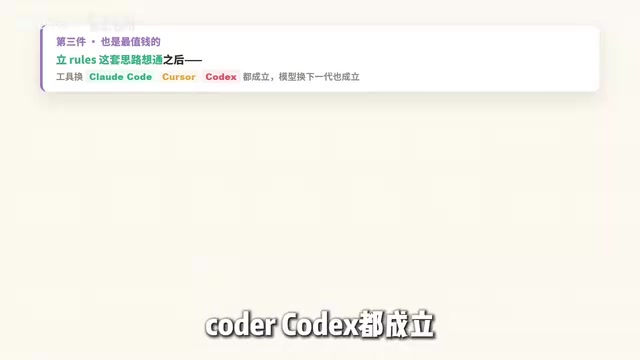
- The methodology works across tools and models — whether you switch to Claude Code, Cursor, or Codex, whether the model upgrades to the next generation or the one after that, your approach to managing AI shifts from relying on luck to stable, controllable delivery.
One person can reliably deliver work that used to require assembling a small team.
Final Thoughts
These Rules weren't dreamed up out of thin air — they were forged one by one through real projects, real mistakes, and real iterations. So don't copy them wholesale — take them, adapt them against your own project, and that's how they truly become useful.
Managing AI and managing projects are fundamentally the same thing. Establishing your Rules in an MD document, placing them at the very front of your engineering workflow — that's more effective than any remediation down the line.
Related articles

Xiaomi MIMO vs. Huawei Pangu AI Strategy Comparison: The Android vs. iOS Battle of the Agent Era
Xiaomi releases open-source MIMO Code while Huawei enters the Agent era with Pangu. Compare their AI strategies: Xiaomi's Android-like open ecosystem vs. Huawei's iOS-like vertical integration.
What Is Google WebMCP? A Deep Dive into the New Standard for AI Agents to Directly Invoke Web Functionality
A deep dive into Google WebMCP (Web Model Context Protocol): how it works, its technical implementation, and use cases. Learn how WebMCP lets AI Agents directly invoke web tools.

AI Can't Kill Old-School Programming: Why Fundamentals Are Still a Developer's Moat
Vibe Coding is trending, but can it replace solid fundamentals? A deep analysis of why core principles, systems thinking, and knowledge frameworks remain a developer's moat in the AI era.