Claude Code Installation Guide & The Five Stages of AI Programming Tools Explained
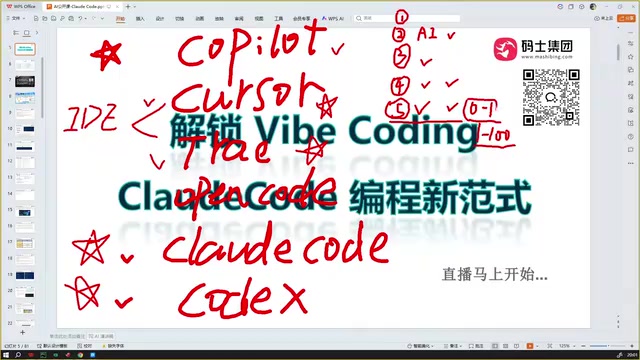
Claude Code installation guide and a deep dive into the five evolutionary stages of AI programming tools.
This article walks through the complete Claude Code installation process, maps out the five development stages of AI programming tools — from manual coding to intelligent agents — and analyzes why AI excels at building projects from scratch (0 to 1) but still struggles with iterative development (1 to 100). It also covers interrogative programming, the evolving role of developers, and practical troubleshooting tips.
The Five Stages of AI Programming Tools
Before diving into Claude Code, it's worth reviewing the evolution of AI programming tools. Understanding this trajectory helps us more accurately position Claude Code within the current technology ecosystem.
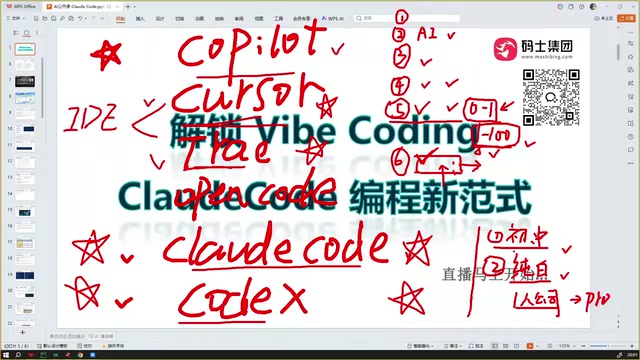
Stage One: Pure Manual Coding. Programmers relied entirely on writing code by hand, with no AI assistance whatsoever.
Stage Two: AI Conversational Assistance. In early 2023, after the emergence of large language models like ChatGPT, developers began obtaining code snippets through AI chat interfaces, then copying and pasting them into their development tools for debugging. This was essentially a "manual transfer" workflow. The core principle behind large language models (LLMs) is based on the Transformer architecture, pre-trained on massive code corpora (including public GitHub repositories, Stack Overflow Q&A, etc.), giving models the ability to understand programming language syntax, design patterns, and common algorithms. However, the interaction at this stage was fundamentally a "request-response" pattern — the AI had no awareness of the developer's project context, file structure, or dependencies, and generated code snippets often required extensive manual adaptation to fit into real projects.
Stage Three: The IDE Plugin Era. Plugins like GitHub Copilot could be installed directly in IDEs, offering code completion, comment inference, and snippet modification — but still only provided localized assistance. GitHub Copilot first released its technical preview in 2021, powered by OpenAI's Codex model (a code-fine-tuned version of GPT-3). The technical principle behind code completion involves feeding the current editor context (including code before and after the cursor, related open files, comments, etc.) as a prompt to the model, which then predicts the most likely subsequent code. The limitation of this approach is the restricted context window — it can typically only "see" the current file and a handful of related files, unable to understand the overall project architecture or inter-module dependencies.
Stage Four: AI-Native IDEs. Products like Cursor and Trae emerged, essentially functioning as Deep Agents that can directly manipulate project code through conversational interfaces for debugging and modification — though early versions had limited context understanding. Deep Agent is a key concept that distinguishes these tools from simple code completion — agents possess a "perceive-plan-execute" closed-loop capability: they can not only generate code but also read project file trees, understand module dependencies, invoke terminal commands, parse compilation errors, and autonomously fix issues. Products like Cursor achieve semantic search across large codebases by indexing entire projects (building vector embeddings of the codebase), enabling AI to precisely locate where modifications are needed across tens of thousands of lines of code. This architecture is essentially a deep application of RAG (Retrieval-Augmented Generation) technology in the code domain.
Stage Five: Happening Right Now. Claude Code, Codex, and the iteratively upgraded Cursor and Trae can not only write code but also autonomously debug, run, test, and commit, supporting multi-turn deep interactions with significantly improved code quality.
Strong at "0 to 1," Still Challenged at "1 to 100"
Current AI programming tools have a notable characteristic: the ability to build projects from scratch (0 to 1) is already excellent, but continuously iterating on existing frameworks and filling in business details (1 to 100) remains a clear weakness.
Specifically, when you give AI a detailed requirements document, it can quickly generate a well-structured, functionally viable project. But when you need to continuously add complex business logic, handle multi-module coordination, and perform deep debugging within that framework, AI performance drops off.
There are deep technical reasons behind this phenomenon. AI excels at the "0 to 1" stage because when building from scratch, the codebase is empty — there are no compatibility issues with existing code, and AI can organize the code structure according to its most proficient patterns and best practices. The difficulty at the "1 to 100" stage stems from multiple technical bottlenecks: first, the long-context comprehension problem — large projects may have hundreds of thousands of lines of code, far exceeding the model's context window; second, the implicit dependency problem — business logic contains vast amounts of domain knowledge and constraints not explicitly expressed in the code; and finally, the side-effect prediction problem — modifying one piece of code may trigger chain reactions in other modules, and AI currently struggles to comprehensively assess this "butterfly effect."
This also leads to a noteworthy trend — interrogative programming. Claude Code's Plan mode is a prime example: during the programming process, AI proactively asks you what kind of implementation approach and style you want, gradually clarifying requirements through multi-turn dialogue. Alibaba's Coze and similar products are also exploring comparable interaction paradigms.
Interrogative Programming represents a new paradigm in human-machine collaboration. Traditional AI programming interaction follows a one-way "command-execute" pattern, while interrogative programming introduces a bidirectional dialogue mechanism. Claude Code's Plan mode generates an implementation plan before execution, listing the files to be modified, the technical approach to be adopted, and potential risks, then confirms with the user. This pattern draws from the "design review" concept in software engineering, elevating AI from a passive executor to an active participant in design discussions. Alibaba's Coze platform takes this further by using workflow orchestration to let AI interact with users at multiple decision points, progressively narrowing requirement ambiguity.
Can Complete Beginners Use AI Programming? A Realistic Assessment
This is a question many people care about. Here's a pragmatic perspective:
- Demand for junior and mid-level programmer positions will likely decrease significantly — this is highly probable in the foreseeable future
- Complete beginners building enterprise-grade projects with AI alone is essentially impossible right now
- The future requirement for developers is broad technical knowledge, not necessarily deep expertise — understanding both frontend and backend, being familiar with both cloud-native technologies and data analysis
The "broad technical knowledge" mentioned here actually points to an evolution of the T-shaped talent model long discussed in the software industry. Traditional T-shaped talent emphasizes deep expertise in one area (the vertical bar of the T) while having basic understanding of other areas (the horizontal bar). The AI programming era is reshaping this model into a "π-shaped" or even "comb-shaped" profile — requiring moderate depth of understanding across multiple domains. Full-stack capability has become especially important: understanding frontend frameworks (React/Vue), backend architecture (microservices/Serverless), cloud-native technologies (Docker/Kubernetes), database design (SQL/NoSQL), and CI/CD pipelines — this knowledge forms the "meta-capability" for effectively guiding AI.
The value of technical breadth lies in this: when AI goes off track or makes mistakes, you can identify the problem and provide correct guidance. This is the irreplaceable human value in the "1 to 100" stage — the ability to steer AI is fundamentally built on technical understanding.
Regarding token costs, the DeepSeek V4 Pro model offers excellent cost-effectiveness with continuously declining token prices, making it suitable for Claude Code coding scenarios. A token is the basic unit by which large language models process text — one English word typically corresponds to 1-2 tokens, and one Chinese character typically corresponds to 1-3 tokens. In AI programming scenarios, token consumption far exceeds ordinary conversation — a single complete code generation task may involve thousands to tens of thousands of tokens in input (project context) and output (generated code). Domestic models like DeepSeek V4 Pro have dramatically reduced inference costs through MoE (Mixture of Experts) architecture, with token prices roughly one-tenth or even lower than GPT-4. Claude Code supports configuring different model backends, allowing developers to flexibly switch based on task complexity: low-cost models for simple tasks, high-performance models for critical architectural decisions, achieving a balance between cost and quality.
What Is Claude Code? Clarifying Core Concepts
Claude Code is not an IDE — it's a standalone AI programming tool. This is a point many beginners easily confuse.
- Cursor and Trae are IDEs (Integrated Development Environments) — after downloading and installing, you can write code directly within them
- Claude Code is a standalone tool that, once installed, can be configured as a plugin in various IDEs
- Claude Code's strongest suit is code writing, while also supporting research and documentation generation
Claude Code is developed by Anthropic, based on its Claude series of large language models. The fundamental difference from an IDE is this: an IDE is a software environment providing complete development features like code editing, compilation, and debugging, while Claude Code is an AI agent program that runs through a command-line interface (CLI). It interacts with the development environment by reading the file system, executing Shell commands, and calling APIs. The advantage of this design is decoupling — it's not bound to any specific IDE and can integrate with VS Code, JetBrains products, Cursor, or any other editor through LSP (Language Server Protocol) or plugin mechanisms. It can also run independently in a pure terminal environment, giving it unique advantages in CI/CD pipeline and remote server scenarios.
Think of it simply: Cursor is your "workbench," and Claude Code is the "intelligent assistant" you place on that workbench. The two can be used together or independently.
Claude Code Installation Guide
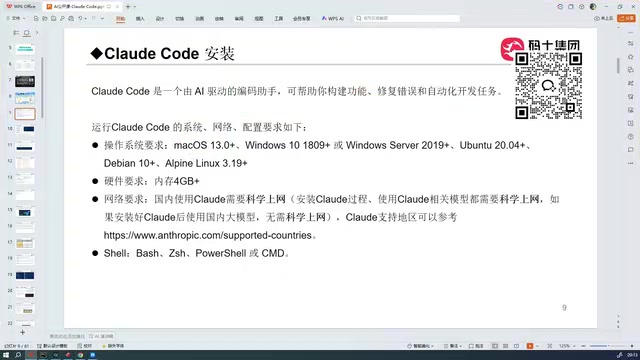
System Requirements
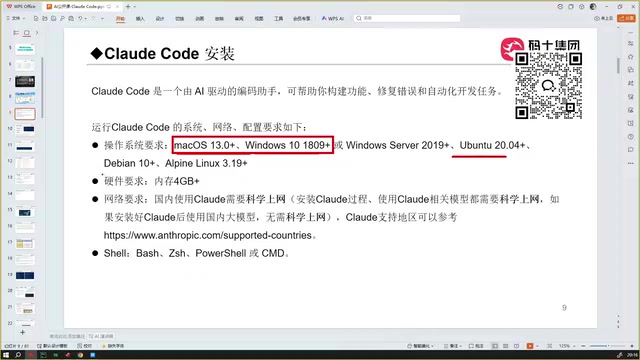
Before installing Claude Code, make sure your device meets the following conditions:
- Operating System: macOS, Windows, or Linux
- Memory: At least 4GB or more
- Network: VPN/proxy access required during installation (not needed during use)
- Terminal: Shell/command-line environment required
Installation Steps
macOS / Linux:
# Use the official installation command (VPN/proxy required)
Windows (PowerShell or CMD):
# Use the official Windows installation command
After installation, type claude in the terminal and press Enter to launch. On first run, it will ask whether you trust the current directory — confirm and you're ready to go.
Installation Failed? Common Troubleshooting
The most common issue during installation is incorrect network proxy configuration. Many VPN/proxy tools only proxy browser traffic without enabling global proxy. Here's how to troubleshoot:
- Run
ping google.comin the terminal - If your browser can access Google but the terminal can't ping it, global proxy is not enabled
- You need to find the Global Proxy or TUN Mode toggle in your proxy tool and enable it
It's worth explaining the technical differences between proxy modes here. Proxy tools offer multiple levels of proxying: browser proxy (or system proxy) only intercepts requests made through HTTP/HTTPS protocols, while command-line tools like npm, pip, and curl in the terminal don't use the system proxy by default — they require manually setting environment variables (such as HTTP_PROXY and HTTPS_PROXY). TUN mode (network tunnel mode) operates at the OS network layer, creating a virtual network adapter that takes over all network traffic, including terminal commands, Docker containers, and network requests from any application. This is why the terminal can only properly ping external networks after enabling TUN mode. Some tools also offer "Enhanced Mode" or "Virtual NIC Mode," which are essentially implementation variants of TUN.
If the terminal can successfully ping Google and receive data, then installing Claude Code won't have any network issues. A successful installation will show no red error messages in the terminal.
Summary and Outlook
Current AI programming tools have reached a fairly mature stage. As a flagship product of this wave, Claude Code performs excellently in "0 to 1" project construction. While there's still room for improvement in "1 to 100" continuous iteration capabilities, given the rapid progress in AI programming over the past six months, the future is promising.
For developers looking to get started with AI programming, here's a recommended progression:
- Set up your environment first — ensure Claude Code installs and runs properly
- Start with small projects — experience the complete "0 to 1" workflow
- Continuously broaden your technical knowledge — this is the core competitive advantage for mastering AI programming tools
- Focus on cost optimization — leverage cost-effective models like DeepSeek to reduce token expenses
Key Takeaways
Related articles
Xiaomi MIMO vs. Huawei Pangu AI Strategy Comparison: The Android vs. iOS Battle of the Agent Era
Xiaomi releases open-source MIMO Code while Huawei enters the Agent era with Pangu. Compare their AI strategies: Xiaomi's Android-like open ecosystem vs. Huawei's iOS-like vertical integration.
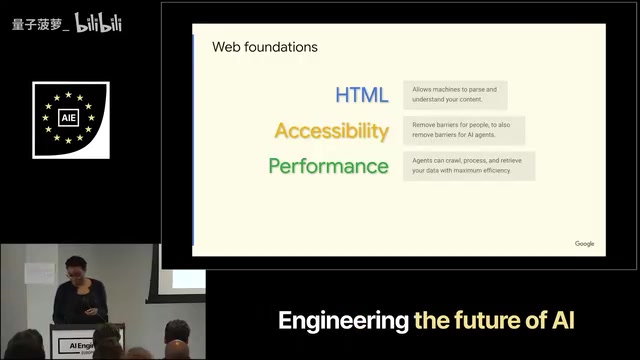
What Is Google WebMCP? A Deep Dive into the New Standard for AI Agents to Directly Invoke Web Functionality
A deep dive into Google WebMCP (Web Model Context Protocol): how it works, its technical implementation, and use cases. Learn how WebMCP lets AI Agents directly invoke web tools.
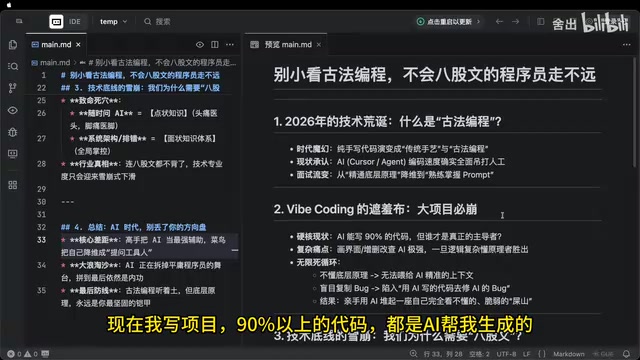
AI Can't Kill Old-School Programming: Why Fundamentals Are Still a Developer's Moat
Vibe Coding is trending, but can it replace solid fundamentals? A deep analysis of why core principles, systems thinking, and knowledge frameworks remain a developer's moat in the AI era.