Complete Guide to Codex Installation & DeepSeek Integration Troubleshooting
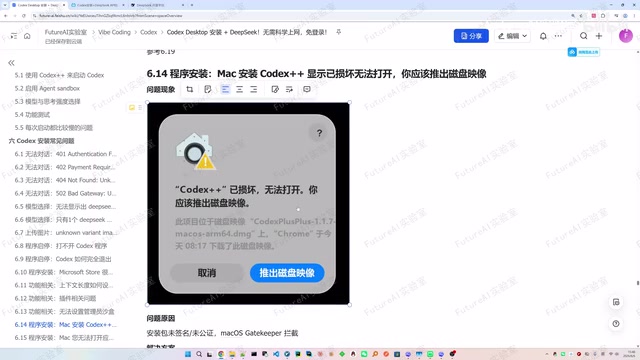
A comprehensive troubleshooting guide for Codex installation and DeepSeek API integration issues.
This article systematically covers common issues when installing Codex and integrating with the DeepSeek API. It addresses HTTP error codes (401, 402, 404, 502), display problems like missing models, program startup failures, and system compatibility issues on both Windows and Mac. A universal solution involving fresh configuration and full restart is provided as a catch-all fix.
Introduction
Codex is a popular AI-powered programming assistant, and pairing it with the DeepSeek API can significantly reduce usage costs. However, many users encounter various issues during installation and configuration—from 401 authentication failures to 502 gateway errors, from models not displaying to the program failing to start.
Based on extensive user feedback, this article systematically covers common issues and their solutions when installing Codex and integrating with the DeepSeek API, helping you troubleshoot and resolve problems in one place.
Three Key Checks Before Installation
Before troubleshooting any issue, confirm the following three points:
1. DeepSeek Account Must Have Funds
If you're using the DeepSeek API, you must add funds after registration for it to work properly. The minimum top-up is 1 RMB. Without funds, you'll get a 402 error (insufficient balance).
2. Use Codex++ Version V1.2.3
It's strongly recommended to use Codex++ V1.2.3. Different versions have varying provider configuration interfaces, and older versions may cause configuration mismatches. If you're on an older version, upgrade first. The upgrade process is simple: uninstall the old version and install the new one.
3. DeepSeek API Configuration Must Be Precise
The root cause of many issues lies in the API configuration step. Pay attention to:
- When adding a provider in Codex++, options may differ between versions—use V1.2.3 as the reference
- Always test the connection after configuration
- The most critical step: enable the provider. Many users complete the configuration but forget to enable it, rendering it unusable
- In the Codex++ management tool settings, the API Key must match the one in the provider configuration
HTTP Error Code Troubleshooting
401 Unauthorized: Authentication Failed
Symptom: Getting 401 Unauthorized when sending messages or testing the connection.
Cause: Incorrect API Key.
Solution:
- Create a new API Key on the DeepSeek website
- Note: The API Key is the string starting with SK generated after clicking "Create"—not the name you entered
- Follow the complete configuration process (sections 3.3-3.6) from scratch
- Fully exit Codex++ and Codex (including background processes), then restart
402 Payment Required: Insufficient Balance
Symptom: Getting 402 Payment Required or balance-related errors on the chat page or during testing.
Solution: Simply add funds on the DeepSeek website.
404 Not Found: Incorrect URL Configuration
Symptom: Request returns 404 Not Found.
Cause: Some users reported this was caused by accidentally copying an extra space when setting the Base URL.
Solution: Carefully check the Base URL configuration to ensure there are no extra spaces or characters. If the issue persists, refer to the universal solution below.
502 Bad Gateway: Network Proxy Conflict
Symptom: Request returns 502 Bad Gateway—this is a very frequently reported issue.
Cause: A local network proxy (VPN/proxy tool) is also proxying local addresses, intercepting communication between Codex++ and the local Codex instance.
Solution:
- Fully exit all Codex++ and Codex-related processes
- Configure "Do not proxy local addresses" in Windows settings
- Different proxy software may require internal configuration changes
- If the above doesn't work, disable the proxy entirely and try again
- If still unresolved, use the universal solution
Feature & Display Issues
DeepSeek Option Not Showing
If you can't see the DeepSeek option in the model selection dropdown, the Codex++ configuration likely hasn't taken effect. Solutions:
- Fully exit and restart Codex++ (note: restart Codex++, not Codex itself)
- After restarting, click the plugin and switch to a new conversation—the option may appear
- If still not working, refer to the universal solution
Incomplete Model List
Only DeepSeek Pro or only DeepSeek Flash appears, not both models.
Cause: The "Model List" field in the provider configuration was left empty.
Solution: Go to the provider edit page, click "Fetch from upstream" to auto-populate the model list, or manually copy and paste model names. Restart Codex++ after configuration.
Image Feature Not Supported
Getting an "unsupported" error when asking questions with images. This is because DeepSeek currently does not support multimodal input—sending images will cause errors. The solution is to start a new conversation and avoid continuing in sessions that contain images.
Context Length Display Anomaly
Even after setting a 1 million token context length, the chat page shows 256K. According to the Codex++ author's response on GitHub, the setting has actually taken effect—it's just a UI display bug. This information is for reference only and hasn't been fully verified.
Model Identifies Itself as GPT Instead of DeepSeek
This is normal behavior. Codex includes role definitions in the prompt sent to the LLM, and the model responds according to the preset role. As long as you can confirm billing activity on your DeepSeek account, you're indeed using DeepSeek.
Program & System Issues
Program Won't Start
Clicking start or restart for Codex++ has no response. Suggestions:
- Upgrade to V1.2.3 first
- Watch whether the Codex icon briefly appears in the system tray (bottom-right corner) during startup
- If the icon appears then immediately disappears, right-click the icon and select Open Codex the instant it appears
Microsoft Store Unavailable
Codex installation depends on the Microsoft Store. If the Store is unavailable, enabling the Windows Update service should resolve it.
VC Runtime Not Found
Download the Visual C++ Redistributable installer directly from Microsoft's official website, install it, and try again.
Local Database Error
If you get Codex cannot access local database during installation, delete the corresponding directory and reinstall.
Mac Installation Issues
- "Damaged and can't be opened": The installer isn't signed. Run the
xattrcommand in Terminal to remove the quarantine attribute, then reopen - "This app is not supported on this computer": This may be an Intel-based Mac with system version compatibility issues
Universal Solution (Resolves 90%+ of Issues)
If none of the targeted solutions above work, try this "catch-all" approach:
- Upgrade Codex++ to V1.2.3 (uninstall old version, install new one)
- Create a new API Key on the DeepSeek website
- Create a new provider in Codex++ (don't modify the old one—create a fresh one)
- Strictly follow the configuration documentation (sections 3.3-3.6) for all steps
- Fully exit Codex++ and Codex (including background processes in Task Manager)
- Restart Codex++ (note: start Codex++, not Codex directly)
The core idea behind this process: replace potentially broken old configurations with completely fresh ones, and ensure the new configuration takes effect through a full restart. This has been tested to resolve the vast majority of issues.
Conclusion
While the Codex + DeepSeek combination offers excellent value, there are plenty of pitfalls in the configuration process. Based on the issues covered in this article, more than half of all problems stem from the API configuration step—wrong API Key, spaces in the Base URL, empty model list, provider not enabled, etc. The other major category of issues relates to network proxy conflicts and version inconsistencies.
When encountering problems, start by matching your error code against this article to identify the issue, then try the corresponding solution. If nothing works, the universal solution (fresh configuration + full restart) is your last resort.
Related articles
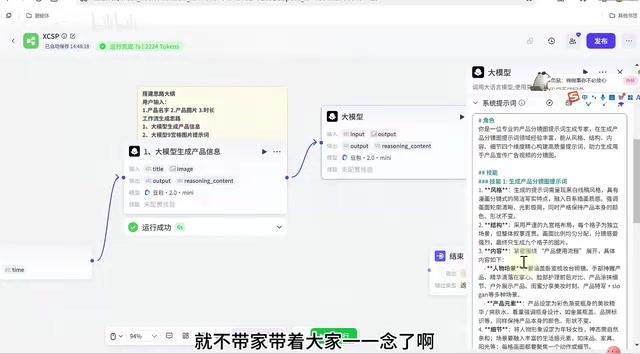
Coze Workflow in Practice: Complete Tutorial for AI One-Click Product Promo Video Generation
Step-by-step guide to building a Coze workflow for AI product promo videos, integrating HappyHours and Jimeng across 12 nodes with nine-grid storyboards and polling loops.
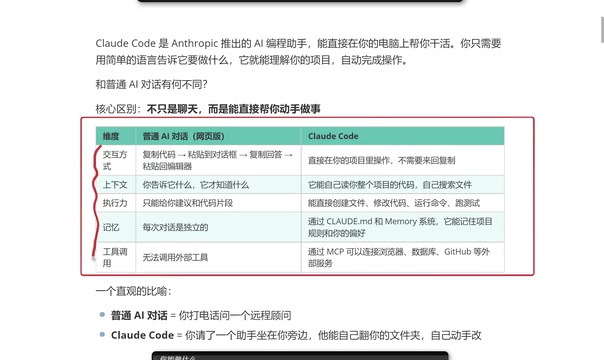
Getting Started with Claude Code: 5 Key Differences from Traditional AI Chatbots
Explore 5 key differences between Claude Code and traditional AI chatbots like ChatGPT, covering interaction, context, execution, memory, and tool integration.

Your Pension Forced to Buy AI Bubble Stocks: The Truth Behind Nasdaq's Rule Changes
Nasdaq's fast-track rule changes may force your 401K and pension funds to buy SpaceX, OpenAI, and Anthropic stock. Analysis of the $4T valuation bubble and what investors can do.