Connecting OpenAI Codex to Chinese AI Models: A Zero-Barrier AI Programming Guide
Connect OpenAI Codex to Chinese AI models via CC Switch for accessible AI-powered coding.
This guide shows how to use CC Switch, an open-source relay tool, to connect OpenAI Codex to Chinese AI models like DeepSeek and Volcano Engine Coding Plan. It covers installation, API configuration, model switching, cost analysis, and demonstrates generating a complete 2048 game with zero coding experience.
OpenAI Codex is a powerful AI coding agent tool that ships with GPT-5.5 by default, but users in China cannot access it directly. This article walks you through using the relay tool CC Switch to connect Codex to Chinese AI models (such as Volcano Engine Coding Plan and DeepSeek), complete with a hands-on demo of generating a fully functional 2048 game.
The term "AI Coding Agent" refers to a new development paradigm distinct from traditional code completion tools (like early GitHub Copilot). Traditional tools can only suggest single or multiple lines of code at the cursor position, whereas Agent-mode tools possess full capabilities for task understanding, planning, execution, and self-correction — they can interpret a high-level requirement description, autonomously break it down into subtasks, create files, write code, debug, and even automatically backtrack to fix errors when something goes wrong. This leap from "assisted completion" to "autonomous execution" represents the most significant technical trend in AI programming during 2024-2025.
Downloading and Installing OpenAI Codex
First, head to the OpenAI website to download the Codex desktop application. The Mac version is currently available — simply download and install it to get started.
Note that logging into Codex has certain requirements: Chinese phone numbers currently cannot be used for login. You'll need a Google account plus an overseas phone number for verification codes, along with a VPN connection. Once logged in, you'll be taken to the Codex main interface.
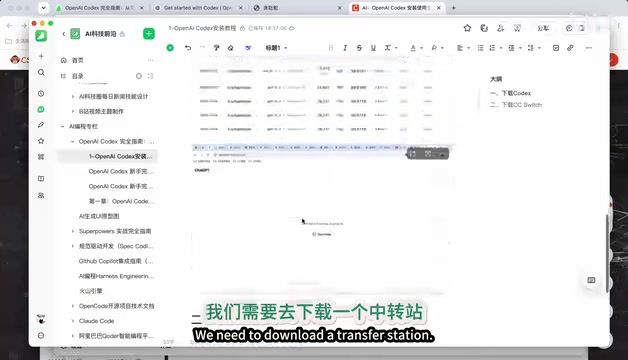
Since the default GPT-5.5 cannot be called directly from China, we need a relay tool to forward requests to Chinese models. The recommended tool here is CC Switch.
CC Switch: A Unified Management Hub for AI Programming Tools
CC Switch is an open-source AI programming tool manager available for free download on GitHub. Its core capabilities include:
- Unified management of multiple AI programming tools: Supports configuration management for mainstream tools like Cursor, Google Gemini, Anthropic Claude, OpenCode, and more
- Local route forwarding: Proxies and forwards API requests to designated model providers
- Usage statistics: Real-time tracking of token consumption and cost expenditure
Technically, CC Switch is essentially a local reverse proxy server. When Codex sends an API request, it doesn't go directly to OpenAI's servers — instead, CC Switch intercepts it first. CC Switch then adapts and rewrites the request — converting OpenAI-format API calls (following the OpenAI Chat Completions API specification) into a format the target model provider can understand, then forwards it to API endpoints of Chinese models like DeepSeek or Volcano Engine. When the response comes back, CC Switch converts it back into an OpenAI-compatible format, allowing Codex to receive the results seamlessly. This "protocol translation" mechanism enables virtually any tool compatible with the OpenAI API format to integrate with Chinese models, dramatically reducing migration costs.
Download the version for your operating system and install it directly. On Mac, for example, download the macOS version and drag it into the Applications folder to complete installation.
Configuring the DeepSeek Model
Obtaining a DeepSeek API Key
In CC Switch, click Add and select DeepSeek Official — the tool will automatically preset the API address. Next, obtain your API Key:
- Click "Get API Key" to navigate to the DeepSeek website
- Create a new API Key and copy it
- Return to CC Switch and paste the API Key
- Click "Get Model List" — the system will automatically fetch DeepSeek's Flash and Pro versions
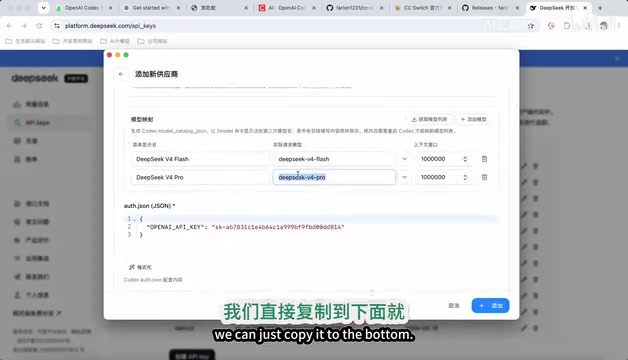
The Flash model is used by default for lower costs; if you need to switch to the Pro model, simply copy the model ID into the default model field. Other options like model testing and billing configuration don't require additional setup — just click "Add" to complete the configuration.
It's worth understanding the core differences between DeepSeek Flash and Pro. DeepSeek Flash uses a lightweight version of the MoE (Mixture of Experts) architecture, activating only a subset of expert networks during each inference pass. This makes it faster and cheaper per call, ideal for latency-sensitive scenarios like code completion and simple Q&A. DeepSeek Pro is the full-parameter flagship model that excels at complex reasoning, long-context understanding, and multi-step code generation, though its per-token pricing is correspondingly higher. For everyday AI-assisted programming, the Flash model is more than adequate in most scenarios; when tackling architecture design, complex algorithm implementation, or other challenging tasks, switching to Pro will yield better results.
Once added, enable the model and turn on billing usage queries to check your remaining balance in real time. After configuration, you need to quit and reopen Codex for the new model settings to take effect.
Cost Comparison Analysis
Although DeepSeek's API pricing is very low, cumulative costs in high-frequency usage scenarios shouldn't be overlooked. A notable characteristic of AI coding agents is that their token consumption far exceeds that of regular conversations — a single complete code generation task may involve tens or even hundreds of thousands of tokens in context passing (including system prompts, project file contents, multi-round reasoning, etc.). This means that even at prices as low as a few yuan per million tokens, monthly expenses under sustained heavy use could reach tens or even hundreds of yuan. By comparison, Volcano Engine's Coding Plan offers better cost control, making it particularly suitable for scenarios involving frequent calls during daily development.
Configuring Volcano Engine Coding Plan
Subscription and API Key Setup
Volcano Engine Coding Plan offers promotional pricing for new users: 9.9 yuan for the Basic plan and 50 yuan for the Pro plan. After subscribing, follow these steps:
- Go to the Volcano Ark console
- Navigate to the API Key management page
- Create and copy your API Key
- In CC Switch, add Volcano Engine Coding Plan and paste the API Key
- Click "Get Model List" to verify the connection
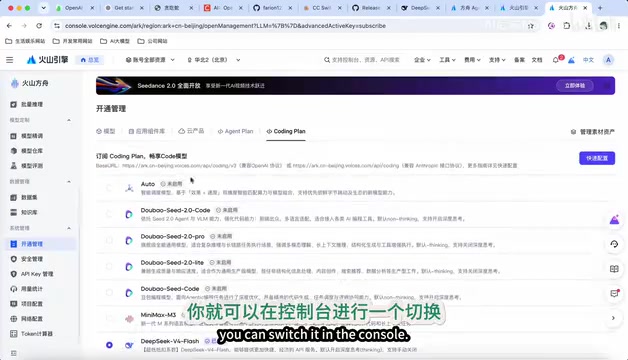
Model Selection and Intelligent Routing
Volcano Engine Coding Plan supports switching between multiple models, including Flash, MiniMax ML3, Gemini 5.1, and Doubao models. A standout feature is Auto mode — the system intelligently routes tasks to the most suitable model based on complexity, striking a balance between speed and quality.
Volcano Engine Ark is ByteDance's large model service platform, positioned similarly to AWS Bedrock or Azure OpenAI Service, providing developers with a unified model invocation endpoint. Its Coding Plan is a subscription package specifically designed for AI programming scenarios, bundling multiple models so users don't need to integrate with each model provider's API separately. The underlying logic of Auto intelligent routing is a request routing strategy: the platform performs preliminary analysis of user input (such as token length, task type keywords, context complexity, etc.), then routes simple tasks to lightweight models (like the Flash series) to reduce latency and cost, while routing complex tasks to flagship models to ensure output quality. This "model router" design philosophy has become increasingly common in AI infrastructure in 2025, essentially an engineering practice for optimizing cost-effectiveness in a multi-model ecosystem.
If you need to specify a particular model, you can copy the corresponding model ID from the Volcano Ark backend for manual switching. Note that Volcano Engine's usage statistics feature may not retrieve data properly — it's recommended to disable this option to avoid error messages from failed queries.
As with DeepSeek, you'll need to restart Codex after configuration for changes to take effect.
Codex Core Features and Settings Explained
Task Execution Modes
Codex offers several task execution modes suited to different development scenarios:
- Auto-Approve Mode: Automatically confirms all operations without manual step-by-step approval, ideal for simple and straightforward tasks
- Plan Mode: Creates detailed plans and assessments before writing code, reducing the likelihood of rework
- Goal Mode: By defining objectives, the Agent continuously loops until the goal is achieved, similar to a Loop Engine
These modes reflect core concepts in current AI Agent architecture. Auto-Approve Mode corresponds to the simplest "single execution" paradigm, where the Agent receives instructions and completes all operations in one pass. Plan Mode draws from the ReAct (Reasoning + Acting) framework — the Agent performs explicit reasoning and planning before taking action, decomposing complex tasks into manageable steps, with each step following a "think → act → observe" cycle. This approach significantly improves success rates for complex tasks. Goal Mode goes further by introducing an autonomous Agent-like loop execution mechanism: the Agent continuously evaluates the gap between the current state and the target state, repeatedly executing a "plan → code → test → fix" closed loop until all acceptance criteria are met. This evolution from "instruction-driven" to "goal-driven" represents the technical direction of AI programming tools transitioning from assistive tools to autonomous developer roles.
Advanced Features Overview
In the settings panel, Codex also provides rich extensibility:
- MCP Servers: Add MCP services like Figma, browser tools, and more
- Browser Control: Allows Codex to control the browser for automated operations such as auto-login, posting, etc.
- Computer Control: Once installed, can operate local applications to complete automated tasks
- Personalization: Supports custom system prompts and memory collection on startup
- Repository Connection: Can connect to remote code repositories via SSE
MCP (Model Context Protocol) is a standardized protocol proposed and open-sourced by Anthropic in late 2024, designed to solve the connection problem between AI models and external tools and data sources. Before MCP, every AI tool needed to develop separate integration interfaces for each external service, leading to severe ecosystem fragmentation. MCP defines a unified communication specification that enables AI Agents to invoke external tools in a standardized way (such as database queries, file system operations, browser control, third-party API calls, etc.). Think of MCP as the "USB port of the AI era" — as long as both tools and models follow this protocol, they can plug-and-play with each other. Codex's support for MCP means users can infinitely extend the Agent's capabilities by adding MCP servers, for example, letting it directly query databases, operate design tools, or interact with project management systems.
Hands-On Demo: Generating a 2048 Game in One Go
With configuration complete, let's verify the results with a practical example. Create a new task in Codex, type "make a 2048 game," and select "Auto-Approve" mode to let the Agent execute automatically.
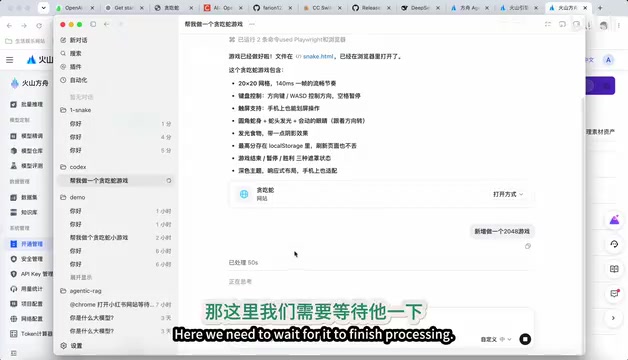
Codex's workflow is remarkably clear:
- Thinking Phase: Extensive upfront reasoning to plan the complete implementation. During this phase, the Agent analyzes the core mechanics of 2048 — the 4×4 grid, number tile generation and merging rules, directional swipe handling, score calculation logic, and game-over conditions — then plans the code structure and file organization accordingly.
- Coding Phase: Automatically generates the HTML file and related code. The Agent typically integrates game logic (JavaScript), page structure (HTML), and styling (CSS) into one or more files, including complete implementations of grid rendering, keyboard event listeners, tile animations, and more.
- Deployment Phase: Once complete, the game can be opened and run directly in a local browser
The resulting 2048 game page was generated in a single pass — complete interface, fully functional. The entire process required zero programming experience, fully demonstrating the practical capabilities of an AI coding agent.
Conclusion
Using the CC Switch relay tool, we successfully connected OpenAI Codex to Chinese AI models, solving the pain point of Chinese users being unable to directly access GPT-5.5. Volcano Engine Coding Plan excels in both cost and usability, and combined with Codex's powerful Agent capabilities, even users with zero programming background can quickly build websites, applications, and mini-games. You can further explore advanced features like MCP services and browser control to unlock even more AI programming potential.
From a broader perspective, the emergence of relay tools like CC Switch reflects an important trend in the current AI development ecosystem: the decoupling of the model layer from the application layer. Excellent AI programming tools (like Codex) provide outstanding Agent frameworks and user experiences, while various model providers compete on reasoning capability and cost efficiency. Through standardized API protocols and relay adaptation layers, users can freely combine "the best tools + the most suitable models" without being locked into a single vendor. This flexibility not only lowers barriers to entry and costs but also opens up vast opportunities for Chinese large language models to be deployed in real-world development scenarios.
Key Takeaways
Related articles
SpaceX: A Multi-Dimensional Analysis of Engineering Marvels, Business Revolution, and the Mars Vision
A deep multi-dimensional analysis of SpaceX covering engineering breakthroughs, business revolution, organizational culture, and the Mars colonization vision that is redefining the boundaries of human space exploration.
Claude Code Practical Guide: From Installation & Configuration to Production-Grade Project Delivery
Complete guide to Claude Code + Opus for production projects: CC Switch setup, engineering-minded prompting, and a real case study delivering a complex payment system in 4 hours.

Tutorial: Using Claude Code to Auto-Generate Video Chapter Progress Bar Animations
Use Claude Code's Skill mechanism and Remotion to auto-generate video chapter progress bar animations from subtitle files. Six built-in styles, custom stickers, and one-click rendering.