Cursor Editor Diff Marker Style Settings: Classic +/- Markers Return
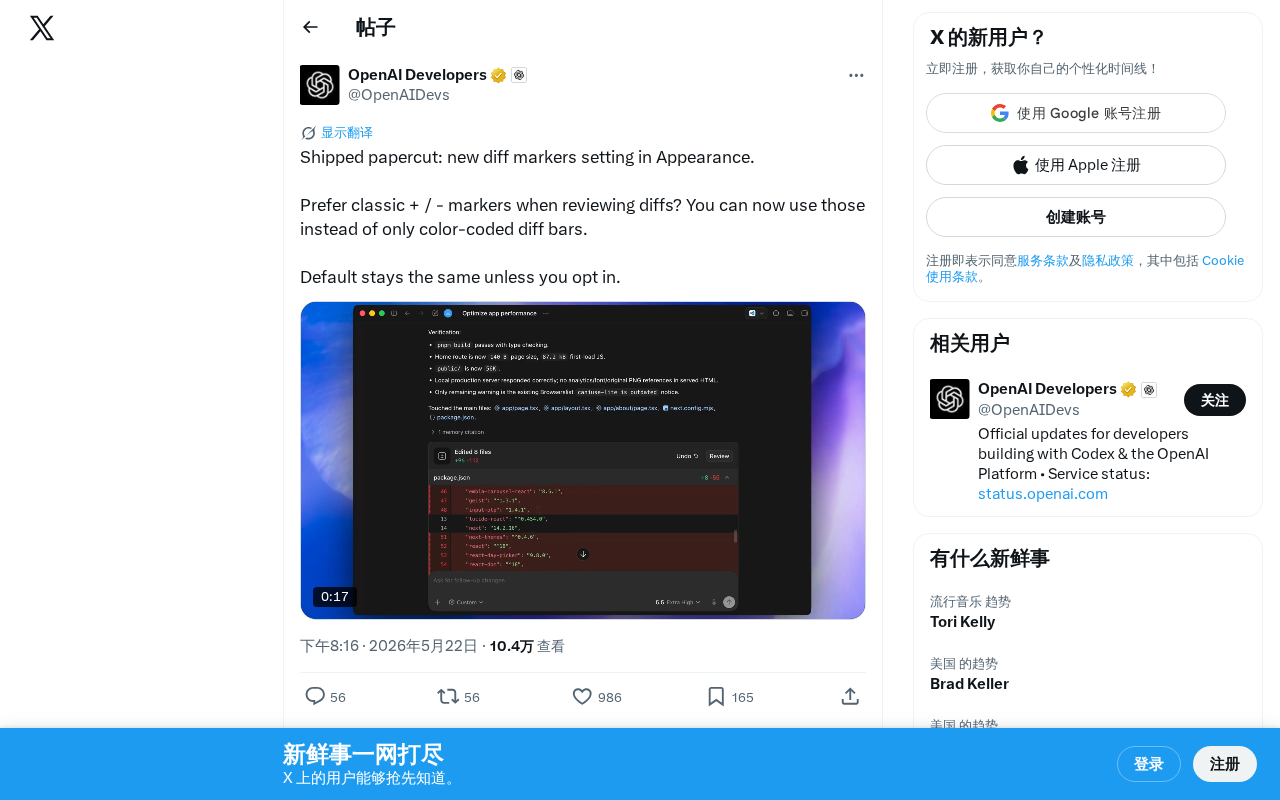
Cursor adds classic +/- Diff markers as an alternative to color-coded bars in Appearance settings.
Cursor editor introduced a new Appearance setting that lets developers switch from default color-coded diff bars to classic +/- text markers. This opt-in feature improves accessibility for color-blind users, aligns with Git CLI conventions, and enhances code review readability in AI-assisted workflows where quickly understanding changes is critical.
A Small but Beautiful UX Improvement
Cursor editor recently rolled out a subtle refinement: a new Diff marker style option in the Appearance settings. Users can now choose to use classic + / - text markers instead of the default color-coded diff bars to view code differences.
Diff (difference comparison) is one of the most fundamental and important concepts in software development. It originated from the diff tool in 1970s Unix systems, developed by Douglas McIlroy at Bell Labs, using the Longest Common Subsequence (LCS) algorithm to efficiently calculate differences between two files. In modern development workflows, Diff is used not only for change tracking in version control systems (like Git) but is also an indispensable part of code review, continuous integration, and automated testing. The most widely used Unified Diff format marks added lines with +, deleted lines with -, unchanged lines with spaces, and annotates line number ranges with @@ symbols.
Why This Change Matters
Advantages of Classic Markers
For many developers coming from Git command line or traditional code review tools (like GitHub PRs, GitLab MRs), + and - markers are the most intuitive and familiar way to represent Diffs. This marking style has several clear advantages:
- Clearer semantics:
+represents added lines,-represents deleted lines — immediately obvious - Accessibility-friendly: Doesn't rely on color differentiation, making it more friendly for users with color vision deficiency
- Consistent with terminal habits: Matches
git diffcommand-line output, reducing cognitive switching costs
In terms of accessibility design, this change is particularly significant. Approximately 300 million people worldwide have some degree of Color Vision Deficiency (CVD), with an incidence rate of about 8% in males and 0.5% in females. In the software development industry, this means a mid-sized development team likely has one or two developers with color vision deficiency. Traditional color-coded Diff views typically use red and green to distinguish deletions and additions, yet red-green color blindness (Deuteranopia and Protanopia) happens to be the most common type of color vision deficiency. The WCAG (Web Content Accessibility Guidelines) 2.1 standard explicitly requires that information should not be conveyed through color as the sole visual channel. Providing text markers as an alternative is precisely in line with accessibility design principles.
Default Behavior Unchanged
Interestingly, the Cursor team adopted a conservative strategy when launching this feature — the default settings remain unchanged, and users need to actively enable it (opt-in) in the Appearance settings. This approach accommodates users who are comfortable with the existing interface while providing choice for those who prefer the classic style.
The Product Philosophy of Papercut-Style Iteration
The official team described this update as a "shipped papercut" (fixing a minor pain point like a paper cut), which is an interesting framing in itself. In product development, "papercut" refers to experience issues that aren't serious bugs but continuously cause mild discomfort for users.
The term papercut has clear methodological support in the product management field. Google's Android team has dedicated "Papercut Rounds" across multiple version iterations, focusing on fixing these tiny but cumulatively significant issues. Research shows that users' overall satisfaction with a product is often not determined by a few major features, but is collectively shaped by the smoothness of dozens of daily interactions — this is the reverse application of the so-called "Death by a Thousand Cuts" effect: rather than letting countless small frictions gradually erode user patience, continuously fixing these papercuts accumulates user goodwill.
While these improvements won't make headlines in major version updates, they are often key to improving daily user satisfaction. For AI programming tools, code review is one of the core touchpoints in developer-AI collaboration — after AI generates or modifies code, developers need to quickly and accurately understand the changes. The readability of the Diff view directly impacts the efficiency of this process.
In AI-assisted programming workflows, the importance of the code review step is further amplified. Unlike traditional manually-written code, AI-generated code changes often involve larger-scale modifications, and developers need to understand and verify the correctness and security of these changes in a short time. Cursor, as an AI programming editor based on VS Code, has one core interaction pattern: "AI proposes changes → developer reviews → accept or reject." In this loop, the Diff view is the developer's primary source of information for making judgments. If Diff readability is poor, developers may tend to accept AI suggestions without review, which poses risks to code quality and security. Therefore, optimizing how the Diff view is presented is essentially optimizing the trust verification mechanism in human-AI collaboration.
Summary
This is a classic "small feature, big experience" update. The Cursor team's continued attention to these detailed refinements shows their deep understanding of developer workflows. If you prefer the classic + / - Diff markers, you can now enable this option in Cursor's Appearance settings.
Key Takeaways
Related articles

Coze Workflow in Practice: Complete Tutorial for AI One-Click Product Promo Video Generation
Step-by-step guide to building a Coze workflow for AI product promo videos, integrating HappyHours and Jimeng across 12 nodes with nine-grid storyboards and polling loops.
Getting Started with Claude Code: 5 Key Differences from Traditional AI Chatbots
Explore 5 key differences between Claude Code and traditional AI chatbots like ChatGPT, covering interaction, context, execution, memory, and tool integration.

Your Pension Forced to Buy AI Bubble Stocks: The Truth Behind Nasdaq's Rule Changes
Nasdaq's fast-track rule changes may force your 401K and pension funds to buy SpaceX, OpenAI, and Anthropic stock. Analysis of the $4T valuation bubble and what investors can do.