Cursor in Action: Building a Library Management System in 15 Minutes — Full Walkthrough
A step-by-step guide to building a full-stack library system in 15 minutes using Cursor AI.
This article walks through how Cursor AI was used to build a complete FastAPI + Vue3 library borrowing management system in just 15 minutes. It covers structured prompt design, the Plan-then-Build strategy using GPT-4.0 and Claude 3.5 Sonnet, scaffolding projects with standard tools before handing off to AI, and practical bug-fixing techniques — offering actionable lessons for AI-assisted development.
Introduction
How long does it really take to build a complete full-stack project with an AI coding tool? Bilibili creator Java1234 Xiaofeng demonstrated the answer with a real-world example — in just 15 minutes, he used Cursor to generate a library borrowing management system built on FastAPI + Vue3. This article provides a complete walkthrough of the key steps, prompt design techniques, and bug-fixing lessons from the development process.
Requirements Design: Giving AI a Clear "Specification"
The biggest problem most people face when using AI coding tools isn't the tool itself — it's that their requirements aren't clear enough. In this project, Xiaofeng showcased a highly structured requirements prompt that's well worth learning from.
Core Requirements Elements
The prompt covered the following key details:
- Tech stack specification: Backend with FastAPI (Python), frontend with Vue3 + Element Plus
- Directory structure convention: Backend in the Server directory, frontend in the Client directory
- Database configuration: MySQL 8, port 3308, with generated table creation SQL and test data
- Complexity positioning: Suitable for an undergraduate thesis project, moderate complexity
- Code standards: All classes and methods annotated with Chinese comments
- File management: Uploaded images stored uniformly in an uploads directory at the disk root
- UI requirements: Clean and polished design, with data statistics charts on the homepage
The design philosophy behind this prompt is well worth studying — instead of vaguely saying "build me a library system," it front-loads every detail including tech stack choices, directory structure, database configuration, and coding standards. This way, the AI-generated code aligns with actual requirements on the first pass, minimizing rework.
Tech Stack Selection Explained
It's worth explaining why the FastAPI + Vue3 stack was chosen. FastAPI is one of the fastest-growing web frameworks in the Python ecosystem, released by Sebastián Ramírez in 2018. Compared to Django and Flask, FastAPI's core advantages include: automatic API documentation generation (Swagger UI and ReDoc) based on Python Type Hints, native support for asynchronous programming (async/await), and extremely high runtime performance — official benchmarks show performance approaching Node.js and Go. FastAPI is built on Starlette (a high-performance ASGI framework) and Pydantic (a data validation library), which means it requires virtually zero extra code for request parameter validation and serialization. For thesis projects or small-to-medium applications, FastAPI has a much gentler learning curve than Django while offering more out-of-the-box functionality than Flask.
On the frontend side, Vue3 is the third major version of the Vue.js framework, officially released in September 2020, introducing important features like the Composition API, Teleport, and Fragments. The Composition API allows developers to organize component logic in a functional style, solving the code organization chaos that plagued complex components under Vue2's Options API. Element Plus is the Vue3 version of Element UI, open-sourced by the Ele.me team, providing a rich set of enterprise-grade UI components (tables, forms, dialogs, pagination, etc.) that are ideal for rapidly building admin dashboards. This tech stack enjoys extremely high adoption in the Chinese developer community and is one of the most common frontend choices for university thesis projects.
Four-Step Development Process in Detail
The entire development process was broken down into four clear steps, each with a well-defined objective.
Step 1: Create the FastAPI Backend Project
First, create a parent project directory on the local disk, then create an empty Server directory. Open PyCharm, select the FastAPI project template, configure a Python 11 virtual environment, and point the project to the Server directory. After creation, there's only a default main.py file.
The key point here: set up the project skeleton and virtual environment with the IDE first, rather than having Cursor build everything from scratch. This ensures the Python environment is configured correctly and avoids dependency installation issues later.
Step 2: Create the Vue3 Frontend Project
The frontend project is created using the Vite build tool. In the command line, enter npm create vite@latest, set the project name to client, and select the Vue framework with JavaScript. Vite automatically generates the project structure and installs dependencies.
Vite was developed by Evan You, the creator of Vue.js, and represents a next-generation frontend build tool. Traditional Webpack needs to bundle all modules before starting the dev server — the larger the project, the slower the startup. Vite leverages the browser's native ES Modules (ESM) support — in development, it doesn't bundle at all but compiles on demand, only compiling the module the browser requests. This means startup is nearly instant regardless of project size. For production builds, Vite uses Rollup under the hood for bundle optimization. This "ESM for development, Rollup for production" dual-engine strategy gives Vite significant advantages over Webpack in both developer experience and build performance.
This step follows the same pattern: create the project skeleton with standard tooling first, then hand it off to AI to fill in the business code. This "manual scaffolding + AI content" collaboration model is far more stable than relying entirely on AI to generate everything from scratch.
Step 3: Cursor AI Generates the Project Code
This is the core phase of the entire workflow. Open the parent directory in Cursor (containing both the Server and Client subdirectories), then start an AI conversation.
The Plan-then-Build strategy is critical. Xiaofeng didn't ask the AI to generate code directly. Instead, he first used Plan mode (selecting the GPT-4.0 model) to let the AI understand the requirements and output a proposal. The AI proactively asked questions like "How should the system roles and feature scope be designed?" — at which point clear answers were needed:
- Dual-role design: Admin (manages books, borrowing, etc.) and Reader/Student (login, search, borrow)
- Borrowing business rules: Basic borrow/return, borrowing limit caps, overdue management, renewal functionality
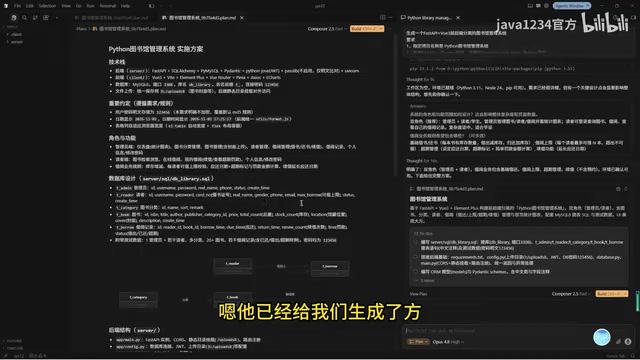
The AI-generated proposal included a complete database design (user, category, book tables, etc.), backend API structure, and frontend page structure. After confirming the proposal was correct, he switched to Build mode (selecting Claude 3.5 Sonnet) to have the AI formally generate the code.
Why Use Different Models for Plan and Build?
A noteworthy detail: Plan uses GPT-4.0, Build uses Claude 3.5. This "one model for planning, another for coding" strategy fully leverages the strengths of different models — GPT-4.0 excels at understanding complex requirements and designing solutions, while Claude performs better in code generation accuracy and completeness.
This multi-model collaboration approach has deep theoretical roots in software engineering — it's essentially decoupling "thinking" from "execution." In the LLM domain, this aligns with Chain-of-Thought prompting techniques — having the model reason first before outputting results significantly improves completion quality on complex tasks. This also reflects a current trend in AI engineering practice: no single model performs optimally across all tasks, and thoughtful Model Orchestration is often more effective than simply chasing the most powerful model.
After generation was complete, two things needed to be done:
- Execute the generated SQL scripts in MySQL to create the database and tables
- Start both frontend and backend services separately for verification
The backend was started using the UV library (uvicorn), and the frontend with npm run dev. Both services started successfully, and basic functionality was working. Here, uvicorn is a high-performance ASGI server based on uvloop and httptools — the standard way to run FastAPI applications.
Step 4: Testing and Bug Fixing
Code generation isn't the end of the story. Each module's functionality needs to be verified one by one, with fixes and optimizations applied for any issues discovered.
Bug Fixes and Feature Optimization
UI Adjustment: Book Cover Display Optimization
In the AI-generated initial version, the reader center's book browsing page had a UI issue — book cover images were displayed as horizontal rectangles, which didn't look great.
Xiaofeng simply described the modification in natural language within Cursor: "In the reader center book browsing module, change the book image display from horizontal rectangle to vertical rectangle." The AI quickly made the change, and the image display improved noticeably, showing complete book covers.

Functional Verification: Borrowing Workflow Testing
The system's core borrowing workflow was tested and verified to be essentially correct:
- Borrowing: Readers can click to borrow from the book browsing page; the system checks the borrowing limit
- Category search: Supports filtering by book category
- Returning: Both reader and admin sides can process returns, with real-time data synchronization
- Renewal: Clicking renew automatically extends the borrowing period by approximately two weeks
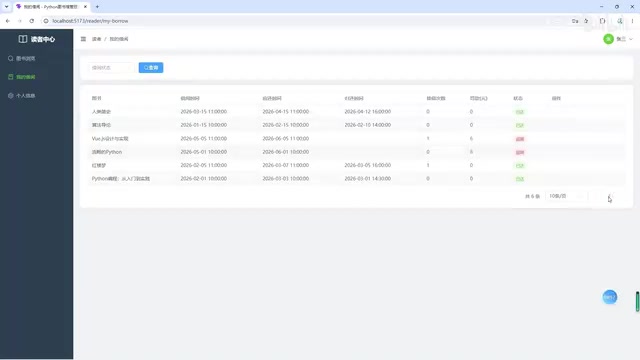
- Borrowing records: Complete history of all borrowing activity, including checkout time, due date, and actual return time
- Personal info: Supports viewing and editing personal information and changing passwords
The admin side was also fairly complete, including category management, book management (with cover upload support), borrowing management (view all records and process returns/renewals), and data statistics charts. These features cover the complete lifecycle of a typical CRUD system — CRUD stands for Create, Read, Update, and Delete, the four basic data operations that form the core of virtually every business system.
It's worth noting that the entire system's frontend-backend separation architecture means the FastAPI backend runs on an independent port serving JSON-formatted RESTful APIs, while the Vue3 frontend calls these APIs via HTTP requests (typically using the axios library) to fetch data and render pages. The two communicate through the Cross-Origin Resource Sharing (CORS) mechanism. The advantage of this architecture is that frontend and backend can be developed in parallel, deployed independently, and scaled independently — it's the mainstream architecture pattern in modern web development.
Lessons Learned and Practical Recommendations
From this case study, we can distill several key lessons for using Cursor and similar AI coding tools:
1. Prompts should be structured and specific. Tech stack, directory structure, database configuration, coding standards, UI style — all should be explicitly specified in the requirements. Don't let the AI improvise.
2. Build the skeleton first, then fill in the content. Use PyCharm to create the FastAPI project and Vite to create the Vue project, ensuring the environment is properly configured before handing things off to AI. This is far more reliable than having AI generate package.json and requirements.txt from scratch.
3. Separate Plan and Build into distinct phases. Use Plan mode to confirm the approach first, then Build mode to generate code. This lets you catch issues at the design stage, avoiding large volumes of code that need to be scrapped and redone.
4. Describe bug fixes in natural language. When encountering UI issues or functional defects, simply describe the desired outcome in plain language — Cursor understands and makes the changes effectively.
5. Keep complexity moderate. The prompt's positioning as "suitable for an undergraduate thesis project" was a clever move — it prevents the AI from generating overly simplistic CRUD while also avoiding quality degradation from excessive complexity.
Overall, completing a full-stack system with comprehensive CRUD operations and business logic in 15 minutes — Cursor's efficiency is genuinely impressive. Of course, the "15 minutes" primarily refers to the AI code generation time; requirements analysis, testing, and bug fixing in real projects still require developer experience and judgment. The true value of AI coding tools lies in freeing developers from repetitive coding so they can focus on higher-value work like architecture design and business logic.
Related articles

Stop Writing Prompts by Hand: Let AI Agents Prompt Themselves
Deep dive into the AI coding paradigm shift: from hand-crafted prompts to self-prompting agent loops. Learn how agent self-review and proactive context fetching enable scalable, high-quality AI coding.

Behind SpaceX's Acquisition of Cursor: Musk's True $60 Billion Ambition
SpaceX acquires Cursor parent Anysphere in a $60B all-stock deal. Musk's real play: an AI-driven software production line and invaluable real workflow data.

Dark Mode for WeChat Mini Programs: One-Click Color Scheme Generation with Pencil MCP
Complete guide to WeChat Mini Program dark mode: from generating dark color schemes with Pencil MCP and AI image generation, to building a Theme.js switching architecture with CSS variables and system dark mode detection.