Cursor Programming Tool Deep Dive: Core Advantages and Usage Guide for This AI-Native IDE
Deep dive into Cursor, the AI-native IDE that transforms programming through intelligent collaboration.
This article provides a comprehensive analysis of Cursor, an AI-native IDE built on a deeply modified VS Code. It covers Cursor's four core features — AI-native architecture, context-aware code generation, multi-model switching, and natural language interaction — and compares it against traditional IDEs across six dimensions. The article also examines the broader AI programming tool ecosystem and identifies who benefits most from using Cursor.
What is Cursor?
Cursor is an AI-native programming tool built on a deeply modified version of VS Code. However, it's not simply VS Code with plugins bolted on — it's designed from the ground up for AI collaboration. In simple terms, Cursor is an intelligent IDE that "writes code and teaches you programming."
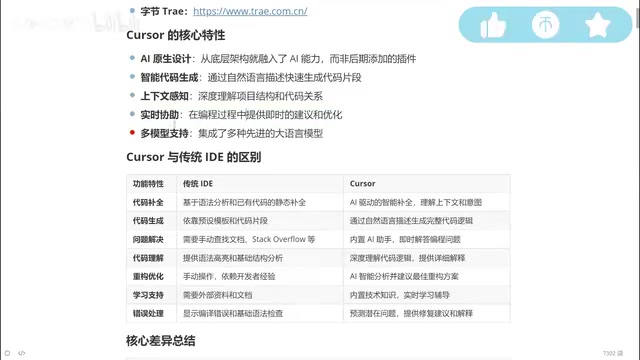
It comes with built-in access to the world's top large language models, including DeepThink (free), Claude 3.5/3.7/4.0, and other leading models in the programming domain. These help developers with the entire workflow — writing code, debugging, error detection, and refactoring. Users simply describe their requirements in natural language, and Cursor understands the context to automatically generate complete code logic.
Four Core Features of Cursor
AI-Native Architecture
Unlike IDEs that integrate AI through plugins, Cursor was built for AI collaboration from day one. This means AI isn't an add-on feature — it's the core of the entire development experience. This design philosophy enables a much deeper and more natural fusion between AI and the programming environment, giving developers a seamless intelligent coding experience.
AI-Native is an important trend in software engineering in recent years. It refers to building AI capabilities as the core architecture from the very first day of product design, rather than adding them later through API calls or plugins. The difference in design philosophy is similar to the distinction between "mobile-first" and "responsive adaptation" in the mobile internet era — the former builds everything around AI from the underlying data flow, user interaction models, to performance optimization, while the latter is constrained by the limitations of existing architecture. This is why Cursor can seamlessly embed AI capabilities into every aspect — file indexing, code parsing, terminal interaction — rather than being limited to calling models through restricted interfaces like traditional plugin solutions.
Intelligent Code Generation and Context Awareness
Cursor's most outstanding capability is its context awareness. One of the current bottlenecks of large language models is the "forgetting" problem in long conversations — when conversation content becomes too extensive, the model may lose earlier information. Cursor has deeply optimized this aspect, understanding the entire project structure and relationships between variables to provide more precise code suggestions.
From a technical perspective, a large language model's Context Window refers to the maximum number of tokens the model can process in a single inference. Early GPT-3.5 had a context window of only 4K tokens, while Claude 3.5 has expanded to 200K tokens. However, even with expanded windows, models still face the "Lost in the Middle" phenomenon when processing very long texts — the recall rate for information in the middle of the text is significantly lower than for the beginning and end. Cursor addresses this through RAG (Retrieval-Augmented Generation) and intelligent indexing technology, vectorizing and semantically indexing the project codebase to ensure precise recall of relevant code snippets during AI conversations. This effectively mitigates the problem, allowing AI to accurately understand upstream and downstream dependencies of current modifications even in large projects with tens of thousands of lines of code.
Free Multi-Model Switching
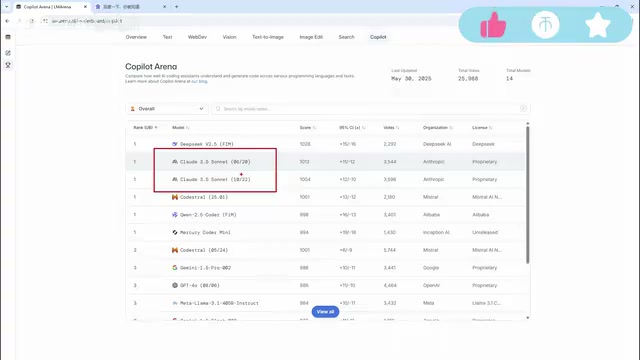
Cursor supports multi-model switching, including the Claude series, Google models, and other top-ranked programming models globally. Users can freely switch between models based on different development scenarios and requirements, choosing the AI model best suited for the current task.
Natural Language Interaction
Cursor enables natural language interaction through a built-in chat panel. Developers don't need to memorize complex commands — they can complete code generation, troubleshooting, and other operations simply by describing their needs in everyday language.
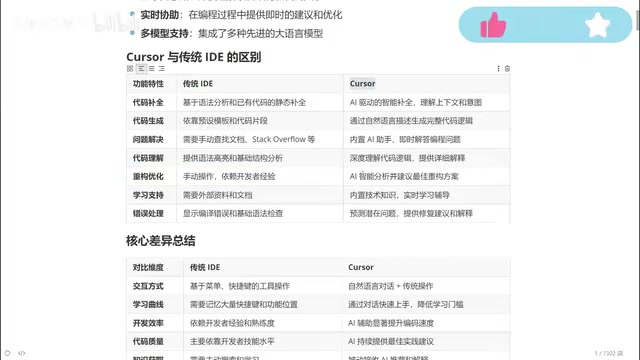
Cursor vs Traditional IDEs: A Six-Dimension Comparison
Code Completion and Generation
Traditional IDE code completion is based on syntax analysis — if you've written a function before, it will auto-suggest it next time you use it. Cursor's completion, however, is based on contextual understanding. It "guesses" what you're going to do next and proactively completes logic you haven't yet typed.
Code completion technology has actually gone through three generations of evolution: the first generation was static completion based on prefix matching (like early Eclipse's Content Assist); the second generation was semantic completion based on AST (Abstract Syntax Tree) analysis (like IntelliJ IDEA's Smart Completion, which filters suggestions based on expected types); the third generation is predictive completion based on deep learning. Cursor is at the cutting edge of the third generation — it not only understands syntactic structure but can also infer developer coding intent through Transformer architecture, achieving predictive completion across lines and even across functions. You might have just finished writing a function signature, and it's already completed the entire function body implementation.
In terms of code generation, traditional IDEs rely on preset templates and code snippets, while Cursor can generate complete business logic code from natural language descriptions. For example, if you say "write me a login endpoint," it can generate code with complete logic including parameter validation, database queries, and token generation.
Problem Solving and Error Handling
This is the most painful area for beginner programmers. In traditional development, encountering errors means relying on search engines and documentation. Senior programmers can solve problems quickly because they've accumulated extensive experience. Cursor's built-in AI assistant can directly analyze error messages, provide fix suggestions and detailed explanations — essentially having an experienced mentor available at all times.
Code Refactoring and Optimization
Code refactoring in traditional IDEs is highly dependent on individual developer experience — junior programmers struggle to produce high-quality refactoring plans. With Cursor, you simply describe "optimize this function for me," and the AI provides optimization suggestions based on best practices. This means a junior programmer working with Cursor can potentially produce code approaching senior programmer quality.
The concept of Refactoring was systematically introduced by Martin Fowler in his 1999 classic book of the same name, referring to improving the internal structure of software without changing its external behavior. Common refactoring patterns include Extract Method, Inline Variable, replacing conditional branches with the Strategy Pattern, and more. Traditionally, high-quality refactoring requires developers to have solid design pattern knowledge and rich engineering experience — this is one of the most significant capability divides between junior and senior engineers. Cursor's AI models have learned from excellent refactoring practices in massive open-source projects during training, enabling them to identify Code Smells and suggest corresponding refactoring techniques, giving junior developers senior-engineer-level refactoring guidance.
Interaction Methods and Learning Curve
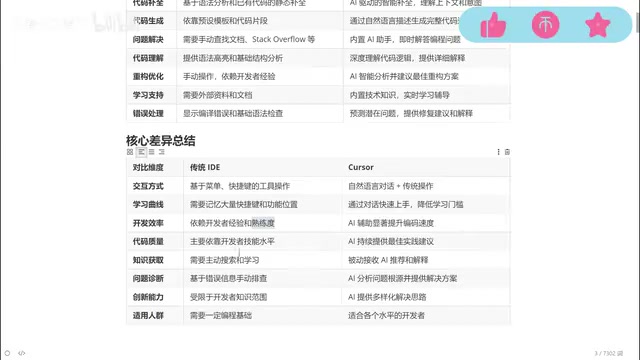
Traditional IDEs require memorizing numerous keyboard shortcuts and feature locations, resulting in a steep learning curve. Cursor achieves natural language interaction through a side chat panel, dramatically lowering the barrier to entry. Whether querying technical documentation, understanding code logic, or obtaining solutions, everything can be accomplished through conversation.
Project Understanding Depth
Traditional IDEs understand projects only at the level of file indexing and symbol references. Cursor can understand the overall project architecture, inter-module dependencies, and business logic context, providing suggestions that better align with the actual project situation.
Development Efficiency Gains
Overall, Cursor significantly saves time in repetitive coding, troubleshooting, and code review, allowing developers to focus their energy on more valuable architectural design and business logic thinking.
Domestic vs International AI Programming Tool Ecosystem
The AI programming tool landscape currently shows parallel development domestically and internationally:
- Domestic tools: Alibaba's Tongyi Lingma, ByteDance's Trae, etc. — fast iteration speed and Chinese developer-friendly
- International tools: Cursor, GitHub Copilot, etc. — currently maintain a lead in overall feature integration and model capabilities
It's worth noting that GitHub Copilot and Cursor represent two different technical approaches. Copilot is based on the OpenAI Codex model, adopting an editor plugin integration model that primarily provides code completion through Inline Suggestions, compatible with VS Code, JetBrains, and other IDEs. Cursor chose to fork VS Code and deeply modify it, enabling deeper AI interaction at the editor level, such as multi-file simultaneous editing and Agent mode for automatic terminal command execution. The two represent different product philosophies — "lightweight plugin" vs "heavyweight IDE" — each with their own strengths and weaknesses.
While domestic tools are catching up quickly, Cursor still maintains certain advantages in deep AI integration and multi-model collaboration. Developers are advised to choose the appropriate tool based on their actual needs.
Who is Cursor For?
Cursor's applicability is extremely broad, covering virtually all types of developers:
- Senior programmers: Reduce repetitive coding work, let AI handle simple logic while focusing on architectural design and technical decisions
- Junior to mid-level programmers: Improve code quality through AI assistance, learn better programming practices and design patterns
- Programming beginners: Even with a weak programming foundation, you can implement features through natural language descriptions, lowering the entry barrier
- Cross-language developers: AI supports virtually all mainstream programming languages — frontend, backend, Python, Go, Rust, and more can all be efficiently assisted
Conclusion
Cursor represents a paradigm shift in programming tools from "input assistance" to "intelligent collaboration." It doesn't just increase coding speed — more importantly, it levels the capability gap between developers of different experience levels. For any programmer looking to improve development efficiency, mastering AI-native programming tools like Cursor has become a key skill for staying competitive.
Of course, AI tools cannot completely replace programming thinking and business understanding. Developers still need to understand business requirements, grasp fundamental programming concepts and system design principles to better collaborate with AI and produce high-quality code. Tools are amplifiers, not replacements — the true core competitive advantage always lies in the developer's own thinking ability.
Related articles
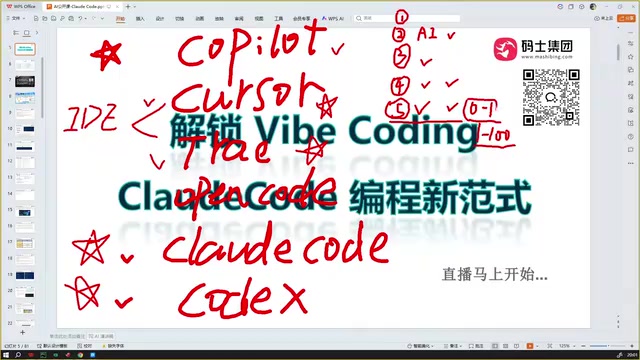
Claude Code Installation Guide & The Five Stages of AI Programming Tools Explained
Complete Claude Code installation guide with the five stages of AI programming tools, from manual coding to agents. Learn 0-to-1 project building and 1-to-100 iteration challenges.

Enterprise-Level AI Project Rules Files: 5 Hard Rules + 6 Writing Techniques
AI keeps messing up your code? Learn 5 hard rules and 6 writing techniques for enterprise-level Rules files in Claude Code, Cursor & more, with templates.

Building Cloud Computing Clusters from Old Phones: Google and UCSD Explore a New Path to Sustainable Computing
Google and UCSD explore building cloud clusters from old phones, leveraging ARM chip efficiency to cut e-waste and data center carbon footprints.