Cursor Programming Tool In-Depth Review: Core Features and Use Cases of an AI-Native IDE
In-depth review of Cursor: an AI-native IDE redefining how developers write code.
This article provides a comprehensive review of Cursor, an AI-native IDE built on VS Code. It explores four core features — AI-native architecture, natural language code generation, project-level context awareness, and multi-model switching — and compares Cursor against traditional IDEs across six dimensions including code completion, problem solving, and refactoring.
What Is Cursor? A New AI Programming Paradigm Built on an Enhanced VS Code
Cursor is an AI-native programming tool built through deep modification of VS Code. Rather than simply bolting AI plugins onto a traditional editor, it was designed from the ground up for AI collaboration. In short, Cursor = VS Code's editing experience + the intelligent capabilities of the world's leading large language models.
VS Code (Visual Studio Code) is an open-source code editor released by Microsoft in 2015. Thanks to its lightweight design, rich plugin ecosystem, and cross-platform support, it quickly became one of the most widely used editors among developers worldwide. The Cursor team chose to build on VS Code rather than start from scratch precisely because of its mature editing experience and massive user base — developers can seamlessly migrate to an AI-enhanced development environment without relearning their workflow.
Unlike Microsoft's free VS Code, Cursor deeply integrates AI capabilities throughout the entire programming workflow — from code generation and debugging to refactoring and optimization. Developers simply describe their requirements in natural language to receive high-quality code output. This means the barrier to programming is significantly lowered, and the interaction model shifts from "typing code character by character" to "conversational collaboration."
Cursor's Four Core Features
AI-Native Architecture
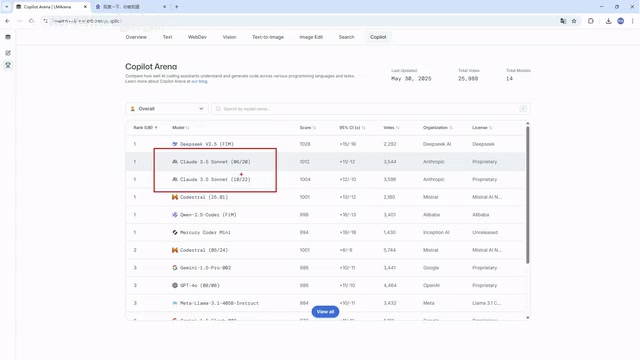
Cursor's greatest differentiator is its AI-native architecture. Unlike some IDEs that bolt on AI capabilities through plugins after the fact, Cursor was designed with AI as its core engine from the very beginning. This design philosophy makes the integration between AI and the editor far more seamless, with faster response times and more accurate contextual understanding.
To understand the fundamental difference between "AI-native" and "AI plugin," consider the evolution of smartphones: early smartphones were essentially feature phones with touchscreens and app stores tacked on, while the iPhone was designed from the operating system level for touch interaction — the user experience was worlds apart. Similarly, plugin-based AI integration (such as installing the GitHub Copilot plugin in VS Code) is constrained by the host editor's API interfaces. The AI can only work within limited "channels" — the contextual information it can see and the editor features it can manipulate are all restricted by the plugin interface. Cursor's AI-native architecture means the AI engine can directly access the editor's underlying data structures, including the Abstract Syntax Tree (AST), file system index, terminal output, and other comprehensive information, enabling more precise code understanding and a smoother interactive experience.
Natural Language-Driven Code Generation
Traditional IDEs rely on preset templates and code snippets for code generation, while Cursor can generate complete business logic code from natural language descriptions. For example, if you type "help me write a login endpoint," it not only understands your intent but also generates a complete implementation that matches your project's current tech stack.
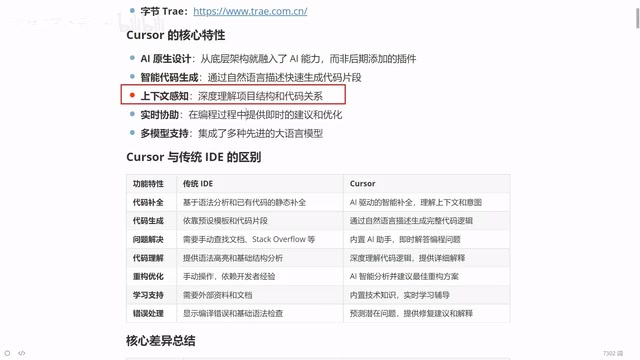
This is powered by breakthrough advances in large language models (LLMs) in the code domain. The release of OpenAI's Codex model in 2021 marked the beginning of practical AI code generation, and since then, major models have continued to evolve in code comprehension and generation capabilities. The core reason modern LLMs can translate natural language into code is that during training, models learn from massive open-source code repositories (such as billions of lines of code on GitHub) along with corresponding documentation, comments, and technical discussions, thereby establishing mappings between "natural language descriptions" and "code implementation patterns." When you describe "write a login endpoint," the model considers the framework used in your project (such as Express, Spring Boot, or FastAPI), existing database connection methods, authentication schemes, and other contextual information to generate code consistent with your project's style, rather than outputting a generic template.
Project-Level Context Awareness
One major challenge facing large language models is the context window limitation — when conversation content grows too long, earlier information can be "forgotten." Cursor has made dedicated optimizations in this area: it can perceive the entire project's structure, variable relationships, and code dependencies, fully considering the project's big picture when generating suggestions rather than processing individual files in isolation.
The "Context Window" refers to the maximum text length a large language model can "see" in a single processing pass. Taking GPT-4 as an example, its context window is 128K tokens (roughly equivalent to 100,000 words). While this seems large, a medium-sized project's codebase can reach hundreds of thousands or even millions of lines, far exceeding the model's single-pass processing capacity. Cursor's core technology for solving this problem is Codebase Indexing combined with Retrieval-Augmented Generation (RAG). Specifically, Cursor builds a semantic index of the entire project locally — chunking code files, vectorizing them, and storing them in a local database. When a user asks a question or requests code generation, the system first uses semantic retrieval to find the code snippets most relevant to the current task (such as related class definitions, interface declarations, configuration files, etc.), then sends these key contextual elements along with the user's request to the large language model. This way, although the model cannot "read" the entire project at once, through intelligent retrieval, the context information it receives is highly relevant filtered content, effectively achieving "project-level understanding."
Flexible Multi-Model Switching
Cursor integrates top-performing large language models from across the global programming landscape, including:
- DeepThink (free model)
- Claude 3.5 / 3.7 / 4.0 (commercial models with outstanding coding capabilities)
- Google Gemini series
Users can freely switch between models based on task complexity and personal preference, flexibly adapting to different development scenarios.
Different models have distinct strengths in programming tasks: The Claude series (developed by Anthropic) is renowned for code generation accuracy and instruction-following ability, particularly excelling in complex logic implementation and long code generation, making it the preferred coding model for many developers. The Google Gemini series offers ultra-long context windows (supporting up to 1 million tokens), giving it an advantage in scenarios requiring comprehension of large code contexts. DeepThink, as a free model, is suitable for everyday simple tasks and budget-conscious developers. The practical value of a multi-model strategy is that developers can use free models for simple code completion and formatting tasks, reserving paid model quotas for complex architectural design, algorithm implementation, and difficult debugging — achieving the optimal balance between cost and effectiveness.
Cursor vs Traditional IDEs: A Six-Dimension Comparison
Code Completion: From Syntax Matching to Intent Prediction
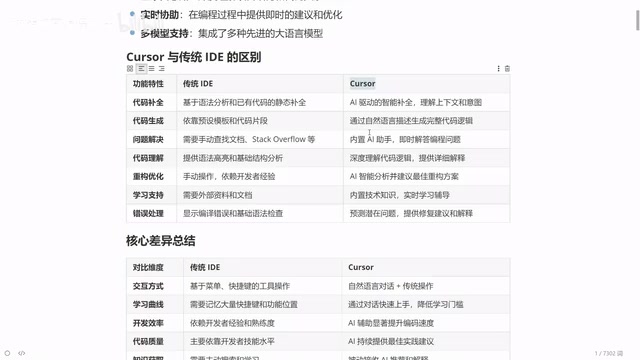
Traditional IDE auto-completion is based on syntax analysis — function names and variable names you've previously defined are extracted and offered as choices. Cursor's completion, however, is intent prediction based on contextual understanding. It infers the functionality you want to implement next and proactively offers complete code block suggestions.
Traditional code completion technology (such as Microsoft's IntelliSense) is essentially a symbol-matching system based on static analysis: the editor parses the code's Abstract Syntax Tree (AST) and type system to build a Symbol Table, and when you type code, the system filters syntactically valid candidates from the symbol table for you to choose from. While precise, this approach is fundamentally "retrospective" — it can only offer content you've already defined. Cursor's AI completion is "prospective": based on deep semantic understanding of the code context, the model can predict code logic you haven't yet written. For example, when you're writing an order processing function in an e-commerce project, the AI won't just complete variable names — it may directly suggest complete inventory checking, price calculation, and status update logic, all based on understanding business patterns rather than simple syntax inference.
Problem Solving: From Searching Documentation to Instant Q&A
When encountering unfamiliar APIs or error messages, the traditional development workflow involves switching to a browser to search documentation. Cursor has a built-in AI assistant chat window where developers can ask questions directly within the IDE and receive precise answers tailored to their current code context, without ever leaving the programming environment.
This "never leave the editor" design philosophy is known in developer experience research as reducing "Context Switching Cost." Studies show that programmers need an average of 15-25 minutes to re-enter a deep coding state after being interrupted. The traditional flow of "encounter a problem → open browser → search Stack Overflow → filter answers → return to editor" is not only time-consuming but also breaks the developer's train of thought. Cursor's built-in Q&A system not only eliminates this switching but, more importantly, it's aware of the code you're currently editing — when you ask about an error, the AI has already "seen" your code context, so the answer it provides is a customized solution for your specific situation, rather than a generic answer from Stack Overflow.
Refactoring: From Relying on Experience to AI-Assisted Decision Making
Code refactoring is a key area that reflects a programmer's skill level. The traditional approach relies entirely on the developer's personal experience, and junior programmers often struggle. With Cursor, you simply describe your optimization goal (e.g., "help me optimize the performance of this function"), and the AI provides refactoring suggestions based on industry best practices.
Code Refactoring refers to the process of improving the internal structure of code without changing its external behavior. Common refactoring patterns include: Extract Method, eliminating duplicate code (DRY principle), simplifying conditional expressions, and introducing design patterns. Traditional IDE refactoring features are typically mechanical — operations like renaming variables or extracting functions — but they cannot determine "whether this code needs refactoring" or "in which direction it should be refactored." The value of AI-assisted refactoring lies in the fact that models have learned from the code evolution history of numerous excellent open-source projects during training, enabling them to identify common Code Smells and suggest improvements aligned with industry best practices such as SOLID principles and design patterns.
Error Handling: From Passive Searching to Proactive Diagnosis
Beginner programmers are often at a loss when facing error messages, while experienced programmers can quickly locate problems thanks to years of accumulated pattern recognition. Cursor digitizes this "experience" — simply paste the error message, and the AI analyzes the cause and provides fix suggestions with detailed explanations.
Domestic and International AI Programming Tool Ecosystem Comparison
The AI programming tool space has formed a dual-track landscape with both domestic (Chinese) and international players:
Major Domestic Tools:
- Tongyi Lingma (under Alibaba)
- Trae (ByteDance's domestic AI programming tool)
International Representatives:
- Cursor (the subject of this article, currently leading in feature integration and intelligence level)
While domestic tools are developing rapidly, Cursor still maintains a certain advantage in overall feature integration and intelligence level, which is precisely why it's worth understanding in depth.
The AI programming tool space has heated up rapidly since GitHub Copilot's release in 2021 and has become one of the most active innovation areas in developer tools. From a technical approach perspective, there are clear differences between domestic and international tools: international tools (such as Cursor, GitHub Copilot, Windsurf, etc.) typically call APIs from the world's top closed-source models (such as Claude, GPT series), giving them a first-mover advantage in model capabilities. Domestic tools rely more on self-developed large models (such as Tongyi Qianwen, Doubao, etc.), offering localization advantages in Chinese language understanding, domestic development ecosystem adaptation (such as supporting WeChat Mini Program development and domestic cloud service integration), and data compliance. From a market perspective, Cursor has built an excellent reputation in the global developer community through its AI-native product design and flexible multi-model integration, while domestic tools' core competitiveness lies in free pricing strategies, Chinese scenario optimization, and deep support for domestic tech stacks. As domestic large models rapidly close the gap, this difference is gradually narrowing.
Who Should Use Cursor?
Cursor's applicability is broader than traditional IDEs, covering developers at different skill levels:
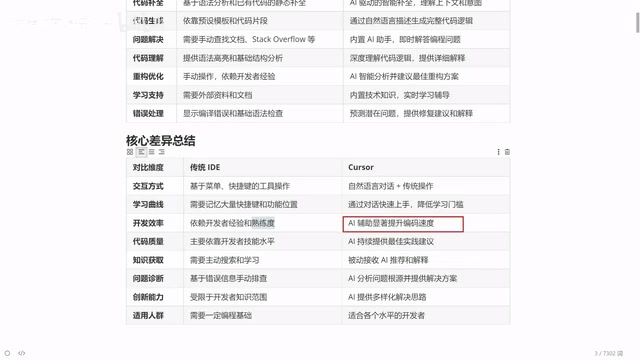
- Senior Programmers: Delegate repetitive simple code to AI generation while focusing on architecture design and core logic, dramatically improving development efficiency
- Junior Programmers: Learn best practices through AI assistance, compare AI-generated code with their own implementations, and rapidly improve coding skills
- Programming Beginners: Lower the entry barrier and understand programming logic through natural language interaction
- Cross-Language Developers: AI supports virtually all programming languages, covering frontend, backend, data science, and more
Final Thoughts
Cursor represents not just a tool upgrade, but a paradigm shift in programming. From "humans writing code" to "human-AI collaboration," junior programmers can produce code quality approaching mid-to-senior levels with the help of AI tools. However, it's important to emphasize that AI tools are assistants, not replacements — understanding business requirements, steering technical direction, and reviewing code quality remain the developer's irreplaceable responsibilities.
Mastering AI programming tools is essentially mastering a new productivity multiplier. In an era of rapid AI iteration, the sooner you adapt to the human-AI collaborative development model, the better positioned you'll be in your career development.
Related articles
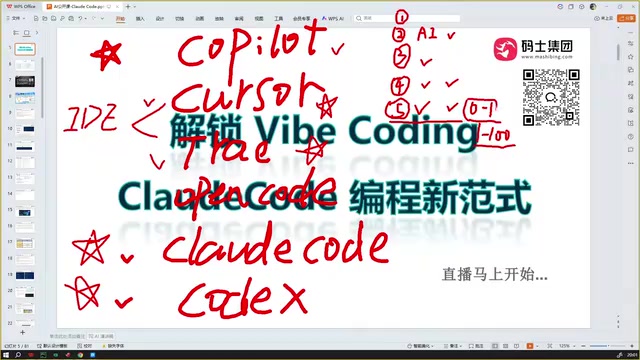
Claude Code Installation Guide & The Five Stages of AI Programming Tools Explained
Complete Claude Code installation guide with the five stages of AI programming tools, from manual coding to agents. Learn 0-to-1 project building and 1-to-100 iteration challenges.

Enterprise-Level AI Project Rules Files: 5 Hard Rules + 6 Writing Techniques
AI keeps messing up your code? Learn 5 hard rules and 6 writing techniques for enterprise-level Rules files in Claude Code, Cursor & more, with templates.

Building Cloud Computing Clusters from Old Phones: Google and UCSD Explore a New Path to Sustainable Computing
Google and UCSD explore building cloud clusters from old phones, leveraging ARM chip efficiency to cut e-waste and data center carbon footprints.