Deep Dive into Claude Code SDK: A New AI Programming Paradigm for Auto-Writing Code and Reviewing PRs
Deep Dive into Claude Code SDK: A New …
Anthropic's Claude Code SDK and GitHub Action embed AI Agents into the full software development lifecycle.
Anthropic released Claude Code SDK and Claude GitHub Action, enabling developers to programmatically invoke AI Agents for code writing, review, and project management. The SDK follows UNIX tool philosophy, supporting headless mode, piping, and JSON structured output for seamless CI/CD integration. GitHub Action can automatically create PRs from Issues, modify code, and perform reviews, with flexible permission management and session resumption mechanisms — representing a major evolution from code completion to full-lifecycle development automation.
Anthropic recently released the Claude Code SDK and Claude GitHub Action, offering developers an entirely new programming paradigm — programmatically invoking AI Agents to handle code writing, review, and project management tasks. Based on a live demo by Anthropic engineer Shafi, this article provides an in-depth analysis of the core capabilities and practical applications of these tools.
What Is Claude Code SDK
Claude Code SDK is a tool that provides programmatic access to Claude Code Agent capabilities in headless mode. Headless mode refers to running a program without a graphical user interface (GUI) — a concept first widely adopted in headless browsers (such as Chromium controlled by Puppeteer), allowing developers to automate operations in server environments. In the context of Claude Code SDK, headless mode means the AI Agent can run entirely detached from an interactive terminal interface, receiving input and producing output through pure programmatic calls. This makes it ideal for integration into CI/CD pipelines, scheduled tasks, or other automation systems.
Its core philosophy draws from the UNIX tools philosophy — first systematically articulated by Doug McIlroy of Bell Labs in 1978. The key principles are: each program should do one thing and do it well, and programs should communicate through standard input/output (stdin/stdout). This design philosophy gave rise to classic tools like grep, awk, sed, and sort, which can be combined using the pipe operator (|) to accomplish extremely complex text processing tasks. Claude Code SDK borrows this philosophy, meaning it's designed as a composable atomic tool rather than a closed black-box system. Developers can seamlessly integrate it with existing toolchains like snapping together LEGO bricks — it can be used anywhere bash or a terminal runs, supports piping, accepts input, produces output, and can be used to build complex automation chains.
This means Claude Code SDK is not just a chat tool, but a programming primitive that can be embedded into any workflow. Its typical use cases include:
- Using it in pipelines like a UNIX tool
- Building CI/CD automation workflows
- Having AI review code or even write new lint rules
- Building AI-powered chatbots
- Automatically writing code in remote environments
Basic Usage: From Simple Calls to Powerful Pipelines
Simplest Invocation
The most basic way to call it is claude -p followed by your prompt. For example, to have Claude write a Fibonacci sequence generator while granting file write permission via --allowedTools write, it can directly create files in your filesystem.
Piping: Seamless Integration with Existing Tools
A more practical scenario is using Claude as a pipeline tool. For instance, cat app.log | claude -p "summarize the failure reasons" lets Claude automatically analyze logs and provide a summary. Similarly, ifconfig | claude -p "explain this output" can have Claude help you interpret cryptic network configuration information.
This pipe-based invocation style allows Claude Code SDK to work alongside traditional command-line tools like grep, awk, and sed, greatly expanding the possibilities for automated operations and development debugging.
Structured Output: The Foundation for Building Automated Applications
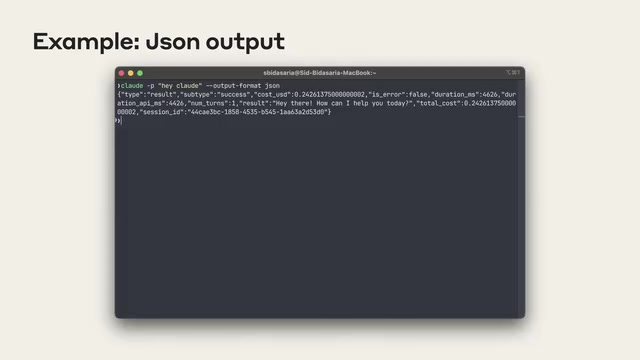
With the --output-format json parameter, Claude Code returns responses in JSON format instead of plain text. This is where the SDK truly shines — you can parse this JSON and build automated applications on top of it.
Claude GitHub Action: Hands-On Demo
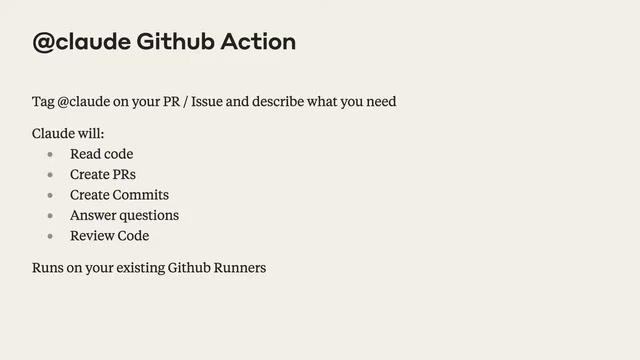
Claude GitHub Action is a higher-level application built on top of the SDK, representing a concrete step toward AI-native DevOps. Traditional CI/CD (Continuous Integration/Continuous Delivery) pipelines rely on predefined rules and scripts, lacking the ability to understand ambiguous requirements. By embedding an AI Agent into CI/CD workflows, AI can not only execute deterministic tasks but also understand requirements described in natural language, analyze code semantics, and generate code that matches the project's style. Claude GitHub Action is exactly this in practice — it can perform code reviews, feature development, and bug triage directly within GitHub repositories.
From Issue to PR: Fully Automated Development Workflow
In the demo, Shafi used an open-source trivia game application. The repository had an Issue requesting a "power-ups" feature (50/50 elimination and skip question), with a very brief description — essentially a wish list.
The workflow is extremely simple: comment @claude please implement this feature on the Issue, and Claude automatically completes the following steps:
- Analyzes the Issue requirements and understands the feature specifications
- Creates a to-do checklist, breaking down the development tasks
- Implements the feature code item by item
- Creates a Pull Request and submits it for review
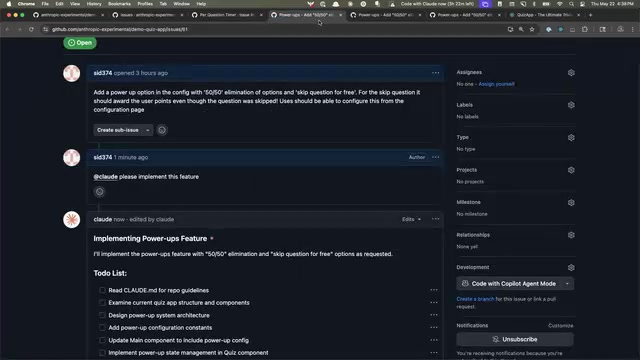
In the end, Claude successfully implemented the power-up checkboxes on the configuration page, the 50/50 elimination button, and the skip question button — all without any manual intervention. While there's room for optimization (such as showing which questions power-ups were used on), the core functionality was fully working.
Appending Changes to Existing PRs
Claude can not only create PRs from scratch but also modify existing ones. In the demo, there was a PR that changed the background color to blue. Shafi simply commented "please change this to green," and Claude automatically updated all three locations where the color was defined and added a new commit.
Advanced SDK Features Explained
Permission Management: Balancing Security and Flexibility
By default, claude -p has no editing or destructive permissions, ensuring safety. Through --allowedTools, you can pre-configure permissions — for example, granting bash(npm run build), bash(npm test), and write permissions so Claude can self-verify code quality.
For scenarios where you can't predict which tools will be needed, the SDK provides --permission-prompt-tool, which delegates permission management to an MCP (Model Context Protocol) server. MCP is an open protocol introduced by Anthropic in late 2024, designed to standardize interactions between AI models and external tools and data sources. The MCP server acts as a middleware layer, managing the set of tools the AI can invoke and their permission boundaries. When the AI needs to perform an operation that hasn't been pre-authorized, the SDK sends a permission query to the designated server via the MCP protocol, and the server decides in real-time whether to approve it. This design decouples permission control logic from the AI caller, allowing enterprises to implement fine-grained security policies on their own infrastructure — for example, dynamically granting permissions based on user roles, time windows, or operation types.
Session Resumption and Multi-Turn Interaction
Large language models are inherently stateless — each API call is independent, and the model doesn't automatically remember the content of previous conversations. To enable multi-turn dialogue, there are typically two approaches: passing the complete conversation history as context with each call, or persisting the conversation state and retrieving it by ID. Claude Code SDK uses the latter — when calling Claude in JSON mode, it returns a conversation ID. The SDK saves the Agent's complete context state on the server side (including files read, commands executed, reasoning process, etc.). By saving and referencing this ID, developers can precisely return to the context state Claude had when it completed a task, without retransmitting large amounts of historical data. This enables building multi-turn interactive applications — the user asks, Claude answers, the user provides feedback, Claude adjusts, forming a complete conversation loop.
This mechanism provides the foundation for building complex AI programming assistants. Developers can implement iterative code generation and review workflows on top of it, which is especially critical for AI development assistants that need to track project state over extended periods.
System Prompts: Customizing AI Behavior
The --system-prompt parameter lets you customize Claude's behavior. While "talk like a pirate" is just a fun example, in practice, system prompts can be used to define code style guidelines, project-specific constraints, and other important context.
GitHub Action's Three-Layer Architecture
Claude GitHub Action adopts a clear three-layer architecture:
- Bottom Layer — Claude Code SDK: Provides core AI interaction capabilities, handling communication with the model
- Middle Layer — Claude Code Base Action: A thin layer that implements conversation with Claude Code and returns responses
- Top Layer — PR Action: Handles all GitHub-specific functionality, such as to-do list rendering, PR link insertion, etc.
Both the Base Action and PR Action are open source, allowing developers to draw inspiration and build their own automation tools.
Quick Start Guide
Installing Claude GitHub Action is straightforward: open Claude Code in the target repository, run /install-github-action, and follow the guided setup. This generates a GitHub Action YAML file — once merged and configured with your API Key, you're ready to go.
Notably, Anthropic is about to release Python and TypeScript SDK bindings, which will make it even easier for developers to integrate Claude Code capabilities into their own applications.
Conclusion
Claude Code SDK and GitHub Action represent an important direction in AI-assisted development: rather than simple code completion, they embed AI Agents as programmable developer roles throughout the entire software development lifecycle. From Issue analysis to code implementation, from PR review to automatic modifications, these tools are redefining what "automation" means in software engineering.
For engineers looking to boost team development efficiency, Claude Code SDK offers a technical direction worth exploring deeply — harnessing AI through programming, so that automation is no longer limited to scripts and rules, but truly possesses the ability to understand and reason.
Key Takeaways
- Claude Code SDK is designed with UNIX tool philosophy, supporting piping and structured JSON output, embeddable into any automation workflow
- Claude GitHub Action can automatically create PRs from Issues, append changes to existing PRs, review code, and answer questions — no additional infrastructure management required
- The SDK provides flexible permission management mechanisms, including pre-configured allowedTools and real-time permission delegation via MCP servers
- Through the session ID resumption mechanism, developers can build multi-turn interactive AI applications without repeatedly transmitting large amounts of historical context
- Python and TypeScript SDK bindings are coming soon; GitHub Action uses a three-layer open-source architecture, encouraging community-driven development
Related articles
 Tutorials
Cursor + Codex Dual-IDE Collaboration: A Practical Methodology for Open-Source Project Customization
A complete methodology for open-source project customization based on real-world experience, detailing the Cursor+Codex dual-IDE workflow, seven-stage process, MVP validation, and AI source code reading techniques.
 Tutorials
Cursor Multi-Agent in Practice: Building a Full-Stack Next.js Blog in 50 Minutes
Build a full-stack blog in 50 minutes using Cursor IDE's multi-Agent mode with Next.js, Clerk auth, and Supabase. Learn the 4-phase AI Agent workflow and key integration pitfalls.
 Tutorials
Building an AI Software Factory from Scratch: A Cursor Engineer's Hands-On Experience with Multi-Agent Collaboration
Cursor engineer Eric shares practical insights on building an AI software factory: automation levels, guardrail design, parallel Agent management, and scaling to 1000+ Agents for 24/7 development.