Deep Dive into Goose Open-Source AI Assistant: A Practical Guide to the 50K-Star Local Workbench
A comprehensive guide to Goose, the open-source local AI workbench with MCP integration and flexible model support.
Goose is a 50K-star open-source local AI assistant that goes beyond chatbots by offering a composable workbench environment. It supports MCP protocol for tool integration, flexible model switching between cloud and local options, and reusable Recipes for workflow automation. Unlike Codex (code-focused) or Cursor (editor-embedded), Goose serves as a unified local platform for developers and automation enthusiasts.
Goose is an open-source local AI assistant project with 50K GitHub Stars. It's not just a chatbot—it's a complete assistant environment you can set up on your own computer. It can read files, modify code, run commands, and connect to various external tools via the MCP protocol. This article provides an in-depth analysis of Goose's core capabilities and how it fundamentally differs from popular tools like Codex, Cursor, and others.
How Goose Differs from Mainstream AI Tools
Goose originally belonged to Block (Square's parent company) and has since migrated to the Agentic AI Foundation under the Linux Foundation. The project was open-sourced in August 2024. To understand Goose's value, you first need to clarify how it differs from similar tools.
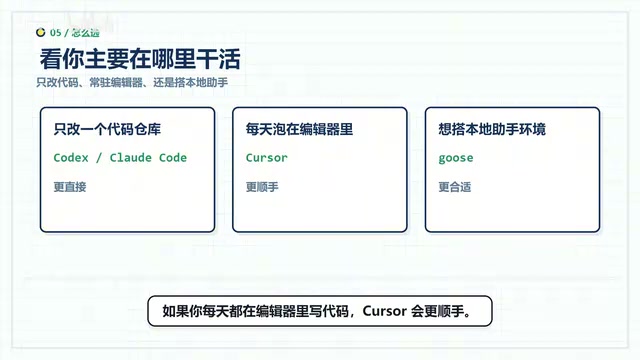
Codex / Claude Code primarily targets code repository scenarios—you open a terminal, point it at a project directory, and it can read code, modify code, and run tests. Its core capabilities focus on code engineering.
Cursor / Windsurf are deeply embedded in editors. You write code while the AI completes, modifies, and explains context alongside you—the experience leans more toward real-time collaborative coding assistance.
Tools like Lobehub / Hermes are more like ready-made Agent clients. You give them a task, they call models and tools, and push things forward.
Goose is more like a local workbench: it works on desktop, in the terminal, and via API. It can connect to models, connect to MCP tools, and save common workflows for reuse. So when using Goose, you're not just asking an AI questions—you're building an assistant environment that lives on your own machine.
In short: if you just want to work on a code repository, Codex or Claude Code is more direct; if you write code in an editor every day, Cursor is smoother; if you want a local assistant that can connect to different models, different tools, and handle tasks beyond code, Goose is the better fit.
Real-World Use Cases: Goose Goes Beyond Code
Project Debugging: A Complete Loop from Error to Fix
Traditionally, when a project throws an error, you need to copy the error message, copy code snippets, explain the directory structure, then paste everything into a chat window and wait for a response. Goose works completely differently—it can directly inspect files in your local project, identify the root cause, modify the code, and run tests. If tests fail, it continues analyzing the new errors, forming a complete debugging loop. You don't need to switch back and forth between a chat window and your terminal.
Information Organization: Cross-Tool Information Aggregation
Beyond code, Goose can handle a much broader range of tasks. You can have it read local files and compile them into documentation, or connect it to a browser to review web resources. If you've connected the GitHub extension, it can browse repositories, check Issues, and read documentation and code. What it can do mainly depends on what tools you've connected to it.
MCP Integration: Letting AI Truly Access Your Work Materials
Goose supports MCP (Model Context Protocol), which can be simply understood as a standardized method for connecting tools. Through MCP extensions, file systems, browsers, GitHub, Google Drive, databases, and more can all be connected to Goose.
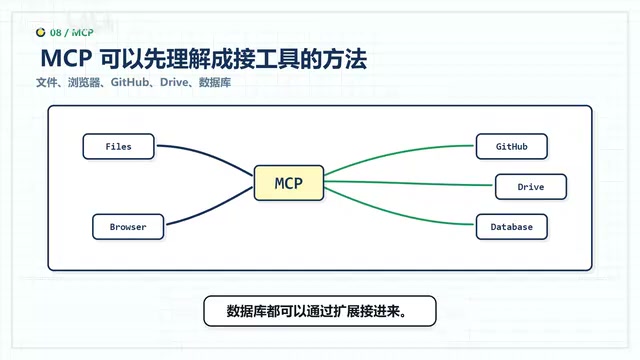
This is crucial—only after connecting the right tools can AI actually touch your work materials. Otherwise, it can only rely on your verbal descriptions and has to guess many details. The introduction of MCP upgrades Goose from a "chat assistant" to a "working partner with hands and feet."
Flexible Model Switching: Choose the Best Option for Each Need
In terms of model support, Goose offers considerable freedom:
- Cloud models: Supports mainstream services including Anthropic, OpenAI, Gemini, OpenRouter, Azure, Bedrock, and more
- Local models: Can connect to Ollama, LM Studio, keeping data entirely on your machine
- Subscription reuse: If you already have Claude, ChatGPT, or Gemini subscriptions, you can connect them following the documentation
This flexibility is highly practical for individual users: use a stronger model when you need top-quality code output; switch to a cheaper model for organizing routine materials; connect a local model when you want data to stay on your machine. Different strategies for different scenarios—controlling costs while maintaining quality.
Recipes: Reusable Task Workflow Templates
Goose also has a feature called Recipes, which can be thought of as saved task workflow templates.
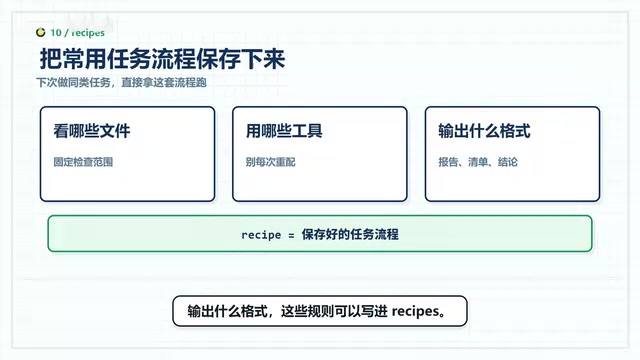
For example, if you frequently need to review a certain project—checking specific files, using specific tools, outputting in a specific format—all these rules can be written into Recipes. Next time you have a similar task, just invoke that workflow directly. It's particularly suited for two scenarios: automating repetitive personal tasks, and standardizing processes and quality standards within a team.
Permission Management: Greater Power Requires Clearer Boundaries
Goose can read files, modify files, and execute commands. These capabilities are powerful, but they also carry risks. Here are some practical recommendations:
- When starting out, have it confirm multiple times: Ask before modifying files, ask before running commands—confirm everything is fine before proceeding
- Exclude sensitive files in advance: Keys, private data, account configurations, and anything else you don't want the assistant to touch should have explicit exclusion rules
- Grant permissions gradually: As your familiarity with the tool increases, progressively expand its permissions
The more capable an AI assistant is, the clearer its permission boundaries need to be—this is a fundamental principle for using any local Agent tool.
Getting Started Guide and Target Audience
Regular users who want to try it out can start with the desktop version; developers comfortable with terminal operations can use the command-line version directly.
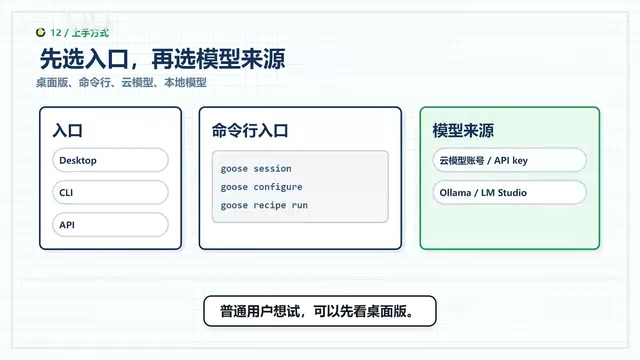
After opening it for the first time, you'll need to select a model source—generally you'll need to have the corresponding account or API Key ready. If you choose a local model, install Ollama or LM Studio first.
Goose is best suited for three types of people:
- Local developers: People who frequently modify code, run tests, and check logs in local projects
- Cross-tool workers: People who want AI to handle files, web pages, and repositories, but don't want to rely solely on a chat window
- Automation enthusiasts: People already using MCP or Agent automation workflows who need a unified workbench
If you only occasionally ask AI a quick question, web-based chat is perfectly sufficient. But if you want to build a long-term, extensible AI assistant environment on your own computer, Goose is worth serious consideration.
Conclusion
Goose's core value isn't that it writes code better than Cursor or understands repositories better than Codex. Rather, it provides an open, composable local AI workbench. By connecting various tools through MCP, solidifying workflows through Recipes, and controlling costs and quality through flexible model switching—this "building blocks" design philosophy lets everyone construct a unique AI assistant environment tailored to their own needs. In an era where AI tools are becoming increasingly homogeneous, this differentiated positioning actually holds more long-term value.
Related articles
AI Programming Learning Roadmap: A Complete Six-Stage Guide from Beginner to Expert
A systematic breakdown of the six-stage AI programming learning roadmap, from zero-code start to mastering Cursor and professional tools, methodology frameworks, advanced patterns, and project practice.
Deep Dive into Devin's Background Agent Architecture: Behind the 80% AI-Committed Code
Deep analysis of Devin's background agent architecture: brain-sandbox separation, environment setup, MCP integration, memory systems, and multi-agent collaboration challenges.

Claude Code in Practice: An In-Depth Efficiency Comparison Between Claude and DeepSeek for Programming
A hands-on comparison of Claude vs DeepSeek V4 for AI programming: code quality, development efficiency, and cost differences. DeepSeek costs 1/6 to 1/10 of Claude but requires 1-2x more time.