DeepSeek + Codex Tutorial: Achieve Low-Cost AI Coding with Codex++
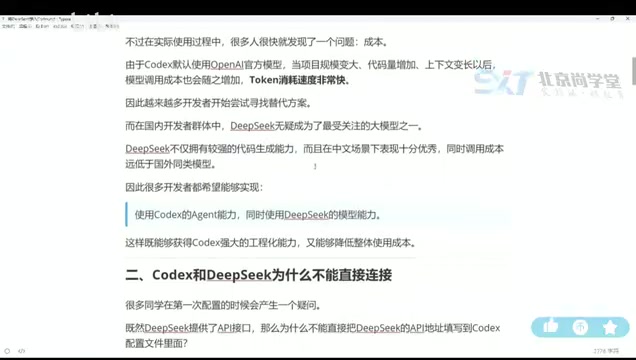
Use Codex++ to bridge DeepSeek into Codex for affordable AI-assisted coding.
This tutorial explains how to integrate DeepSeek models into OpenAI's Codex using Codex++, an open-source bridging tool. It covers why direct integration isn't possible due to protocol differences, walks through the full setup process including provider configuration, connection testing, and proper launch procedures, and offers model selection tips and common pitfalls to avoid.
Why Connect DeepSeek to Codex?
Codex is an AI-powered coding assistant developed by OpenAI. Built on the code generation capabilities of large language models, it enables features like code completion, function generation, and code explanation directly within your IDE. Under the hood, it relies on OpenAI's GPT model family (such as GPT-4 and GPT-4o), delivering real-time code suggestions via API calls. As one of the most popular AI coding tools available today, Codex has become an indispensable companion for many developers. However, there's one persistent pain point in practice: Codex defaults to OpenAI's official models, which are expensive and burn through tokens extremely fast. Since every interaction consumes tokens (the basic unit for measuring text length in large language models — roughly 1–2 tokens per English word, with Chinese characters typically consuming even more), API costs can accumulate rapidly with heavy use. This is especially true with GPT-4-level models, where costs can reach tens of dollars per million tokens.
For developers in China, DeepSeek offers an exceptionally cost-effective alternative. DeepSeek is a series of large language models developed by the Chinese company DeepSeek. Its V4 series models employ a Mixture of Experts (MoE) architecture, whose core idea is to split the model into multiple "expert" sub-networks and activate only a subset of them during each inference pass. This approach maintains a massive overall parameter count while dramatically reducing the computational cost per inference — one of the key technical foundations enabling DeepSeek to offer high-quality API services at prices far below OpenAI's. DeepSeek's API pricing is significantly cheaper, and its code generation capabilities are impressive, making the integration of DeepSeek into Codex a real need for many developers.
Why Can't You Connect Directly? Protocol Differences Are the Key
Since DeepSeek also provides an API, why can't you simply configure it in Codex?
The core reason is that the two use different interface protocols. The protocol difference refers to variations in API communication formats across different AI service providers. OpenAI defined a widely adopted Chat Completions API specification, where requests and responses follow a specific JSON structure (containing fields like role, content, etc.). However, Codex's internal communication with OpenAI models may use a more low-level or customized Responses protocol, with specific parameter formats, streaming methods, and authentication mechanisms. While DeepSeek is largely compatible with OpenAI's Chat protocol format, it doesn't fully match the proprietary protocol used internally by Codex — similar to how different countries have different power plug standards, requiring an adapter for things to work.
A look at DeepSeek's official documentation reveals that its list of supported integration tools includes products like Claude Code, but not Codex. This isn't because DeepSeek doesn't want to support it — it's because protocol-level incompatibility prevents direct integration.
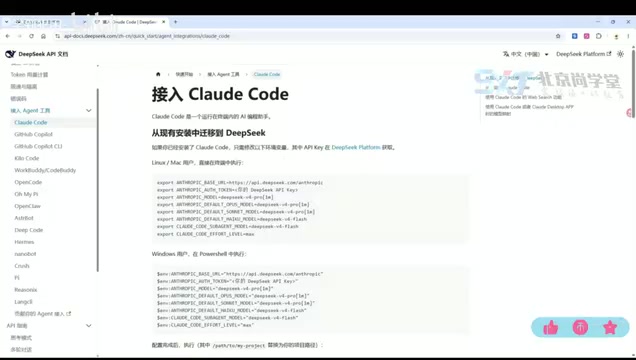
Therefore, we need a third-party bridging tool to handle the protocol conversion. The solution introduced in this article is an open-source project on GitHub — Codex++.
Codex++: An Open-Source Tool to Bridge DeepSeek and Codex
What Is Codex++?
Codex++ is an open-source project hosted on GitHub whose core function is to serve as a protocol translation layer between Codex and third-party models. It works by launching a local proxy service that intercepts API requests from Codex, converts them from Codex's proprietary request format into the Chat Completions format that DeepSeek understands, and then forwards the requests to DeepSeek's API server. When DeepSeek returns a response, Codex++ converts the response data back into a format that Codex can parse. This intermediary proxy pattern is very common in software engineering, similar to the Adapter Pattern in design patterns — it allows two originally incompatible systems to work together without modifying either one's source code. Through Codex++, developers can seamlessly integrate DeepSeek and other Chat-protocol-compatible models into Codex, enabling low-cost AI-assisted programming.
Full Installation and Configuration Walkthrough
After installation, Codex++ provides a standalone management interface. The entire configuration process is straightforward. Here are the key steps.
Step 1: Add Provider Configuration
Codex++ supports importing preset configurations or manually adding providers. When configuring DeepSeek, pay attention to the following parameters:
- Integration Mode: Select the "DeepSeek" configuration
- API Address: Enter DeepSeek's API URL path
- Model Selection: Choose either DeepSeek V4 Pro or DeepSeek V4 Plus
- API Key: Enter the API key you obtained from the DeepSeek platform
- Upstream Protocol: ⚠️ You must select the "Chat" protocol — this is the most common mistake
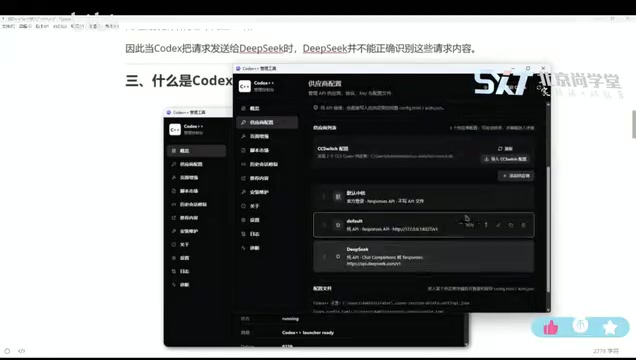
Regarding the upstream protocol selection, a special note is needed: DeepSeek's API follows the OpenAI Chat Completions format, not the Responses format used internally by Codex. Codex++ needs to know exactly which protocol the upstream provider uses in order to correctly convert request and response formats. Selecting the wrong protocol will cause a mismatch in the request body structure, making the server unable to parse the request content and returning an error.
Click save after completing the configuration.
Step 2: Test the Connection
After saving the configuration, click the test button in the management interface. If it returns an HTTP 200 status code, the connection is working and DeepSeek's API has been successfully bridged. HTTP 200 is a standard response status code defined in the HTTP protocol, indicating that the server has successfully processed the client's request. If you receive other status codes during testing, you can troubleshoot based on the specific error code: 401 typically means the API Key is incorrect, 404 indicates the endpoint address is misconfigured, and 429 means the request rate has exceeded the limit.
Step 3: Launch Codex Through Codex++
This step is crucial: you must launch Codex through Codex++'s management tool, rather than opening Codex directly. Only when launched via Codex++ will the local proxy service intercept Codex's network requests and enable protocol conversion. If you open Codex directly, all API requests will still be sent directly to OpenAI's servers, completely bypassing Codex++'s bridging layer.
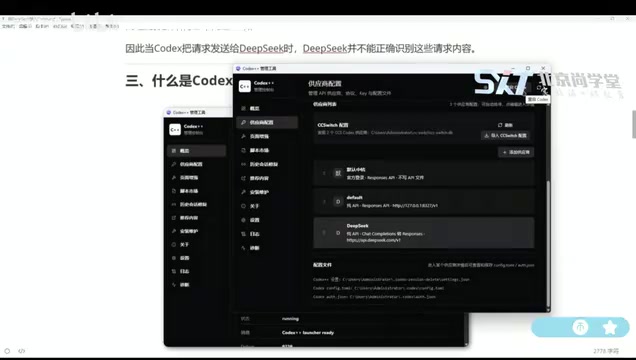
How to Verify a Successful Connection
After launching through Codex++, you can observe the following changes in the Codex interface:
- The title bar will display a Codex++ 1.1.7 identifier (version number may vary)
- The plugin status will show as "Unlocked"
- The model selection list will include DeepSeek V4 Plus and DeepSeek V4 Pro as new options alongside the existing GPT series
Select a DeepSeek model and start coding. In our testing, response speed was quite fast, providing a smooth daily development experience.
Advantages and Considerations for DeepSeek + Codex Integration
Key Advantages
- Significantly Lower Costs: DeepSeek's API pricing is far below OpenAI's, allowing heavy users to save considerably
- Excellent Code Capabilities: The DeepSeek V4 series performs impressively on code generation, completion, and refactoring tasks
- Minimal Configuration: No complex environment setup required — the entire process takes just a few minutes
- Open Source and Transparent: Codex++ is fully open source, secure, and transparent, supporting self-auditing
Model Selection Recommendations
DeepSeek V4 Pro and V4 Plus represent different performance-cost tradeoff strategies. The Pro version has a larger model parameter scale or longer context window (the maximum text length a model can process in a single pass), delivering better performance on complex code logic, large codebase comprehension, and high-precision refactoring tasks — though with correspondingly higher API call costs and potentially slightly longer response latency. The Plus version is moderately streamlined in model scale, making it better suited for everyday code completion, simple function generation, and other high-frequency, low-complexity tasks, with faster response times and lower per-call costs. Developers can flexibly switch based on their specific use case — using Plus for daily coding and Pro for critical module development is a cost-effective strategy.
Common Pitfalls to Avoid
- Upstream protocol must be set to Chat: Selecting the wrong protocol will cause communication failures — this is the most frequent configuration error
- You must launch Codex through Codex++: Opening Codex directly won't load the bridging configuration, and DeepSeek options won't appear in the model list
- API Key Security: Keep your DeepSeek API key safe and avoid hardcoding it in public repositories. Use environment variables or dedicated secret management tools to store API keys, preventing accidental exposure through code commits
- Network Environment: Since Codex++ runs a proxy service locally, ensure your local network can access DeepSeek's API servers. If you're using a VPN or proxy tool, you may need to check for port conflicts or routing rules
Conclusion
For developers in China, connecting DeepSeek to Codex is a practical solution that balances performance and cost. With the open-source bridging tool Codex++, the entire configuration process can be completed in just a few minutes without any programming expertise. Codex++ cleverly solves the compatibility issue between two different API protocols through the adapter pattern, allowing developers to enjoy DeepSeek's cost-effective code generation services with minimal effort. If you've been frustrated by Codex's steep API costs, give this solution a try — it's affordable, effective, and there's no reason not to.
Related articles

AI Alleviating Sierra Leone's Teacher Shortage: Technology Empowering Rather Than Replacing Educators
Sierra Leone faces severe teacher shortages. AI as a teacher partner can provide personalized tutoring, content preparation, and basic Q&A. This article analyzes AI education prospects, infrastructure challenges, and localization strategies in developing countries.

Hands-On Tutorial: Integrating Google Maps Grounding with Firebase AI Logic
Learn how to integrate Google Maps Grounding with Firebase AI Logic in three steps. Combine Gemini with map data to build smart location-aware AI apps.
A $10 Million Research Fund Launches: What Happens When Millions of AI Agents Interact with Each Other?
Google.org and Schmidt Sciences launch a $10M fund to study collective behavior and emergent risks of multi-agent AI systems, from flash crashes to mass AI Agent deployment.