DeepSeek + MATLAB: Zero-Barrier AI Auto-Programming and Debugging
Build a zero-dependency AI auto-programming and debugging assistant in MATLAB using the DeepSeek API.
This article details how to call the DeepSeek API directly from MATLAB to create an AI-powered auto-programming and debugging system. It covers API key setup, prompt engineering for code generation, and a closed-loop auto-debugging mechanism that iterates until code runs successfully. A linear fitting demo showcases the full workflow, proving this lightweight, low-cost solution is ideal for beginners and professionals alike.
Introduction: A New AI Programming Paradigm for MATLAB Users
For many engineers and researchers, MATLAB is an indispensable tool in their daily work. But have you ever considered that without installing any additional editors or plugins, you could achieve AI-assisted programming and even automatic code debugging using nothing but MATLAB itself and the DeepSeek API?
This article provides a detailed walkthrough of a lightweight solution: by calling the DeepSeek API directly from MATLAB, you can have AI write MATLAB scripts for you, automatically run them, and self-correct any errors — forming a complete "inner loop" auto-programming system. The entire process is extremely beginner-friendly, making it one of the best entry points for getting started with AI-assisted programming from scratch.
Applying for a DeepSeek API Key
Registration and Top-Up
To use DeepSeek's API service, you'll first need to complete the following preparations:
- Visit the DeepSeek official website and find the "API Open Platform" entry
- After registering an account, add funds to your balance (DeepSeek's API pricing is relatively affordable)
- In the right-side menu, find the "API Key" option and click to create a new key
- Copy the generated API Key and save it to a local text file for later use
This key serves as your "pass" for communicating with DeepSeek's AI — all subsequent API calls will require it. Keep it safe and don't share it with others.
Background on the DeepSeek API
DeepSeek is a large language model series developed by DeepSeek (the company). Its API follows a RESTful design specification compatible with OpenAI. A RESTful API is an interface design style based on the HTTP protocol, where clients send standard HTTP requests (such as POST requests) with JSON-formatted payloads to interact with server-side AI models. This compatibility means that developers familiar with OpenAI's API can migrate to the DeepSeek platform with virtually zero effort. More importantly, DeepSeek's pricing strategy offers a significant cost advantage over international models like GPT-4 and Claude — the price per million tokens is typically only a fraction, sometimes even one-tenth, of those alternatives. This makes scenarios requiring iterative debugging, like auto-programming, entirely economically viable.
Building AI Chat Functionality in MATLAB
Creating a MATLAB-Native AI Chat Assistant
With your API key in hand, the first feature you can implement is direct conversation with DeepSeek from within MATLAB — essentially a native MATLAB AI chat assistant.
The implementation logic is straightforward:
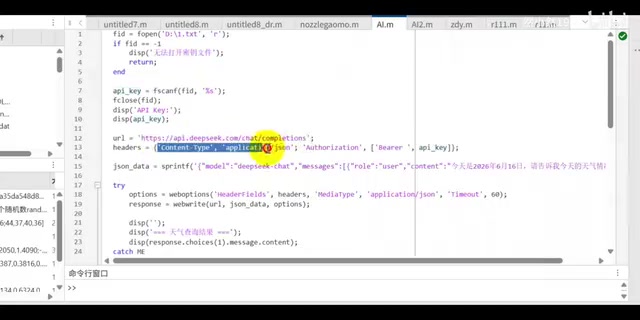
- Store the key: Save the API Key in a local file that the MATLAB script reads at runtime
- Build request headers: Set up the HTTP request headers according to DeepSeek API specifications (including authentication info and content type)
- Send the request and receive the response: Send the user's question as the request body and receive the AI's answer
It's worth mentioning MATLAB's native HTTP request capabilities here. Starting from R2014b, MATLAB introduced functions like webread and webwrite, and later versions provided the more powerful weboptions configuration object and the matlab.net.http package, giving MATLAB native HTTP client capabilities. This means MATLAB is no longer just a numerical computing environment — it can communicate directly with any cloud service offering a RESTful API, including AI model inference services, database services, and cloud storage services. This capability forms the technical foundation that makes our solution possible without any external tools.
For example, when you type a question like "What should I do when I'm feeling down today?", MATLAB sends the question to DeepSeek via the API and outputs the AI's suggestions directly in the Command Window. The entire process takes place within the MATLAB environment — no need to switch to a browser or other tools.
Implementing the Core AI Auto-Programming Feature
Prompt Design Is Key
Building on the chat functionality, the truly exciting part is having DeepSeek write MATLAB code for you directly. The key here lies in prompt design.
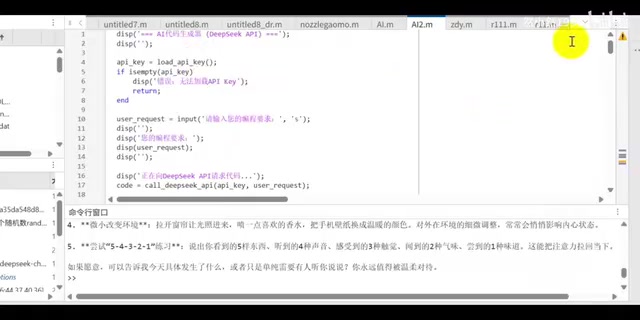
The prompt strategy includes several critical constraints:
- Role assignment: "You are a MATLAB programming expert"
- Output format: Require the generation of directly runnable MATLAB scripts (not functions)
- Code standards: No function definitions (no
functionkeyword), no explanatory text — output pure MATLAB code only
Prompt Engineering is a crucial technique in current AI applications. It guides the model to produce desired outputs by carefully designing the text prompts fed to large language models. In code generation scenarios, prompt quality directly determines the usability of the generated code. Each of the constraints above has deep technical reasoning behind it:
Requiring "scripts rather than functions" relates to the fundamental difference between Script and Function file types in MATLAB. Scripts execute directly in the current workspace (Base Workspace) and can freely access and modify all variables in it. Functions, on the other hand, have their own independent scope, requiring data to be passed through input/output arguments, and the function name must match the filename. For automated execution scenarios, the parameterless direct-run nature of scripts is clearly more convenient, eliminating the extra complexity of constructing calling logic.
Requiring "no explanatory text" is designed to avoid a common AI output habit — adding Markdown code block markers (like ```matlab) before and after the code or interspersing natural language explanations. If this non-code content is treated as code by the MATLAB interpreter, it immediately triggers syntax errors and breaks the automated execution flow.
The "Inner Loop" Auto-Debugging Mechanism
The most elegant aspect of this solution is its auto-debugging mechanism. The entire workflow forms a closed loop:
- The user inputs a programming request (e.g., "Fit 10 data points with a linear formula")
- MATLAB sends the request to DeepSeek via the API
- DeepSeek returns the generated MATLAB code
- MATLAB automatically runs the code
- If an error occurs, the error message is fed back to DeepSeek so the AI can fix the code
- Steps 3–5 repeat until the code runs successfully
- Upon success, the result is presented to the user with a prompt to save the code file
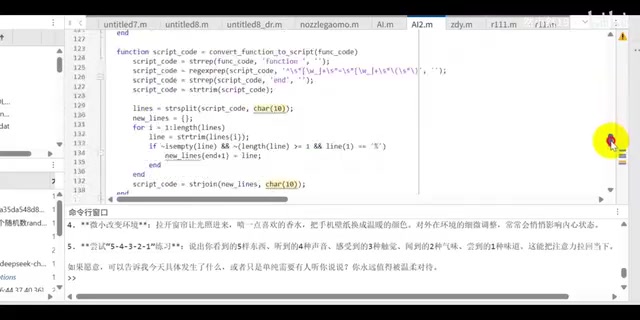
This is what's meant by "fully based on an inner loop" — the system only gives you feedback once the code runs successfully. This means the code you receive is guaranteed to work, dramatically reducing the cost of manual debugging.
From a technical architecture perspective, this "generate-execute-feedback-fix" loop is actually a lightweight implementation of the AI Agent programming paradigm. In the AI field, an Agent refers to an autonomous system capable of perceiving its environment, making decisions, and taking actions. In this solution, the "environment" is MATLAB's runtime environment, "perception" is capturing code execution errors, "decision-making" is DeepSeek determining a fix based on the error information, and "action" is generating corrected code and executing it again. This pattern shares similarities with the Continuous Integration/Continuous Deployment (CI/CD) philosophy in software engineering, with the key difference being that the "developer" role is entirely handled by AI.
At the implementation level, MATLAB's try-catch error handling mechanism plays a critical role in this process. The AI-generated code executes within the try block, and when a runtime exception occurs, the catch block captures the MException object, extracting structured error information — including the error identifier, the specific line number where the error occurred, and a detailed error description. This precise contextual information is concatenated into a new prompt and sent to DeepSeek, enabling the AI to pinpoint and fix the problem rather than blindly regenerating the entire code block.
Live Demo: Linear Fitting Case Study
In a practical demonstration, a specific programming request was entered: "Fit 10 data points with a linear formula." The system's execution process went as follows:
- After clicking OK, MATLAB sends a code generation request to the DeepSeek API
- The AI returns code, which is automatically executed
- The system prompts the user to save the generated script file
- The final output is a chart containing random data points and a linear fitting curve
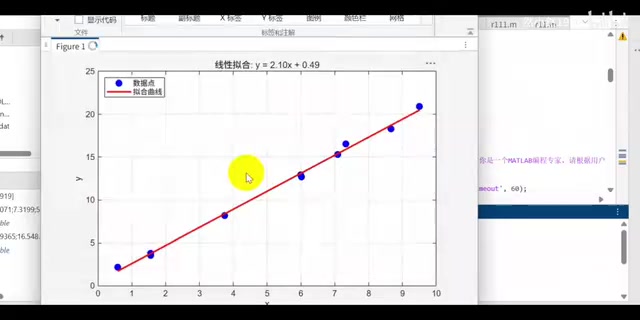
Opening the saved .m file reveals that the code was entirely auto-generated by the AI, including random data point generation, linear fitting calculations, and graph plotting. Running it again produces no issues whatsoever.
The Technical Principles Behind Linear Fitting
Linear fitting is one of the most fundamental and commonly used techniques in data analysis. Its mathematical essence is the Least Squares Method — finding a line $y = ax + b$ that minimizes the sum of squared vertical distances from all data points to the line. In MATLAB, this is typically achieved through first-order polynomial fitting with the polyfit function, or using the more general fitlm regression analysis tool. While the linear fitting algorithm itself isn't complex, it serves as an excellent demonstration case because it simultaneously involves data generation (rand or randn functions), mathematical computation (polyfit and polyval), and graphical visualization (plot, scatter, and legend annotations) — three core MATLAB application areas — comprehensively showcasing the AI's end-to-end code generation capabilities.
Advantages and Use Cases
Why This Solution Deserves Your Attention
Zero additional dependencies: No need to install MATLAB Coder, MATLAB Server, or any third-party IDE plugins — it works entirely through MATLAB's built-in HTTP request capabilities and the DeepSeek API.
Extremely beginner-friendly: You don't even need to know how to write MATLAB code. Simply describe the functionality you want in natural language, and the AI handles everything from coding to debugging.
Low cost: DeepSeek's API fees are far lower than those of international models like GPT-4, making it very accessible for students and individual developers. In an auto-debugging scenario, even if a request goes through 5 rounds of correction iterations, the total token consumption is typically only a few thousand to ten thousand or so, translating to a negligible cost.
Highly extensible: This framework isn't limited to simple linear fitting. In theory, anything MATLAB can do — signal processing, image analysis, control system simulation, finite element analysis preprocessing — can be written by AI using this approach. MATLAB has over 80 specialized toolboxes covering fields from communication systems to computational biology, and DeepSeek's training data includes extensive MATLAB-related code and documentation, providing the knowledge foundation for AI to generate domain-specific code.
Potential Limitations
Of course, this approach has its limitations. For large, complex projects, the single-script format may lack flexibility, modularity, and code reuse capabilities. AI-generated code may not match the algorithmic efficiency and coding standards of experienced engineers — for example, it might not fully leverage MATLAB's vectorization capabilities when handling large-scale matrix operations. Additionally, for scenarios involving specific hardware interfaces (such as data acquisition card drivers) or obscure functions in specialized toolboxes, the AI's generation quality may noticeably decline due to insufficient training data coverage. The auto-debugging loop also needs a reasonable maximum iteration limit to prevent infinite loops on problems the AI cannot solve.
Conclusion
The DeepSeek + MATLAB combination essentially merges the code generation capabilities of large language models with MATLAB's instant execution environment. Through an automated "generate-execute-feedback-fix" loop, it creates a lightweight yet practical AI programming assistant. This pattern represents an important direction in the evolution of AI-assisted programming — from "suggestive" to "autonomous." The AI doesn't just offer code suggestions; it autonomously verifies and corrects them, truly delivering "runnable results." For MATLAB users, this is an excellent entry point to experience AI programming at virtually zero cost. Whether you're a research newcomer or a seasoned engineer, it's well worth spending a few minutes to set it up and give it a try.
Key Takeaways
Related articles

DeepSeek Forms Harness Team: AI Coding Competition Enters the Second Half
DeepSeek forms a dedicated Harness team to rival Claude Code. Analysis of the four-layer architecture, three core advantages, and 40x cost edge driving AI competition from model wars to engineering deployment.
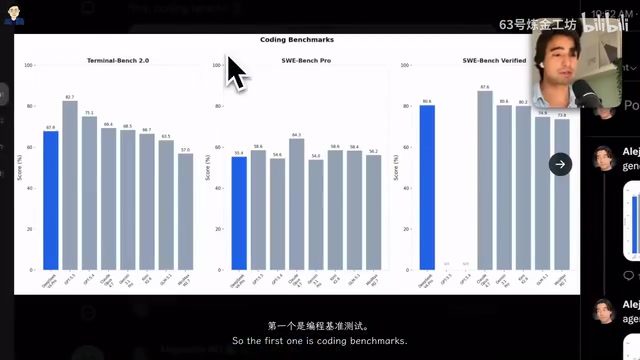
DeepSeek V4 Pro In-Depth Review: Performance Rivaling GPT-5.5 at 1/12 the Cost
Comprehensive review of DeepSeek V4 Pro across coding, reasoning, and Agent benchmarks. Compare pricing vs GPT 5.5 and Claude Opus, plus hands-on coding demo with Pi Agent.
Vibe Coding in Practice: Building a Global Product from Scratch with an AI Workflow
A battle-tested AI development workflow covering Claude Code Plan Mode, documentation management, version control, and Cloudflare deployment for building global products.