Dify AI Agent Tutorial: Tool Integration & ESA Search Configuration in Practice

A complete hands-on guide to building AI Agents on Dify with zero code
This article provides a detailed walkthrough of building AI Agents on the Dify platform with zero code, covering the core differences between Agents and chat assistants (Function Call/ReAct modes, external tool mounting), selection strategies for 161 plugins, in-depth ESA search tool configuration and parameter tuning, and solutions for Agent time-awareness issues. Key recommendations include focusing each Agent on a single task, choosing models with strong tool-calling capabilities (like DeepSeek V3), and following the functional focus design principle.
Introduction
AI Agents are one of the hottest AI application forms today—they can autonomously invoke tools, search the web, and analyze data, truly letting AI handle complex tasks on your behalf. However, many people still find the Agent-building process confusing. This article walks through the entire zero-code process of building an AI Agent on the Dify platform, from Agent creation and tool configuration to ESA search optimization and hands-on debugging, helping you get started quickly while avoiding common pitfalls.
Core Differences Between Agents and Chat Assistants
In Dify, the entry point for creating an Agent is similar to a chat assistant—you create a new blank application, select the "Agent" type, and enter an interface nearly identical to the chat assistant: prompts on the left, conversation testing on the right.
So what makes an Agent special? The key differences come down to two points:
First, Agents have independent strategy settings. The default mode is Function Call, which is OpenAI's tool-calling API standard that most models supporting tool invocation are now compatible with. Function Call was introduced by OpenAI in June 2023 alongside the GPT-3.5/GPT-4 API update as a critical capability. It allows developers to define a set of function (tool) descriptions as JSON Schema in API requests, and the model autonomously determines whether to call a function based on user input, outputting the function name and parameters in structured JSON format. The core advantage of this mechanism is that the model's tool-calling decisions are made at the inference level, rather than relying on the "soft guidance" of prompt engineering. However, note that Agents in Dify can invoke tools a maximum of 5 times—this is a hard limit.
Second, Agents can mount external tools. This is a capability that chat assistants don't have, and it's what makes Agents truly powerful—they can autonomously determine when to call which tool and pass in appropriate parameters.
For models that don't support Function Call (such as DeepSeek R1), Dify automatically switches to ReAct mode. ReAct (Reasoning + Acting) is an Agent paradigm proposed by Princeton University and Google Brain in 2022. Its core idea is to let the model solve problems step by step in a "think-act-observe" loop—at each step, the model first outputs its reasoning process (Thought), then decides what action to take (Action), then observes the action result (Observation), iterating until reaching a final answer. ReAct mode has broader compatibility because it essentially only relies on the model's text generation capability without requiring native function-calling interface support. In this mode, system prompts don't need manual adjustment—the framework handles everything automatically.
Practical tip: Since tool invocations are limited to 5 times, it's recommended to split different functions into separate Agents. For example: one dedicated to searching news and summarizing, one for stock analysis, and one for knowledge base Q&A.
Dify Tool Ecosystem: A Guide to 161 Plugins
Dify Platform Architecture and Tool Ecosystem Positioning
Dify is an open-source LLM application development platform (with over 60K stars on GitHub), positioned as an "LLMOps" tool designed to let both developers and non-technical users quickly build applications based on large language models. It supports the full spectrum of application forms, from simple Chatbots to complex multi-step Workflows and Agents. Dify's core architecture includes: a Prompt orchestration engine, RAG knowledge base pipeline, Agent framework, model gateway (supporting dozens of model providers including OpenAI, Anthropic, local Ollama, etc.), and a plugin ecosystem. One of the major upgrades in version 1.0 was the introduction of a plugin-based architecture that decouples tool capabilities from the platform core, enabling on-demand installation through the Marketplace. This reduces the platform's maintenance complexity while making it easier for community developers to contribute new tools. Compared to code-based frameworks like LangChain and AutoGen, Dify's biggest differentiator is its visual zero-code/low-code interface, which dramatically lowers the barrier to building AI applications.
Tool Installation and Management
After Dify 1.0, only a few preset tools are retained (such as CurrentTime, Audio, etc.), and the rest need to be manually downloaded and installed through the Marketplace.
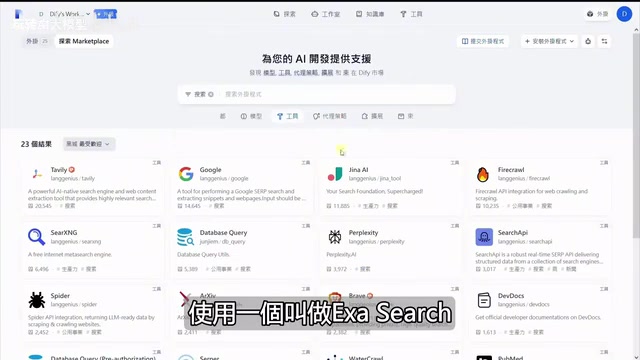
Access method: Click "Plugins" → "Explore Marketplace" to browse all available tools. As of now, the platform offers 161 tool plugins to choose from, with filtering by popularity, recent updates, latest releases, and other dimensions.
Popular Tools at a Glance
Here are several noteworthy high-frequency tools:
| Tool Name | Core Function | Downloads |
|---|---|---|
| Tavily | Web search queries, returns structured results | 20K+ |
| Jina | Web content extraction similar to Tavily | High |
| FireCrawl | Deep crawling of entire websites, supports multiple levels | High |
| DALL-E | OpenAI image generation | High |
| Poke | Markdown to PPT/Word | Medium |
| Email sending functionality | Medium |
The key difference between FireCrawl and Tavily/Jina is that the latter two primarily do search queries, while FireCrawl can completely extract an entire website's content and allows you to set crawl depth (how many link levels), making it suitable for scenarios requiring large amounts of web data.
ESA Search Tool: In-Depth Configuration Guide
Why ESA Is Recommended
Among the many search tools available, ESA (Exa Search) is a highly worthwhile option to try. Its biggest difference from Tavily and Jina is that ESA uses a RAG-like retrieval approach, pre-storing website content in its own vector database and using fuzzy semantic matching for queries rather than traditional keyword search. This means even if your query isn't precisely worded, ESA can find semantically relevant content.
To understand ESA's technical advantage, you need to grasp the basic principles of vector retrieval. The underlying technology converts text into high-dimensional vectors (typically 768 or 1536 dimensions) through Embedding models (such as OpenAI's text-embedding-ada-002 or the open-source BGE series), then stores them in specialized vector databases (like Pinecone, Milvus, Weaviate, etc.). During queries, the user's question is similarly converted to a vector, and the most semantically similar document fragments are found using algorithms like cosine similarity or Euclidean distance. This is fundamentally different from traditional search engines based on inverted index keyword matching—keyword search requires literal matching between query terms and document vocabulary, while vector retrieval understands that "latest advances in artificial intelligence" and "AI frontier breakthroughs" are semantically similar expressions. RAG (Retrieval-Augmented Generation) combines this vector retrieval with LLM generation capabilities—first retrieving relevant documents, then having the model generate answers based on retrieval results, significantly reducing model hallucination issues.
ESA provides four core functions:
- ESA Search — Supports neural network (vector), keyword, and hybrid search modes
- URL Content — Directly fetches webpage content given a URL (pre-crawled, extremely fast)
- Similar Link — Given a URL, uses vector retrieval to find similar websites
- ESA Answer — Directly returns AI-summarized answers
Registration and API Configuration
After registering for ESA, you receive generous free credits. After completing onboarding tasks, you'll have approximately $230 in usage credits, essentially allowing long-term free use. After obtaining your API Key, paste and save it in Dify's plugin settings—a green status indicator means configuration is successful.
Key Parameter Tuning
After adding ESA as an Agent tool, several parameters deserve special attention:
Search Mode Selection:
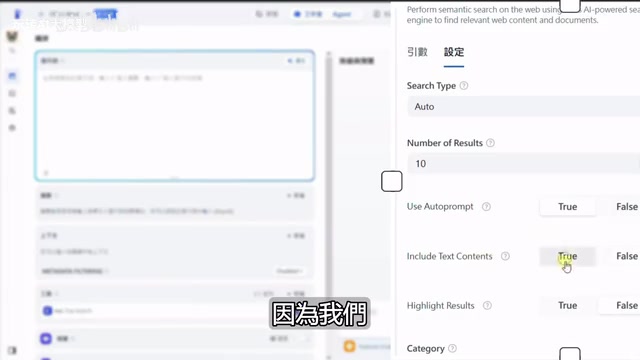
- Neural (neural network/vector retrieval): Semantic similarity matching, suitable for fuzzy queries
- Keyword: Exact matching, requires literal consistency
- Auto (recommended): Hybrid mode combining the advantages of both
Number of Results: Default is 10. For simple needs like news or weather queries, 10 is sufficient; for in-depth research reports or Deep Research-like functionality, consider increasing to dozens or even hundreds.
Use Auto-Prompt: Automatically optimizes your query prompts. If you haven't done specialized prompt engineering optimization, it's recommended to enable this option.
Text Content: Must be checked! Otherwise, only summary information is returned without complete webpage text content, and the Agent cannot perform analysis and summarization based on complete information.
Category Filter: You can select specific domains such as News, GitHub (code), Twitter (social), PDF, etc. When selected, search results focus on that domain, preventing overly scattered results.
Practical Pitfall: Solving the Time Awareness Problem
Problem Reproduction
After configuring ESA, when we ask "Please give me AI-related news," the Agent does invoke the ESA search tool, but the returned news dates back to 2023 or even earlier—clearly not the "latest news" we wanted.
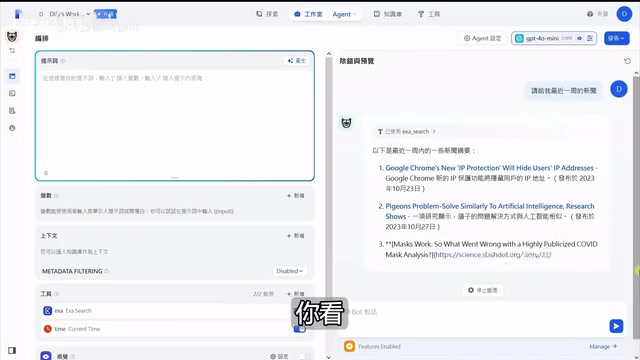
Even after adding the CurrentTime tool so the Agent knows the current time, asking "Please give me news from the past week" still returns 2023 content. The root cause is: without explicit instructions, large language models won't proactively invoke the time tool to determine the current date.
The deeper reason behind this problem is worth exploring. LLM training data has a fixed cutoff date (knowledge cutoff)—for example, GPT-4o's training data cuts off in early 2024, and DeepSeek V3 has a similar time boundary. This means the model knows nothing about events after its training cutoff. More critically, even if the model "knows" its training cutoff date, it has no built-in real-time clock during inference—it cannot perceive "what today's date is." This is why when a user says "news from the past week," the model might "guess" a time range based on the time distribution in its training data rather than accurately pinpointing the current date. This limitation is particularly prominent in Agent scenarios, as many real-world tasks (news queries, scheduling, data reports) depend on precise temporal context.
Solution: Use a Model with Stronger Tool-Calling Capabilities
After switching the model from GPT-4o Mini to DeepSeek V3, the results immediately improved:
- The Agent first automatically invokes CurrentTime to get the current time
- Then passes the time parameters (e.g., March 28 to April 4, 2025) into the ESA search
- Finally returns genuinely recent news from the past week
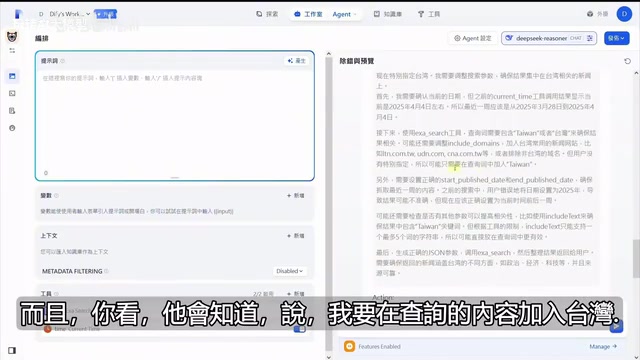
The differences in tool-calling capabilities among LLMs fundamentally stem from whether they underwent specialized fine-tuning and alignment for tool-calling scenarios during training. OpenAI's GPT-4 series excels at tool calling because it was trained on extensive function-calling data; however, GPT-4o Mini, as a lightweight version, has reduced capabilities in complex multi-step tool orchestration. DeepSeek V3's superior performance in this scenario is closely related to its 671B-parameter MoE (Mixture of Experts) architecture—greater model capacity means stronger reasoning and planning abilities, enabling it to autonomously construct tool-calling chains like "first get time → then search with time parameters." Anthropic's Claude 3.5 Sonnet also excels at tool calling, with its Tool Use feature supporting parallel invocation of multiple tools. When selecting a base model for your Agent, beyond cost and speed considerations, tool-calling accuracy and multi-step planning capability should be core evaluation dimensions.
Even more impressive is that the Agent has conversational memory capability. In the second round of conversation, when asked "Please give me Taiwan news from the past week," it no longer re-invokes CurrentTime (because it remembers the time obtained in the previous round) and instead directly adds the "Taiwan" keyword and time range to the ESA query, conserving precious tool invocation counts.
Key takeaway: Models vary enormously in tool-calling capability. Lightweight models like GPT-4o Mini may need explicit guidance on tool-calling order in the prompt; while stronger models like DeepSeek V3 can autonomously plan tool-calling chains. If your Agent is underperforming, prioritize switching to a model with stronger tool-calling capabilities.
Best Practices for Agent Design
Functional Focus Principle
Due to Dify's 5-tool-invocation limit, each Agent should focus on a single, well-defined task domain:
- News Agent: ESA Search + CurrentTime → Query and summarize latest news
- Knowledge Base Agent: Local knowledge base retrieval → Answer questions based on enterprise documents
- Data Analysis Agent: Stock/weather APIs → Data querying and visual analysis
Don't try to cram all tools into a single Agent—this not only risks exceeding the invocation limit but also causes the model to become confused in tool selection, degrading answer quality.
Interaction Experience Optimization
In the Agent's management settings, several practical features are worth enabling:
- Opening statement: Preset guided messages and suggested questions to lower the barrier for user queries
- Next step suggestions: Based on current conversation content, predict and recommend possible follow-up questions
- Annotated replies: For customer service scenarios, you can set standardized reply templates to ensure consistent formatting and accurate content for critical questions
Conclusion
The Dify platform has reduced the barrier to building AI Agents to nearly zero, but there's still a significant gap between "being able to build" and "building well." The core points covered in this article include: understanding the differences between Function Call and ReAct modes, making informed tool selections from 161 plugins, mastering ESA search parameter tuning techniques, solving common Agent time-awareness issues, and following the functional focus design principle. Put these insights into practice, and you'll be able to build AI Agent applications that truly deliver value.
Key Takeaways
- Agents in Dify can invoke tools a maximum of 5 times; it's recommended to split Agents by functional domain, with each Agent focusing on a single task
- The ESA search tool uses RAG-like vector retrieval; use Auto hybrid search mode and always enable the Text Content option for complete content
- LLMs lack time awareness and need the CurrentTime tool; stronger models (like DeepSeek V3) have better tool-calling chain planning capabilities
- After Dify 1.0, tools must be manually installed from the Marketplace; there are currently 161 plugins available covering search, crawling, image generation, email, and more
- Agents have conversational memory, reusing previously obtained information (like time) across multiple turns to avoid redundant tool invocations
Related articles
 Tutorials
Cursor + Codex Dual-IDE Collaboration: A Practical Methodology for Open-Source Project Customization
A complete methodology for open-source project customization based on real-world experience, detailing the Cursor+Codex dual-IDE workflow, seven-stage process, MVP validation, and AI source code reading techniques.
 Tutorials
Cursor Multi-Agent in Practice: Building a Full-Stack Next.js Blog in 50 Minutes
Build a full-stack blog in 50 minutes using Cursor IDE's multi-Agent mode with Next.js, Clerk auth, and Supabase. Learn the 4-phase AI Agent workflow and key integration pitfalls.
 Tutorials
Building an AI Software Factory from Scratch: A Cursor Engineer's Hands-On Experience with Multi-Agent Collaboration
Cursor engineer Eric shares practical insights on building an AI software factory: automation levels, guardrail design, parallel Agent management, and scaling to 1000+ Agents for 24/7 development.