Dissecting Cursor's Technology: Why IDEs Are Being Agent-ified
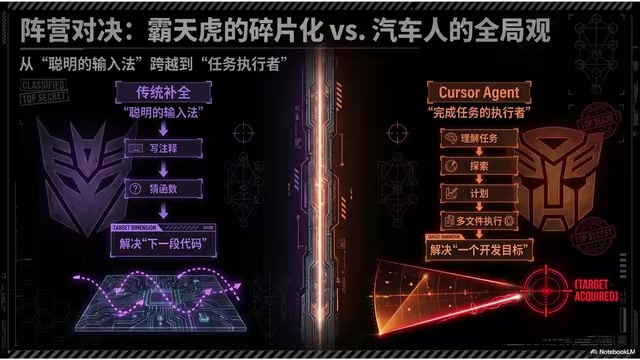
How Cursor transforms the IDE from a code editor into a full-fledged Agent work interface.
This article dissects how Cursor embeds Agent capabilities natively into the IDE, going far beyond a simple chat sidecar. It explores Cursor's zero-friction context acquisition, structured planning and todo mechanisms, layered rules system, and surgical-precision diff review — revealing why the IDE's unmatched context density makes it the ideal home for coding Agents and what this means for the future of Agents embedded in professional tools.
When we talk about AI programming tools, three distinct forms have clearly emerged: Claude Code is rooted in the terminal, Codex occupies the cloud, and Cursor has chosen a battleground no one can avoid — the IDE. This isn't simply slapping a chat box next to the editor. It's about embedding Agent capabilities directly inside the editor, letting it participate throughout your entire workflow of reading, selecting, modifying, and reviewing code.
In one sentence: Cursor aims to transform the IDE from a code editor into an Agent work interface.
What True IDE Agent-ification Really Means
First, let's clear up a common misconception. Many people think attaching a chat box beside the editor makes it an IDE Agent. This "sidecar model" essentially puts a layer between the AI and your code — you ask, it answers, but it doesn't truly understand what you're doing at any given moment.
True IDE Agent-ification means the Agent isn't mounted alongside — it takes over the entire workflow. Your core actions in the IDE — browsing code, selecting code, running commands, reviewing changes — it directly participates in every step. It becomes the IDE's native operational layer, built into the editor rather than bolted onto it.
It's equally important to distinguish Cursor from traditional code completion. Many people's first encounter with AI programming was through code completion: you write a comment and it fills in a function, you type a function name and it guesses the body. That's valuable, but it's not an Agent. Traditional completion is more like an exceptionally smart input method, focused on the question of "what's the next chunk of code." Cursor's Agent mode, on the other hand, focuses on "a development objective" — it can proactively explore the codebase around a task, find relevant files, propose a modification plan, edit multiple files, run commands, and then fix any errors that come up. This is a qualitative leap from completion to task execution.
The IDE: The Development Environment with the Highest Context Density
Why does the Agent need to be "built into" the IDE? Because the IDE is the developer's working environment with the highest context density.
Think about when you're working in an IDE — your attention focus is naturally exposed through a wealth of signals: which file you're viewing, which section you've selected, which tabs are open, where your cursor is resting, what you've recently changed, what errors the diagnostics panel is reporting, which breakpoints are set in the code… All of these are extremely valuable context signals.
Terminal-based Agents can't see any of this. They know the project structure, the git status, and file contents, but they don't know where your attention is focused right now. An IDE Agent is different — it stands right in the middle of this information stream.
Here's the most typical example: you select a function and say, "Make this support async." If it's a terminal Agent, it first has to guess which function "this" refers to — it needs to search the code, list a bunch of candidates, and come back to ask for confirmation. Every round trip is friction. But an IDE Agent immediately knows that "this" is the section your cursor has selected — lock on, understand, act, all in one smooth motion.
This zero-friction context acquisition is the IDE Agent's unique advantage — something other forms simply can't replicate.
Planning, Rules, and Fine-Grained Collaboration
Planning and Todo Mechanism
Cursor has a built-in planning and todo mechanism. When a task gets complex, the IDE Agent doesn't just dive in blindly. It first lays out a plan, clearly showing you the steps it intends to take: step one, analyze interface dependencies; step two, refactor the data layer; step three, update test cases.
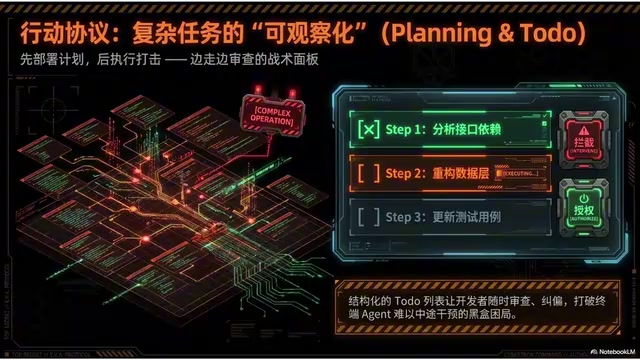
This plan-first, execute-second design is especially important in the IDE because developers are already accustomed to viewing structured information there. A clear, well-organized todo list is far easier to understand, evaluate, and intervene in than a wall of streaming text. More critically, you can review its changes at any intermediate step, make a local correction, and then decide whether to let it continue — this ability to review as you go is something terminal Agents can hardly offer.
Layered Rules Mechanism
Cursor's rules mechanism is essentially the same category of thing as Claude Code's CLAUDE.md or Codex's agents.md — project-level rule files that encode team conventions. But Cursor has a key advantage in the IDE context: rules can be layered and activated by directory, file type, or specific patterns.
For example, some rules only activate under the src directory, some only in .ts files, and some only trigger when API calls are involved. Mandatory type checking, UI component standards, request validation constraints — each governs its own scenario. This granular activation keeps rule files lightweight while precisely constraining Agent behavior. It illustrates a principle: project memory must become increasingly fine-grained to be truly useful in large-scale projects.
Surgical-Precision Diff Review
Cursor also delivers a particularly critical experience: it keeps both modifications and reviews inside the IDE. After the AI modifies code, what matters most isn't it saying "I'm done" — it's whether you can clearly see exactly what it changed. The IDE's diff review experience is naturally built for this — you can review changes file by file, hunk by hunk, accept or reject them section by section, directly follow up on an unsatisfactory section asking it to only modify that part without touching anything else, or manually fine-tune a few lines yourself while reviewing.
This grinds the granularity of human-machine collaboration down to an extremely fine level — down to a single hunk, a few lines of code. It's like a scalpel, not a hammer. This precision is the IDE Agent's killer feature.
A New Collaboration Paradigm: From Commander-Subordinate to Co-Pilots

Connecting everything above, you'll see that the IDE Agent introduces an entirely new collaboration paradigm. A terminal Agent is more like you handing it a task and it goes off to execute — a commander-subordinate relationship. An IDE Agent is more like you and it editing back and forth within the same code. It constantly understands what you just changed, and you seamlessly pick up what it generates — a continuous back-and-forth with maximum synchronization.
To use an analogy: this isn't a commander and a soldier — it's the pilot and co-pilot inside the same mech. You steer the big picture, it fills in the operational details, and both of you share the same screen, the same code.
Looking at Cursor's core advantages across five dimensions:
- Native Integration: Built into the IDE, no tool-switching needed, right alongside your daily development environment
- Perception Radar: Context acquisition is naturally low-friction, leveraging every signal available in the IDE
- Surgical-Precision Diff: Modification feedback is intuitive, with review precision down to individual lines of code
- High-Frequency Collaboration: Especially suited for the fine-grained collaboration of browsing-while-asking, asking-while-editing
- Fine-Grained Rules: Supports layered rules that precisely constrain Agent behavior
Boundaries and Insights: The Future of Agents Embedded in Professional Tools
Even the mightiest weapon has its blind spots. There are three types of scenarios where Cursor isn't the optimal solution:
- Long-running, heavily parallelized background tasks: A multi-task workbench like Codex is more suitable — you can't just stare at the IDE waiting for it to run all afternoon
- Pure command-line batch automation tasks: Terminal Agents are more direct and natural
- Ops-type tasks outside the IDE environment: IDE Agents simply can't reach these
In the future, developers will likely not use just one AI tool, but switch between IDE, terminal, and cloud task platforms as needed.
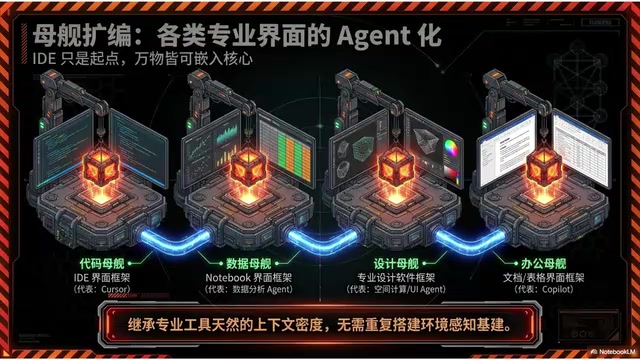
But Cursor offers a particularly important insight for the broader Agent technology landscape: Agents don't necessarily need to exist as standalone apps — they can be embedded directly into existing professional work interfaces. In the programming context, that interface is the IDE. What about other contexts? In office scenarios, it might be embedded in document and spreadsheet software; in data analysis, it might be embedded in Notebooks; in operations, it might be embedded in monitoring platforms; in design, it might be embedded in design tools.
Why does this approach work? Because every professional tool comes with its own naturally dense context signals. Once an Agent is embedded, it directly inherits that context density — there's no need to build an environment-awareness infrastructure from scratch.
So understanding Cursor isn't just about understanding an AI editor — it's about understanding how Agents enter professional tools. This pathway is very likely one of the mainstream forms for vertical Agents in the future. Terminal, cloud, and IDE form a three-way balance, and the direction for next-generation intelligent agents is likely their trinity: combining the integration and large-scale orchestration capabilities of terminal and cloud with the specialization and intimate perception advantages of the IDE. Integration and specialization will ultimately reach a dialectical unity, merging into a super-form with multimodal capabilities.
Related articles

MCP vs Skills: Understanding the Key to AI Testing Efficiency
Understand the key differences between MCP (Model Context Protocol) and Skills through practical analogies and real testing scenarios to boost AI-driven test automation efficiency.

The Essential Difference Between Skill and MCP: A Kitchen Analogy That Makes It Crystal Clear
Skill and MCP are two easily confused core concepts in AI Agent development. This article uses a kitchen analogy to explain how Skill (recipe/methodology) and MCP (kitchen assistant/tool connection) differ and work together.

Ponytail Plugin: The Minimalist Philosophy That Makes AI Coding Agents Write Less Code
Ponytail is a minimalist plugin for Claude Code that uses YAGNI principles and a decision ladder to cut AI-generated bloat. Tests show 47%-77% cost savings and 94% less code.