Extract Skills in One Click During a Claude Code Session: Turn Inspiration into Reusable Skills Instantly
Extract reusable Skills from Claude Code sessions instantly with a single in-conversation command.
Discover a hidden Claude Code trick that lets you extract Skill files directly within your current session using a single command. Instead of interrupting your workflow to manually create skill files, leverage Claude Code's full session context to automatically generate structured, reusable knowledge assets in seconds — preserving every insight and best practice from your conversation.
When working on complex tasks with Claude Code, have you ever found yourself in this situation: after a long debugging conversation, you finally arrive at a brilliant solution — but you don't want to interrupt your current work just to create a skill file? This tutorial introduces a highly practical hidden trick: extracting Skills directly within your session so that no flash of inspiration is ever lost.
The Pain Point: Inspiration Strikes, but You Can't Afford to Stop
Developers who use Claude Code know that a high-quality session often comes with extensive context. As Anthropic's command-line AI coding assistant, one of Claude Code's core strengths is its support for long context windows. Within a single session, Claude Code maintains awareness of the entire conversation history — including code changes, error troubleshooting, solution discussions, and all other interactions. This context awareness means the AI remembers not just the final conclusion, but also the intermediate states and decision logic from the reasoning process. The solutions you and the AI explored together, the pitfalls you encountered, and the best practices you ultimately confirmed — all of these are incredibly valuable "session gems."
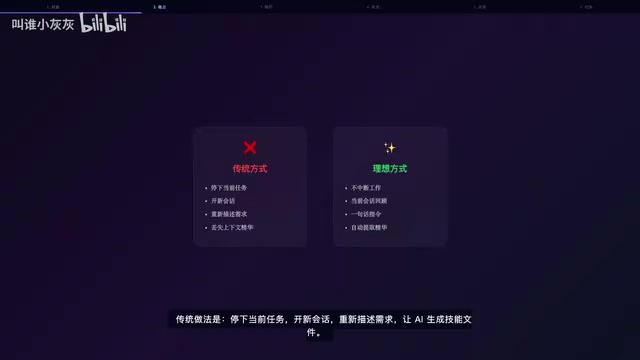
However, the traditional approach usually looks like this:
- Stop your current task, interrupting your active workflow
- Start a new session, re-describing the requirements and background
- Have the AI regenerate a skill file, but now you've lost the original context
This approach has three obvious drawbacks: it breaks your focus, loses contextual gems, and significantly reduces efficiency. Even worse, you often think "I'll do it after I finish," only to find that by then the inspiration has faded and you can never fully reconstruct your original thinking.
One Command, Instantly Transformed into a Reusable Skill
The answer is surprisingly simple — you don't need to leave your current session at all. Just send a review command directly in the conversation, and Claude Code handles everything for you.
What Is a Skill File?
Before diving into the operation, let's briefly understand the concept of Skills. In Claude Code, a Skill is essentially a structured knowledge file, typically stored in Markdown format under the .claude/skills directory of your project. Each Skill file contains operational steps, best practices, caveats, and key parameters for a specific task. When Claude Code encounters a related task in subsequent sessions, it automatically retrieves and loads the matching Skill file, skipping the exploration phase and jumping straight to the optimal solution. This mechanism is like building "muscle memory" for the AI, dramatically improving efficiency for repetitive work.
How to Do It
In your current session, type a command like this:
"Review our conversation and save the approach for XX as a skill — organize the core solution for me."
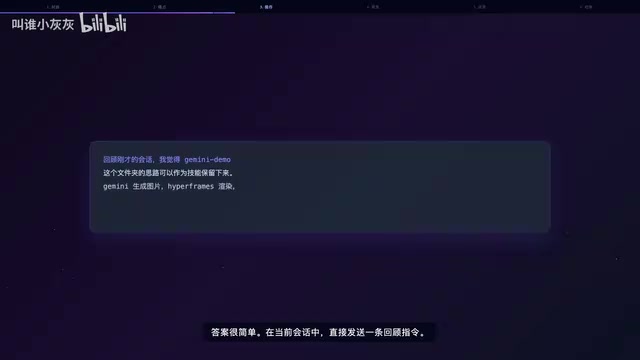
The key here is that you don't need to re-describe any background information, because Claude Code already has the full session context. It knows what you discussed, which approaches you tried, and which path you ultimately chose.
Automatic Analysis and Intelligent Skill File Generation
After sending the command, Claude Code automatically invokes the Skill Creator to perform the following:
- Analyze session history: Trace back through the entire conversation to identify key decision points
- Extract key information: Filter out core solutions, best practices, and important parameters
- Skill check and parameter collection: Complete prerequisite work to ensure the generated Skill file is complete and usable
- Generate a standard skill file: Output a structured, directly callable Skill file
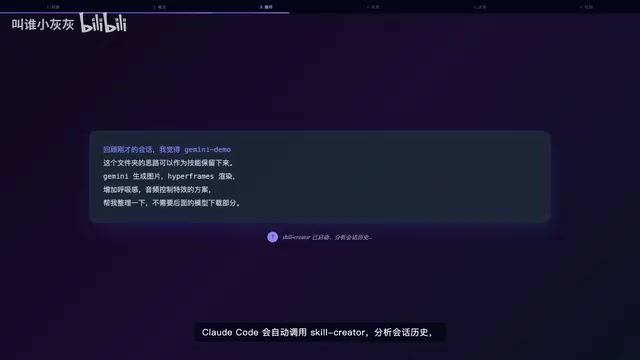
The Skill Creator's workflow involves multiple intelligent processing steps: first, it performs semantic analysis on the session history to identify key problem definitions, solution explorations, and final decision nodes; then, through information extraction techniques, it aggregates core knowledge points scattered across multiple conversation turns into structured content; finally, it formats the output according to a standard Skill file template. This process includes conversation summarization, key information ranking, and redundancy removal, ensuring the generated skill file is both concise and comprehensive.
Throughout the entire process, you don't need to manually organize your thoughts or recall the context — the AI has already sorted everything out for you.
Results Comparison: Seconds vs. 20 Minutes
The power of this trick becomes very apparent in actual use.
| Comparison | Traditional Approach | One-Click Skill Extraction |
|---|---|---|
| Time required | 20+ minutes | A few seconds |
| Context retention | Loses many details | Fully preserved |
| Interrupts work? | Must interrupt | No interruption needed |
| Skill quality | Relies on memory, may miss things | AI auto-extracts, complete and accurate |
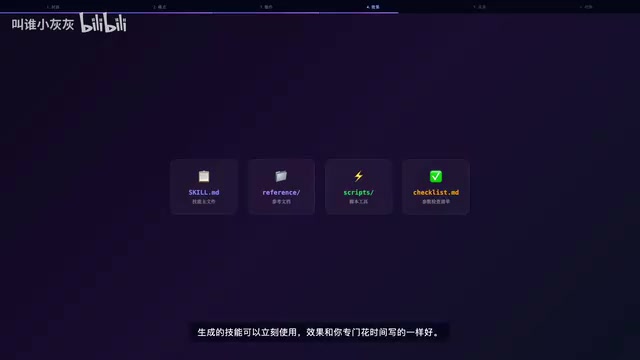
The generated Skill file quality matches — or even exceeds — what you'd produce by dedicating time to write it carefully, because the AI can capture details you might overlook.
Extract Once, Reuse Many Times
Extracted Skills are saved locally in your project, which means:
- Cross-session reuse: Any subsequent session can directly invoke this skill
- Knowledge accumulation: Every spark of inspiration can be transformed into a reusable asset
- Team sharing: Skill files can be included in version control and shared with team members
This is essentially building your own personal AI knowledge base. This concept aligns with the "Knowledge Management" philosophy in software engineering. In traditional development, teams accumulate experience through Wikis, Runbooks, Playbooks, and similar formats. In the era of AI-assisted programming, Skill files serve a similar role but with much stronger executability — they're not just documentation for humans to read, but instruction sets that AI can directly understand and execute. This "human-and-machine-readable" knowledge medium represents a new paradigm for knowledge management in AI-native workflows.
As you accumulate more Skills over time, Claude Code's capabilities grow accordingly, creating a positive feedback loop.
Practical Tips: Getting Better Skill Extraction Results
To make the most of this trick, here are a few recommendations:
- Extract promptly: Extract the moment inspiration strikes — don't wait until the session ends. The more complete the context, the higher the quality of the generated Skill. This is especially important because although Claude Code supports long context, as the conversation continues, early key information may get diluted in attention allocation. Timely extraction ensures the most relevant context is in its optimal state.
- Specify the scope clearly: State exactly which part of the content to extract in your command — for example, "the database optimization approach" rather than a vague "our earlier discussion." Precise scope specification helps the Skill Creator more accurately locate and extract target information, avoiding overly broad skill files or ones mixed with irrelevant content.
- Verify quickly after extraction: Spend a few seconds reviewing the generated Skill to confirm no key information is missing. If you find gaps, you can request additions directly in the current session while the context is still complete, making corrections extremely low-cost.
- Organize periodically: Once you've accumulated a certain number, categorize and organize your Skill files for easier retrieval and invocation. Consider building a subdirectory structure by technical domain (e.g., frontend, backend, database, deployment) or project dimension. You can also add dates or version identifiers to filenames to track the evolution of your skills.
Conclusion
In daily Claude Code usage, the insights that emerge during sessions are often the most precious. The one-click Skill extraction trick solves the core pain point of "fleeting inspiration," ensuring every good idea can be captured, accumulated, and reused. Next time a lightbulb moment hits while you're in Claude Code, don't forget to try this method — one simple command turns a fleeting flash of insight into a permanently reusable Skill asset.
Key Takeaways
Related articles
Anjney Midha: The Rise from Singapore to Helm of a16z's AI Investment Empire
Deep dive into Anjney Midha, the key figure behind a16z's AMP fund, covering investments in Anthropic, Mistral, and Black Forest Labs, and his Outputmaxxing philosophy.
Pi: A Lightweight AI Coding Agent Framework — Setup & Hands-On Guide
A deep dive into Pi, a minimalist AI coding Agent framework covering multi-model support, extensions, skill loading, and hands-on custom extension building with model mixing strategies.

Why the Mayor of Los Angeles Has No Real Power: A City Designed to Be the Anti-New York
Why does LA's mayor seem powerless during crises like wildfires? It's not about competence — it's a century-old system designed to prevent corruption by radically decentralizing power.