Firebase Full-Stack App Template Launches on ADC: One-Click Cloud Infrastructure Deployment

Google Cloud ADC launches a Firebase full-stack template for one-click cloud infrastructure deployment.
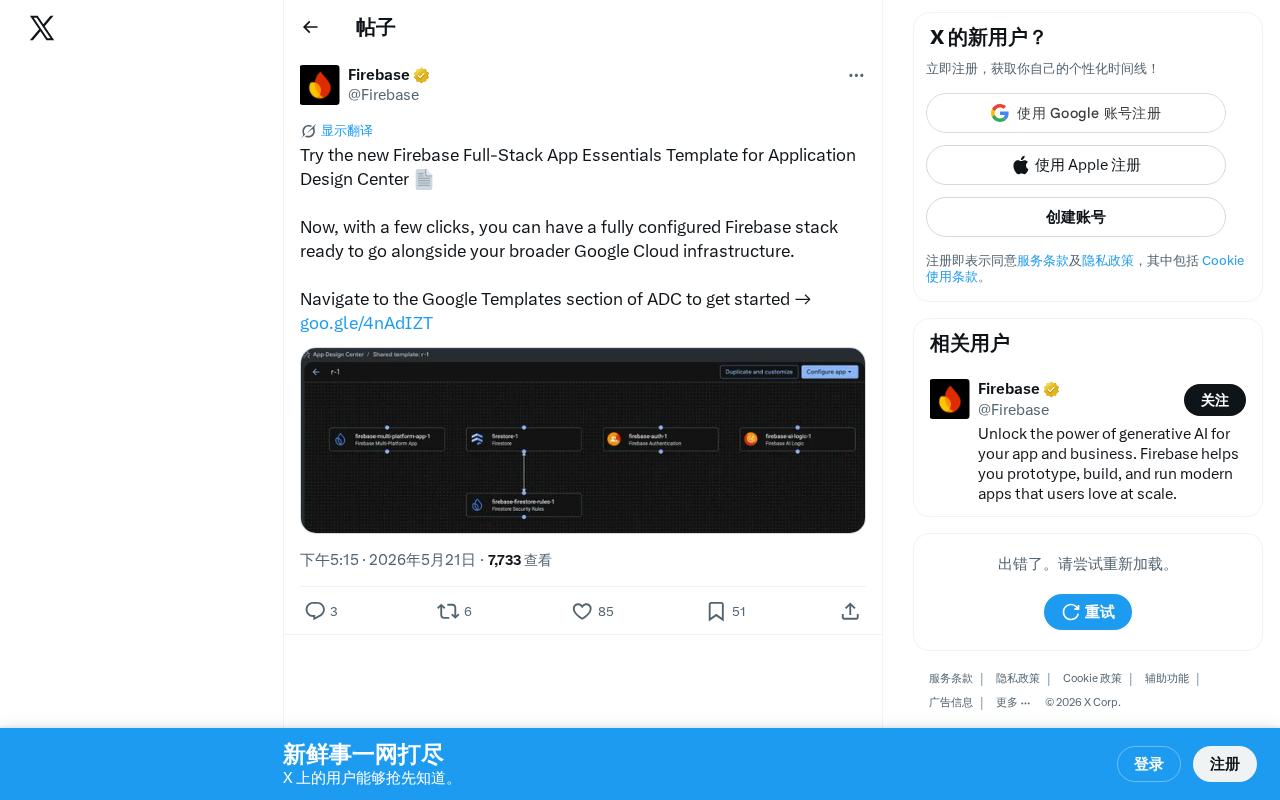
Google Cloud's Application Design Center (ADC) introduces the Firebase Full-Stack App Essentials template, enabling developers to deploy a fully configured Firebase stack — including Authentication, Firestore, Hosting, and Cloud Functions — with just a few clicks. The template deeply integrates with Google Cloud infrastructure like VPC, IAM, and Cloud Run, supporting both rapid prototyping and production-grade enterprise applications.
Overview
Google Cloud recently introduced a new Firebase Full-Stack App Essentials template for its Application Design Center (ADC). This template allows developers to obtain a fully configured Firebase tech stack with just a few clicks, seamlessly integrated with the broader Google Cloud infrastructure.
What Is Application Design Center
Application Design Center (ADC) is an architecture design and deployment tool provided by Google Cloud, designed to help developers and architects quickly set up cloud application infrastructure that follows best practices. Through pre-built templates, users can skip the tedious manual configuration process and directly obtain a production-grade project skeleton.
ADC's design philosophy stems from the engineering practice of Infrastructure as Code (IaC). In traditional cloud development, teams often need to manually create resources through the console or write extensive IaC scripts using tools like Terraform or Pulumi to define infrastructure. Terraform, developed by HashiCorp, is currently the most popular multi-cloud IaC tool, using the declarative HCL language to describe infrastructure state; Pulumi allows developers to write infrastructure code using general-purpose programming languages like TypeScript and Python, lowering the learning curve. However, even with these tools, developers still need deep cloud architecture knowledge to write secure, efficient configurations. ADC takes this a step further by packaging architecture patterns validated by Google's engineering teams into visual templates, enabling even developers unfamiliar with underlying IaC tools to quickly obtain production-standard infrastructure configurations. This approach effectively bridges the gap between "architecture design" and "actual deployment."
The Google Templates section within ADC brings together various application templates officially maintained by Google, covering scenarios ranging from simple web applications to complex microservice architectures. These templates include not only resource definitions but also built-in security baseline configurations (such as IAM role assignments following the principle of least privilege and network firewall rules), monitoring and alerting rules (threshold-based alerts on key metrics via Cloud Monitoring), and cost optimization recommendations (such as auto-scaling policies and idle resource detection), reflecting Google's engineering experience accumulated from operating large-scale systems.
Firebase Full-Stack App Essentials Template Highlights
One-Click Full-Stack Configuration
Traditionally, building a complete Firebase full-stack application requires separately configuring Authentication, Firestore, Hosting, Cloud Functions, and other services, while handling the permissions and network relationships between them. The new template consolidates these steps into an automated workflow, significantly lowering the initialization barrier.
Specifically, Firebase Authentication provides an out-of-the-box user authentication system supporting email/password, phone number, Google/Apple and other third-party OAuth login methods, as well as advanced scenarios like anonymous login and custom tokens. Under the hood, it uses the industry-standard JWT (JSON Web Token) mechanism for stateless session management. Firestore is a NoSQL document database that uses a Document-Collection hierarchical data model, supporting real-time data synchronization and offline caching. It's particularly well-suited for applications requiring multi-device real-time collaboration — when one client modifies data, all clients listening to that data receive update notifications within milliseconds. This feature has made it popular in chat applications, collaborative editing, real-time dashboards, and similar scenarios. Firebase Hosting provides globally CDN-accelerated static resource hosting based on Google's worldwide edge node network, supporting custom domains and automatic SSL certificate management, with built-in atomic deployments and one-click rollback capabilities. Cloud Functions for Firebase is a serverless computing platform that allows developers to write event-triggered backend logic (such as sending welcome emails upon user registration or triggering data validation when Firestore documents change), with no server management required and pay-per-invocation billing.
In manual configuration scenarios, developers not only need to enable each of these services individually but also correctly set up Firestore security rules (a declarative access control language defining which users can read and write which data paths), configure Cloud Functions service account permissions (following the principle of least privilege to avoid security risks from over-authorization), handle CORS (Cross-Origin Resource Sharing) policies to allow frontend applications to legitimately call backend APIs, and more. Any oversight in these steps could lead to security vulnerabilities or functional issues.
Deep Integration with Google Cloud Infrastructure
The core value of this template lies not only in Firebase's own configuration but also in its ability to coordinate the deployment of Firebase services with broader Google Cloud infrastructure (such as VPC, IAM, Cloud Run, etc.). This is especially important for enterprise-grade applications that need to extend backend services beyond Firebase's frontend capabilities.
VPC (Virtual Private Cloud) is Google Cloud's network isolation layer, allowing enterprises to build logically isolated network environments in the cloud and control communication paths and access boundaries between services. Unlike AWS's VPC, Google Cloud's VPC uses a global design — a single VPC can span multiple regions, and subnets can automatically expand their IP ranges. This design simplifies network planning for multi-region deployments. IAM (Identity and Access Management) is Google Cloud's permission control system, using Roles and Policies to granularly manage "who can perform what operations on which resources." It supports predefined and custom roles and can enforce security constraints across an entire enterprise through Organization Policies. Cloud Run is Google's fully managed container runtime platform, built on the open-source Knative project. It supports deploying any containerized application as an auto-scaling HTTP service (including scaling down to zero instances to save costs), making it suitable for complex backend workloads that Firebase Cloud Functions cannot handle — such as those requiring custom runtime environments, long-running tasks, or GPU-accelerated AI inference services.
Notably, Firebase was originally founded in 2011 by James Tamplin and Andrew Lee as an independent real-time database service, primarily offering Backend-as-a-Service (BaaS) capabilities for mobile app developers. After being acquired by Google in 2014, Firebase was gradually integrated into the Google Cloud ecosystem, adding over a dozen services including Analytics, Crashlytics, Remote Config, and Cloud Messaging, evolving into a comprehensive application development platform. In recent years, Google has continued to drive deep integration between Firebase and the Cloud platform — a Firebase project is essentially a Google Cloud project, and services like Firestore and Cloud Functions share the same underlying infrastructure. Developers can access the same set of resources from both the Firebase console and the Google Cloud console. The release of this template marks an extension of this integration from the underlying technology to the developer tooling layer, providing a standardized path for the progressive architectural evolution of "starting with Firebase and expanding to Google Cloud."
Designed for Both Rapid Prototyping and Production Deployment
Whether for rapid prototyping to validate product ideas (typically during hackathons or early startup stages) or for formal projects that need to comply with enterprise security requirements (such as SOC 2, HIPAA, GDPR, etc.), this template provides sensible default configurations as a starting point. The preset security rules and IAM configurations in the template follow Google Cloud's Well-Architected Framework best practices. Developers can adjust them as needed without having to build a security baseline from scratch. This "secure by default, relax as needed" design philosophy effectively reduces the risk of security incidents caused by configuration oversights.
How to Get Started
Developers can navigate to the Google Templates section in ADC, find the Firebase Full-Stack App Essentials template, and launch the configuration workflow. The process mainly involves:
- Selecting the target Google Cloud project (if no existing project is available, a new one can be created during the process)
- Reviewing the service components included in the template (viewing the list of APIs to be enabled and resources to be created)
- Clicking deploy and waiting for the automated configuration to complete (resource orchestration is executed in the background via Terraform or Deployment Manager)
- Starting development on the generated project structure (the template typically generates a code repository containing sample code and configuration files)
What This Means for Developers
This update reflects Google's continued investment in Developer Experience (DX). As cloud application architectures grow increasingly complex — a modern web application might simultaneously involve over a dozen cloud services including authentication, databases, object storage, CDN, serverless functions, container services, and message queues — Infrastructure as Code and template-based deployment are becoming industry standards. As Google's core platform for frontend and mobile developers, Firebase's deeper integration with Google Cloud means developers can complete everything from frontend to backend within a unified toolchain, without switching between multiple consoles.
From an industry perspective, template-based deployment has become a competitive focal point among major cloud providers. AWS Amplify offers a similar full-stack development framework supporting one-stop configuration from frontend UI components to backend APIs and databases; Azure's Developer CLI (azd) accelerates application scaffolding through template repositories and deeply integrates with GitHub Actions for CI/CD automation; Vercel's template marketplace focuses on instant deployment experiences for frontend frameworks (Next.js, Nuxt, etc.). All these solutions are evolving in the same direction — reducing the time cost from "zero" to "running application" and letting developers focus on business logic rather than infrastructure configuration.
Google's differentiation lies in the fact that Firebase has a massive developer base of over 3 million active applications worldwide (according to data shared at Google I/O 2023), and ADC templates connect these developers with Google Cloud's enterprise-grade capabilities (such as BigQuery — a serverless data warehouse supporting petabyte-scale data analytics, and Vertex AI — a full lifecycle management platform from model training to deployment), providing a clear path for Firebase applications to "grow upward." This aligns with Google's product strategy in recent years of positioning "Firebase as the frontend gateway to Google Cloud" — attracting developers through Firebase's low barrier to entry, then guiding them to adopt more enterprise services through seamless integration with Google Cloud, achieving funnel-style conversion within the developer ecosystem.
For teams already using Google Cloud, this template provides a convenient path to incorporate Firebase capabilities into existing cloud architectures, avoiding common integration challenges such as permission conflicts, network isolation issues, and resource naming convention inconsistencies that often arise when layering Firebase on top of existing infrastructure.
Key Takeaways
- New Application Design Center Template: Google Cloud ADC launches the Firebase Full-Stack App Essentials template, packaging full-stack application infrastructure configuration into an automated workflow
- One-Click Full-Stack Configuration: Automatically enables and configures core services including Firebase Authentication, Firestore, Hosting, and Cloud Functions, eliminating the complexity of manual setup
- Deep Cloud Integration: The template not only configures Firebase services but also coordinates Google Cloud infrastructure including VPC, IAM, and Cloud Run, supporting architectural expansion for enterprise-grade applications
- From Prototype to Production: Built-in security baselines and best practice configurations make it suitable for both rapid prototyping and enterprise compliance requirements
- Industry Trend: Template-based deployment has become a competitive focal point among cloud providers, with Google leveraging Firebase's massive developer base and Google Cloud's enterprise capabilities to form a differentiated advantage
Related articles

Claude Code for Test Development in Practice: An AI Programming Workflow That Doubles Your Efficiency
A practical guide to Claude Code for test development: auto-generating test scripts, Plan Mode workflows, MCP + Playwright integration, and Subagent parallel tasks to build systematic AI-assisted workflows.

Hermes Agent Hands-On Review: An AI Efficiency Revolution for Indie Game Developers
Indie game developer reviews Hermes Agent vs OpenClaude: intelligent context compression, real-time Memory, remote control via Telegram, and practical use cases in game dev, social media, and email.

Vibe Coding Beginner's Guide: Tool Selection Across Three Categories with Practical Examples
A comprehensive guide to Vibe Coding's three tool categories: Agent frameworks, CLI Coding, and IDE tools, with practical examples including Snake game and data analysis workbench.