Get Kiro Pro Membership for Free: Full-Power Claude for One Month at Zero Cost
Get a free month of Kiro Pro with full Claude access using a new account and credit card.
This tutorial walks you through getting Amazon's Kiro Pro membership (normally $20/month) completely free for one month. It covers account preparation, the subscription process, virtual credit card solutions for declined payments, and the critical step of canceling auto-renewal. Kiro offers full-power Claude models for AI-assisted coding in a VS Code-like interface.
What is Kiro?
Kiro is an AI coding tool launched by Amazon (AWS) — think of it as a supercharged VS Code. Its core selling point is the built-in full Claude model series, supporting code writing, bug fixing, and project management all in one place.
Currently, the official team is running a promotional campaign where new users can get one month of Pro membership for free, including 100 interaction credits. For individual developers, this quota is generally sufficient. Pro membership normally costs $20/month, but through this promotion, you can get it at zero cost.
Preparation Before Registration
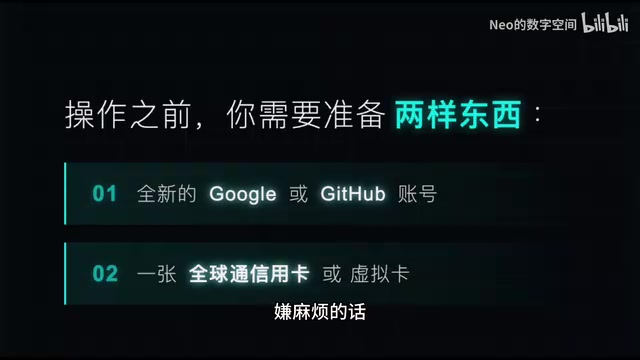
Before you start, you'll need two things:
1. A Fresh Account
A Google account or GitHub account that has never been used to register for Kiro. It must be a new account — existing accounts cannot take advantage of this new-user benefit. If you've already registered with your primary account, you'll need to prepare a new one.
2. A Credit Card
A personal credit card will do. If you don't have a physical credit card or yours gets declined, you can open a virtual credit card through a virtual card platform for just a few RMB. Links to virtual card platforms can typically be found in related tutorial video descriptions.
Detailed Steps to Register for Kiro Pro Membership
Step 1: Visit the Kiro Website and Log In
Go to the Kiro official website and log in with your prepared new account. You can choose either Google login or GitHub login — click the login button, select the corresponding account, and confirm to proceed to the subscription page.
Step 2: Select the Pro Subscription Tier
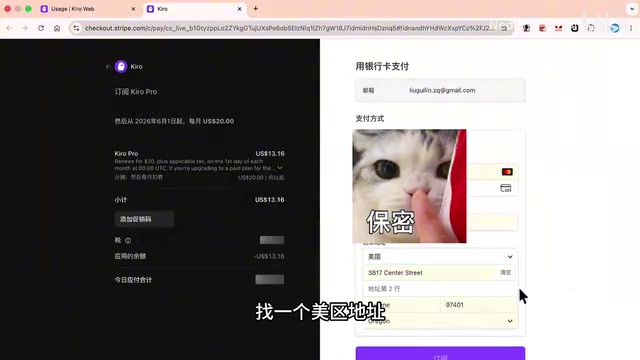
On the subscription page, select the $20 Pro tier and click "Upgrade to Pro." On the payment page, you'll see the left side showing a promotional discount with the actual amount due being $0. This is the core of the new-user benefit — a free first month of full-power Claude.
Step 3: Fill in Payment Information
Enter your credit card information (card number, expiration date, CVV, cardholder name). For the billing address, you can find a US address on Google Maps. If your Google account already has an address linked, the system will auto-fill it.
Solution if Your Physical Credit Card Gets Declined:
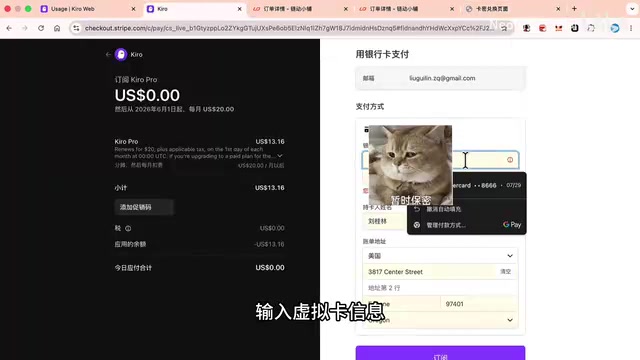
This happens quite often. In this case, you can use a virtual credit card as an alternative:
- Open the virtual card platform and go to the virtual card section
- Purchase a virtual card (approximately 2 RMB)
- After payment, obtain the card credentials and redeem them on the redemption page
- After redemption, you'll get the complete virtual card information
- Enter the card number, expiration date, CVV, cardholder name, and address into Kiro's subscription page
Step 4: Complete the Subscription
After filling in the payment information, click the subscribe button and complete the CAPTCHA verification. If the first verification attempt fails, don't panic — just click subscribe again to retry.
When using a virtual card, you may need to enter a verification code. If the platform fails to retrieve the code, you can copy the decoding API address into your browser to view the six-digit verification code. Enter the code and click pay, then wait a moment for completion.
Step 5: Download and Install Kiro
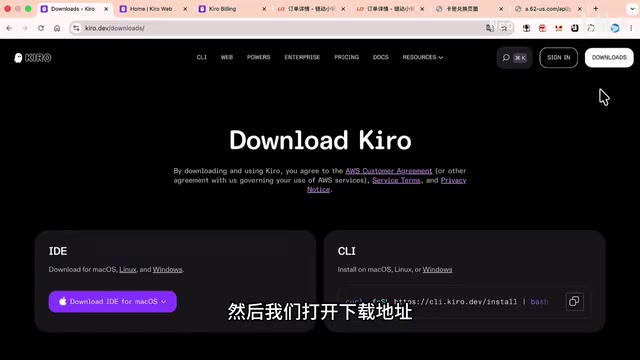
After successful subscription, open Kiro's download page and select the installer for your operating system (Windows/Mac/Linux). After installation, open the software, click the login button, and log in with your previous account on the redirect page to start using it.
Important Reminder: Make Sure to Cancel Auto-Renewal
Do not forget this step! Immediately after logging in, click the subscription management button and turn off auto-renewal. If you don't, you'll be automatically charged $20 next month. After canceling auto-renewal, you can still use your Pro benefits for the remainder of the current month.
Quick Review of the Kiro Experience
Kiro's coding experience is remarkably smooth. The interface and workflow are highly consistent with VS Code, allowing for a nearly seamless transition. The built-in Claude model performs excellently in code generation, bug fixing, and project planning. While 100 interaction credits are limited, they're generally sufficient for daily development assistance.
For developers who want to experience full-power Claude coding capabilities without spending money, this is an excellent deal. After all, Claude's API costs aren't cheap — why not take advantage of a free month of Pro membership?
Important Notes
- This promotion is for new users only; each account can only benefit once
- Virtual credit cards carry some risk — choose a reliable platform
- The promotion may end at any time, so act sooner rather than later
- Remember to cancel your subscription before the free period ends to avoid unnecessary charges
Related articles
Jeff Dean's Commencement Speech at UW Allen School: A Message to the Next Generation of Engineers in the AI Era
Jeff Dean delivers commencement speech at UW Allen School of Computer Science & Engineering, sharing insights with the next generation of CS graduates in the AI era.
Codex VS Claude Code: The Token Economics Behind a 10x Price Gap
Same coding task: Codex costs $15, Claude Code costs $155. Deep dive into the real reasons behind the 10x gap — it's not pricing, it's token volume, output style, and context strategy.
Gemma 4 Open-Source Model Local Deployment Guide: Ollama Installation & Mobile Setup
Step-by-step guide to deploying Google's Gemma 4 open-source model locally with Ollama and running the lightweight version on mobile with tool calling support.