Getting Started with Claude Code: A Five-Dimensional Analysis of the New AI Programming Paradigm
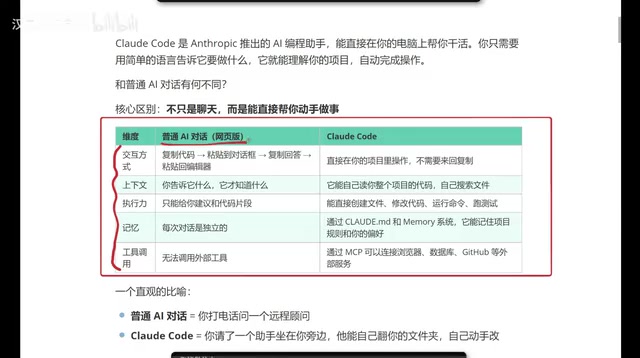
A five-dimensional breakdown of how Claude Code transforms AI from advisor to hands-on coding executor.
This guide analyzes Claude Code across five key dimensions — interaction method, context understanding, execution power, memory persistence, and tool integration via MCP — comparing it with traditional AI chat tools. It explains how Claude Code represents the Agentic Coding paradigm, enabling AI to autonomously plan, execute, and verify coding tasks directly within your project, and offers practical guidance on choosing between Claude Code and Cursor.
What Is Claude Code?
Claude Code is an AI programming assistant developed by Anthropic, but it's fundamentally different from the AI chat tools we're familiar with, such as ChatGPT and DeepSeek. In short, it doesn't just "chat" — it can directly "take action" and help you complete programming tasks.
Here's an intuitive analogy: Traditional AI chat is like calling a remote consultant over the phone — they know everything, but you have to do the work yourself. Claude Code, on the other hand, is like having an assistant sitting right next to you who can browse through your folders and modify code on their own.
This shift from "advisor" to "executor" is the core reason Claude Code has sparked intense discussion in the developer community. In fact, AI programming assistants have evolved through three stages: code completion (like GitHub Copilot's line-level suggestions), conversational coding (like ChatGPT's code Q&A), and autonomous execution (like Claude Code's project-level operations). The technical driving force behind this evolution is the continuous improvement of large language model capabilities — particularly the expansion of context windows (from 4K to 200K tokens) and the maturation of Function Calling capabilities. These advances allow AI to move beyond text generation and engage in substantive interaction with external environments.
What Claude Code represents is what the industry calls "Agentic Coding" — a new paradigm. Unlike the traditional "Copilot mode" (human-led, AI-assisted), the Agentic mode gives AI the ability to autonomously plan, execute, and verify. It can break down a high-level requirement into multiple subtasks, sequentially perform file reading, code modification, test execution, and other operations, and autonomously adjust its strategy based on results. This model essentially elevates AI from a "tool" to a "collaborator" — developers only need to describe the goal, and the AI handles the planning and execution path.
Five-Dimensional Comparison: Claude Code vs. Traditional AI Chat
To better understand Claude Code's unique advantages, let's compare across five key dimensions.
Interaction Method: Say Goodbye to Copy-Paste
With traditional AI chat tools, the typical workflow is: copy code → paste into the chat box → get a response → copy it back to your editor. While this back-and-forth isn't overly complex, it's certainly tedious.
Claude Code runs directly in your project directory, with all operations completed locally, completely eliminating the copy-paste step. You simply describe your needs in natural language, and it executes operations directly within your project. It's worth noting that Claude Code chose the command line (CLI) over a graphical interface — a design decision that reflects the Unix philosophy of "do one thing and do it well." The CLI's advantages include scriptability (it can be combined with other command-line tools), low resource consumption, and precise, repeatable operations. Additionally, the CLI means Claude Code can easily integrate into CI/CD pipelines, automation scripts, and other DevOps workflows, enabling advanced scenarios like unattended code reviews and automated fixes.
Context Understanding: Automatic Project-Wide Awareness
With traditional AI chat, context depends entirely on your input — it only knows what you tell it. This means you need to manually provide relevant code snippets and background information with every question.
Claude Code can automatically read your entire project's code structure, proactively search for relevant files, and understand inter-module dependencies. This global awareness makes its suggestions far more accurate and practical. Behind the scenes, this relies on Claude's massive context window (up to 200K tokens), which allows it to "see" the contents of dozens or even hundreds of files at once and reason and make decisions based on that information.
Execution Power: From Suggestions to Action
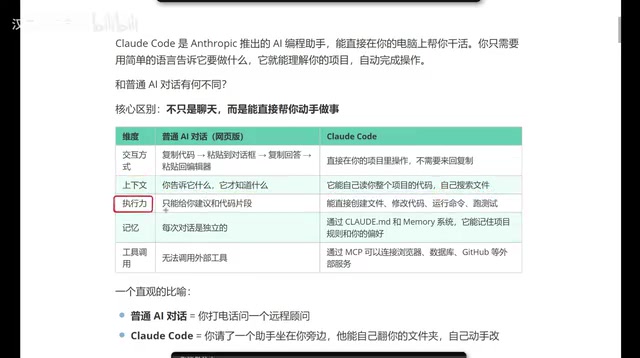
Traditional AI can only give you code snippets or modification suggestions — it can't provide complete project-level solutions. After all, a real project consists of numerous files and complex code structures, and a simple chat box can't handle that level of complexity.
Claude Code can directly create files, modify code, run commands, and execute tests — it has full project operation capabilities. From individual functions to entire module refactoring, it can complete everything in one go. More importantly, it autonomously verifies results during execution — for example, after modifying code, it automatically runs tests, and if tests fail, it analyzes the error and makes fixes, forming a complete "write-test-fix" loop.
Memory: Persisting Your Development Preferences
Traditional AI chat loses all context when you close the window — every new conversation starts from scratch. Claude Code, through configuration files (like CLAUDE.md), can remember your project rules, coding style, and personal preferences.
CLAUDE.md is the core of Claude Code's memory system. It's a Markdown file placed in the project root directory that stores project-specific rules and preferences. Developers can define code style conventions (such as single quotes vs. double quotes), project architecture descriptions, commonly used commands, testing standards, and more. Claude Code automatically reads this file at startup, using it as persistent context. This design borrows from developer-familiar configuration file concepts like .editorconfig and .eslintrc, but extends them to the AI behavior customization layer. Furthermore, CLAUDE.md supports hierarchical structures — you can place different configurations in different directories to achieve module-level behavior customization.
This means it gradually adapts to your development habits, generating code that increasingly matches your expectations and significantly reducing post-adjustment work.
Tool Invocation: Connecting to External Ecosystems via MCP
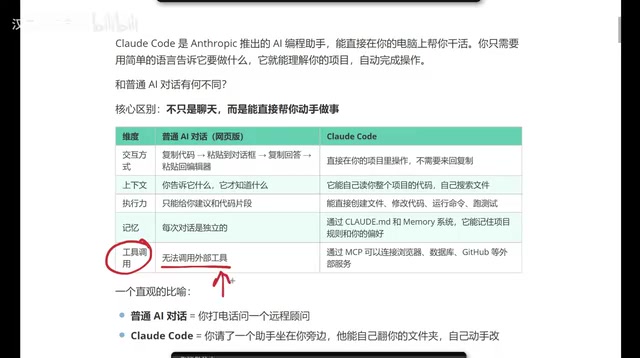
Standard web-based AI tools generally can't invoke external tools, and even when some platforms offer plugins, the experience isn't smooth. Claude Code, through the MCP (Model Context Protocol), can directly connect to browsers, databases, GitHub, and other external services, delivering a true end-to-end development experience.
MCP is a standardized protocol open-sourced by Anthropic in late 2024, designed to solve the connection problem between AI models and external data sources and tools. Before MCP, every AI application needed to develop separate integration interfaces for each external service, resulting in massive duplication of effort. MCP adopts a client-server architecture and defines unified communication standards, allowing AI models to access file systems, databases, APIs, and other resources through standardized interfaces. Similar to how the USB protocol unified hardware connection standards, MCP unifies the connection standard between AI and external tools. There are now hundreds of MCP server implementations covering mainstream development tools like GitHub, Slack, and PostgreSQL. Developers can freely combine them as needed to build personalized AI development environments.
Claude Code's Core Capability Checklist
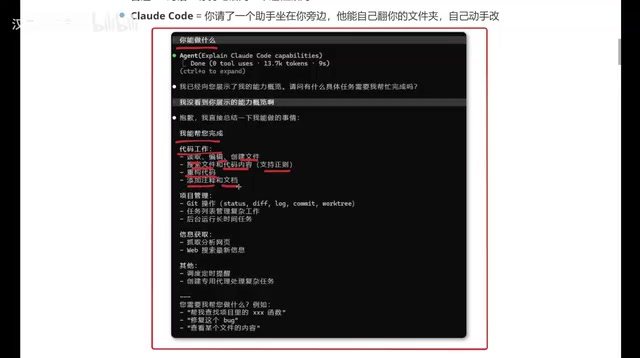
Based on hands-on experience, Claude Code's capabilities can be summarized as follows:
Code Work:
- Read, edit, and create files
- Search files and code content
- Code refactoring, adding comments and documentation
Project Management:
- Git operations (commits, branch management, etc.)
- Task list management
- Running long-duration tasks in the background
Information Retrieval:
- Fetching and analyzing web content
- Web search for the latest information
Advanced Features:
- Scheduling timed tasks
- Creating dedicated agents for complex workflows
The combination of these capabilities allows Claude Code to handle everything from simple code modifications to complex cross-file refactoring. For example, when you ask it to "add user authentication to the project," it will autonomously analyze the existing architecture, create necessary files, write authentication logic, update route configurations, add test cases, and finally commit all changes via Git — without requiring manual intervention at each step.
Claude Code vs. Cursor: How to Choose?
This is a question many developers care about. From a practical standpoint, each has its strengths:
- Cursor: Offers a friendly graphical interface, suitable for developers accustomed to IDE workflows, with a lower learning curve. Built on VS Code, it retains the familiar editor experience, with AI features naturally integrated into the editing flow through sidebars and inline suggestions.
- Claude Code: Command-line based, more token-efficient, and for scenarios like front-end development, the generated results often better match expectations. It's better suited for developers who prefer terminal workflows and advanced scenarios that require integrating AI into automated processes.
The token efficiency difference is worth elaborating on: Tokens are the basic units that large language models use to process text — roughly 1-2 tokens per English word and about 1.5-2 tokens per Chinese character. In AI programming scenarios, token consumption directly impacts costs. IDE-integrated tools like Cursor typically send a large amount of editor context (such as open files, cursor position, etc.) to the model automatically. While this improves convenience, it also increases token consumption. Claude Code uses command-line interaction with more precise context management, allowing developers to more accurately control the amount of information sent to the model, thereby reducing token overhead while maintaining output quality. For developers who frequently use AI programming tools, this efficiency difference becomes clearly visible on monthly bills.
If you're already comfortable with Cursor and it works well for you, there's no need to force a switch. But if you're pursuing higher token efficiency or have higher standards for generated code quality, Claude Code is worth a serious try. The two aren't mutually exclusive — many developers choose to use Cursor for everyday editing tasks while reserving Claude Code for complex refactoring and automation tasks.
Conclusion
Claude Code represents an important evolutionary direction for AI programming tools: moving from "conversational suggestions" to "direct execution." It's no longer a remote consultant that requires you to copy and paste back and forth — it's a local assistant that can directly operate on your project. For developers, this paradigm shift means higher development efficiency and a smoother workflow.
From a broader perspective, the Agentic Coding trend that Claude Code represents is redefining the collaboration model in software development. Future developers may no longer need to focus on the writing details of every line of code, instead taking on more of an "architect" and "reviewer" role — defining goals, reviewing results, and steering direction. This doesn't mean programming skills become less important. On the contrary, the ability to understand code logic and system architecture becomes even more critical, because you need to effectively guide AI and evaluate the quality of its output.
Whether you're an experienced full-stack developer or a programming newcomer, Claude Code offers a completely new approach to human-machine collaboration that's well worth exploring in depth.
Key Takeaways
Related articles
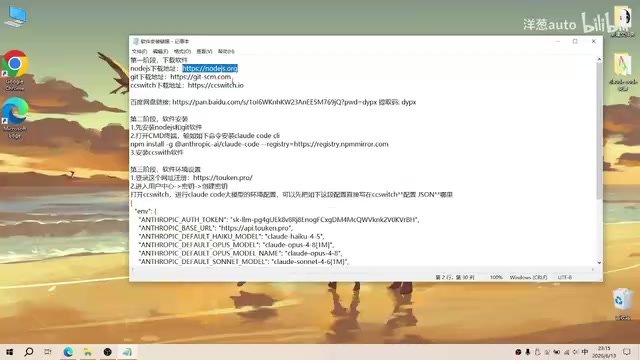
Complete Guide to Installing Claude Code CLI in China: Four Simple Steps
Step-by-step guide to installing Claude Code CLI in China using Node.js, Git, CC Switch, and an API relay service to bypass Anthropic's access restrictions.

The Compute Crisis: Why Google and Anthropic Are Paying SpaceX a Premium to Rent GPUs
Microsoft, Google, and Anthropic face severe compute shortages. Anthropic pays SpaceX $1B/month for GPUs. From TSMC capacity to HBM, storage, and power, the AI supply chain is in full crisis.
Mistral Le Chat Image Generation Review: Can It Replace Fable?
Mistral AI launches image generation in Le Chat, dubbed Le Chaton Fat. We analyze its capabilities, compare it with Fable, and explore the trend of AI chat platforms integrating image generation.