Godot + Cursor: Building a Survivors-like Game from Scratch to Steam — A Complete Record
Using Cursor AI and Godot to build a Survivors-like game from zero to Steam publication.
A developer documents the full journey of building a Survivors-like game using Vibe Coding with Cursor AI and the Godot engine, aiming for Steam release. The first episode covers why Godot's text-based files and open-source nature make it ideal for AI-assisted development, how to set up Git version control as a safety net, Cursor Pro configuration, and validating the workflow with an AI-generated Hello World.
Introduction: An Experiment in AI-Assisted Game Development
This is an ambitious series project — a Chinese content creator decided to use Vibe Coding with Cursor (an AI-assisted programming tool) and the Godot game engine to build a Survivors-like game from scratch, with the ultimate goal of publishing it on Steam or itch.io.
Vibe Coding is a concept coined by Andrej Karpathy — former OpenAI co-founder and former Tesla AI Director — in early 2025. The core idea is that developers no longer write code line by line. Instead, they describe requirements to an AI in natural language, let the AI generate the code, and take on the role of "director" and "editor." This approach is redefining the boundaries of "programming" — you don't need to master every line of syntax, but you do need to know clearly what you want and how to judge whether the AI's output is correct.
The standout feature of this series is its live format: the creator didn't build the entire game beforehand. Instead, he works through problems alongside his audience, pushing the project forward step by step. The first episode focuses on project initialization. While it may seem basic, the tool selection rationale, workflow setup, and Godot fundamentals covered are highly valuable for anyone looking to get started with AI-assisted game development.
Why Choose the "Survivors-like" Genre?
Among the many game genres available, the Survivors-like category was chosen for very pragmatic reasons:
- Manageable project scope: Not as massive and hard to finish as an RPG, yet not so simple that it fails to showcase AI programming capabilities
- Clear gameplay framework: Survivors-like games have a mature design paradigm (auto-attack, upgrade choices, enemy waves, etc.), making them ideal as experimental projects for AI-assisted development
- Strong extensibility: Start with a 2D version, then potentially evolve it into 3D later
The explosion of the Survivors-like genre can be traced back to 2022, when Italian indie developer Luca Galante created Vampire Survivors. This game — priced at just a few dollars with extremely rudimentary graphics — sold millions of copies on Steam thanks to its incredibly addictive core loop: "Kill monsters → Gain experience → Choose weapon/passive upgrades → Face stronger enemy waves." It spawned an entirely new game sub-genre. Since then, titles like Survivor.io, Brotato, and Soulstone Survivors have flooded the market, proving the powerful vitality of this gameplay framework. For AI-assisted development, the Survivors-like genre's advantage lies in its high degree of system modularity: weapon systems, upgrade systems, enemy spawning systems, experience/loot systems — all can be developed and tested relatively independently, making them perfect for iterative development.
For art style, the initial plan is to use a minimalist polygon style, with the option to replace assets with AI-generated ones later. This is a smart strategy — get the gameplay working first, then polish the visuals, avoiding the trap of getting bogged down in art assets early on.
Why Godot Instead of Unity or Unreal?
This is a question many developers care about, and several key reasons were given:
First, text-based file formats. Godot was designed from the ground up with version control in mind. Whether it's script files (.gd), scene files (.tscn), or resource files, the vast majority are in plain text format. This not only makes Git management easy but, more importantly — AI can directly generate and modify these files.
Specifically, Godot's .tscn (Text Scene) files use an INI-like plain text structure, with [node] tags describing node hierarchy relationships and [ext_resource] referencing external resources. For example, a simple scene file might look like this: node names, types, parent relationships, and property values are all presented as readable text. Similarly, .tres (Text Resource) files are plain text used to store materials, themes, animations, and other resource data. By comparison, Unity's .unity scene files, while also in YAML-based text format, contain numerous GUID references and serialized binary data references, making them far less readable than Godot's. Unreal's .umap and .uasset files are entirely binary formats that neither humans nor AI can directly read or edit. This means that in a Vibe Coding scenario, AI can not only generate GDScript code but also directly "write" complete scene files and resource files, achieving true end-to-end automation.
Second, the "white box" advantage of open source. Godot is a fully open-source game engine, which means its internal implementation is transparent to AI large language models. Unity and Unreal, on the other hand, are more like "black boxes" to AI — many underlying mechanisms are unknown to the AI, which directly impacts code generation quality.
This "white box" advantage deserves further elaboration. The programming capabilities of current mainstream AI models (such as GPT-4, Claude, etc.) come from the massive amount of code in their training data. Godot's complete source code is hosted on GitHub with over 90,000 stars — its C++ core implementation, GDScript interpreter logic, and rendering pipeline code are all publicly indexable. This means AI models have "read" Godot's internal implementation during training and understand the real behavior behind its APIs. Unity's core runtime (C++ layer) is closed-source, so developers and AI can only infer underlying behavior through official documentation and the C# API layer. While Unreal does provide source code access, it requires signing an agreement, and the codebase is enormous (millions of lines of C++), meaning AI's depth and accuracy of understanding is far inferior to that of the smaller, more clearly structured Godot. In practice, this difference manifests as: AI-generated code for Godot is less likely to exhibit the "looks correct but behaves unexpectedly at runtime" problem.
This perspective is worth pondering. In the era of AI-assisted programming, a tool's "AI-friendliness" is becoming an important dimension for technology selection.
Toolchain Setup: Git + Cursor + Godot
Version Control: An Indispensable Safety Net for AI Programming
It was particularly emphasized that version control tools are especially important when using AI-assisted programming. AI-generated code can introduce unexpected issues, and with Git you can always roll back.
This point is especially critical in Vibe Coding practice. Unlike traditional development where programmers write and debug line by line, AI often generates large amounts of code or modifies multiple files at once. If the generated code introduces subtle bugs, or if the AI "helpfully" refactors parts you didn't want changed, the lack of version control means catastrophic consequences — you might not even remember which files were modified or what changed. Git's branching and rollback mechanisms serve as a "time machine" here: commit before having the AI execute any major task, and if the results are unsatisfactory, a single git checkout brings you back to a safe state.
The specific workflow:
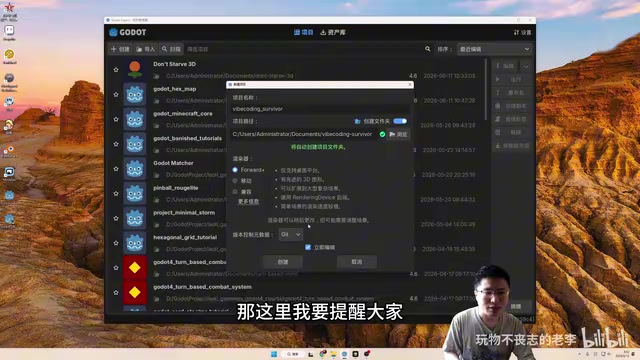
- When creating a project in Godot, select Git as the version control metadata option
- Use TortoiseGit or the command line to initialize a Git repository
- Create a private remote repository on Gitee (to avoid GitHub network issues in China)
- Configure the remote address and complete the first push
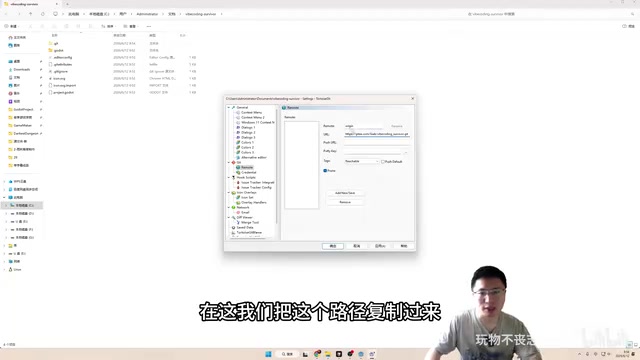
Choosing Gitee over GitHub is a practical decision — for developers in China, network stability is a very real pain point.
Cursor AI Programming Tool Configuration
For AI programming tool selection, several options were compared:
| Tool | Advantages | Disadvantages |
|---|---|---|
| Cursor Pro | Mature ecosystem, automatic model allocation | Requires subscription fee |
| Claude Code | Powerful capabilities | Official models are expensive, risk of account bans |
| MiniMax Agent | Free to use | Relatively limited features |
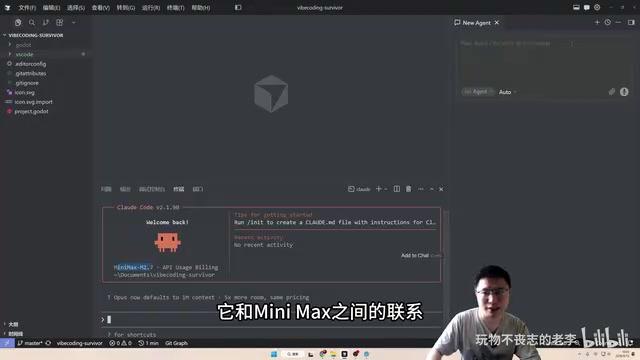
The final choice was Cursor Pro, using automatic model allocation mode, with MiniMax M2.7 configured as a backup model. It was also mentioned that if using Claude Code, domestic Chinese models can be configured to reduce costs.
Cursor is essentially a deeply customized fork of Visual Studio Code that retains VS Code's full editor functionality while deeply integrating AI capabilities. Its core features include: Tab auto-completion (predicting the code you're about to write based on context), Cmd+K inline editing (selecting a code segment and describing modification intent in natural language), and Agent mode (using conversation to let AI autonomously complete complex cross-file tasks, including creating files and running terminal commands). Cursor Pro's "automatic model allocation" means the system automatically selects the appropriate underlying model based on task complexity — simple completion tasks may use lightweight models for faster response, while complex architecture-level tasks invoke more powerful models. This strategy controls API costs while maintaining a good user experience.
A practical tip: after installing the Godot Tools VS Code extension, Cursor can recognize Godot project structures, enabling script navigation and method call tracing. This extension provides GDScript syntax highlighting, auto-completion, and error checking for Cursor. More importantly, it allows the AI to understand Godot-specific node reference relationships and signal connection mechanisms when analyzing project code, resulting in more accurate code generation.
The First AI-Generated Hello World
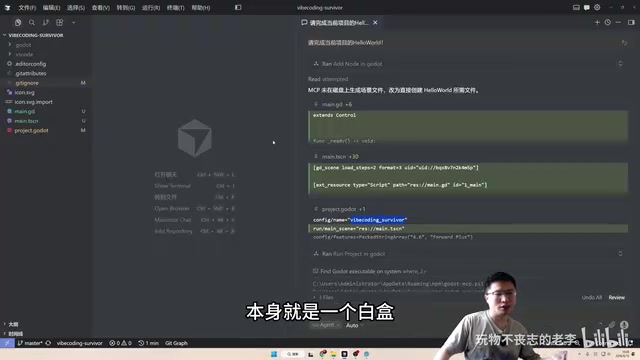
After the project setup was complete, the AI was asked to generate a Hello World to validate the entire workflow. The AI automatically completed the following tasks:
- Created Main.gd script: Inheriting from Control, printing Hello World in the
_ready()method - Created Main.tscn scene: Containing a full-screen Control root node and a Label child node
- Modified project.godot: Setting the main scene to Main.tscn
This also served as an opportunity to explain an important Godot concept: the _ready() call order goes from child nodes to parent nodes. In other words, child nodes are ready first, and only then does the parent node receive its _ready() callback. This seemingly simple detail is frequently the source of bugs in complex projects.
To understand this, you first need to know Godot's unique Node-SceneTree architecture. Unlike Unity's flat "GameObject + Component" model, everything in Godot is a Node, and nodes form a tree structure through parent-child relationships. Each node has well-defined lifecycle callbacks: _enter_tree() (when entering the scene tree), _ready() (when the node itself and all its children are ready), _process() (called every frame), and _exit_tree() (when leaving the scene tree). A Scene is essentially a pre-configured subtree of nodes that can be instantiated and attached to any position in the main scene tree. This design enables extremely high reusability — an "enemy" scene can contain Sprite (display), CollisionShape (collision), AI script, and other child nodes, and be repeatedly instantiated as a single unit. The "children first, parent last" _ready() call order ensures that when a parent node executes its initialization logic, it can safely access all child nodes' properties and methods — this is the cornerstone of Godot's scene composition pattern.
Throughout the entire process, the developer didn't write a single line of code manually. The AI generated all files based on the requirement description. While it was just a Hello World, it validated the complete pipeline from "describing requirements in natural language" to "having a runnable Godot project."
Key Reasons to Follow This Series
Based on the first episode's content, there are several aspects worth keeping an eye on:
- Authenticity: The live format means we get to see the real performance of AI-assisted programming, including the mistakes it makes and where human intervention is needed
- Educational value: There's a commitment to review AI-generated code and explain Godot fundamentals, which is very beginner-friendly
- Completeness: From project initialization to final Steam publication — if completed in full, this will be an extremely valuable reference case
For indie game developers, just how far can AI-assisted programming go? Can one person plus AI create a game worthy of publishing? This series might provide a real answer.
Key Takeaways
Related articles
PiDeck 0.5.0 Released: Ten Versions in One Week, a Complete Overhaul of the Desktop AI Agent
PiDeck 0.5.0 completes the rebrand from PiDesktop, shipping 10 versions with ~100 changes in one week: design system overhaul, dark mode, LAN sharing, Git integration, and dual-layer proxy config.
Claude Fable 5 Hands-On Review: Double the Price — Is It Worth It?
Hands-on comparison of Claude Fable 5 vs Opus 4.8 on landing page design and website rebuilds. Detailed API pricing analysis and practical advice on whether double the cost delivers double the value.
Introduction to AI Literacy: How Teachers Can Build a Systematic Cognitive Framework
A teacher's guide to AI literacy: from AI history and LLM fundamentals to the Agent era, build a systematic cognitive framework and master tool selection strategies.