How to Claim Your Free OpenAI Codex Rate Limit Reset Pack
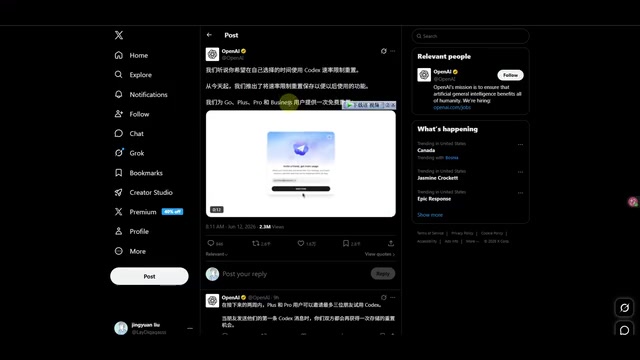
OpenAI offers paid users free Codex rate resets with bonus referral resets — here's how to claim them.
OpenAI is distributing free Codex rate limit reset packs to all Plus, Pro, and Business subscribers. Each user gets one free reset automatically, with the option to earn up to three more by inviting friends. The resets let you instantly restore your consumed Codex quota, skipping the cooldown period. This guide covers how to claim the perk, when to use it strategically, and key details like the 30-day expiration window.
OpenAI Is Giving Free Codex Rate Reset Packs to Paid Users
OpenAI recently announced a perk for all paid users — free Codex rate limit resets. Whether you're on a Pro, Plus, or Business plan, you'll receive one free rate reset, with the option to earn additional resets by inviting friends. This is great news for developers who rely heavily on Codex for AI-powered coding and frequently run into usage limits.
Before diving into the details, here's some quick background. OpenAI Codex is a cloud-based AI coding agent launched in 2025 — not to be confused with the earlier Codex model used for code completion. It's a brand-new product integrated into the ChatGPT platform. Users can give Codex natural language programming instructions, and it autonomously handles code writing, debugging, testing, and even submitting PRs in a cloud sandbox environment. Since each task requires significant compute resources to run an isolated development environment, OpenAI enforces strict rate limits — which is exactly why this "rate reset" perk has real practical value.
This article covers the specifics of the Codex rate reset offer, how to claim it, and important details to keep in mind.
What's Included: Free Resets + Referral Bonuses
Base Perk: One Free Reset for All Paid Users
According to OpenAI's official announcement on Twitter/X, this promotion is available to all users subscribed to Plus, Pro, and Business plans. Each user automatically receives one free rate limit reset. No extra steps required — just log into Codex and you'll see the perk.
Rate limiting is a very common resource management mechanism in cloud services and AI products. In simple terms, OpenAI sets a maximum number of uses within a given time window for each user — for example, how many Codex tasks you can run every 5 hours or per week. Once you hit the cap, you have to wait for your quota to naturally replenish before continuing. This "rate reset" essentially zeroes out your consumed quota immediately and restarts the counter, effectively skipping the cooldown period. For developers racing against project deadlines, this means you won't get blocked by usage limits at critical moments.
It's important to note that free-tier users are not eligible for this promotion — only paid subscribers qualify.
Referral Bonus: Up to Three Additional Resets
Beyond the base free reset, OpenAI also offers a referral mechanism:
- Each friend you invite to join Codex earns you one additional rate reset
- You can invite up to three friends, meaning a maximum of three extra resets
- Earned resets can be used at any time — you don't have to use them immediately
This design is quite flexible, allowing you to save your resets for when you actually need them rather than being forced to use them right away.
How to Claim and Use Your Codex Rate Reset Pack
Step 1: Log Into Codex to Confirm Your Perk
Open the latest version of the Codex client and log in with your paid account. After logging in, the system will automatically display a prompt informing you that you have a new rate limit reset available.
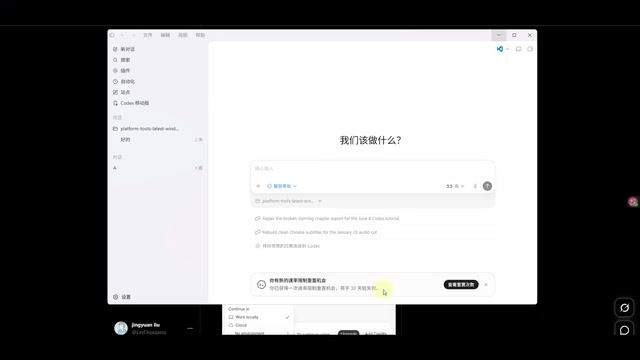
On the interface, you can see your current usage status along with a "Resettable" indicator. It's recommended to log in as soon as possible to confirm the perk has been credited, since this reset opportunity expires in 30 days.
Here's a quick overview of OpenAI's current subscription tiers so users at different levels understand their entitlements: Plus users are the basic paid tier ($20/month) with access to GPT-4o, Codex, and other premium features, though with certain usage limits. Pro users are the premium tier for heavy users ($200/month), enjoying higher usage caps and priority access. Business/Team users are on enterprise plans that include higher quotas plus admin consoles, data privacy protections, and other enterprise-grade features. Rate limits on Codex vary by subscription tier — Pro users typically have the highest quotas while Plus users have relatively limited ones, making this reset perk potentially more valuable for Plus subscribers.
Step 2: Choose the Right Moment to Reset
Click the reset button in the interface to refresh your Codex usage quota. The process is straightforward, and you can also click "Cancel" to skip the reset.
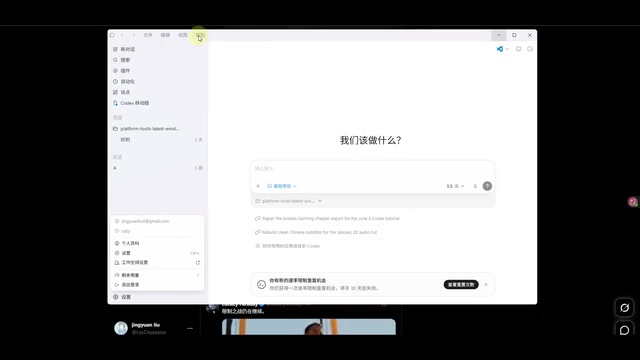
Regarding the specific scope of the reset, there are two possibilities:
- Resets 5 hours of quota (more likely)
- Resets a full week of quota (less likely)
Since not many users have tested and reported back yet, the exact amount of quota restored remains to be confirmed. If you've already used yours, feel free to share your experience in the comments.
Step 3: Invite Friends for Extra Resets (Optional)
According to official instructions, the friend invitation option should be located in the settings area at the bottom-left of Codex. However, based on actual testing, some users may not see the "Invite Friends" button yet.
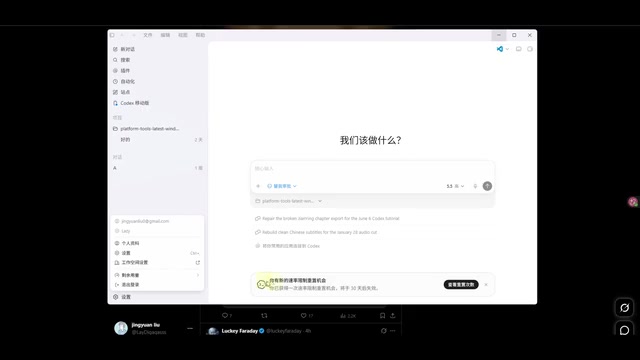
This could be related to several factors:
- Client version differences: Update rollout timelines may vary across platforms (Windows/Mac)
- Account type differences: Feature availability may roll out at different times for different subscription tiers
- Gradual rollout: OpenAI may be pushing this feature out in batches
Regarding gradual rollout (also known as canary release), this is a very common feature deployment strategy in internet products. Instead of pushing a new feature to all users at once, a gradual rollout first opens the feature to a small subset of users (say 5% or 10%). After confirming the feature is stable and free of critical bugs, coverage is gradually expanded until it reaches everyone. OpenAI frequently uses this approach when launching new features — GPT-4o's image generation and memory features both went through similar phased rollouts. So if you don't see the invite button yet, it most likely means you're not in the current rollout batch, not that there's anything wrong with your account.
Keep Codex updated to the latest version and wait patiently for the invite feature to become fully available.
Important Notes and Practical Tips
Key Information at a Glance
| Item | Details |
|---|---|
| Eligible Users | Plus, Pro, Business paid subscribers |
| Free Resets | 1 (base) + up to 3 (referrals) |
| Validity Period | 30 days |
| When to Use | Flexible — no need to use immediately |
| Free-Tier Users | Not eligible |
Usage Tips
-
Log in to confirm ASAP: While it's unclear whether you must log in to "claim" the perk, it's best to log into Codex early to make sure it's been credited.
-
Don't rush to use it: If your current quota is sufficient, save the reset for when you truly need it — you have a 30-day window after all.
-
Watch for invite feature updates: The friend invitation feature may still be rolling out gradually. Keep your client updated and watch for notifications.
-
Plan your usage strategically: With a reset as your "safety net," you can use Codex more aggressively during important projects without being overly conservative with your quota. For example, during a sprint phase, use Codex intensively for heavy coding tasks, and trigger the reset the moment your quota runs out to ensure your development workflow isn't interrupted.
-
Understand your quota cycle: Before using your reset, figure out your account's quota refresh schedule (every 5 hours or weekly). This way, you can execute the reset at the optimal moment — right when your quota is fully depleted — to maximize the value of this perk. Resetting when you still have half your quota left effectively wastes the unconsumed portion.
Summary
OpenAI's free Codex rate reset packs for paid users may seem like a small perk, but for developers who use Codex heavily for daily coding work, it's essentially an extra "full health restore." Combined with the referral mechanism, you can earn up to four resets total, which can make a real difference during crunch time on projects.
From a broader perspective, this promotion also reflects the increasingly fierce competition in the AI coding tools market. With products like GitHub Copilot, Cursor, Windsurf, and Devin constantly emerging and rapidly iterating, OpenAI needs ongoing user engagement strategies to boost Codex's activity and retention. Free reset packs paired with a referral-based viral mechanism both re-engage existing users and attract new ones through social sharing — a textbook growth strategy.
All paid users should log into Codex as soon as possible to confirm the perk and plan the best time to use their reset based on their usage patterns. The 30-day validity period goes by fast — don't let this perk expire unused.
Related articles
One Person + AI Agent Team: Building a Web Game from Idea to Finished Product
A developer built a self-designed AI Agent collaboration system that turns a one-sentence idea into a complete playable Web game, auto-generating GDD docs and code.
Developing a 2D RPG with Godot 4: A Hands-On Tutorial for Complete Beginners
A complete tutorial on building a 2D RPG from scratch with Godot 4 and GDScript, covering tilemaps, character controls, enemy AI combat, and scene transitions for beginners.

The Ultimate Guide to Squeezing Every Drop from Mythos/Fable: Burning Through $8,000 in Inference Credits in 10 Days
Deep dive into maximizing Anthropic's Fable/Mythos model: 5-hour limit workarounds, dual account rotation, multi-Agent orchestration, and Mac Mini remote deployment to get $8,000 of inference from a $200 subscription.