InsForge in Practice: A Lightweight Open-Source Backend Platform That Unleashes AI Programming

InsForge is an open-source Agentic Backend platform enabling non-technical users to build full-stack apps with AI.
InsForge is an open-source Agentic Backend platform built on PostgreSQL, providing core backend capabilities including authentication, database, S3 object storage, and AI gateway. Compared to Supabase, it offers minimal deployment (one-click Docker startup), is fully open-source, and lightweight enough for production use. Through MCP protocol or Skills mechanisms, AI programming assistants can autonomously understand and invoke backend services, enabling end-to-end development from table creation to API calls, dramatically lowering the backend development barrier for non-technical users.
Introduction: AI Writes Frontend Easily, But Backend Is a Disaster
For anyone using AI for web development, there's a universal pain point: AI can write frontend pages with virtually no friction, but when it comes to backend development—database design, user authentication, API development—it's an absolute disaster for users without development experience.
This asymmetry in difficulty between frontend and backend has deep-rooted reasons: frontend development output is visual, and AI can generate high-quality code from extensive training data on UI component libraries and design patterns. Backend development, however, involves abstract problems like data consistency, security, permission control, and concurrency handling. Errors often don't manifest immediately but can cause serious consequences in production environments.
The platform introduced today, InsForge, was built to solve exactly this problem. It's an open-source Agentic Backend platform designed for AI-native developers. Built on PostgreSQL, it encapsulates core backend capabilities including authentication, storage, compute, and AI gateway, enabling non-technical users to rapidly build complete full-stack projects with AI assistance.
What Is an Agentic Backend?
Agentic Backend is an emerging concept referring to backend architectures specifically designed for AI Agents. Traditional backends are designed for human developers, interacting through documentation and SDKs. An Agentic Backend, on the other hand, is designed for AI programming assistants, enabling AI to autonomously understand, invoke, and orchestrate backend services through structured interface descriptions, MCP protocols, or Skills mechanisms. This means the backend platform must not only provide functionality but also sufficient semantic information for AI to correctly understand each API's purpose, parameter meanings, and calling sequence. This is a critical link in the AI-native development toolchain—it evolves AI from "generating code snippets" to "autonomously completing end-to-end development."
InsForge vs Supabase: Why Choose InsForge?
A Lightweight Supabase Alternative
Many people's first reaction is: isn't this just Supabase? Indeed, both have similar positioning—they're both BaaS (Backend as a Service) platforms. BaaS is a cloud computing service model that abstracts the most common backend development functions—such as user authentication, database management, file storage, push notifications—into ready-to-use APIs and SDKs. Developers don't need to build servers from scratch, configure databases, or write authentication logic; they simply call the interfaces provided by the BaaS platform. Firebase (Google) and Supabase are representative products in this space.
But InsForge has several key advantages:
- Extremely simple local deployment: Supabase local deployment involves numerous components (PostgreSQL, GoTrue authentication service, PostgREST, Realtime engine, Storage service, and over a dozen other microservices), with complex configuration that's difficult for ordinary users to manage. InsForge only requires installing Docker and running
docker-compose upto start - Fully open-source: Can be freely deployed within enterprises with complete data control
- Feature-complete yet lightweight enough: Authentication, database, and object storage are all included without being overly complex
- Production-ready: Not a toy project—fully usable in production environments
The Significance of One-Click Docker Compose Deployment
Docker is a containerization technology that packages applications and all their dependencies into standardized container images, ensuring consistent execution in any environment. Docker Compose is Docker's orchestration tool that defines relationships between multiple container services through a single YAML configuration file, then starts the entire tech stack with one command. InsForge minimizes deployment complexity, which is a huge experience improvement for users without DevOps backgrounds—you don't need to understand network configuration, port mapping, service discovery, or other DevOps concepts. One command gives you a complete backend environment.
InsForge Core Features Overview
Based on the demonstration, InsForge provides the following core capabilities:
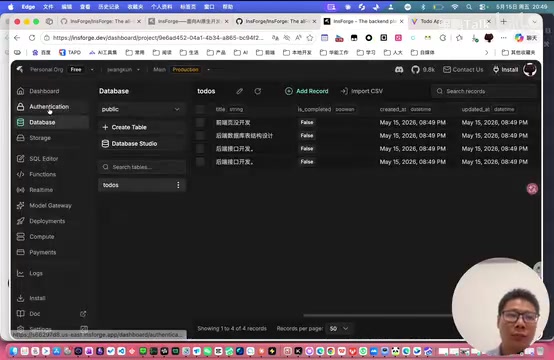
- User Authentication (Auth): Supports email registration and login, verification code validation, with configurable enterprise email
- Database: Built on PostgreSQL, supporting SQL execution and function calls
- S3 Object Storage: Comes with object storage buckets after deployment
- AI Gateway: Integrated large model gateway for convenient AI capability invocation
Why PostgreSQL?
PostgreSQL is the world's most advanced open-source relational database, renowned for its powerful extensibility, standard SQL compatibility, and enterprise-grade reliability. Compared to MySQL, PostgreSQL supports richer data types (such as JSON, arrays, geospatial data), a more powerful query optimizer, and advanced features like Row Level Security. For AI-generated code, PostgreSQL's standardized SQL syntax means there are abundant related examples in AI training data, resulting in typically higher-quality generated SQL. Additionally, PostgreSQL's JSONB support allows it to accommodate both relational and document data models, adapting to rapidly iterating product requirements.
What Is S3 Object Storage?
S3 (Simple Storage Service) was originally an object storage service launched by Amazon AWS and has since become the de facto standard protocol for object storage. Unlike traditional file systems, object storage manages data as independent "objects," each containing the data itself, metadata, and a unique identifier, accessed via HTTP APIs. This architecture is naturally suited for storing unstructured data like images, videos, and documents, with extremely high scalability. InsForge's built-in S3-compatible object storage means developers can implement file uploads, image hosting, and other features without configuring additional cloud storage services, and future migration to AWS S3, MinIO, or other compatible services is very convenient.
Hands-On Demo: Developing a To-Do List App with Claude Code + InsForge
Environment Setup Process
The installation process is very streamlined:
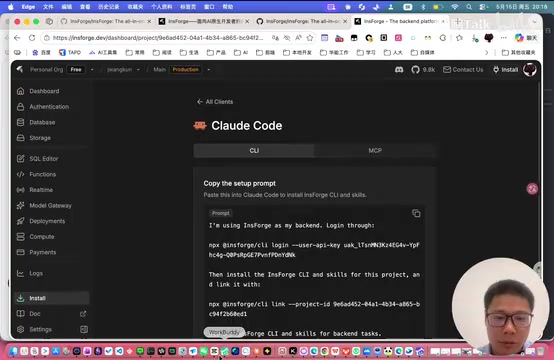
- Copy the installation command from the official website homepage and execute it in the terminal
- An authentication window appears; complete account verification on the website
- Create a test environment with automatic local-to-cloud association
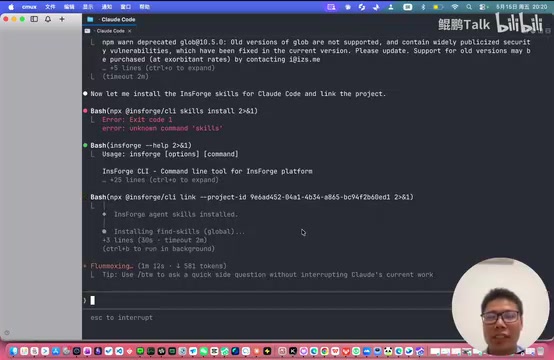
- Install the corresponding Skills to bind the project (can also integrate into any IDE tool via MCP)
About the MCP Protocol
MCP (Model Context Protocol) is an open standard protocol proposed by Anthropic, designed to provide AI models with a unified interface for interacting with external tools and data sources. Before MCP, every AI tool's integration with external services required custom development; MCP defines a standardized communication method that allows AI assistants to discover, understand, and invoke any compatible external service. In InsForge's context, integration via MCP protocol means users can have AI directly interact with the InsForge backend in any MCP-supporting IDE (such as Cursor, Windsurf, VS Code, etc.) without additional configuration. This achieves true "plug and play," greatly reducing toolchain coupling.
Once setup is complete, you can directly call InsForge from Claude Code for backend development.
Complete Development Workflow
The demonstrator issued this instruction to Claude Code:
"Help me develop a To-Do List web interface that includes user registration/login and basic functionality for adding To-Do items"
Claude Code immediately began working:
- Automatically created database table structures: Designed user and to-do item tables, including field definitions, primary key constraints, foreign key relationships, etc.
- Developed registration and login pages: Built the frontend interface with React, calling InsForge's Auth API for identity verification
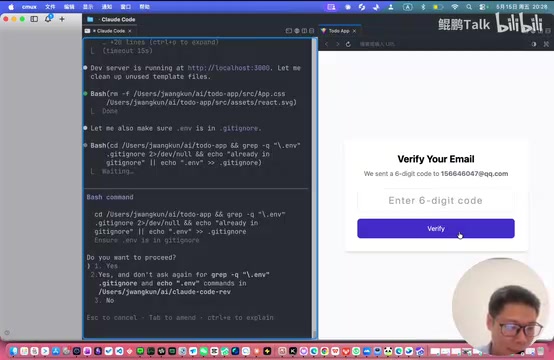
- Implemented email verification: Automatically sent verification code emails after registration, completed through InsForge's built-in email service
- Completed CRUD operations: Adding, viewing, and deleting to-do items, with data persisted to PostgreSQL through InsForge's database API
Throughout the entire process, the developer didn't need to understand backend development or database design—AI handled everything. This is the core value of an Agentic Backend—AI doesn't just generate code; it autonomously interacts with backend services, completing the full chain from table creation to API invocation.
Problems Encountered and Solutions
During the demonstration, a minor issue arose: the AI wrote the wrong API endpoint path for email verification, causing the verification code to fail after registration. After fixing it, functionality was restored. This demonstrates:
- The problem was with the quality of AI-generated code, unrelated to the InsForge platform itself
- Actual development still requires some debugging capability
- Even the most advanced AI programming assistants can still make detail errors when coordinating multiple services—this is a common limitation of current AI Coding
Final Results
After the fix, re-registering and logging in showed:
- User data successfully written to the PostgreSQL database
- After adding to-do items on the frontend (such as "Frontend page development," "Backend database table structure design," "Backend API development"), the To-Do List table in the database updated in real-time
- The entire frontend-backend integration worked seamlessly
InsForge Use Cases and Recommendations
Who Should Use InsForge?
- AI Coding users: Those developing projects with Cursor, Claude Code, and similar tools but struggling with backend setup
- Non-technical founders: Those wanting to quickly validate product prototypes (MVPs) without diving deep into backend technology
- Enterprise internal teams: Those needing a lightweight BaaS platform to support internal tool development while requiring data to stay within the corporate network
Usage Recommendations
- Getting started: Use the official cloud service directly to experience full functionality without worrying about infrastructure
- Production stage: Research local deployment options to ensure data security and control, and configure backup strategies
- Integration method: Can bind projects through Skills or integrate into any IDE via MCP protocol—the choice depends on whether your development tool natively supports MCP
Positioning Compared to Other BaaS Platforms
In the BaaS ecosystem, Firebase is great for rapid prototyping but locks you into the Google ecosystem; Supabase is feature-rich but complex to deploy; Appwrite focuses on self-hosting but has a steeper learning curve. InsForge's differentiated positioning is "AI-first"—it's not just a backend platform but a backend platform designed for AI Agents, with its API design, documentation structure, and integration methods all prioritizing AI comprehension and invocation efficiency.
Conclusion
InsForge provides a pragmatic solution for web development in the AI era. It doesn't pursue being comprehensive; instead, it finds the balance between "sufficient" and "easy to use." For AI Coding users frustrated by backend development, this may currently be the lowest-barrier production-grade open-source backend platform available.
Of course, it cannot completely replace professional backend development—complex business logic, high-concurrency scenarios, and distributed transaction processing still require professional engineers. But for most small-to-medium projects and prototype validation, the combination of InsForge + AI programming assistants is already powerful enough. As AI programming capabilities continue to evolve and the Agentic Backend ecosystem matures, the vision of "everyone is a full-stack developer" is rapidly becoming reality.
Related articles
 Tutorials
Cursor + Codex Dual-IDE Collaboration: A Practical Methodology for Open-Source Project Customization
A complete methodology for open-source project customization based on real-world experience, detailing the Cursor+Codex dual-IDE workflow, seven-stage process, MVP validation, and AI source code reading techniques.
 Tutorials
Cursor Multi-Agent in Practice: Building a Full-Stack Next.js Blog in 50 Minutes
Build a full-stack blog in 50 minutes using Cursor IDE's multi-Agent mode with Next.js, Clerk auth, and Supabase. Learn the 4-phase AI Agent workflow and key integration pitfalls.
 Tutorials
Building an AI Software Factory from Scratch: A Cursor Engineer's Hands-On Experience with Multi-Agent Collaboration
Cursor engineer Eric shares practical insights on building an AI software factory: automation levels, guardrail design, parallel Agent management, and scaling to 1000+ Agents for 24/7 development.