Install Claude Code in Five Minutes: A Quick Setup Guide Using WorkBuddy and DeepSeek
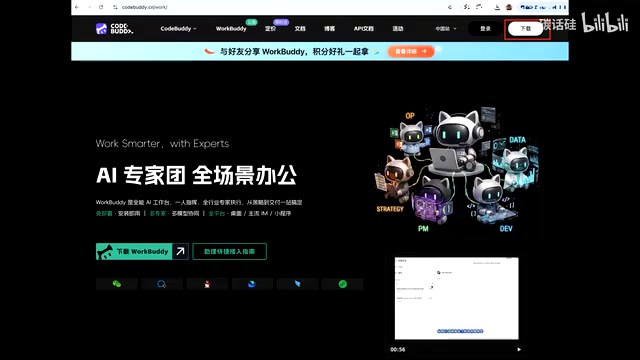
Use Tencent WorkBuddy to install Claude Code in 5 minutes with DeepSeek API for affordable AI coding.
This guide shows how to quickly install Claude Code using Tencent's WorkBuddy AI assistant and DeepSeek's affordable API. By leveraging WorkBuddy's computer-use capabilities, users can bypass the complex manual setup of Node.js, npm, and API configurations. The approach replaces Claude's native model with DeepSeek for cost-effective AI programming assistance, making powerful coding tools accessible to non-technical users in under five minutes.
For everyday users looking to enhance their AI-powered programming experience, Claude Code is one of the most powerful AI coding tools available today. However, its installation and configuration process often intimidates users without a technical background. A Bilibili creator "碳化龟" shared a clever method — using Tencent's WorkBuddy as an "installation assistant" combined with DeepSeek's API key to complete the entire setup in under five minutes.
Core Idea: Using AI to Install AI Tools
The essence of this method is "using AI to install AI." Traditionally, installing Claude Code requires manually configuring the Node.js environment, setting up API keys, and handling various dependency issues — extremely unfriendly for beginners.
It's worth understanding Claude Code's technical background first. Claude Code is a command-line AI programming tool developed by Anthropic. Unlike common graphical interface AI assistants, it runs directly in the terminal environment and can read/write local files, execute Shell commands, manage Git repositories, and more. This design allows it to deeply integrate into a developer's actual workflow rather than being just a chat window. Claude Code is built on the Node.js runtime, so you need to configure Node.js and npm (Node Package Manager) before installation — the first technical hurdle for users without programming experience.
The core logic of this shortcut approach is: let Tencent WorkBuddy act as your technical assistant, completing all the tedious installation and configuration steps through natural language commands.
Specifically, instead of following the officially recommended standard installation process, you leverage WorkBuddy to automate handling of various pitfalls during installation. Combined with the dedicated prompts provided by the creator in the comments section, this effectively shields against various unexpected issues during the installation process.
Detailed Claude Code Installation Steps
Step 1: Download and Install WorkBuddy
WorkBuddy is an AI assistant tool made by Tencent with the ability to operate on your local system. After downloading and installing it, simply open it and complete the login. This tool plays the role of a "smart installer" throughout the process — you just need to tell it what you want to do in natural language, and it will execute the specific technical operations for you.
It's worth noting that WorkBuddy belongs to a new generation of AI assistants with "computer use" capabilities. It can not only have conversations but also directly control the user's desktop system — including opening applications, executing commands in the terminal, editing configuration files, accessing web pages, and more. This capability is technically called Computer Use or Agent mode, and has been an important trend in AI tool development since 2024. Unlike traditional automation scripts, these AI assistants can understand natural language instructions and dynamically determine operation steps, and can autonomously adjust strategies when encountering exceptions — this is precisely why it can serve as a "smart installer."
Step 2: Install Claude Code with a Single Command
In WorkBuddy, simply type "Help me download and install Claude Code," then press Enter and wait. WorkBuddy will automatically handle environment dependencies, downloads, installation, and a series of other operations. This step eliminates the hassle of manually installing Node.js, npm, and other prerequisites.
Step 3: Apply for a DeepSeek API Key
Next, you need to obtain a DeepSeek API key. Type "Open DeepSeek Open Platform" in WorkBuddy, and it will automatically open the corresponding page in the sidebar.
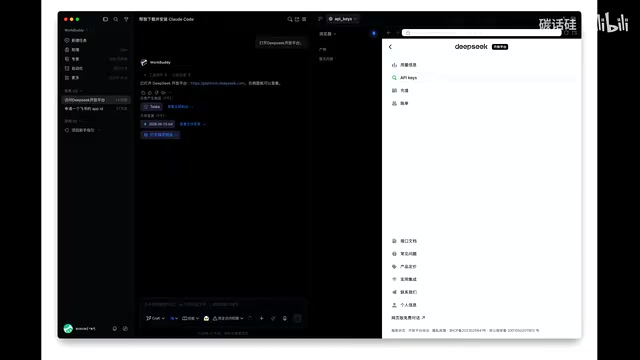
First-time users need to register and log in, with support for WeChat QR code scanning or phone verification code. After successful login, you need to top up first — spending 10 yuan to purchase some tokens is enough to get started.
Here's an explanation of API keys and tokens. An API Key (Application Programming Interface Key) is an identity credential for accessing AI large model services, similar to a digital key. When you use Claude Code locally, each time you send a programming request, the tool sends your instructions to the cloud-based large model for processing via the API, then returns the generated code to you. This process consumes tokens — tokens are the basic billing unit for large models, roughly understood as the smallest processing fragments of text. In Chinese, one character typically corresponds to 1-2 tokens.
Step 4: Create and Save the API Key
Find "API Keys" in the left menu of the DeepSeek Open Platform, and click "Create API Keys."
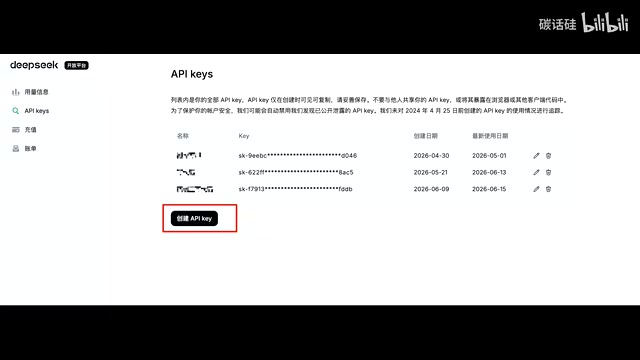
Enter any name and click create. Here's a critical reminder: After creation, immediately copy and securely save your API Key, because this is the only time you'll be able to see the complete key. You won't be able to view it again after closing the page. The reason API keys can only be viewed once is for security: if the key is leaked, others can use your account balance to call model services, causing financial loss. It's recommended to save the key in a local password manager or encrypted notes — never paste it directly in chat logs or public documents.
Step 5: Configure the Key and Launch Claude Code
Return to WorkBuddy and enter your API Key following the prompt template provided by the creator. WorkBuddy will automatically complete the most tedious configuration process, including writing the key to the correct configuration file, setting environment variables, and more.
Finally, tell WorkBuddy "Open Claude Code in the terminal and tell me how to open it myself in the future." If an approval prompt appears, click submit.
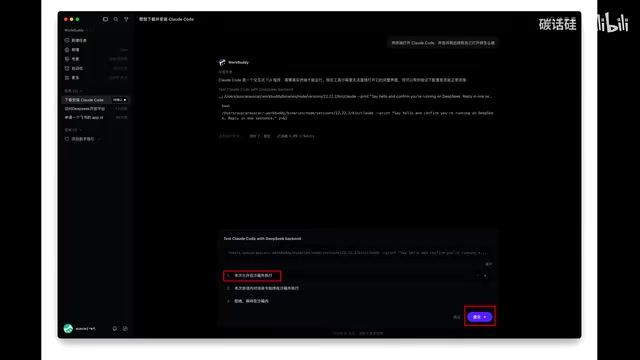
WorkBuddy will open the terminal for you — select the first option. When you see the Claude Code mascot icon appear, it means the installation and configuration are fully complete.
Value and Limitations of This Approach
Why It's Worth Trying
The greatest value of this approach is that it dramatically lowers the installation barrier for Claude Code. Claude Code itself is a command-line tool designed for developers, but by connecting through the DeepSeek API, regular users can also enjoy powerful AI programming assistance. Moreover, DeepSeek's API pricing is quite affordable — 10 yuan worth of tokens is enough for extensive programming conversations.
From a technical perspective, this essentially replaces Claude's native model with DeepSeek's model to drive Claude Code's interactive interface and toolchain. This is possible because Claude Code's architecture design relatively decouples the interactive interface, file operations, code execution, and other toolchain components from the underlying language model. By modifying the API endpoint configuration, you can replace the default Claude model with other model services compatible with the OpenAI API format. DeepSeek's API interface happens to follow this universal format, enabling seamless integration. Developed by DeepSeek (深度求索), their code generation model performs excellently in multiple programming benchmarks, especially with a significant advantage in cost-effectiveness — their API call prices are typically only a fraction or even a tenth of Claude API's prices. While there may be differences in model capabilities, DeepSeek's performance in code generation is indeed impressive and more than sufficient for everyday programming assistance.
Issues to Keep in Mind
- API costs: Although the unit price is cheap, frequent use will still incur charges. It's recommended to monitor token consumption. You can check daily consumption details on the usage statistics page of the DeepSeek Open Platform and control usage frequency accordingly
- Stability: This unofficial integration method may break due to version updates. API interface changes from either Claude Code or DeepSeek could cause compatibility issues, requiring configuration adjustments
- Model differences: DeepSeek and Claude's native model may differ in performance on certain complex programming tasks. For example, in advanced scenarios like understanding context in large projects or coordinating modifications across multiple files, Claude's native model may still have an advantage
Summary
The core innovation of this approach is using WorkBuddy, an AI assistant, to solve Claude Code's installation and configuration challenges, creating an interesting "AI nesting doll" effect. For users who want to experience AI programming but have been deterred by technical barriers, this is genuinely a low-cost approach worth trying. The entire process takes no more than five minutes, and even if you encounter problems, you can directly ask WorkBuddy for help.
Key Takeaways
Related articles

The Clotilda: Underwater Archaeological Discovery of America's Last Slave Ship
The Clotilda, America's last slave ship, was discovered by underwater archaeologists in Alabama nearly 160 years after sinking. Learn about the search, key evidence, and other slave trade shipwreck discoveries.
Sakana AI in Practice: Reshaping Banking Lending Operations with AI Agents — Technology and Strategy
Deep dive into how Sakana AI applies AI Agents to banking lending operations, covering end-to-end support from information gathering to approval document generation, plus technical challenges and human-AI collaboration design.
Instagram Enters the Living Room: Long-Form Video, Series, and Live Streaming Challenge Netflix
Instagram is building a TV app with long-form video, episodic series, and live streaming to challenge Netflix. Deep analysis of its living room strategy and industry impact.