JavaScript Fundamentals: A Complete Guide to Variables, DOM Manipulation, Event Handling, and API Calls
A comprehensive beginner's guide to JavaScript covering syntax, DOM, events, and API calls.
This article systematically covers four core JavaScript modules: basic syntax (variables, data types, functions, conditionals), DOM manipulation (selecting elements, modifying content and styles), event handling (listeners, propagation, delegation), and Fetch API calls (GET/POST requests). It explains how HTML, CSS, and JavaScript collaborate to transform static pages into dynamic applications.
JavaScript is the key technology that transforms web pages from static displays into dynamic applications. This article systematically covers four core modules of JavaScript — basic syntax, DOM manipulation, event handling, and API calls — helping beginners build a complete understanding of front-end interactive development.
Why Do We Need JavaScript?
Static HTML pages have fixed content. Once JavaScript is introduced, web pages gain dynamic capabilities on three levels:
Dynamic Page Manipulation: Through the DOM API, JavaScript can modify a page's structure, content, and styles in real time — dynamically adding or removing elements, updating text content, and even automatically refreshing the display based on data changes.
User Interaction Response: JavaScript captures user actions through event listeners — clicks, keyboard input, form submissions, and more — and executes corresponding logic based on these behaviors. Web pages are no longer passive displays of information; they can interact with users in real time.
Data Communication: Using the Fetch API or libraries like Axios, JavaScript can communicate with backend servers, asynchronously fetching or submitting data to enable refresh-free loading, data synchronization, and state updates, significantly improving user experience and page performance. "Asynchronous" is a core concept in JavaScript programming — since JavaScript is a single-threaded language, if network requests were executed synchronously, the entire page would freeze while waiting for a server response, preventing any user interaction. The asynchronous mechanism allows the program to continue executing other code while waiting for a response, keeping the page fluid and responsive.
Using the FireUG project from the course as an example, JavaScript enables dynamic recipe loading, ingredient addition and deletion, and form validation, giving the entire application a complete and smooth interactive experience.
JavaScript Basic Syntax
Variable Declaration: let and const
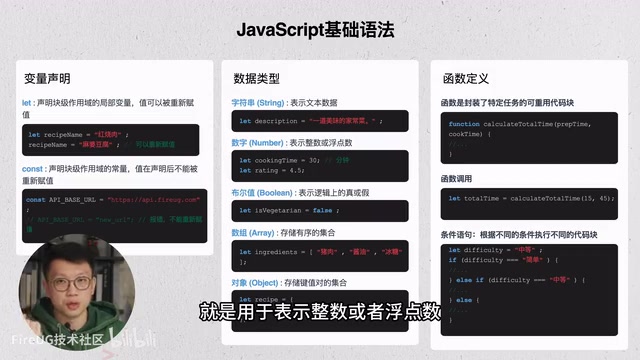
JavaScript has two commonly used variable declaration methods — let and const:
let: Declares a block-scoped local variable whose value can be reassigned later in the code. For example, you can declarelet recipeName = 'Mapo Tofu'and later modify the variable's value as needed.const: Declares a constant that is also block-scoped but cannot be reassigned after declaration. It's ideal for fixed, unchanging data such as configuration items or constant identifiers.
It's worth noting that before ES6, JavaScript only had the var keyword for variable declaration. var has function-level scope and exhibits "hoisting" — the variable declaration is hoisted to the top of the function, but the assignment is not, which often leads to hard-to-track bugs. The let and const introduced in ES6 use block-level scope (defined by curly braces {}), meaning variables are only valid within the code block where they are declared. They also have a "Temporal Dead Zone," meaning accessing a variable before its declaration statement throws an error. This design makes code behavior more predictable and is the reason modern JavaScript development recommends completely abandoning var.
Data Types
JavaScript is a weakly typed language (if you need strong typing, consider TypeScript), but it still provides several fundamental data types:
| Type | Description | Example |
|---|---|---|
| String | Text data | 'Mapo Tofu' |
| Number | Integers or floating-point numbers | 30, 4.5 |
| Boolean | Logical true/false | isVegetarian = false |
| Array | Ordered data collection | ['Tofu', 'Chili', 'Sichuan Pepper'] |
| Object | Key-value pair data | {name: 'Mapo Tofu', difficulty: 'Medium'} |
"Weakly typed" (also called dynamically typed) means variables don't need to be declared with a type in advance, and the same variable can hold values of different types at runtime. This provides flexibility but also increases the risk of runtime errors — for example, when adding a string and a number, JavaScript performs implicit type coercion: '5' + 3 results in the string '53' rather than the number 8, which can be unexpected. TypeScript is a superset of JavaScript developed by Microsoft that introduces static type checking at compile time, catching type errors before the code runs. TypeScript is ultimately compiled into standard JavaScript, so it adds no runtime overhead and has become the mainstream choice for large-scale front-end projects.
Among these types, arrays are well-suited for storing ordered collections like ingredient lists, while objects are ideal for describing a complete recipe entity with multiple properties such as name, difficulty, and cooking time.
Functions and Conditional Statements
Functions are reusable code blocks that encapsulate specific tasks. Functions can accept parameters and execute a series of logic internally — for example, defining a cook(recipeName, cookTime) function to handle the cooking logic for a dish. By passing specific arguments into a function call, you can avoid repetitive code and improve maintainability and readability.
Conditional statements (if, else if, else) allow us to execute different code blocks based on different conditions. For example, executing different prompt logic based on a recipe's difficulty level, or handling different scenarios based on user input.

These basic syntax elements are typically used in combination: variables store data, functions encapsulate behavior, conditional statements control flow, and arrays and objects organize and manage data structures. Through the coordination of these syntax elements, you can build clear and extensible program logic.
DOM Manipulation: The Core of Making Web Pages Dynamic with JavaScript
The DOM (Document Object Model) is the core mechanism through which JavaScript achieves dynamic effects on web pages. Through the DOM API, JavaScript can directly access and manipulate elements on the page.
From a technical perspective, the DOM is a standard programming interface defined by the W3C that parses HTML documents into a tree structure composed of nodes. Every HTML tag, attribute, and text content is a node object in the tree. When a browser loads a page, it first parses the HTML source into a DOM tree, then combines it with CSS to generate a Render Tree, and finally paints it to the screen. The DOM API that JavaScript operates on is precisely this in-memory node tree — when we modify a node, the browser triggers a reflow or repaint to update the visual presentation. Understanding the hierarchical relationships of the DOM tree (parent nodes, child nodes, sibling nodes) is crucial for efficiently manipulating page elements.
Selecting Page Elements
There are three common ways to select elements:
// Get a unique element by ID
document.getElementById('recipe-title')

// Get a single element using a CSS selector
document.querySelector('.recipe-card')

// Get all matching elements (returns a collection)
document.querySelectorAll('.ingredient-item')
getElementById is simple and straightforward, ideal for locating unique elements. querySelector supports CSS selector syntax for greater flexibility. querySelectorAll returns a collection of elements, suitable for batch operations.
Modifying Content and Styles
Once you have a reference to an element, you can modify its content:
element.textContent: Modifies plain text content. It's safe and won't parse HTML.element.innerHTML: Can directly insert HTML structures to dynamically generate tag content, but you need to be cautious about security to avoid introducing untrusted content (XSS risk).
Regarding XSS (Cross-Site Scripting), this is one of the most common vulnerabilities in web security. Attackers inject malicious script code into a page, and when other users browse that page, the malicious script executes in the victim's browser, potentially stealing cookies, session tokens, or other sensitive information. innerHTML poses an XSS risk because it parses strings as HTML and can execute <script> tags or event handler attributes (like onerror) within them. Defensive measures include: using textContent instead of innerHTML for plain text, escaping and encoding user input, and implementing Content Security Policy (CSP) headers.
For style modifications, JavaScript can directly manipulate an element's style property — for example, element.style.color = 'red' to change the color. However, in practice, it's generally recommended to control styles through CSS classes:
element.classList.add('highlight')    // Add a CSS class
element.classList.remove('highlight')  // Remove a CSS class
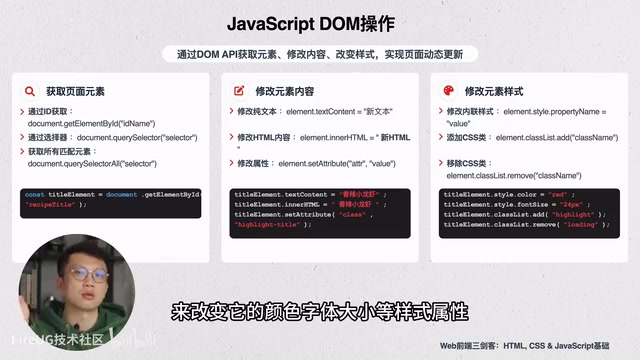
This approach keeps structure, style, and behavior clearly separated, following front-end development best practices.
Event Handling: Implementing User Interaction with JavaScript
Event handling is the core mechanism through which JavaScript enables interactivity. Common event types include:
- Mouse events:
click,mouseover, etc. - Keyboard events:
keydown,keyup,keypress - Form and page events:
focus,blur,change,submit
The most commonly used method for binding events is addEventListener:
const button = document.getElementById('submit-btn')
button.addEventListener('click', function() {
  alert('Button has been clicked!')
})
Event handling is often tightly coupled with DOM manipulation and business logic — every click, input, or submission by the user triggers a corresponding event, and JavaScript dynamically updates the page content based on the event type and current state, or communicates with the backend for data exchange.
A deeper understanding of the event mechanism requires knowledge of event propagation. DOM event propagation consists of three phases: the capturing phase (propagating from window down to the target element), the target phase (reaching the target element), and the bubbling phase (propagating from the target element back up to window). The third parameter of addEventListener controls which phase the event is listened for. The event bubbling mechanism gave rise to an important design pattern called "event delegation" — binding an event listener to a parent element and using event.target to determine which child element actually triggered the event, thereby avoiding the need to bind listeners to numerous child elements individually. This is especially useful for dynamically generated lists (such as recipe lists), since newly added elements automatically respond to interactions without requiring additional event binding.
Fetch API Calls: Front-End and Back-End Data Communication
In modern web development, the most common approach for front-end and back-end data communication is the Fetch API. It's a browser-native interface that supports GET, POST, and other request methods, and is built on Promises for cleaner and more flexible usage.
Promise is an asynchronous handling solution introduced in ES6 that represents an operation that hasn't completed yet but will eventually produce a result. It has three states: pending, fulfilled, and rejected. async/await is syntactic sugar provided in ES2017 on top of Promises — functions marked with async can use await internally to pause execution and wait for a Promise to resolve before continuing, making asynchronous code look as intuitive and readable as synchronous code. The Fetch API returns a Promise object, so the await fetch() syntax in the examples is essentially waiting for the network request to complete before executing subsequent data processing logic.
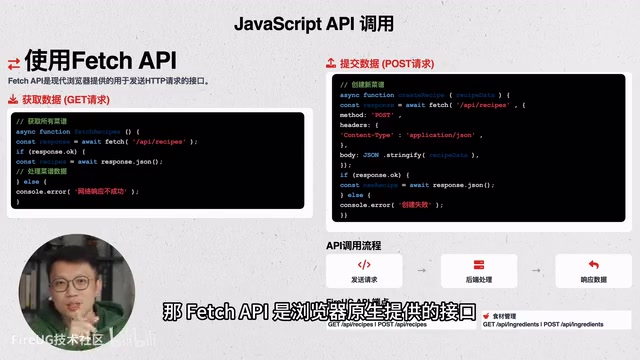
GET Request: Fetching Data
For example, fetching all recipe data when the page loads:
const response = await fetch('/api/recipes')
const data = await response.json()
// Render and display the fetched data
After the server returns a response, response.json() parses the result into a JavaScript object, which is then rendered and displayed. This approach enables asynchronous page loading without requiring a full page refresh.
POST Request: Submitting Data
When creating a new recipe, the front end needs to send user-entered data to the backend:
const response = await fetch('/api/recipes', {
  method: 'POST',
  headers: { 'Content-Type': 'application/json' },
  body: JSON.stringify(newRecipe)
})
You need to specify the request method as POST, set the Content-Type to application/json, and serialize the data using JSON.stringify before placing it in the request body. JSON (JavaScript Object Notation) is a lightweight data interchange format. Although it originated from JavaScript object syntax, it has become a universal cross-language data format standard, with virtually all modern programming languages supporting JSON parsing and generation.
In the FireUG project, the recipe management and ingredient management modules correspond to different API endpoints, implementing complete CRUD data operations through these interfaces. CRUD stands for Create, Read, Update, and Delete — the fundamental operation pattern for virtually all data-driven applications.
Summary: The Collaboration of HTML, CSS, and JavaScript
Looking back at the division of responsibilities across the front-end technology stack:
- HTML is responsible for building the page structure (the skeleton)
- CSS is responsible for controlling visual styles (the appearance)
- JavaScript is responsible for logic and interaction (the behavior)
These three work together to complete the entire rendering process from static pages to dynamic applications. This layered architecture is also known as "Separation of Concerns," an important design principle in software engineering — each layer of technology focuses on solving problems in one dimension, reducing code coupling and making team collaboration and long-term maintenance more efficient.
Mastering JavaScript fundamentals — variable declaration, data types, functions, conditional statements, DOM manipulation, event handling, and API calls — is a crucial step toward modern web development. For developers using AI-assisted programming, understanding these underlying concepts helps you describe requirements to AI more accurately and better understand and debug AI-generated code.
Related articles

AI Programming Learning Roadmap: A Complete Six-Stage Guide from Beginner to Expert
A systematic breakdown of the six-stage AI programming learning roadmap, from zero-code start to mastering Cursor and professional tools, methodology frameworks, advanced patterns, and project practice.

Deep Dive into Devin's Background Agent Architecture: Behind the 80% AI-Committed Code
Deep analysis of Devin's background agent architecture: brain-sandbox separation, environment setup, MCP integration, memory systems, and multi-agent collaboration challenges.

Claude Code in Practice: An In-Depth Efficiency Comparison Between Claude and DeepSeek for Programming
A hands-on comparison of Claude vs DeepSeek V4 for AI programming: code quality, development efficiency, and cost differences. DeepSeek costs 1/6 to 1/10 of Claude but requires 1-2x more time.