Kimi Code Open-Source Hands-On Review: Installation, Feature Comparison & Cost Analysis
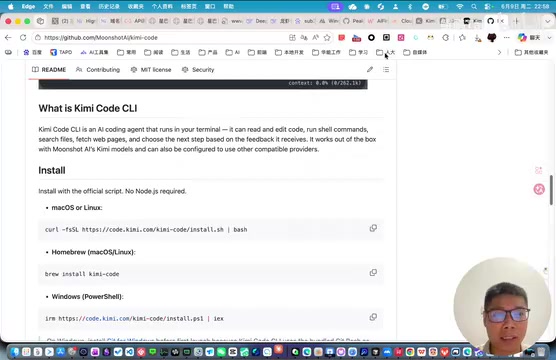
A deep-dive review of Kimi Code: Moonshot's open-source terminal AI coding tool and how it stacks up against competitors.
Moonshot's newly open-sourced Kimi Code is a lightweight terminal AI coding assistant rebuilt on Node.js with the Ink framework. While it offers streamlined one-command installation, VS Code integration, and clean open-source code worth studying, its biggest limitation is the lack of third-party model support. In a crowded field with Claude Code, Gemini CLI, and OpenCode, Kimi Code's competitiveness hinges on its underlying model quality and future openness.
Introduction
Moonshot recently open-sourced a brand-new AI coding tool — Kimi Code. This tool is a rewrite of the earlier Kimi CLI project, rebuilt from scratch on Node.js and positioned as a lightweight terminal-based AI coding assistant. Its usage pattern closely resembles similar tools like Claude Code and OpenCode, though it currently only supports Kimi's own API Key or subscription plans. This article provides a detailed analysis covering installation experience, technical architecture, ecosystem positioning, and usage costs.
Kimi Code Installation & Basic Usage
One-Command Installation — No More Dependency Headaches
Compared to the previous Kimi CLI installation experience (which users complained about as "a pain to install with a massive pile of dependencies"), Kimi Code's installation is remarkably streamlined. You only need to run a single command in the terminal to complete the deployment, with virtually no dependency hassles.
After installation, simply type kimi in the terminal to launch the tool. First-time use requires login authentication, and after running the login command, you'll have three authentication options:
- Kimi Code Subscription Plan: Use the official subscription package
- Domestic Platform Version: Authenticate via Kimi's domestic platform API Key
- Platform-Based Authentication: Third-party platform integration
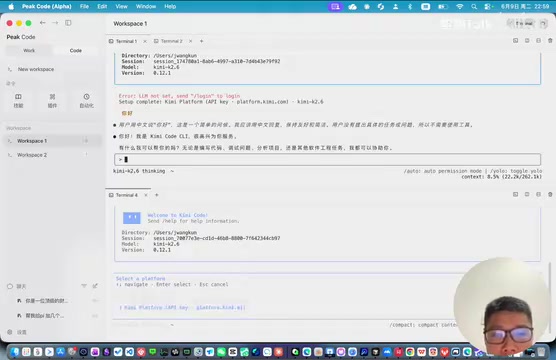
Once logged in, you can interact with the AI by typing natural language instructions directly in the terminal. The experience is essentially identical to Claude Code, OpenCode, and similar tools.
Technical Architecture & Open-Source Value
Lightweight Design Built on the Ink Framework
Kimi Code is developed within the Node.js ecosystem, using the Ink framework (a React-based terminal UI framework) under the hood to build its interactive interface. Ink is an open-source framework created by Vadim Demedes that brings React's component-based development paradigm to terminal applications. Traditional terminal UI development typically relies on low-level libraries like ncurses or blessed, offering a rather primitive development experience. Ink's innovation lies in enabling developers to use JSX syntax and React's state management mechanisms (such as useState, useEffect, and other Hooks) to build terminal interfaces, dramatically lowering the development barrier. Under the hood, Ink controls terminal output through ANSI escape sequences and applies React's virtual DOM diffing mechanism to terminal character rendering, achieving efficient UI updates. This also explains why Kimi Code chose Node.js as its runtime — Ink is inherently a product of the JavaScript/TypeScript ecosystem. This technology choice allows the tool to maintain feature completeness while achieving solid lightweight performance.
As an open-source project, Kimi Code offers valuable reference material for developers looking to learn terminal AI tool development. While Claude Code, OpenCode, Gemini CLI, and other terminal AI coding tools carry different brand names, they follow similar technical paradigms under the hood: they are essentially AI Agents with tool-calling (Tool Use/Function Calling) capabilities. After a user inputs a natural language instruction, the AI model analyzes the intent and then interacts with the local development environment through a predefined toolset (such as file read/write, shell command execution, code search, etc.). This architecture typically includes a session management layer (maintaining context history), a model invocation layer (handling API communication and streaming responses), a tool execution layer (sandboxed file operations and command execution), and a permission control layer (preventing the AI from executing dangerous operations). Developers can study Kimi Code's source code to understand the complete implementation of this paradigm, including the specific code organization of core modules like session management, tool calling, and file operations.
Lack of Third-Party Model Support Is the Biggest Limitation
However, Kimi Code currently has one notable limitation — it does not support configuring third-party models. This means if you want to use DeepSeek, GPT-4, or other large language models, the official version cannot accommodate that for now. Of course, since the project is open-source, technically proficient users can compile and modify the API configuration themselves to connect other models.
Kimi Code's strategy of only supporting its own models is known in business terms as "vertical integration" or the "walled garden" approach. Notably, Anthropic's Claude Code also defaults to binding with Claude models — this isn't a technical limitation but a deliberate business decision. For AI companies, coding tools serve as the most direct showcase of model capabilities and a significant source of API call volume. By binding tools to models, companies can ensure a consistent user experience (prompt engineering optimized for a specific model) while locking in API revenue. The risk of this strategy, however, is clear: if the model isn't powerful enough, users will simply switch to open tools that support stronger models (e.g., OpenCode supports any OpenAI-compatible API).
This limitation has sparked community discussion: if you can only use Kimi's own models, why not just use the already mature Claude Code? It's a valid question, and the answer ultimately comes down to user preferences for different model capabilities and actual usage habits — a tool's value ultimately depends on the competitiveness of its underlying model.
Dual-Form Product Strategy: Terminal + VS Code
Kimi Code doesn't just offer a terminal command-line tool — it also provides a VS Code extension that can be installed directly into the IDE. This dual-form product strategy covers different developer usage scenarios.
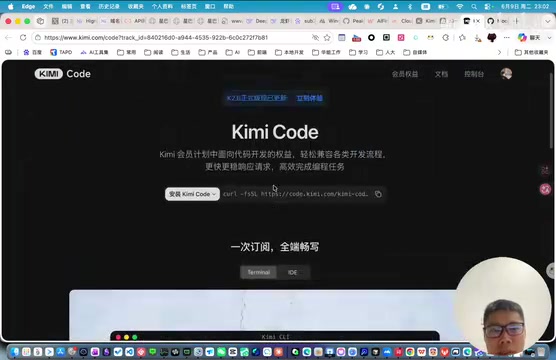
From a practical standpoint, though, the VS Code extension mode doesn't offer a particularly strong differentiator — after all, there are already numerous mature IDE AI plugins on the market, including GitHub Copilot, Cline, and Continue. The terminal mode, with its lightweight and flexible characteristics, may actually be more competitive.
Ecosystem Comparison with Claude Code and Other Competitors
The Terminal AI Coding Tool Space Is Already Crowded
The terminal AI coding tool space is fiercely competitive. The community's Pick Code project has already integrated multiple mainstream tools including CodeX, Claude Code, Cursor, Gemini CLI, Grok, and OpenCode.
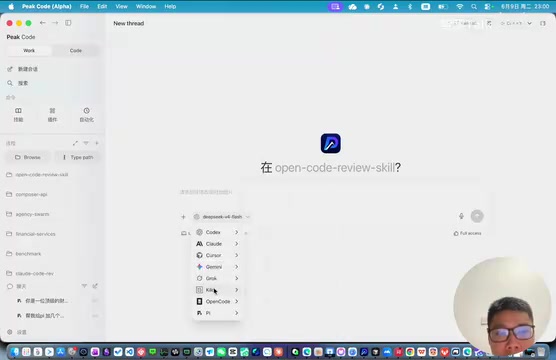
In terms of feature completeness, Kimi Code is on par with these tools, supporting common features like skill plugins and automation. However, there's still a gap in model capability and ecosystem openness. If Kimi Code performs well going forward, it could also be integrated into more aggregation tools.
Kimi Code's release isn't an isolated event — it's a microcosm of the collective push by Chinese AI coding tools. Currently on the domestic front, ByteDance's Trae (based on the Doubao model), Alibaba's Tongyi Lingma, Baidu's Comate, and Zhipu's CodeGeeX are all actively expanding their presence. Compared to international competitors, domestic tools' core advantages lie in optimization for Chinese-language coding scenarios, network stability within China, and pricing strategies that better align with Chinese developers' habits. But the challenges are equally clear: on code generation quality benchmarks (such as SWE-bench, HumanEval, etc.), domestic models still lag behind Claude 3.5/4, GPT-4, and others. Kimi Code's choice of the open-source route is partly an attempt to accelerate iteration through community power, while also accumulating more real-world coding usage data for its K2 model.
Don't Overlook the Token Consumption Costs of AI Coding Tools
You might not have noticed, but AI coding tools typically consume a significant amount of tokens. Some heavy users have revealed that their spending on the Kimi platform over the past year reached tens of thousands of RMB (thousands of USD).
The reason AI coding tools consume far more tokens than typical conversation scenarios is that each interaction requires injecting a large amount of contextual information into the prompt. A typical coding session might include: current file contents, related dependency files, project directory structure, previous conversation history, tool call results, and more — a single request's input token count can reach tens of thousands or even hundreds of thousands. Taking Kimi's K2 model as an example, while its API pricing is more cost-effective compared to international models like GPT-4, cumulative costs in high-frequency usage scenarios can still be substantial. The industry currently employs several strategies to reduce costs: context compression (automatically summarizing conversation history), intelligent caching (reusing results from similar requests), and tiered model invocation (using smaller models for simple tasks and larger models for complex ones).
This reminds us that when choosing an AI coding tool, we need to carefully evaluate long-term usage costs in addition to features and experience. It's recommended to test actual token consumption on small-scale projects first before committing long-term, to avoid bills exceeding expectations.
Conclusion: Is Kimi Code Worth Trying?
As Moonshot's latest venture into the AI coding space, Kimi Code demonstrates several commendable directions:
- Open-source strategy allows the community to contribute and learn — the source code itself is excellent study material
- Lightweight design completely resolves the installation pain points of its predecessor Kimi CLI
- Multi-form layout covers both terminal and IDE development scenarios simultaneously
But it also faces challenges: the model lock-in strategy limits user choice, and against strong competitors like Claude Code and Gemini CLI, Kimi Code needs to make more progress in model capability and openness. If it can support third-party model integration in the future and continuously improve code comprehension and generation quality, Kimi Code has the potential to carve out a meaningful position among Chinese AI coding tools.
For developers, if you're already a paying Kimi user, Kimi Code provides a convenient terminal interaction method. If you're an open-source enthusiast, the project's well-organized source code is worth spending time studying.
Related articles

AI Code Output Up 10x — How Do You Keep Code Review from Collapsing?
When AI code generation outpaces human review, Code Review becomes the biggest bottleneck. Learn guardrail systems, architecture constraint tests, and TDD-driven Agent development strategies.
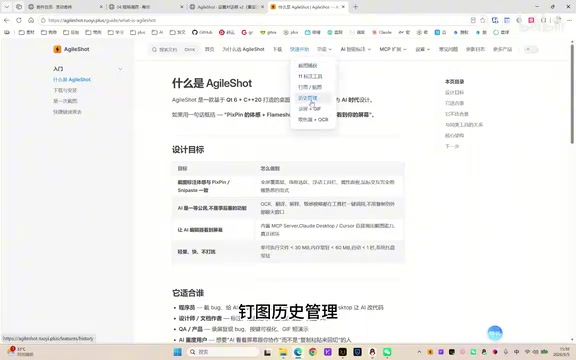
A Giant Shot: An AI Screenshot Tool with Built-in MCP That Lets AI Directly Control Your Computer
A Giant Shot is a desktop screenshot tool with a built-in MCP Server, offering 11 annotation tools, smart OCR, AI chat, and desktop automation for Cursor and Claude Desktop.
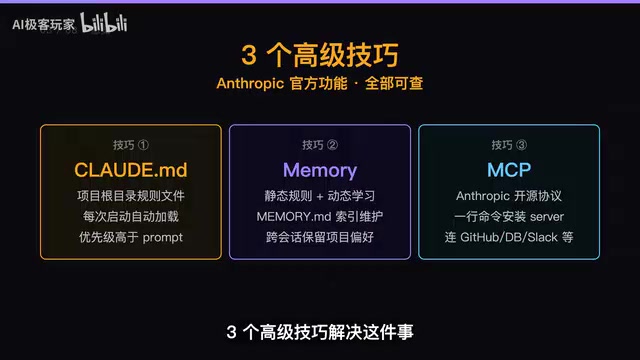
Three Essential Claude Code Configuration Techniques: A Practical Guide to CLAUDE.md, Memory & MCP
Master three Claude Code configuration techniques: use CLAUDE.md for project rules, Memory for auto-learning preferences, and MCP for connecting GitHub and external tools.