Kimi K2.7-Code vs K2.6 Real-World Comparison: Who Wins Across Five Hardcore Challenges?
K2.7-Code beats K2.6 on quality but costs 48% more and runs 4.4x slower across five coding challenges.
A hands-on comparison pits Kimi K2.7-Code against K2.6 across five challenges: particle effects, rigid body physics, soft body physics, UI design, and code review. K2.7-Code scores nearly double on quality (153.5 vs 79) thanks to better reliability, but runs 4.4x slower and costs 48% more. The claimed 30% Thinking Token reduction only held for 2 of 5 tasks. Code review performance was essentially tied, suggesting code generation and comprehension improve on different paths.
Background: K2.7-Code Launches — How Real Is the Upgrade?
Kimi has been on a tear in the AI coding space recently — across 15 AI challenge episodes run by a Bilibili creator, Kimi appeared in 5 and won 3 championships. Just recently, Kimi K2.7-Code was officially released, with the team claiming significantly improved coding capabilities and a 30% reduction in Thinking Token consumption.
But talk is cheap — is this a PowerPoint upgrade or a real one? The Bilibili creator designed a "family showdown" internal battle: K2.7-Code vs K2.6, with five challenges covering particle effects, rigid body physics, soft body physics, UI design, and code review. Each challenge was scored on three metrics: quality score, Token consumption, and runtime. How did it go? Let's break it down challenge by challenge.
Five Hardcore Challenges Dissected
Challenge 1: Burning Envelope — Particle and Deformation Basics
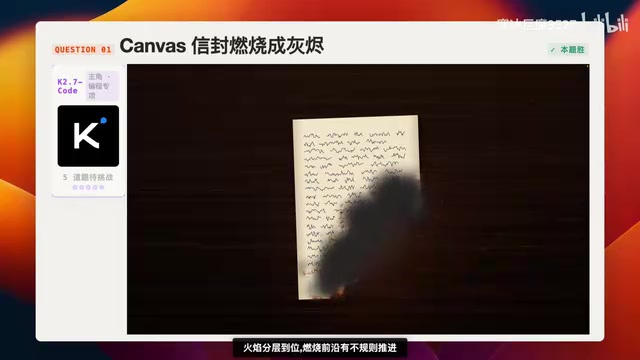
This challenge primarily tests flame morphology and ash scattering effects — a fundamental test of particle systems and deformation capabilities. A Particle System is a core technique in computer graphics for simulating non-rigid phenomena like fire, smoke, and explosions. The basic principle involves generating large numbers of tiny particles, each with properties like position, velocity, lifetime, and color, driven by physics rules governing their motion and decay to ultimately produce complex natural phenomena visually. The difficulty of an envelope-burning effect lies in the fact that it requires not only a particle system for flame simulation but also real-time Mesh Deformation on the paper grid, advancing the burn front in an irregular pattern while coordinating the timing of multiple subsystems — charring discoloration, ash detachment, and more. This is a comprehensive test of an AI model's ability to coordinate multi-system coding.
K2.6 flopped: it produced results in just 2 minutes 41 seconds, but the output was a black screen. Even more embarrassingly, it reviewed and modified its own code but still couldn't get it to run — final score: 0 points.
K2.7-Code took 21 minutes (nearly 9x longer than K2.6) but produced a fully working result. The flame layering was solid, the burn front advanced irregularly, and the paper charring progressed through three stages: dark brown → black → disappearing. The overall effect was quite good. However, there was a flaw — the paper had completely disappeared, yet ash was still appearing out of thin air, which doesn't make logical sense. It also used Headless Chrome to capture keyframes for multi-round verification, showing a noticeably higher level of engineering sophistication.
Headless Chrome is Google Chrome's headless mode, capable of running the full browser engine without a graphical interface. In AI coding scenarios, the model uses Headless Chrome to automatically open generated web pages, capture keyframe screenshots, and then analyze those screenshots to determine whether the rendering meets expectations. This "generate → render → screenshot → evaluate → modify" closed-loop verification workflow is essentially an automated Test-Driven Development (TDD) approach. It significantly improves output reliability — the model is no longer "blindly writing code and hoping it works" but actively verifying results and iterating. The trade-off, however, is obvious: each verification round requires launching a browser, waiting for rendering, and analyzing screenshots, which directly leads to dramatically increased runtime.
Challenge 2: Two-Car Collision — Rigid Body Physics Test
Almost no model can nail rigid body physics collision on the first try — this is a tough challenge. Rigid Body Physics is the most fundamental and classic module in physics engines, simulating collisions, bouncing, and friction between objects that don't deform. However, a "two-car collision" scenario goes far beyond basic rigid body territory — realistic vehicle collisions involve Collision Detection, Impulse Response, Deformable Body simulation, and debris scattering across multiple layers. Collision detection precision is especially critical: using simple Bounding Boxes instead of precise mesh collision detection easily leads to false positives where "the collision triggers before the objects even touch."
K2.6 once again produced instant results (57 seconds), but created an empty shell UI — buttons were visible but no cars, and clicking start did absolutely nothing. 0 points.
K2.7-Code took 9 minutes 33 seconds and at least showed visible, runnable cars. The collision included slow-motion and particle effects, but there was a fatal bug: the two cars triggered the collision animation while still far apart — they never actually touched, and no car body deformation was implemented. This "phantom collision" bug was most likely caused by an overly large collision detection threshold or excessively coarse bounding volumes. While it's a critical flaw, it's still better than something that doesn't run at all.
Challenge 3: Wind-Blown Curtain — Soft Body Physics and Real-Time Interaction
This challenge tests soft body physics simulation and real-time mouse interaction — as the mouse moves across the screen, the curtain should be "blown" accordingly. Soft Body Physics simulates objects that can deform, such as cloth, jelly, and ropes. Curtain simulation typically uses a Mass-Spring Model or Position Based Dynamics (PBD): the cloth is discretized into mass points on a grid, connected by spring constraints, and at each frame the mass point positions are updated based on external forces (gravity, wind) and constraint conditions. Mouse interaction requires mapping the mouse position to a force field that influences nearby mass points in real time. The difficulty lies in physics parameter tuning — even slight deviations in spring stiffness, damping coefficients, or wind direction can cause "completely reversed physics" or cloth clipping issues.
K2.6 produced results in 46 seconds. The physics direction was completely reversed, but at least you could see a curtain — earning 30 points.
K2.7-Code finished in 3 minutes 25 seconds and even proactively asked whether to add a background — great attitude, but the result was laughably ironic: it rendered the curtain rings but forgot the actual curtain. K2.6 pulled off an upset on this one.
Challenge 4: iOS 29 UI Design — Creativity Meets Engineering
This challenge tests design capability and parallel code output, requiring both desktop and mobile form factors to be generated simultaneously.
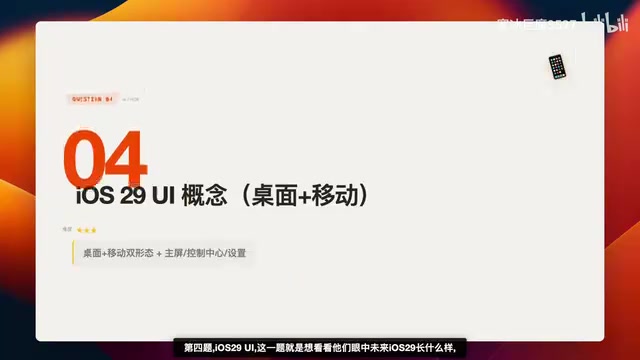
K2.6 finished in 3 minutes 20 seconds. The UI was complete but completely uninspired, with poor layout handling — still, it earned 40 points.
K2.7-Code took 7 minutes 58 seconds and added many details, but heavily relied on emoji — "as if it was afraid people wouldn't know it was AI-designed." The top status bar was also poorly handled across every page. K2.6 pulled off another upset here.
Challenge 5: Code Review — Real-World Project Battle Test
The tester submitted their own in-development desktop Agent project for both models to review. The project was genuine "legacy spaghetti code" with real bugs, but the models weren't told how many.
Code Review is a critical practice in software engineering for ensuring code quality, traditionally performed by senior developers. When AI performs code review, it needs to understand the project's overall architecture, identify potential bugs, discover security vulnerabilities, and evaluate code style and maintainability. "Spaghetti code" (long-iterated legacy code lacking refactoring) is an extreme test of AI review capabilities, as such code typically lacks clear structure and documentation, with bugs hidden in complex contextual dependencies.
K2.6: 2 minutes 59 seconds, consumed 97.7k Tokens, found 7 real issues, scoring 9 points.
K2.7-Code: 5 minutes 7 seconds, consumed 83.3k Tokens, found 6 real issues, scoring 8.5 points.
Both models found real issues beyond the checklist with no hallucinations — essentially a tie. Notably, neither produced "hallucinations" (fabricating non-existent issues), which is especially important in code review scenarios — false positives severely erode developer trust in the tool. The tied performance also suggests that improvements in code comprehension and analysis may require different training strategies than those for code generation. K2.6 edged ahead by 0.5 points on this challenge.
Comprehensive Data Comparison: Who Won?
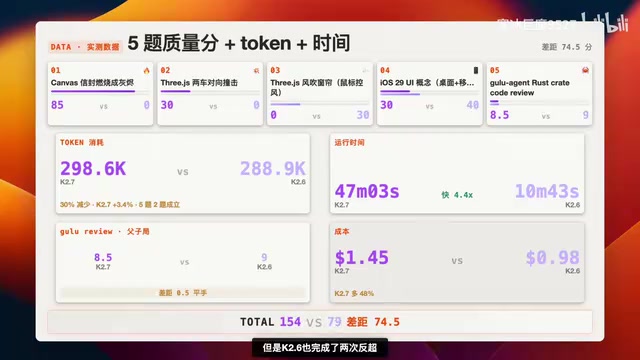
Quality Score Comparison
| Metric | K2.7-Code | K2.6 |
|---|---|---|
| Total Score | 153.5 | 79 |
| Gap | +74.5 points | - |
K2.7-Code leads significantly in overall quality, but K2.6 wasn't completely steamrolled — it pulled off upsets in Challenge 3 (curtain) and Challenge 4 (iOS UI).
Token Consumption Comparison
K2.7-Code consumed 298.6k Tokens, K2.6 consumed 288.9k — K2.7 used roughly 10% more.
Thinking Tokens are the tokens consumed internally by large language models during Chain of Thought reasoning. Unlike Output Tokens delivered directly to the user, Thinking Tokens represent the model's internal "self-talk" reasoning process — users typically don't see this content, but it counts toward total API Token consumption and directly impacts costs. For complex tasks like code generation, models often need substantial Thinking Tokens to plan architecture, reason through logic, and check for errors. The official claim of "30% reduction in Thinking Tokens" implies optimization in reasoning efficiency — achieving equal or better output quality with fewer internal reasoning steps. However, in real testing, this held true for only two of the five challenges; in the other three, K2.7 actually consumed more. This suggests the optimization effect may be highly task-dependent — in complex tasks requiring multi-round verification, the additional engineering workflow overhead may offset reasoning efficiency gains.
Runtime Comparison
K2.7-Code total runtime: 47 minutes 3 seconds. K2.6: only 10 minutes 43 seconds — K2.6 was 4.4x faster. K2.7-Code's engineering verification workflow (such as Headless Chrome multi-round validation) significantly dragged down overall time.
Cost Comparison
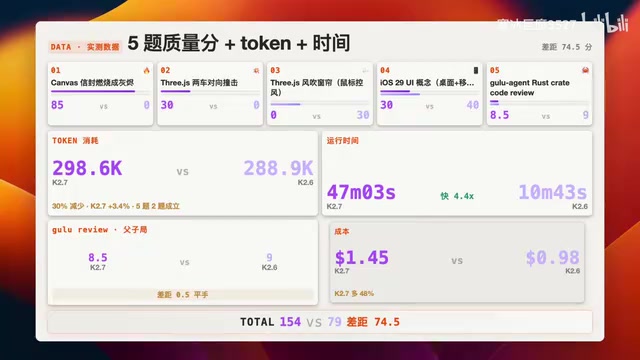
K2.7-Code cost $1.45, K2.6 cost $0.98 — K2.7 was 48% more expensive.
Key Takeaways: A Real Upgrade, But at a Real Cost
K2.7-Code won this internal showdown, but the victory wasn't exactly dominant. Here are the key findings:
1. Quality genuinely improved, but it's not a total blowout. K2.7-Code is clearly stronger on complex tasks like particle effects and physics simulation, but actually underperformed K2.6 on UI design and soft body physics. Its core advantage is "it actually runs" — K2.6 completely failed on three challenges (black screen, empty shell UI), while K2.7 at least produced runnable results every time. This leap from "unusable" to "usable but imperfect" is often more valuable in real-world development than going from "80 points" to "90 points."
2. Time and cost are real trade-offs. 4.4x slower and 48% more expensive — these aren't trivial numbers. K2.7-Code's engineering workflow (proactive verification, multi-round iteration) improves reliability but dramatically increases time and Token overhead. This is fundamentally a classic engineering trade-off: spending more computational resources for higher output reliability. For critical tasks in production environments, this trade-off is usually worth it; but for rapid prototyping scenarios, K2.6's "instant results" may be more practical.
3. The "30% Thinking Token reduction" claim needs a reality check. Only two of five challenges matched expectations, and overall Token consumption actually increased by 10%. This reminds us that model vendors' benchmark results are often based on specific task distributions, and real-world performance may vary significantly.
4. Code review capability is essentially tied. This may be the most surprising result — as an upgrade specifically touting improved coding ability, K2.7-Code showed no clear advantage in real-world project review. Code generation and code comprehension may be two fundamentally different dimensions of capability: the former relies more on pattern matching and code completion, while the latter depends on deep semantic understanding and logical reasoning. Their improvement paths don't necessarily advance in lockstep.
Which version to choose ultimately depends on your actual needs: if you prioritize output quality and reliability, K2.7-Code is the better choice; if speed and cost matter more, K2.6 remains competitive. This isn't a cosmetic rebrand, but it's far from a revolutionary leap either.
Related articles
Claude Code Skills and MCP Resources: A Complete Guide from Beginner to Expert
A comprehensive guide to Claude Code Skills and MCP resources, covering international platforms like Skills.mp and Smithery plus Chinese alternatives, with a quick selection guide to boost AI coding productivity.
AI Code Output Up 10x — How Do You Keep Code Review from Collapsing?
When AI code generation outpaces human review, Code Review becomes the biggest bottleneck. Learn guardrail systems, architecture constraint tests, and TDD-driven Agent development strategies.
A Giant Shot: An AI Screenshot Tool with Built-in MCP That Lets AI Directly Control Your Computer
A Giant Shot is a desktop screenshot tool with a built-in MCP Server, offering 11 annotation tools, smart OCR, AI chat, and desktop automation for Cursor and Claude Desktop.