Local Deployment of Claude Code: Principles and Practical Guide for Three Approaches
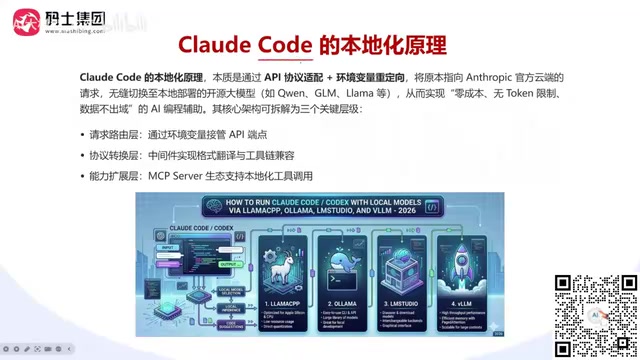
Three practical approaches to locally deploying Claude Code with open-source LLMs for zero-cost AI coding.
This guide explains how to locally deploy Claude Code by redirecting API requests to local open-source models via environment variables and protocol translation middleware. It covers three mainstream approaches — LM Studio for beginners, Ollama for personal/small team use, and vLLM + LiteLLM for enterprise-grade high-concurrency scenarios — along with hardware requirements, model quantization tips, and security considerations.
Claude Code (CC) is one of today's most popular AI coding agents, helping developers efficiently write, debug, and refactor code. An AI coding agent (Agentic Coding Assistant) refers to an AI system that goes beyond generating code snippets — it can autonomously plan tasks, invoke tools, read and write files, execute commands, and iteratively correct itself based on feedback. Unlike traditional code completion tools (such as early Copilot), Claude Code has a complete "perceive-plan-execute-feedback" loop, capable of autonomously completing complex development tasks in a terminal environment like a junior developer. However, using the official API service means continuous token consumption and significant costs. Here, tokens are the basic units that large language models use to process text — in every conversation, the input code context and generated output are tokenized for billing. Taking Anthropic's Claude Sonnet as an example, input tokens cost about $3 per million and output tokens about $15 per million. A single complex code refactoring task might consume tens or even hundreds of thousands of tokens, causing costs to accumulate rapidly. At the same time, sending code data to external servers poses security risks.
The core idea behind locally deploying Claude Code is: preserve Claude Code's interaction experience and toolchain while replacing the backend model with a locally deployed open-source LLM. This approach offers three major advantages:
- Zero cost, no token limits: Beyond electricity and potential server rental costs, there are no more API call fees
- Data security: Code and requests never leave the local network, suitable for enterprise-level sensitive projects
- Flexible model switching: You can freely experiment with different models locally and quickly evaluate which one best fits your use case
Core Architecture of Claude Code Local Deployment
The architecture of Claude Code local deployment can be broken down into three key layers: the request routing layer, the protocol translation layer, and the capability extension layer. Understanding these three layers gives you a grasp of the entire deployment's underlying logic.
Environment Variables Intercepting the API Endpoint
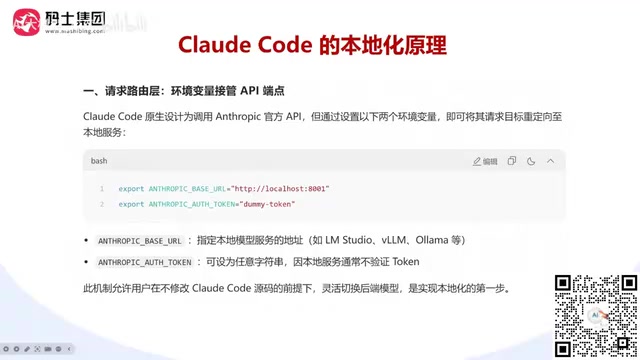
Native Claude Code sends all requests to Anthropic's official cloud API by default. To achieve local deployment, you need to redirect requests to a local service using two environment variables:
- ANTHROPIC_BASE_URL: Specifies the local model service address (IP + port) — this is the most critical configuration item
- ANTHROPIC_AUTH_TOKEN: Authentication token; local deployments typically don't validate tokens, so you can set it to any value (e.g.,
dummy-token)
This design pattern of overriding default endpoints via environment variables is very common in software engineering — it's a lightweight implementation of "dependency injection." When Claude Code starts, it reads these environment variables. If it detects a custom Base URL, it forwards all API requests to the specified address instead of the default https://api.anthropic.com. This mechanism allows users to flexibly switch backend models without modifying Claude Code's source code, making it the first step toward local deployment.
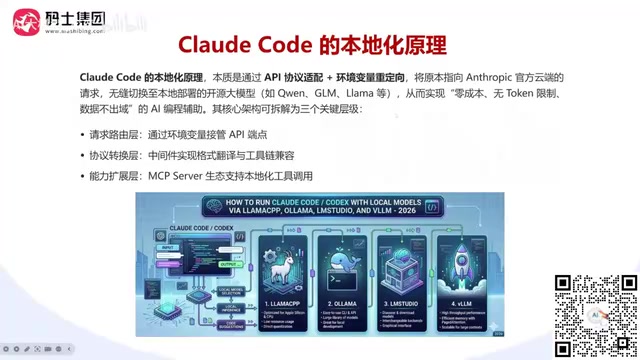
Protocol Translation — Solving Format Incompatibility
Claude Code expects to receive Anthropic-style API responses (/v1/messages format), while local inference engines (like vLLM) typically provide OpenAI-compatible format (/v1/chat/completions). These two API formats differ significantly in request structure and response format: Anthropic's Messages API uses a separate system field for system prompts, explicitly distinguishes user and assistant roles in the message body, and supports multimodal content blocks (text, images, tool calls, etc.) through a content array. OpenAI's Chat Completions API, on the other hand, includes the system prompt as a message within the messages array, wraps results in a choices array in the response, and defines tool call schemas differently. Since the two formats are incompatible, a protocol translation middleware is needed in between.
Commonly used middleware includes:
- LiteLLM: The most widely used protocol translation tool, developed and maintained by BerriAI, supporting unified interfaces for over 100 LLM providers. Its core value lies in abstracting different vendors' API formats into a unified calling interface — after receiving an Anthropic-format request, LiteLLM automatically converts the message structure, parameter naming, streaming response format, and other elements into the format required by the target engine, then reverse-converts the response back to Anthropic format before returning it to Claude Code. The entire process is completely transparent to Claude Code.
- CC-Switch: A switching tool designed specifically for Claude Code
- Custom scripts: Translation logic written for specific needs
It's worth noting that not all approaches require middleware. If the inference engine itself supports Anthropic-format APIs (for example, some engines have built-in multi-format compatibility), you can connect directly and skip the middleware layer.
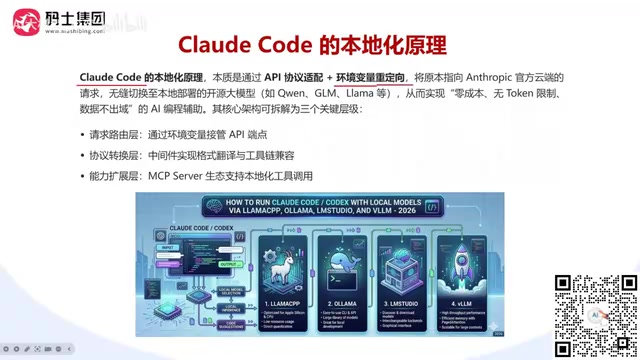
MCP Server Capability Extension
Claude Code's power lies not only in code generation but also in its rich toolchain and MCP (Model Context Protocol) ecosystem. MCP is an open protocol standard introduced by Anthropic in late 2024, designed to establish unified communication standards between AI models and external tools and data sources. Think of MCP as the "USB port" of the AI world — just as the USB protocol allows various peripherals to plug and play with computers, MCP enables AI models to invoke various external tools and services in a standardized way. MCP uses a client-server architecture: Claude Code acts as the MCP client to initiate tool call requests, while MCP Servers handle the actual operations and return results. The MCP ecosystem currently covers hundreds of tools including database queries, browser automation, and cloud service management.
In local deployments, MCP Servers allow Claude Code to invoke local tools, enabling truly automated development — such as Git operations, local command execution, and file system access.
However, there's an important security detail to note: if the local LLM connects to external MCP services, data may still flow to other service providers. For example, if you configure MCP Servers that connect to the GitHub API or Jira cloud services, code content and project information will be transmitted externally through these MCP channels. Therefore, if you have strict data security requirements, the tools connected via MCP should also be locally deployed.
Comparison of Three Mainstream Local Deployment Approaches
There are currently three mainstream approaches for locally deploying Claude Code, each suited to different scenarios.
Approach 1: Claude Code + LM Studio
LM Studio is a graphical local model management tool with the lowest barrier to entry, ideal for individual developers and beginners. It includes built-in model downloading, quantization selection, and API service startup features, with simple and intuitive configuration. LM Studio's core advantage is its "out-of-the-box" experience — users simply search for and download models in the graphical interface (supporting GGUF format models from Hugging Face), select an appropriate quantized version, and click start to launch a compatible API service locally. LM Studio uses llama.cpp as its underlying inference engine and has good support for CPU inference, meaning even users without a dedicated GPU can run models (though much more slowly). Notably, recent versions of LM Studio have begun supporting Anthropic-format API endpoints, which means in certain configurations you can skip the middleware and connect directly to Claude Code.
Approach 2: Claude Code + Ollama
Ollama is currently the most widely used local inference engine among individual users, with easy installation and a rich model ecosystem. A single command can pull and run a model (e.g., ollama run qwen2.5-coder:32b), making it ideal for quick validation and personal development scenarios. Ollama's design philosophy is similar to Docker — packaging models as standardized "images" managed through concise CLI commands. It supports macOS, Linux, and Windows, fully leveraging Metal GPU acceleration on Apple Silicon Macs and CUDA hardware acceleration on NVIDIA GPUs. Ollama includes a built-in model repository (ollama.com/library) with hundreds of pre-configured open-source models, so users don't need to manually handle model format conversion or configuration files. However, it's important to note that Ollama has limited parallel processing capability and is not well-suited for enterprise-level high-concurrency scenarios. Ollama defaults to single-request serial processing mode. While limited parallelism can be enabled through configuration, response latency increases significantly when multiple users make simultaneous requests.
Approach 3: Claude Code + vLLM + LiteLLM
vLLM is an enterprise-grade high-performance inference engine supporting high concurrency, continuous batching, and other features. vLLM (Very Large Language Model inference engine) was developed by a research team at UC Berkeley. Its core innovation is PagedAttention technology — borrowing the paged memory management concept from operating systems, it dynamically allocates and manages the KV Cache (key-value cache) during model inference on a page-by-page basis, rather than pre-allocating fixed-size contiguous memory for each request as traditional approaches do. This design improves VRAM utilization by 2-4x while supporting Continuous Batching, which dynamically inserts new requests into currently executing batches instead of waiting for an entire batch to complete before processing the next one, dramatically improving throughput. In actual benchmarks, vLLM's throughput is typically 14-24x that of native Hugging Face Transformers inference.
Since vLLM provides OpenAI-compatible format, which is inconsistent with Claude Code's Anthropic format, LiteLLM is needed as middleware for protocol translation. Additionally, vLLM is typically deployed in Linux environments, so Mac users need to choose other approaches.
| Approach | Difficulty | Use Case | Middleware Required |
|---|---|---|---|
| LM Studio | ⭐ | Personal/Beginner | Depends |
| Ollama | ⭐⭐ | Personal/Small Team | Depends |
| vLLM + LiteLLM | ⭐⭐⭐ | Enterprise/High Concurrency | Yes |
Hardware Configuration and Model Selection Recommendations
The quality of local deployment fundamentally depends on the match between model size and hardware resources. A large language model's parameter count directly determines its VRAM requirements — loading in FP16 (half-precision floating point) format requires approximately 2GB of VRAM per billion parameters, so a 7B model needs about 14GB of VRAM, while a 70B model requires about 140GB. This is why quantization technology is crucial for local deployment.
- 7B/8B parameter models (e.g., DeepSeek-7B, Qwen2-7B): Can run on a single GPU, 8GB+ VRAM is generally sufficient
- 14B-32B parameter models: Require 16GB-24GB VRAM, RTX 4090 or higher recommended
- 70B+ parameter models: Require multiple high-end GPUs or cloud servers
Several practical tips:
- Quantized models can significantly save VRAM: The same model quantized to INT4/INT8 can reduce VRAM usage by 50%-75%. Quantization is the technique of compressing model weights from high-precision floating point (e.g., 16-bit FP16) to low-precision integers (e.g., 4-bit INT4 or 8-bit INT8). Mainstream quantization methods include GPTQ (layer-wise optimal quantization with minimal precision loss but requiring a calibration dataset), AWQ (Activation-aware Weight Quantization, which adaptively quantizes based on activation value importance and performs excellently on smaller models), and GGUF (the quantization format in the llama.cpp ecosystem, supporting CPU+GPU hybrid inference with maximum flexibility). Generally, INT8 quantization has virtually no impact on model output quality, and INT4 quantization maintains acceptable accuracy for most coding tasks, though slight quality degradation may occur in complex scenarios requiring precise reasoning.
- Choose models with the Flash suffix (such as flash versions of certain models) for faster inference speeds. "Flash" here typically refers to model variants that integrate FlashAttention technology. FlashAttention is an IO-aware exact attention computation algorithm that optimizes GPU memory read/write patterns (reducing data transfer between high-bandwidth memory HBM and on-chip SRAM), achieving 2-4x speedup in attention computation without sacrificing computational precision while significantly reducing VRAM usage.
- Consider cloud GPU rental when local GPU resources are insufficient: On-demand rental options are available from low-end to high-end GPUs, offering more flexibility than purchasing hardware
- MacBook M-series chips (e.g., M5 Pro with 48GB unified memory) can also handle local inference for medium-scale models. Apple Silicon's Unified Memory Architecture is key to its ability to run large models — unlike traditional PCs where CPU memory (RAM) and GPU memory (VRAM) are physically separate, M-series chips share a single high-bandwidth memory pool among the CPU, GPU, and Neural Engine. This means a MacBook with 48GB unified memory can use all 48GB for model loading, while a similarly priced PC might only have 8-12GB of dedicated VRAM available. Combined with inference frameworks optimized for Apple Silicon like llama.cpp and MLX, M-series chips excel in performance-per-watt, making them especially suitable for developers who need quiet, low-power operating environments.
For NVIDIA GPU users, simply ensure CUDA is installed. CUDA (Compute Unified Device Architecture) is NVIDIA's parallel computing platform and programming model — virtually all mainstream deep learning frameworks (PyTorch, TensorFlow) and inference engines (vLLM, TensorRT-LLM) rely on CUDA for GPU-accelerated computing. AMD or Intel GPU users need to look for corresponding compute toolkits — AMD GPUs use ROCm (Radeon Open Compute), which provides a programming interface similar to CUDA, and vLLM and PyTorch now offer ROCm support, though ecosystem maturity and compatibility still lag behind CUDA. Intel GPUs (such as the Arc series) can use oneAPI and SYCL for acceleration, though support in the large model inference domain is still in its early stages.
Conclusion
The core logic of locally deploying Claude Code isn't complicated: redirect API requests via environment variables, use middleware for protocol translation when necessary, and ultimately connect Claude Code's frontend interaction experience to a locally running open-source model. Regardless of which approach you choose, the underlying logic is the same — preserve the agent's interaction capabilities while replacing the backend model service.
For most individual developers, starting with the Ollama or LM Studio approach is recommended — low barrier, quick results. Teams with enterprise-level requirements can consider the vLLM + LiteLLM combination for better concurrency performance and stability. It's worth noting that locally deployed open-source models still lag behind Claude's official models in code generation quality — especially in handling complex multi-file refactoring, long-context understanding, and precise tool invocation. We recommend flexibly choosing between local deployment and cloud APIs based on actual task complexity to find the optimal balance between cost and effectiveness.
Related articles
Agent Tool Selection Guide: A Comprehensive Comparison of API, CLI, MCP, Browser Use, and Computer Use
Compare 5 Agent tool types: CLI, API, MCP, Browser Use & Computer Use on speed, accuracy, and token cost. Includes a selection priority table to cut costs and boost Agent efficiency.

Codex CLI vs. Desktop App: Choosing the Right Dev Mode by Task Type
In-depth comparison of Codex CLI vs. desktop app capabilities, analyzing the best choice for large projects, multi-file refactoring, quick bug fixes, and more.
Trae CN Download & Installation Guide: A Beginner's Guide to AI-Powered Coding
Complete guide to downloading and installing Trae CN, covering Windows & macOS setup, first-time configuration, Builder & Chat modes, and third-party AI model integration for beginners.