Making 5-Figure Monthly Income with AI-Developed Chrome Extensions: A Complete Hands-On Guide
A complete guide to building profitable Chrome extensions with AI tools in 28 days.
This guide details how developers can leverage AI tools like Cursor and Claude Code to build Chrome extensions that generate five-figure monthly income in USD. It covers the full pipeline from demand research and product documentation to AI-powered development, Chrome Web Store publishing, and subscription-based monetization, with real revenue cases and a 28-day implementation timeline.
A Track Severely Overlooked by Chinese Developers
Chrome Extensions are nothing new — Western developers have been building in this ecosystem for nearly 20 years. But surprisingly, Chinese developers account for less than 5% of this market, with the vast majority of players being developers from Europe and the US.
The predecessor of Chrome Extensions can be traced back to Firefox's extension ecosystem in 2004. Google officially launched the Chrome extension platform in 2009. After over a decade of development, the Chrome Web Store now hosts more than 180,000 active extensions, with monthly active users spanning billions of Chrome users worldwide. The commercial value of this ecosystem has long been underestimated by Chinese developers for several reasons: the fragmented domestic browser market (360 Browser, QQ Browser, etc.), lack of overseas payment infrastructure, and a bias in China's internet circles against "small tool" business models. Meanwhile, Western indie developer communities (like IndieHackers and ProductHunt) have long regarded Chrome extensions as one of the lowest-cost ways to validate business ideas.
Chrome browser holds over 65% global market share, which means an enormous user base. And cases of indie developers earning $10,000 to $100,000 per month through Chrome extensions are everywhere. This competitive landscape can be summed up in one phrase: "a 60-point player competing against 30-point players" — there's massive room for asymmetric advantage.
More critically, the rapid maturation of AI tools has completely leveled the technical barrier. You don't need to be a professional programmer — with AI assistance, you can complete a publishable Chrome extension in 2-4 weeks.
Real Cases: Who's Making Money from Chrome Extensions?
Let's look at some verified real data:
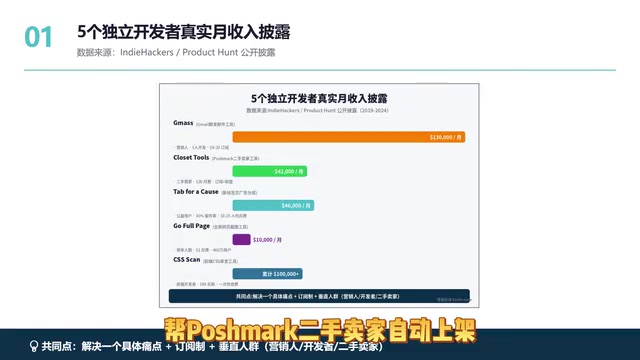
- GameX: A Gmail mass-sending tool, earning $130,000/month
- Tab for a Call: Earning $46,000/month
- Closet Tools: Helps Poshmark resellers auto-list items, earning $42,000/month
These projects share one thing in common: they address a specific pain point for a vertical audience.
Take the YouTube Summarizer niche as an example — search this keyword in the Chrome Web Store and the top 5 results are all AI video summary tools. This niche only exploded in the past two years, and now the leading products have hundreds of thousands of monthly active users with subscription fees of $5 to $15/month. The technical implementation isn't complex — it's essentially calling an AI API to summarize video subtitles.
What does this tell us? New demands emerge every year — the key is whether you can precisely target them.
Four Monetization Models: Deep Breakdown
1. SaaS Subscription (Most Recommended)
Chrome extensions earning five figures or more per month almost universally use subscription pricing. The reason is simple: subscription revenue compounds. 1,000 paying users at $10/month each equals $10,000 in monthly revenue.
The reason SaaS (Software as a Service) subscription is considered the optimal monetization model lies in its financial characteristics: Monthly Recurring Revenue (MRR) offers predictability and compounding effects. Compared to one-time purchases, subscription models typically yield 5-10x higher LTV (Customer Lifetime Value). At the valuation level, SaaS companies are typically valued at 5-15x ARR (Annual Recurring Revenue), while one-time revenue products are valued at only 1-3x. For Chrome extensions, subscriptions have a hidden advantage: once users embed the extension into their daily workflow, switching costs are extremely high, creating natural user stickiness and very low churn rates (excellent products can achieve monthly churn below 3%).
Take the email marketing niche as an example: MailTrack charges $10/month, MailTag charges $9.99/month. The core logic of this niche is: marketers have deep pockets, strong willingness to pay, and daily recurring needs.
2. One-Time Purchase
Simple and direct, but with a low ceiling and hard to scale. Suitable for single-function small tools — not recommended as a primary monetization method.
3. Affiliate Marketing
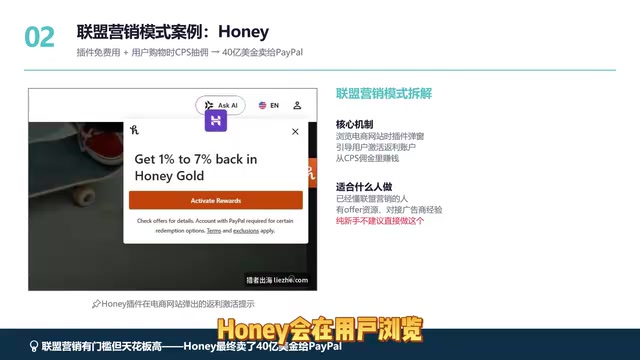
The representative case is Honey — this automatic coupon-finding extension was ultimately sold to PayPal for $4 billion. Its model involves showing coupon alerts when users browse e-commerce sites, monetizing through affiliate commissions.
Honey (now PayPal Honey) represents the largest exit event in Chrome extension history at $4 billion. Its business model is classic Affiliate Marketing: when users complete purchases through Honey's coupons, the e-commerce platform pays Honey a percentage commission (typically 1%-10% of the order amount). The core chain of affiliate marketing is: Advertiser (e-commerce) → Affiliate Network (e.g., CJ Affiliate, ShareASale) → Promoter (Honey) → Consumer. Honey's moat lies in its coupon database covering over 30,000 e-commerce stores and the network effects from 17 million monthly active users.
However, this model has a high barrier: you need to understand how to find offers, how to connect with advertisers, and how to handle account bans. Pure beginners shouldn't attempt this directly.
4. Traffic Monetization
Use the extension as a traffic entry point, funneling users to other products or services.
Recommendation for regular people: The "subscription + small-scale affiliate marketing" combination is most recommended — it provides stable cash flow plus additional revenue.
AI-Powered Chrome Extension Development: Five-Step Process
Step 1: Find the Demand
Identify specific pain points that Western users are willing to pay for. Note: "specific pain points" not "mass-market needs" — a vertical audience's specific pain point is 10x more valuable than a general need.
Step 2: Write a Product Document
This step is crucial yet ignored by most people. Many people directly tell AI "build me a Chrome extension" and expect perfect code generated in one click — this is a huge mistake.
The correct approach: Feed your product document to AI first, and let it evaluate the market and identify technically infeasible parts. AI might directly tell you "this niche is already saturated, suggest pivoting." Spending a day or two on this communication upfront can save you three months of detours.
Step 3: Generate Code with AI
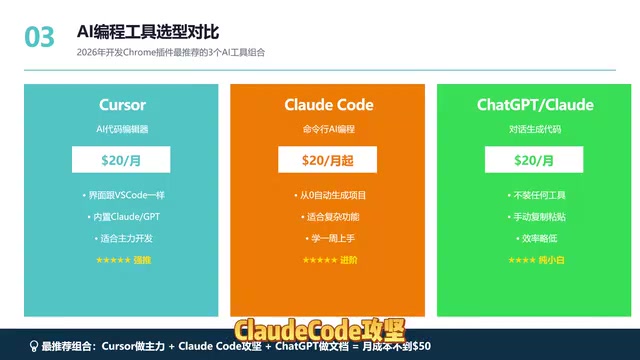
Strategy for choosing among three AI tools:
| Tool | Use Case | Features |
|---|---|---|
| Cursor | Primary development tool (first choice) | VS Code-like interface, built-in AI, $20/month |
| Claude Code | Complex feature supplement | Command-line operation, suited for complex logic |
| ChatGPT web version | Documentation and assistance | Beginner-friendly, no installation needed |
Cursor is an AI-native code editor built on the VS Code open-source codebase, developed by Anysphere. Its core capability is deeply integrating Large Language Models (LLMs) into the coding workflow: supporting code completion, cross-file editing, natural language code generation, and conversational development based on entire project context. Unlike GitHub Copilot's single-line/single-function completion, Cursor's Composer feature can understand the entire codebase structure and implement coordinated modifications across multiple files. Claude Code is Anthropic's command-line AI programming tool, excelling at complex code refactoring and architecture-level tasks. For non-programmers, the significance of these tools is: you only need to describe "what functionality I want," and AI handles converting it into runnable code — your role shifts from "writing code" to "validating results and defining requirements."
Recommended combination: Cursor as the primary tool, Claude Code as supplement, ChatGPT for documentation. Monthly cost under $50.
Step 4: Local Testing
The testing process is very simple — just three steps:
- Type
chrome://extensionsin the address bar - Enable the "Developer mode" toggle in the upper right
- Click "Load unpacked"
The entire debugging cycle takes 3 to 7 days. When you encounter bugs, just feed the error messages back to AI for fixes — you only need to verify the results.
Step 5: Publish + Traffic + Monetization
Full cycle takes 2 to 4 weeks. A 60-point first version is good enough — complete the full loop first, then optimize.
Traffic Acquisition: The Main Battlefield Isn't Google
Traffic source distribution for Chrome extensions:
- Web Store internal search: 50%
- Google Search: 25%
- Social media: 15%
- Word of mouth: 10%
Your SEO main battlefield isn't Google — it's Chrome Web Store internal search. The most critical optimization point: The first 80 characters of your extension title and description — put core keywords at the very front. Understanding this alone puts you ahead of 75% of competitors.
The Chrome Web Store search ranking algorithm is similar to mobile app store ASO (App Store Optimization) but has its unique aspects. Core ranking factors include: keyword relevance (title carries the highest weight), install count and active users, user ratings and review count, update frequency, and uninstall rate. Unlike Google Search SEO, the Web Store algorithm is relatively simple and competition intensity is much lower — many niche keywords have only dozens of competitors rather than millions of web pages in Google Search. This means basic keyword optimization can bring significant ranking improvements. Specific strategies include: placing core keywords in the first 30 characters of the title, naturally repeating keywords 3-5 times in the description, updating regularly to gain the "Recently Updated" tag boost, and proactively guiding satisfied users to leave five-star reviews.
5 Pitfalls Chinese Developers Must Overcome
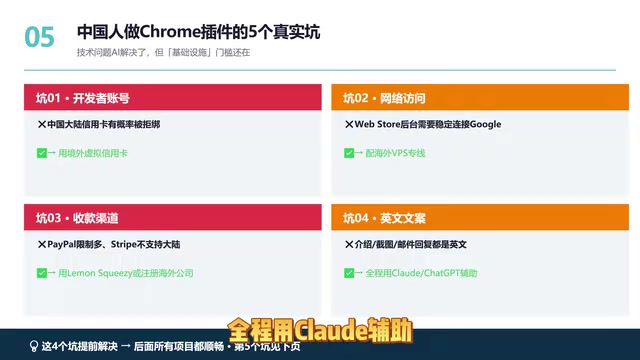
For Chinese developers building Chrome extensions, the biggest barrier isn't technology — it's infrastructure.
Pitfall 1: Developer Account Registration
Requires an overseas payment method. Solution: Use overseas virtual credit cards (services like WildCard).
Pitfall 2: Network Access
Development and debugging require stable overseas network access. Solution: Set up an overseas VPS or dedicated line.
Pitfall 3: Receiving Payments (Hardest)
This is the trickiest part. Two solution paths:
- Use platforms like LemonSqueezy that support global payments
- Register an overseas company and connect Stripe
Pitfall 4: English Copywriting
Targeting overseas users means all copy must be authentic English. Solution: Use Claude throughout for writing and polishing.
Pitfall 5: Permission Review (Most Critical)
After Chrome switched to Manifest V3, Google's review process became very strict. Permissions fall into two categories:
- On-demand access permissions (requires review)
- No access permissions needed (lenient review)
Manifest V3 is the new Chrome extension architecture standard proposed by Google in 2020 and enforced starting in 2023, replacing the previous Manifest V2. Core changes include: replacing persistent Background Pages with Service Workers (reducing memory usage), replacing the webRequest API with the declarativeNetRequest API (limiting network request interception capabilities), and stricter permission declaration mechanisms. Practical impacts for developers include: limited functionality for ad-blocking extensions, more granular permission scope declarations required, and background scripts cannot run persistently. Google's official rationale for V3 is improved security and performance, though it has sparked widespread controversy in the developer community. New developers should note: from 2024 onward, newly submitted extensions must use Manifest V3, and V2 extensions will be gradually delisted.
The strategy: Try to make your extension fall into the second category. If you must request sensitive permissions, submit detailed English documentation, modify based on rejection feedback emails, and resubmit repeatedly.
Solving these infrastructure pitfalls upfront applies to any overseas project you do in the future.
Complete Implementation Path: 28-Day Timeline
| Timeline | Task |
|---|---|
| Days 1-3 | Set up infrastructure (accounts, network, payments) |
| Days 4-7 | Research demands, determine direction |
| Days 8-10 | Write product document, evaluate with AI |
| Days 11-17 | Generate code with AI, local development and debugging |
| Days 18-20 | Prepare English copy and assets |
| Day 21 | Submit to Chrome Web Store for review |
| Day 23+ | Begin promotion, acquire first users |
Remember one core principle: Done is better than perfect. A 60-point first version is good enough — validate that someone is willing to pay first, then talk about optimization and iteration.
Final Thoughts: Three Core Insights
First, AI has leveled the technical barrier, but this also means future competition will intensify. The window of opportunity won't last forever — first-mover advantage matters.
Second, product selection is 10x more important than technology. The formula is simple: vertical audience + specific pain point + subscription model = sustainable income. Don't build broad, all-encompassing tools — build small, precise solutions.
Third, the biggest return isn't money — it's the experience. From demand research, AI development, overseas publishing, to subscription monetization — once you build this complete set of overseas capabilities, it applies to any international project. Chrome extensions are just the starting point; what they help you unlock is the foundational ability for independent overseas development.
Now is the best time to enter. Rather than watching from the sidelines, spend 28 days completing a full loop — even if your first product fails, the experience you gain is far more valuable than continuing to wait.
Related articles

Claude Code for Test Development in Practice: An AI Programming Workflow That Doubles Your Efficiency
A practical guide to Claude Code for test development: auto-generating test scripts, Plan Mode workflows, MCP + Playwright integration, and Subagent parallel tasks to build systematic AI-assisted workflows.

Hermes Agent Hands-On Review: An AI Efficiency Revolution for Indie Game Developers
Indie game developer reviews Hermes Agent vs OpenClaude: intelligent context compression, real-time Memory, remote control via Telegram, and practical use cases in game dev, social media, and email.

Vibe Coding Beginner's Guide: Tool Selection Across Three Categories with Practical Examples
A comprehensive guide to Vibe Coding's three tool categories: Agent frameworks, CLI Coding, and IDE tools, with practical examples including Snake game and data analysis workbench.