OpenAI Codex Parallel Tasks in Practice: Multi-Task Concurrent Execution Tips and Best Practices

Master OpenAI Codex Cloud's parallel task execution for concurrent AI-powered development workflows.
This article explores OpenAI Codex Cloud's parallel task execution capabilities, demonstrating how isolated containers enable multiple AI coding tasks to run simultaneously without interference. Through a practical demo of generating three UI components concurrently, it covers task planning, conflict management, and asynchronous workflows, while emphasizing the critical importance of human code review and maintaining manual coding skills in the AI era.
Introduction
In the final installment of the OpenAI Codex tutorial series, we'll explore one of Codex Cloud's core advantages — parallel task execution. Previously, we've covered Codex Cloud's remote isolated containers, CLI local development, extension plugins, and GitHub PR review capabilities. This article will demonstrate how to launch multiple tasks running in parallel simultaneously, and share some deep reflections on AI programming as we wrap up the series.
How OpenAI Codex Parallel Tasks Work
Isolated Containers That Don't Interfere with Each Other
Codex Cloud's parallel task mechanism is built on a key design principle: each task runs in an independent isolated container. This means you don't have to wait for tasks to complete one by one as in traditional development — instead, you can launch four, five, or even more tasks simultaneously without them conflicting with each other.
From a technical implementation perspective, Codex Cloud's isolated containers are based on modern containerization technologies (such as Docker and lightweight virtual machines), with each task instance having its own independent file system, network namespace, and process space. This is similar to containerized builds in traditional CI/CD pipelines, but specifically optimized for AI code generation scenarios — container cold start times are compressed to the second level, making it possible to create multiple parallel environments on demand. This design avoids race condition issues caused by shared state and ensures that one task's failure won't affect other running tasks.
The advantages of this architecture include:
- Each task has its own independent runtime environment
- Tasks don't interfere with each other
- Development efficiency is dramatically improved
Merge Conflicts to Watch Out For
When executing multiple tasks in parallel, the only issue to consider is merge conflicts. Since each task could theoretically edit the same lines of code, conflicts may arise when you merge these features sequentially. However, if your tasks target completely different functional modules, the likelihood of conflicts is greatly reduced.
Merge conflicts are a classic problem in distributed version control systems like Git. When two branches modify adjacent or overlapping regions of the same file, the automatic merge algorithm (typically based on a three-way merge strategy) cannot determine which version's modifications to keep. In parallel AI task scenarios, this problem is amplified — because the AI may not know which files other parallel tasks are modifying. Common mitigation strategies in the industry include: dividing task boundaries by module, using Feature Flags to isolate changes, and adopting trunk-based development with short-lived branches. In practice, reasonable task decomposition is the most effective way to avoid conflicts.
Hands-On Demo: Generating Three UI Components Concurrently with Codex
Letting Codex Automatically Plan Tasks
In the demo, the first step was to ask Codex a question: "Please look at the codebase and suggest three different reusable UI components as three independent Codex tasks." This uses "Ask" mode rather than direct execution, letting Codex analyze the project first before providing suggestions.
Ask mode is a read-only analysis mode provided by Codex where the AI browses the codebase and offers suggestions without directly modifying any files. This forms a progressive relationship with Code mode (directly generating code) and Agent mode (autonomously executing multi-step operations). The value of Ask mode lies in giving developers a global perspective before AI execution, similar to an architecture review phase — plan first, then execute, avoiding AI blindly generating code that doesn't align with the project's overall design. This phased human-machine collaboration model significantly reduces rework risk.
After analyzing the project code, Codex suggested three components:
- Hero Section Component — The main visual area at the top of the page
- Pair Card Component — A card component for list displays
- Tag Input Component — Extracting existing tag input functionality (with unique interaction behavior using pill-style elements)
A nice detail: a launch button was automatically generated next to each suggestion. Codex created corresponding prompts for each component, and users only needed to click to start the task.
Concurrent Launch and Monitoring
After clicking the launch buttons for all three tasks sequentially, returning to the Dashboard shows three tasks running simultaneously, each working in its own independent container. This experience is difficult to achieve in local development — even with AI assistance, pushing forward three independent refactoring tasks simultaneously is quite challenging, but in Codex Cloud it only takes a few clicks.
Once tasks are completed, you can review code changes one by one, create PRs, preview locally, and finally review and merge on GitHub.
The Core Value of Codex Cloud Parallel Tasks
The greatest value of parallel tasks isn't just speed — it's a fundamental change in workflow:
- Trigger anytime: Whether on your phone or laptop, you can start tasks whenever inspiration strikes
- No local environment needed: You can initiate tasks without opening the project code
- Asynchronous workflow: Tasks run in the background, and you can come back later to review code, test, and merge
Codex Cloud's asynchronous workflow represents a further evolution of the DevOps philosophy. Traditional DevOps emphasizes CI/CD automation pipelines, automating build, test, and deployment stages. AI-driven asynchronous development moves automation forward from the build/deployment stage to the code writing stage itself. This model is consistent with GitOps' declarative philosophy — developers declare intent (through natural language prompts), the system automatically executes and produces results (code changes), and finally returns to the standard code review process through Pull Requests. This essentially incorporates AI programming into existing software engineering best practice frameworks rather than creating an entirely new workflow.
This "fire and forget" model is particularly suited for fragmented work scenarios.
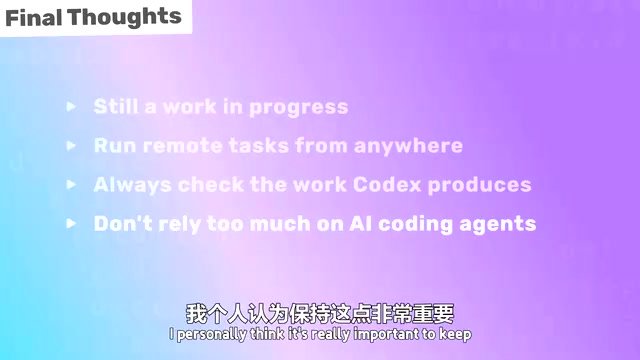
Four Deep Reflections on AI Programming
Codex Local Tools Are Still Rapidly Evolving
Whether it's the CLI tool or the VS Code extension, they're still in a rapid iteration phase. Expect significant improvements over the coming months, particularly in the connection experience between local and cloud services, which still needs further refinement.
Cloud Parallel Tasks Are the True Differentiating Advantage
Codex Cloud's core selling point is: launching remote tasks anytime, anywhere, with support for multi-task parallelism and multiple variant attempts. You can have AI continuously producing output while you're not working, then review everything when you're back at your desk.
Always Keep Humans in the Loop
Regardless of what AI tool or programming agent you use, make sure to check every line of code it produces. AI makes mistakes, and it often takes three to four iterations with different prompts to get satisfactory results — like mentoring a junior developer who needs multiple course corrections.
Human-in-the-Loop (HITL) is a core principle in AI system design, originating from cybernetics and human-computer interaction fields. In AI programming scenarios, HITL means AI-generated code must undergo human review before entering production. This is not only a quality assurance requirement but also a matter of accountability — when AI-generated code introduces security vulnerabilities, performance regressions, or logic errors, the developer who reviewed and approved that code is ultimately responsible. Current mainstream AI programming tools (including GitHub Copilot, Cursor, Codex, etc.) all adopt this design philosophy, positioning AI as a "copilot" rather than "autopilot," ensuring humans always retain final decision-making authority.
Don't Over-Rely on AI Coding
This is the most important advice in this series: Keep your manual coding abilities and domain knowledge fresh. Many AI experts have predicted that AI would soon write nearly all code, but this is far from reality at present.
Even if AI eventually can write all code, you'll still need to:
- Understand the generated code
- Be able to review and debug
- Adapt and modify code
- Understand how the application works
Therefore, continuing to code manually and learning new skills in the AI era has actually become more important. This aligns with the observation of the "Automation Paradox": the more automated a system becomes, the higher the requirements for operators to intervene in abnormal situations. Pilots still need to master manual flying skills; similarly, developers in the AI era need even deeper programming fundamentals to handle edge cases that AI cannot.
Summary
Parallel task execution is the key capability that distinguishes Codex Cloud from local AI programming tools. It frees developers from sequential waiting, enabling truly asynchronous, concurrent development workflows. But technological tool advancement shouldn't become a reason to abandon fundamentals — the ability to understand code, review code, and write code manually will only become more precious in the AI era.
Key Takeaways
Related articles

NestJS + LangChain: A Practical Guide for Frontend Engineers Transitioning to AI Full-Stack Architecture
How can frontend engineers transition to AI full-stack? This guide covers NestJS + LangChain, TypeScript fundamentals, AI Agent development, local model deployment, and cross-language architecture skills.
Building a Complete Mini Program with Codex: A Full-Process Walkthrough from Zero to Launch
A detailed walkthrough of building a complete WeChat Mini Program from scratch using OpenAI Codex, covering seven image tool features, membership system, WeChat Pay integration, and AI-assisted development strategies.
OpenAI Codex Deep Dive: The AI Develop…
OpenAI Codex Deep Dive: The AI Development Tool That Makes Programming Feel Like Flying
Deep dive into how OpenAI Codex redefines programming. From real developer feedback to the Time to Fly project, analyzing Codex's strengths in code generation, context understanding, and the AI coding tool competitive landscape.